Page 80 of 717
Do not drive your vehicle after the air bags have de-
ployed. If you are involved in another collision, the air
bags will not be in place to protect you.
WARNING!
Deployed air bags and seat belt pretensioners cannot
protect you in another collision. Have the air bags,
seat belt pretensioners, and the seat belt retractor
assemblies replaced by an authorized dealer imme-
diately. Also, have the Occupant Restraint Controller
System serviced as well.
NOTE:
•Air bag covers may not be obvious in the interior trim,
but they will open during air bag deployment.
•After any collision, the vehicle should be taken to an
authorized dealer immediately.
Enhanced Accident Response System
In the event of an impact, if the communication network
remains intact, and the power remains intact, depending
on the nature of the event, the ORC will determine
whether to have the Enhanced Accident Response Sys-
tem perform the following functions:
•Cut off fuel to the engine.
•Flash hazard lights as long as the battery has power or
until the ignition switch is turned to the “OFF” posi-
tion.
•Turn on the interior lights, which remain on as long as
the battery has power or until the ignition switch is
turned to the “OFF” position.
•Unlock the doors automatically.
78 THINGS TO KNOW BEFORE STARTING YOUR VEHICLE
Page 114 of 717
WARNING!(Continued)
•Check mounting of mats on a regular basis. Always
properly reinstall and secure floor mats that have
been removed for cleaning.
•Always make sure that objects cannot fall into the
driver footwell while the vehicle is moving. Ob-
jects can become trapped under the brake pedal
and accelerator pedal causing a loss of vehicle
control.
•If required, mounting posts must be properly in-
stalled, if not equipped from the factory.
Failure to properly follow floor mat installation or
mounting can cause interference with the brake
pedal and accelerator pedal operation causing loss of
control of the vehicle.
Periodic Safety Checks You Should Make Outside
The Vehicle
Tires
Examine tires for excessive tread wear and uneven wear
patterns. Check for stones, nails, glass, or other objects
lodged in the tread or sidewall. Inspect the tread for cuts
and cracks. Inspect sidewalls for cuts, cracks and bulges.
Check the wheel nuts for tightness. Check the tires
(including spare) for proper cold inflation pressure.
Lights
Have someone observe the operation of brake lights and
exterior lights while you work the controls. Check turn
signal and high beam indicator lights on the instrument
panel.
11 2 T H I N G S TO K N O W B E F O R E S TA R T I N G Y O U R V E H I C L E
Page 118 of 717
!SEATS . . . . . . . . . . . . . . . . . . . . . . . . . . . . ..143
▫Power Seats — If Equipped..............144
▫Power Lumbar — If Equipped............146
▫Manual Front Seats Forward/Rearward
Adjustment.........................147
▫Manual Front Passenger Seatback Adjustment —
Recline............................148
▫Front Passenger Seat Fold-Flat Feature — If
Equipped...........................148
▫Heated Seats — If Equipped..............149
▫Front Ventilated Seats — If Equipped.......152
▫Head Restraints.......................153
▫60/40 Split Rear Seat..................157
▫Reclining Rear Seat....................159
!DRIVER MEMORY SEAT — IF EQUIPPED . . . .160
▫Programming The Memory Feature.........161
▫Linking And Unlinking The Remote Keyless Entry
Transmitter To Memory.................162
▫Memory Position Recall.................163
▫Easy Entry/Exit Seat...................164
!TO OPEN AND CLOSE THE HOOD.........165
!LIGHTS.............................166
▫Headlight Switch.....................166
▫Automatic Headlights — If Equipped.......168
▫Headlights On Automatically With Wipers . . .168
▫Automatic High Beam — If Equipped......168
▫Daytime Running Lights — If Equipped.....170
11 6 U N D E R S TA N D I N G T H E F E AT U R E S O F Y O U R V E H I C L E
Page 119 of 717
▫Automatic Headlight Leveling — HID Headlights
Only...............................170
▫Adaptive Bi-Xenon High Intensity Discharge
Headlights — If Equipped...............170
▫Headlight Delay......................171
▫Parking Lights And Panel Lights...........171
▫Fog Lights — If Equipped...............171
▫Interior Lights........................172
▫Lights-On Reminder...................173
▫Battery Saver.........................174
▫Front Map/Reading Lights — If Equipped . . .174
▫Courtesy Lights.......................175
▫Ambient Light — If Equipped............176
▫Multifunction Lever....................176
▫Turn Signals.........................177
▫Lane Change Assist...................177
▫Flash-To-Pass........................177
▫High/Low Beam Switch.................177
!WINDSHIELD WIPERS AND WASHERS......178
▫Windshield Wiper Operation.............179
▫Intermittent Wiper System...............180
▫Windshield Washer Operation.............181
▫Mist...............................182
▫Rain Sensing Wipers — If Equipped........182
!TILT/TELESCOPING STEERING COLUMN . . .184
!POWER TILT/TELESCOPING STEERING
COLUMN — IF EQUIPPED...............185
3
UNDERSTANDING THE FEATURES OF YOUR VEHICLE 117
Page 122 of 717
▫ParkSense® System Usage Precautions.......240
!PARKVIEW® REAR BACK UP CAMERA — IF
EQUIPPED...........................243
!OVERHEAD CONSOLE..................245
▫Front Map/Reading Lights — If Equipped . . .246
▫Courtesy Lights.......................247
▫Sunglasses Bin Door...................247
!GARAGE DOOR OPENER — IF EQUIPPED . . .248
▫Before You Begin Programming HomeLink® . .249
▫Programming A Rolling Code.............249
▫Programming A Non-Rolling Code.........251
▫Canadian/Gate Operator Programming......253
▫Using HomeLink®....................254
▫Security............................254
▫Troubleshooting Tips...................255
▫General Information....................256
!POWER SUNROOF — IF EQUIPPED........257
▫Opening Sunroof — Express..............258
▫Opening Sunroof — Manual Mode.........258
▫Closing Sunroof — Express...............258
▫Closing Sunroof — Manual Mode..........258
▫Pinch Protect Feature...................259
▫Venting Sunroof — Express..............259
▫Sunshade Operation....................259
▫Wind Buffeting.......................259
▫Sunroof Maintenance...................260
120 UNDERSTANDING THE FEATURES OF YOUR VEHICLE
Page 144 of 717
Modes Of Operation
Three selectable modes of operation are available in the
Uconnect® System. Refer to “Uconnect® Settings/
Customer Programmable Features” in “Understanding
Your Instrument Panel” for further information.
Blind Spot Alert Lights Only
When operating in Blind Spot Alert mode, the BSM
system will provide a visual alert in the appropriate side
view mirror based on a detected object. However, when
the system is operating in Rear Cross Path (RCP) mode,
the system will respond with both visual and audible
alerts when a detected object is present. Whenever an
audible alert is requested, the radio is muted.
Blind Spot Alert Lights/Chime
When operating in Blind Spot Alert Lights/Chime mode,
the BSM system will provide a visual alert in the appro-
priate side view mirror based on a detected object. If the
turn signal is then activated, and it corresponds to an
alert present on that side of the vehicle, an audible chime
will also be sounded. Whenever a turn signal and de-
tected object are present on the same side at the same
time, both the visual and audible alerts will be issued. In
addition to the audible alert the radio (if on) will also be
muted.
NOTE:Whenever an audible alert is requested by the
BSM system, the radio is also muted.
When the system is in RCP, the system shall respond with
both visual and audible alerts when a detected object is
present. Whenever an audible alert is requested, the radio
is also muted. Turn/hazard signal status is ignored; the
RCP state always requests the chime.
Blind Spot Alert Off
When the BSM system is turned off there will be no
visual or audible alerts from either the BSM or RCP
systems.
142 UNDERSTANDING THE FEATURES OF YOUR VEHICLE
Page 153 of 717
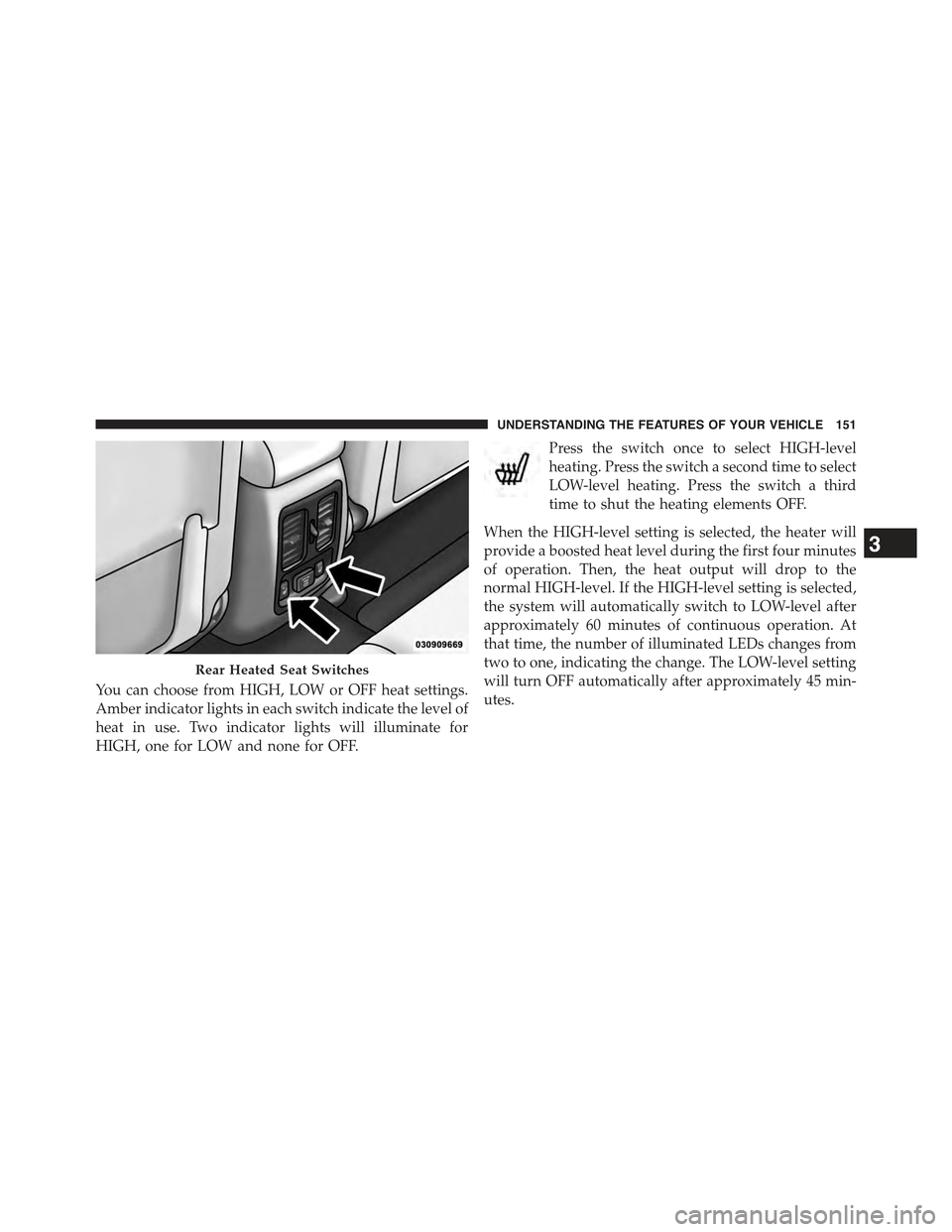
You can choose from HIGH, LOW or OFF heat settings.
Amber indicator lights in each switch indicate the level of
heat in use. Two indicator lights will illuminate for
HIGH, one for LOW and none for OFF.
Press the switch once to select HIGH-level
heating. Press the switch a second time to select
LOW-level heating. Press the switch a third
time to shut the heating elements OFF.
When the HIGH-level setting is selected, the heater will
provide a boosted heat level during the first four minutes
of operation. Then, the heat output will drop to the
normal HIGH-level. If the HIGH-level setting is selected,
the system will automatically switch to LOW-level after
approximately 60 minutes of continuous operation. At
that time, the number of illuminated LEDs changes from
two to one, indicating the change. The LOW-level setting
will turn OFF automatically after approximately 45 min-
utes.
Rear Heated Seat Switches
3
UNDERSTANDING THE FEATURES OF YOUR VEHICLE 151
Page 168 of 717
CAUTION!
To prevent possible damage, do not slam the hood to
close it. Use a firm downward push at the front center
of the hood to ensure that both latches engage.
WARNING!
Be sure the hood is fully latched before driving your
vehicle. If the hood is not fully latched, it could open
when the vehicle is in motion and block your vision.
Failure to follow this warning could result in serious
injury or death.
LIGHTS
Headlight Switch
The headlight switch is located on the left side of the
instrument panel, next to the steering wheel. The head-
light switch controls the operation of the headlights,
parking lights, instrument panel lights, cargo lights and
fog lights (if equipped).
166 UNDERSTANDING THE FEATURES OF YOUR VEHICLE