Page 257 of 560

Push the INFO button once more to return to#elapsed
time#priority mode.
Push and hold the INFO button for three seconds or more
and radio will display song titles for each file.
Push and hold the INFO button again for three seconds
to return to#elapsed time#display.
Operation Instructions — Auxiliary Mode
The auxiliary (AUX) jack is an audio input jack which
allows the user to plug in a portable device such as an
MP3/WMA player, an ipod®, or a microphone and
utilize the vehicles audio system to amplify the source
and play through the vehicle speakers.
Pushing the AUX button will change the mode to auxil-
iary device if the AUX jack is connected.
NOTE:The AUX device must be turned on and the
device’s volume set to the proper level. If the AUX audio
is not loud enough, turn the device’s volume up. If the
AUX audio sounds distorted, turn the device’s volume
down.
SEEK Button (Auxiliary Mode)
No function.
SCAN Button (Auxiliary Mode)
No function.
EJECT Button (Auxiliary Mode)
No function.
TIME Button (Auxiliary Mode)
Push the TIME button to change the display from elapsed
playing time to time of day. The time of day will display
for five seconds.
4
UNDERSTANDING YOUR INSTRUMENT PANEL 255
Page 258 of 560

RW/FF (Auxiliary Mode)
No function.
SET Button (Auxiliary Mode)
No function.
Operating Instructions (Voice Command System) —
If Equipped
Refer to “Voice Command” for further details.
Operating Instructions (Uconnect® Phone) —
If Equipped
Refer to “Uconnect® Phone” for further details.
Operating Instructions — Video Entertainment
System (VES™) (If Equipped)
Refer to “Video Entertainment System (VES™)” for fur-
ther details.
Dolby®
Manufactured under license from Dolby® Laboratories.
Dolby® and the double-D symbol are trademarks of
Dolby® Laboratories.
Macrovision
This product incorporates copyright protection technol-
ogy that is protected by U.S. patents and other intellec-
tual property rights. Use of this copyright protection
technology must be authorized by Macrovision, and is
intended for home and other limited viewing uses only,
unless otherwise authorized by Macrovision. Reverse
engineering or disassembly is prohibited.
DTS™
“DTS™ and “DTS™ 2.0” are trademarks of Digital The-
ater Systems, Inc.
256 UNDERSTANDING YOUR INSTRUMENT PANEL
Page 263 of 560
Every time a preset button is used, a corresponding
button number will display.
Buttons1-6
These buttons tune the radio to the channels that you
commit to pushbutton memory (12 Satellite stations).
Uconnect® 730N/430/430N CD/DVD/HDD/NAV —
IF EQUIPPED
Refer to your Uconnect® Supplement Manual for de-
tailed operating instructions.
Operating Instructions (Voice Command
System) — If Equipped
Refer to “Voice Command” for further details.
Operating Instructions (Uconnect® Phone) —
If Equipped
Refer to “Uconnect® Phone” for further details.
Uconnect® 130
Uconnect® 130
4
UNDERSTANDING YOUR INSTRUMENT PANEL 261
Page 273 of 560

Operating Instructions — Radio Mode
NOTE:The ignition switch must be in the ON or ACC
position to operate the radio.
Power Switch/Volume Control (Rotary)
Push the ON/VOLUME control knob to turn on the
radio. Push the ON/VOLUME control knob a second
time to turn off the radio.
Electronic Volume Control
The electronic volume control turns continuously (360
degrees) in either direction, without stopping. Turning
the ON/VOLUME control knob to the right increases the
volume, and to the left decreases it.
When the audio system is turned on, the sound will be
set at the same volume level as last played.
SEEK Buttons
Push and release the SEEK buttons to search for the next
listenable station in AM/FM mode. Push the right switch
to seek up and the left switch to seek down. The radio
will remain tuned to the new station until you make
another selection. Holding either button will bypass
stations without stopping, until you release it.
Voice Command System (Radio) — If Equipped
Refer to “Voice Command” in “Understanding The Fea-
tures Of Your Vehicle”.
Voice Command Button Uconnect® Phone —
If Equipped
Push this button to operate the Uconnect® Phone feature
(if equipped). Refer to “Uconnect® Phone” in “Under-
standing The Features Of Your Vehicle”.
4
UNDERSTANDING YOUR INSTRUMENT PANEL 271
Page 274 of 560

If your vehicle is not equipped with or this feature is not
available on your vehicle, a “Not Equipped With
Uconnect Phone” message will display on the radio
screen.
Phone Button Uconnect® Phone — If Equipped
Push this button to operate the Uconnect® Phone feature
(if equipped). Refer to “Uconnect® Phone” in “Under-
standing The Features Of Your Vehicle”.
If your vehicle is not equipped with or this feature is not
available on your vehicle, a “Not Equipped With
Uconnect Phone” message will display on the radio
screen.
TIME Button
Push the TIME button to alternate display of the time and
radio frequency.
Clock Setting Procedure
1. Push and hold the TIME button until the hours blink.
2. Adjust the hours by turning the right side TUNE/
SCROLL control knob.
3. After adjusting the hours, push the right side TUNE/
SCROLL control knob to set the minutes. The minutes
will begin to blink.
4. Adjust the minutes using the right side TUNE/
SCROLL control knob. Push the TUNE/SCROLL con-
trol knob to save time change.
5. To exit, push any button/knob or wait five seconds.
The clock can also be set by pushing the SETUP button.
For vehicles equipped with satellite radio, push the
SETUP button, use the TUNE/SCROLL control to select
SET CLOCK, and then follow the above procedure,
272 UNDERSTANDING YOUR INSTRUMENT PANEL
Page 289 of 560

You may add a second channel to each pushbutton by
repeating the above procedure with this exception: Push
the SET button twice and SET 2 will show in the display
window. Each button can be set for SET 1 and SET 2. This
allows a total of 12 Satellite channels to be stored into
pushbutton memory. The channels stored in SET 2 memory
can be selected by pushing the pushbutton twice.
Every time a preset button is used, a corresponding
button number will display.
Buttons1-6
These buttons tune the radio to the channels that you
commit to pushbutton memory (12 Satellite stations).
Operating Instructions (Uconnect® Phone) —
If Equipped
Refer to “Uconnect® Phone” in “Understanding The
Features Of Your Vehicle”.
iPod®/USB/MP3 CONTROL — IF EQUIPPED
This feature allows an iPod® or external USB device to be
plugged into the USB port, located in the center console
or glove compartment.
iPod® control supports Mini, 4G, Photo, Nano, 5G iPod®
and iPhone® devices. Some iPod® software versions
may not fully support the iPod® control features. Please
visit Apple’s website for software updates.
NOTE:
•If the radio has a USB port, refer to the appropriate
Uconnect® Multimedia radio User ’s Manual for
iPod® or external USB device support capability.
•Connecting an iPod® or consumer electronic audio
device to the AUX port located in the radio faceplate,
plays media, but does not use the iPod® /MP3 control
feature to control the connected device.
4
UNDERSTANDING YOUR INSTRUMENT PANEL 287
Page 295 of 560

CAUTION!(Continued)
•Placing items on the iPod® or external USB device,
or connections to the iPod® or external USB device
in the vehicle, can cause damage to the device
and/or to the connectors.
WARNING!
Do not plug in or remove the iPod® or external USB
device while driving. Failure to follow this warning
could result in an accident.
Bluetooth® Streaming Audio (BTSA)
Music can be streamed from your cellular phone to the
Uconnect® phone system.
Refer to the Uconnect® Radio Supplement for further
information on Bluetooth® connectivity.
Controlling BTSA Using Radio Buttons
To enter BTSA mode, push either “AUX” button on the
radio or push the VR button and say “Bluetooth Streaming
Audio.”
Play Mode
When switched to BTSA mode, some audio devices can
start playing music over the vehicle’s audio system, but
some devices require the music to be initiated on the device
first, then it will get streamed to the Uconnect® phone
system. Seven devices can be paired to the Uconnect®
phone system, but just one can be selected and played.
Selecting A Different Audio Device
1. Push the PHONE button to begin.
2. After the#Ready#prompt and following the beep, say
#Setup#, then say#Select Audio Devices.#
3. Say the name of the audio device or ask the
Uconnect® phone system to list the audio devices.
4
UNDERSTANDING YOUR INSTRUMENT PANEL 293
Page 296 of 560
Next Track
Use the SEEK UP button, or push the VR button on the
radio and say “Next Track,” to jump to the next music
track on your cellular phone.
Previous Track
Use the SEEK DOWN button, or push the VR button on
the radio and say “Previous Track,” to jump to the
previous music track on your cellular phone.
Browse
Browsing is not available on a Bluetooth® Streaming
Audio (BTSA) device. Only the current song that is
playing will display info.
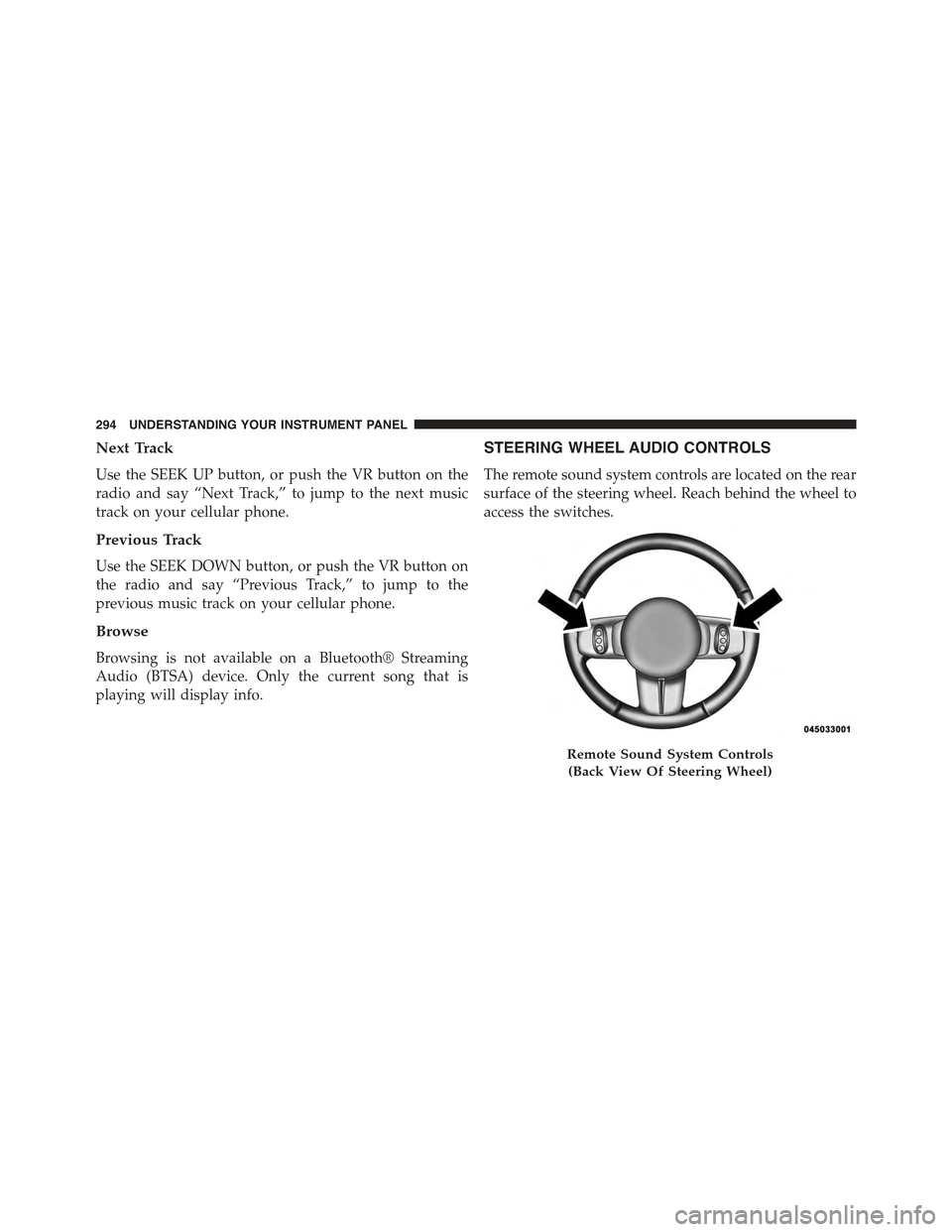
STEERING WHEEL AUDIO CONTROLS
The remote sound system controls are located on the rear
surface of the steering wheel. Reach behind the wheel to
access the switches.
Remote Sound System Controls
(Back View Of Steering Wheel)
294 UNDERSTANDING YOUR INSTRUMENT PANEL