Page 370 of 560

ESC Activation/Malfunction Indicator Light And
ESC OFF Indicator Light
The “ESC Activation/Malfunction Indicator
Light” in the instrument cluster will come on
when the ignition switch is cycled to the ON/
RUN position. It should go out with the engine
running. If the “ESC Activation/Malfunction Indicator
Light” comes on continuously with the engine running, a
malfunction has been detected in the ESC system. If this
light remains on after several ignition cycles, and the
vehicle has been driven several miles (kilometers) at
speeds greater than 30 mph (48 km/h), see your autho-
rized dealer as soon as possible to have the problem
diagnosed and corrected.
The “ESC Activation/Malfunction Indicator Light” (lo-
cated in the instrument cluster) starts to flash as soon as
the tires lose traction and the ESC system becomes active.
The “ESC Activation/Malfunction Indicator Light” also
flashes when TCS is active. If the “ESC Activation/
Malfunction Indicator Light” begins to flash during ac-
celeration, ease up on the accelerator and apply as little
throttle as possible. Be sure to adapt your speed and
driving to the prevailing road conditions.
NOTE:
•The “ESC Off Indicator Light” and the “ESC Acti-
vation/Malfunction Indicator Light” come on momen-
tarily each time the ignition switch is turned to the
ON/RUN position.
368 STARTING AND OPERATING
Page 398 of 560

Base System
This is the TPMS warning indicator located in the
instrument cluster.
The TPMS uses wireless technology with wheel rim
mounted electronic sensors to monitor tire pressure levels.
Sensors, mounted to each wheel as part of the valve stem,
transmit tire pressure readings to the Receiver Module.
NOTE:It is particularly important for you to check the
tire pressure in all of the tires on your vehicle regularly
and to maintain the proper pressure.
The TPMS consists of the following components:
•Receiver Module.
•Four Tire Pressure Monitoring Sensors.
•Tire Pressure Monitoring Telltale Light.
Tire Pressure Monitoring Low Pressure Warnings
The Tire Pressure Monitoring Telltale Light will illumi-
nate in the instrument cluster, a LOW TIRE message will
be displayed for a minimum of five seconds, and an
audible chime will be activated when one or more of the
four active road tire pressures are low. Should this occur,
you should stop as soon as possible, check the inflation
pressure of each tire on your vehicle, and inflate each tire
to the vehicle’s recommended cold placard pressure
value. The system will automatically update and the Tire
Pressure Monitoring Light will extinguish and the LOW
TIRE message will turn off once the updated tire pres-
sures have been received. The vehicle may need to be
driven for up to 20 minutes above 15 mph (24 km/h) to
receive this information.
396 STARTING AND OPERATING
Page 401 of 560
•Various Tire Pressure Monitoring System Messages,
which display in the Electronic Vehicle Information
Center (EVIC)
•Tire Pressure Monitoring Telltale Light
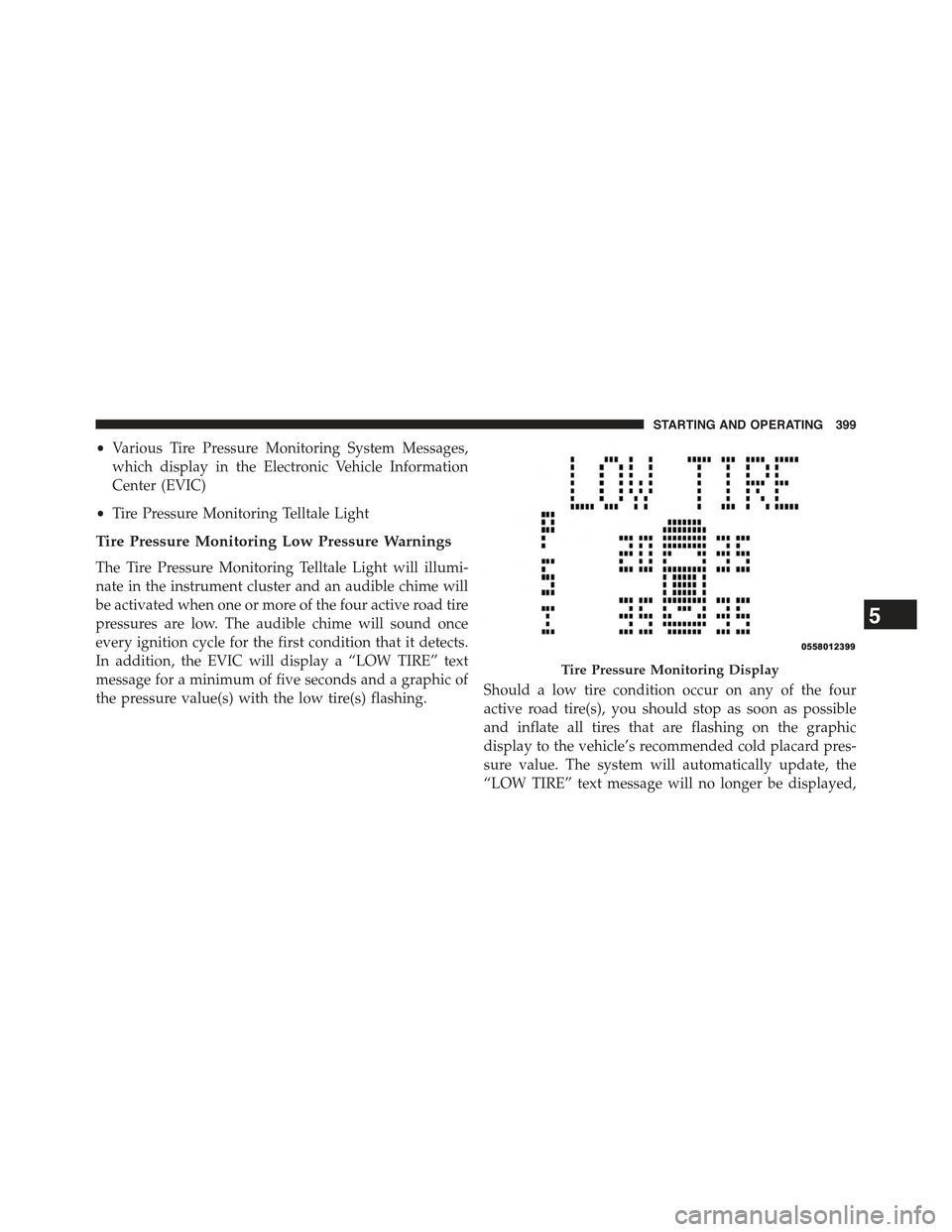
Tire Pressure Monitoring Low Pressure Warnings
The Tire Pressure Monitoring Telltale Light will illumi-
nate in the instrument cluster and an audible chime will
be activated when one or more of the four active road tire
pressures are low. The audible chime will sound once
every ignition cycle for the first condition that it detects.
In addition, the EVIC will display a “LOW TIRE” text
message for a minimum of five seconds and a graphic of
the pressure value(s) with the low tire(s) flashing.Should a low tire condition occur on any of the four
active road tire(s), you should stop as soon as possible
and inflate all tires that are flashing on the graphic
display to the vehicle’s recommended cold placard pres-
sure value. The system will automatically update, the
“LOW TIRE” text message will no longer be displayed,
Tire Pressure Monitoring Display
5
STARTING AND OPERATING 399
Page 411 of 560

WARNING!(Continued)
•Never add fuel when the engine is running. This is
in violation of most state and federal fire regula-
tions and may cause the MIL to turn on.
•A fire may result if gasoline is pumped into a
portable container that is inside of a vehicle. You
could be burned. Always place gas containers on
the ground while filling.
NOTE:
•When the fuel nozzle “clicks” or shuts off, the fuel tank
is full.
•Tighten the gas cap about 1/4 turn until you hear one
click. This is an indication that cap is properly tight-
ened.
•If the gas cap is not tightened properly, the MIL will
come on. Be sure the gas cap is tightened every time
the vehicle is refueled.
Loose Fuel Filler Cap Message
If the vehicle diagnostic system determines that the fuel
filler cap is loose or improperly installed, a “gASCAP”
message will be displayed in the Odometer/Trip Odom-
eter in the instrument cluster. Refer to “Instrument
Cluster Description” in “Understanding Your Instrument
Panel” for further information. Tighten the fuel filler cap
properly and press the odometer/trip odometer RESET
button to turn the message off. If the problem continues,
the message will appear the next time the vehicle is
started. Refer to “Onboard Diagnostic System” in “Main-
taining Your Vehicle” for further information.
5
STARTING AND OPERATING 409
Page 432 of 560

CAUTION!
Driving with a hot cooling system could damage your
vehicle. If the pointer rises to the H (red) mark, the
instrument cluster will sound a chime. When safe,
pull over and stop the vehicle with the engine at idle.
Turn off the air conditioning and wait until the pointer
drops back into the normal range. If the pointer
remains on the H (red) mark for more than a minute,
turn the engine off immediately and call for service.
WARNING!
You or others can be badly burned by hot engine
coolant (antifreeze) or steam from your radiator. If
you see or hear steam coming from under the hood,
do not open the hood until the radiator has had time
to cool. Never try to open a cooling system pressure
cap when the radiator or coolant bottle is hot.
WHEEL AND TIRE TORQUE SPECIFICATIONS
Proper lug nut/bolt torque is very important to ensure
that the wheel is properly mounted to the vehicle. Any
time a wheel has been removed and reinstalled on the
vehicle the lug nuts/bolts should be torqued using a
properly calibrated torque wrench.
Torque Specifications
Lug Nut/Bolt
Torque
**Lug Nut/
Bolt Size
Lug Nut/Bolt
Socket Size
100 Ft-Lbs
(135 N·m)
M12 x 1.25 19 mm
**Use only Chrysler recommended lug nuts/bolts and
clean or remove any dirt or oil before tightening.
430 WHAT TO DO IN EMERGENCIES
Page 471 of 560

ONBOARD DIAGNOSTIC SYSTEM — OBD II
Your vehicle is equipped with a sophisticated onboard
diagnostic system called OBD II. This system monitors
the performance of the emissions, engine, and automatic
transmission control systems. When these systems are
operating properly, your vehicle will provide excellent
performance and fuel economy, as well as engine emis-
sions well within current government regulations.
If any of these systems require service, the OBD II system
will turn on the “Malfunction Indicator Light” (MIL). It
will also store diagnostic codes and other information to
assist your service technician in making repairs. Al-
though your vehicle will usually be drivable and not
need towing, see your authorized dealer for service as
soon as possible.
CAUTION!
•Prolonged driving with the MIL on could cause
further damage to the emission control system. It
could also affect fuel economy and driveability.
The vehicle must be serviced before any emissions
tests can be performed.
•If the MIL is flashing while the engine is running,
severe catalytic converter damage and power loss
will soon occur. Immediate service is required.
Loose Fuel Filler Cap Message
After fuel is added, the vehicle diagnostic system can
determine if the fuel filler cap is possibly loose or
improperly installed. A “gASCAP” message will be dis-
played in the instrument cluster. Tighten the gas cap until
a#clicking#sound is heard. This is an indication that the
gas cap is properly tightened. Press the trip odometer
7
MAINTAINING YOUR VEHICLE 469
Page 507 of 560

Cleaning Plastic Instrument Cluster Lenses
The lenses in front of the instruments in this vehicle are
molded in clear plastic. When cleaning the lenses, care
must be taken to avoid scratching the plastic.
1. Clean with a wet soft rag. A mild soap solution may be
used, but do not use high alcohol content or abrasive
cleaners. If soap is used, wipe clean with a clean damp
rag.
2. Dry with a soft cloth.
Seat Belt Maintenance
Do not bleach, dye, or clean the belts with chemical
solvents or abrasive cleaners. This will weaken the fabric.
Sun damage can also weaken the fabric.
If the belts need cleaning, use MOPAR® Total Clean, a
mild soap solution, or lukewarm water. Do not remove
the belts from the vehicle to wash them. Dry with a soft
cloth.
Replace the belts if they appear frayed or worn or if the
buckles do not work properly.
WARNING!
A frayed or torn belt could rip apart in a collision and
leave you with no protection. Inspect the belt system
periodically, checking for cuts, frays, or loose parts.
Damaged parts must be replaced immediately. Do
not disassemble or modify the system. Seat belt
assemblies must be replaced after a collision if they
have been damaged (i.e., bent retractor, torn web-
bing, etc.).
7
MAINTAINING YOUR VEHICLE 505
Page 510 of 560
Cavity Cartridge FuseMini-FuseDescription
410 Amp RedIgnition Switch/Occupant Classification Module
515 Amp Lt BlueBattery Feed For Power Tech
610 Amp RedPower Mirror/Steering Control Satellite
Radio/Hands-Free Phone
730 Amp GreenIgnition Off Draw
830 Amp GreenIgnition Off Draw
940 Amp GreenPower Seats
1020 Amp YellowPower Locks/Interior Lighting
1115 Amp Lt BluePower Outlet
1220 Amp Yellow115V AC Inverter – If Equipped
1320 Amp YellowCigar Lighter
1410 Amp RedInstrument Cluster
1540 Amp GreenRadiator Fan
1615 Amp Lt Blue Dome Lamp/Sunroof/Rear Wiper Motor
1710 Amp RedWireless Control Module
508 MAINTAINING YOUR VEHICLE
