Page 293 of 560

•RNDbutton (available on sales code RES radio only):
Pushing this button toggles between Shuffle ON and
Shuffle OFF modes for the iPod® or external USB
device, or push the VR button and say#Shuffle ON#or
#Shuffle Off.#If theRNDicon is showing on the radio
display, then the shuffle mode is ON.
List Or Browse Mode
During Play mode, pushing any of the buttons described
below, will bring up List mode. List mode enables
scrolling through the list of menus and tracks on the
audio device.
TUNEcontrol knob: TheTUNEcontrol knob functions in
a similar manner as the scroll wheel on the audio device
or external USB device.
•Turning it clockwise (forward) and counterclockwise
(backward) scrolls through the lists, displaying the
track detail on the radio display. Once the track to be
played is highlighted on the radio display, push the
TUNEcontrol knob to select and start playing the
track. Turning theTUNEcontrol knob fast will scroll
through the list faster. During fast scroll, a slight delay
in updating the information on the radio display may
be noticeable.
During all List modes, the iPod® displays all lists in
“wrap-around” mode. So if the track is at the bottom of
the list, just turn the wheel backward (counterclockwise)
to get to the track faster.
4
UNDERSTANDING YOUR INSTRUMENT PANEL 291
Page 296 of 560
Next Track
Use the SEEK UP button, or push the VR button on the
radio and say “Next Track,” to jump to the next music
track on your cellular phone.
Previous Track
Use the SEEK DOWN button, or push the VR button on
the radio and say “Previous Track,” to jump to the
previous music track on your cellular phone.
Browse
Browsing is not available on a Bluetooth® Streaming
Audio (BTSA) device. Only the current song that is
playing will display info.
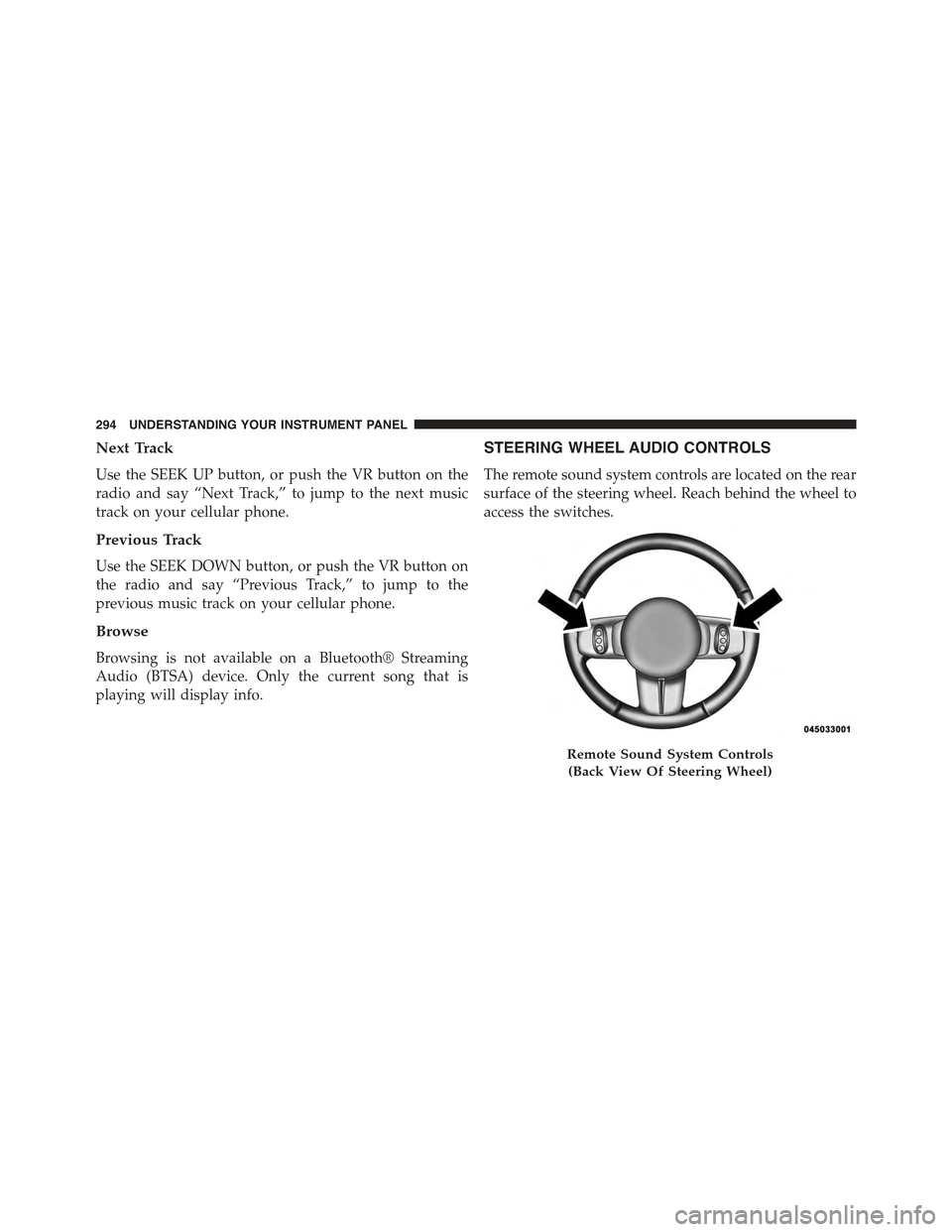
STEERING WHEEL AUDIO CONTROLS
The remote sound system controls are located on the rear
surface of the steering wheel. Reach behind the wheel to
access the switches.
Remote Sound System Controls
(Back View Of Steering Wheel)
294 UNDERSTANDING YOUR INSTRUMENT PANEL
Page 314 of 560
!AUTOSTICK® (SIX-SPEED AUTOMATIC
TRANSMISSION)......................337
▫Operation...........................337
▫AutoStick® (CVT).....................339
▫Operation...........................339
!FOUR-WHEEL DRIVE OPERATION —
IF EQUIPPED.........................341
!ON-ROAD DRIVING TIPS................342
!OFF-ROAD DRIVING TIPS...............342
▫When To Use Low (L Off-Road) With The
4WD Lock Lever Engaged...............343
▫Driving In Snow, Mud And Sand..........343
▫Hill Climbing........................345
▫Driving Through Water.................348
▫After Driving Off-Road.................350
!POWER STEERING.....................351
▫Power Steering Fluid Check..............352
!PARKING BRAKE......................353
!BRAKE SYSTEM.......................355
!ELECTRONIC BRAKE CONTROL SYSTEM . . . .356
▫Anti-Lock Brake System (ABS)............356
▫Traction Control System (TCS)............359
▫Brake Assist System (BAS)...............359
▫Electronic Roll Mitigation (ERM)..........360
▫Hill Descent Control (HDC) — If Equipped . . .361
▫Hill Start Assist (HSA).................362
▫Electronic Stability Control (ESC)..........364
312 STARTING AND OPERATING
Page 315 of 560
▫ESC Activation/Malfunction Indicator Light
And ESC OFF Indicator Light............368
!TIRE SAFETY INFORMATION.............369
▫Tire Markings........................369
▫Tire Identification Number (TIN)...........373
▫Tire Terminology And Definitions..........374
▫Tire Loading And Tire Pressure...........375
!TIRES — GENERAL INFORMATION........380
▫Tire Pressure........................380
▫Tire Inflation Pressures.................381
▫Tire Pressures For High Speed Operation . . . .382
▫Radial Ply Tires......................383
▫All Season Tires — If Equipped............384
▫Summer Or Three Season Tires —
If Equipped..........................384
▫Snow Tires..........................385
▫Spare Tire Matching Original Equipped Tire
And Wheel — If Equipped...............385
▫Compact Spare Tire — If Equipped........386
▫Full Size Spare — If Equipped............386
▫Limited-Use Spare — If Equipped.........387
▫Tire Spinning........................388
▫Tread Wear Indicators..................388
▫Life Of Tire.........................389
▫Replacement Tires.....................390
!TIRE CHAINS (TRACTION DEVICES).......391
5
STARTING AND OPERATING 313
Page 318 of 560

STARTING PROCEDURES
Before starting your vehicle, adjust your seat, adjust both
inside and outside mirrors, and fasten your seat belts.
WARNING!
•Before exiting a vehicle, always apply the parking
brake, shift the transmission into PARK, and re-
move the Key Fob from the ignition. When leaving
the vehicle, always lock your vehicle.
•Never leave children alone in a vehicle, or with
access to an unlocked vehicle.
•Allowing children to be in a vehicle unattended is
dangerous for a number of reasons. A child or
others could be seriously or fatally injured. Chil-
dren should be warned not to touch the parking
brake, brake pedal or the shift lever.
(Continued)
WARNING!(Continued)
•Do not leave the Key Fob in or near the vehicle, or
in a location accessible to children. A child could
operate power windows, other controls, or move
the vehicle.
Manual Transmission — If Equipped
Before starting the engine fully apply the parking brake,
press the clutch pedal to the floor, and place the shift
lever in NEUTRAL.
NOTE:
•The engine will not start unless the clutch pedal is
pressed to the floor.
•If the key will not turn and the steering wheel is locked,
rotate the wheel in either direction to relieve pressure on
the locking mechanism and then turn the key.
316 STARTING AND OPERATING
Page 327 of 560

Only shift from DRIVE to PARK or REVERSE when the
accelerator pedal is released and the vehicle is stopped.
Be sure to keep your foot on the brake pedal when
shifting between these gears.
The transmission shift lever has only PARK, REVERSE,
NEUTRAL, and DRIVE shift positions. Manual shifts can
be made using the Autostick® shift control (refer to
“AutoStick®” in this section). Moving the shift lever to
the left or right (-/+) while in the DRIVE position will
manually select the transmission gear, and will display
the current gear in the instrument cluster as 1, 2, 3, etc.
Gear Ranges
DO NOT race the engine when shifting from PARK or
NEUTRAL into another gear range.
NOTE:After selecting any gear range, wait a moment to
allow the selected gear to engage before accelerating.
This is especially important when the engine is cold.
PARK (P)
This range supplements the parking brake by locking the
transmission. The engine can be started in this range.
Never attempt to use PARK while the vehicle is in
motion. Apply the parking brake when leaving the
vehicle in this range.
When parking on a level surface, you may shift the
transmission into PARK first, and then apply the parking
brake.
When parking on a hill, apply the parking brake before
shifting the transmission to PARK, otherwise the load on
the transmission locking mechanism may make it diffi-
cult to move the shift lever out of PARK. As an added
precaution, turn the front wheels toward the curb on a
downhill grade and away from the curb on an uphill
grade.
5
STARTING AND OPERATING 325
Page 335 of 560

PARK (P)
This range supplements the parking brake by locking the
transmission. The engine can be started in this range.
Never attempt to use PARK while the vehicle is in
motion. Apply the parking brake when leaving the
vehicle in this range.
When parking on a level surface, you may shift the
transmission into PARK first, and then apply the parking
brake.
When parking on a hill, apply the parking brake before
shifting the transmission to PARK, otherwise the load on
the transmission locking mechanism may make it diffi-
cult to move the shift lever out of PARK. As an added
precaution, turn the front wheels toward the curb on a
downhill grade and away from the curb on an uphill
grade.
WARNING!
•Never use the PARK position as a substitute for the
parking brake. Always apply the parking brake
fully when parked to guard against vehicle move-
ment and possible injury or damage.
•Your vehicle could move and injure you and others
if it is not in PARK. Check by trying to move the
shift lever out of PARK with the brake pedal
released. Make sure the transmission is in PARK
before leaving the vehicle.
•It is dangerous to shift out of PARK or NEUTRAL if
the engine speed is higher than idle speed. If your
foot is not firmly pressing the brake pedal, the
vehicle could accelerate quickly forward or in re-
verse. You could lose control of the vehicle and hit
someone or something. Only shift into gear when
the engine is idling normally and your foot is firmly
pressing the brake pedal.
(Continued)
5
STARTING AND OPERATING 333
Page 341 of 560

To disengage AutoStick® mode, hold the shift lever to the
right (+) until “D” is once again displayed in the instru-
ment cluster. You can shift in or out of the AutoStick®
mode at any time without taking your foot off the
accelerator pedal.
WARNING!
Do not downshift for additional engine braking on a
slippery surface. The drive wheels could lose their
grip and the vehicle could skid, causing a collision or
personal injury.
AutoStick® (CVT)
AutoStick® is a driver-interactive transmission feature
providing six manually selectable gear ratios, giving you
more control of the vehicle. AutoStick® allows you to
maximize engine braking, eliminate undesirable upshifts
and downshifts, and improve overall vehicle perfor-
mance. This system can also provide you with more
control during passing, city driving, cold slippery condi-
tions, mountain driving, trailer towing, and many other
situations.
Operation
NOTE:AutoStick® is not available until the CVT warms
up in cold weather.
When the shift lever is in the DRIVE position, AutoStick®
is activated by moving the shift lever side-to-side. Mov-
ing the shift lever to the right (+) will activate AutoStick®
and shift up to the next higher manual ratio, unless you
are already operating in or near Overdrive, in which case
sixth gear ratio will be selected. In like manner, moving
the shift lever to the left (-) will activate AutoStick® and
shift to the next lower manual ratio. The manually-
selected gear will be displayed in the instrument cluster.
5
STARTING AND OPERATING 339