Page 114 of 560

Uconnect® Phone allows you to transfer calls between
the system and your mobile phone as you enter or exit
your vehicle and enables you to mute the system’s
microphone for private conversation.
The Uconnect® Phone is driven through your Bluetooth®
“Hands-Free Profile” mobile phone. Uconnect® features
Bluetooth® technology - the global standard that enables
different electronic devices to connect to each other without
wires or a docking station. Uconnect® Phone operates no
matter where you stow your mobile phone (be it your
purse, pocket, or briefcase), as long as your phone is turned
on and has been paired to the vehicle’s Uconnect® Phone.
The Uconnect® Phone allows up to seven mobile phones to
be linked to the system. Only one linked (or paired) mobile
phone can be used with the system at a time. The system is
available in English, Spanish, or French languages.
WARNING!
Any voice commanded system should be used only
in safe driving conditions following all applicable
laws, including laws regarding phone use. Your at-
tention should be focused on safely operating the
vehicle. Failure to do so may result in a collision
causing serious injury or death.
Uconnect® Phone Button
The radio or steering wheel controls (if
equipped) will contain the two control buttons
(Uconnect® Phonebutton and Voice Com-
mandbutton) that will enable you to
access the system. When you push the button you
will hear the word Uconnect® followed by a BEEP.
The beep is your signal to give a command.
11 2 U N D E R S TA N D I N G T H E F E AT U R E S O F Y O U R V E H I C L E
Page 165 of 560
LIGHTS
Multifunction Lever
The multifunction lever controls the operation of the
headlights, parking lights, turn signals, headlight beam
selection, instrument panel light dimming, interior lights,
the passing lights, and the fog lights. The multifunction
lever is located on the left side of the steering column.
Headlights And Parking Lights
Turn the end of the multifunction lever to the first detent
to turn on the parking lights. Turn the end of the lever to
the second detent to turn on the headlights.
Multifunction Lever
Headlight Control
3
UNDERSTANDING THE FEATURES OF YOUR VEHICLE 163
Page 166 of 560
Daytime Running Lights — If Equipped
The high beam lights will come on as Daytime Running
Lights (lower intensity), whenever the ignition is ON, the
engine is running, the headlight switch is off, the parking
brake is off, the turn signal is off, and the shift lever is in
any position except PARK.
Lights-On Reminder
If the headlights or parking lights are left on after the
ignition is turned OFF, a chime will sound to alert the
driver when the driver’s door is opened.
Fog Lights — If Equipped
The front fog light switch is on the multifunc-
tion lever. To activate the front fog lights, turn
on the parking lights or the low beam head-
lights and pull out the end of the multifunction lever.
NOTE:The fog lights will only operate with the head-
lights on low beam. Selecting high beam headlights will
turn off the fog lights.
Front Fog Light Operation
164 UNDERSTANDING THE FEATURES OF YOUR VEHICLE
Page 167 of 560
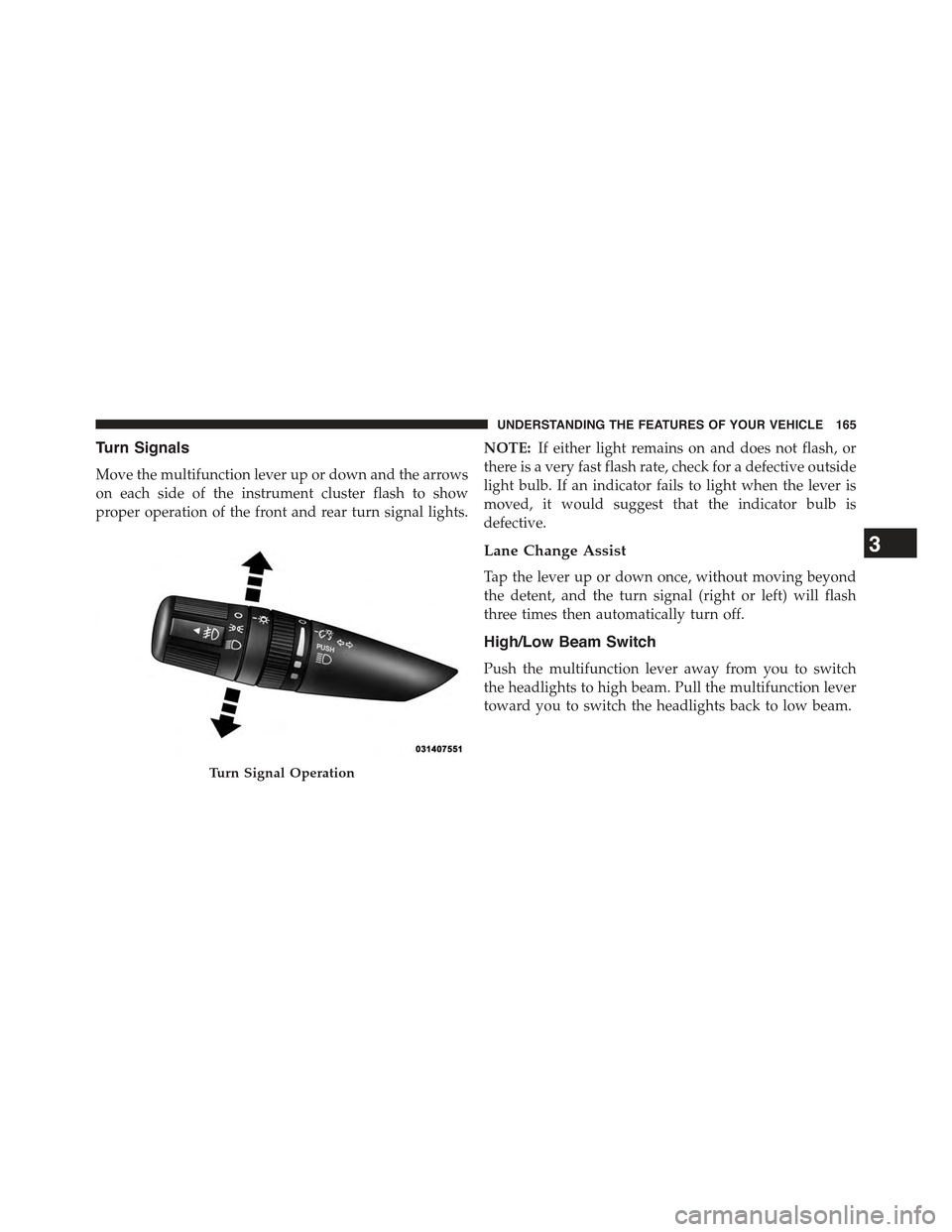
Turn Signals
Move the multifunction lever up or down and the arrows
on each side of the instrument cluster flash to show
proper operation of the front and rear turn signal lights.
NOTE:If either light remains on and does not flash, or
there is a very fast flash rate, check for a defective outside
light bulb. If an indicator fails to light when the lever is
moved, it would suggest that the indicator bulb is
defective.
Lane Change Assist
Tap the lever up or down once, without moving beyond
the detent, and the turn signal (right or left) will flash
three times then automatically turn off.
High/Low Beam Switch
Push the multifunction lever away from you to switch
the headlights to high beam. Pull the multifunction lever
toward you to switch the headlights back to low beam.
Turn Signal Operation
3
UNDERSTANDING THE FEATURES OF YOUR VEHICLE 165
Page 168 of 560

Flash-To-Pass
You can signal another vehicle with your headlights by
lightly pulling the multifunction lever toward you. This
will turn on the high beam headlights until the lever is
released.
NOTE:If the multifunction lever is held in the flash-to-
pass position for more than 20 seconds, the high beams
will shut off. If this occurs, wait 30 seconds for the next
flash-to-pass operation.
Instrument Panel Dimming
Rotate the center portion of the lever to the extreme
bottom position to fully dim the instrument panel lights
and prevent the interior lights from illuminating when a
door is opened.
Rotate the center portion of the lever up to increase the
brightness of the instrument panel lights when the park-
ing lights or headlights are on.
Rotate the center portion of the lever upward to the next
detent position to brighten the odometer and radio when
the parking lights or headlights are on.
Rotate the center portion of the lever upward to the last
detent to turn on the interior lighting.
Dimmer Control
166 UNDERSTANDING THE FEATURES OF YOUR VEHICLE
Page 173 of 560
TILT STEERING COLUMN
This feature allows you to tilt the steering column
upward or downward. The tilt steering column lever is
located on the left side of the steering column, below the
turn signal lever.
Push down on the lever to unlock the steering column.
With one hand firmly on the steering wheel, move the
steering column up or down, as desired. Push the lever
up to lock the steering column firmly in place.
WARNING!
Do not adjust the steering column while driving.
Adjusting the steering column while driving or driv-
ing with the steering column unlocked, could cause
(Continued)
Tilt Steering Column Lever
3
UNDERSTANDING THE FEATURES OF YOUR VEHICLE 171
Page 185 of 560

Programming A Non-Rolling Code
For programming Garage Door Openers manufactured
before 1995.
1. Turn the ignition switch to the ON/RUN position.
2.Place the hand-held transmitter 1 to 3 inches (3 to 8 cm)
away from the HomeLink® button you wish to program
while keeping the HomeLink® indicator light in view.
3. Push and hold the Homelink® button you want to
program while you push and hold the hand-held
transmitter button.
4. Continue to hold both buttons and observe the indi-
cator light. The Homelink® indicator will flash slowly
and then rapidly after HomeLink® has received the
frequency signal from the hand-held transmitter. Re-
lease both buttons after the indicator light changes
from slow to rapid.
5. Push and hold the programmed HomeLink® button
and observe the indicator light.
•If the indicator light stays on constantly, program-
ming is complete and the garage door/device should
activate when the HomeLink® button is pushed.
•To program the two remaining HomeLink® buttons,
repeat each step for each remaining button. DO NOT
erase the channels.
Reprogramming A Single HomeLink® Button
(Non-Rolling Code)
To reprogram a channel that has been previously trained,
follow these steps:
1. Cycle the ignition to the ON/RUN position.
2. Push and hold the desired HomeLink® button until
the indicator light begins to flash after 20 seconds.
Do not release the button.
3
UNDERSTANDING THE FEATURES OF YOUR VEHICLE 183
Page 217 of 560

on briefly as a bulb check. If the light does not come on
during starting, have the system checked by an autho-
rized dealer.
4. Oil Pressure Warning Light
This light indicates low engine oil pressure. The
light should turn on momentarily when the engine is
started. If the light turns on while driving, stop the
vehicle and shut off the engine as soon as possible. A
chime will sound when this light turns on.
Do not operate the vehicle until the cause is corrected.
This light does not indicate how much oil is in the engine.
The engine oil level must be checked under the hood.
5. Low Fuel Light
When the fuel level reaches approximately 2.0 gal
(7.8 L) this light will turn on, and remain on until
fuel is added.
6. Speedometer
The Speedometer shows the vehicle speed in miles per
hour (MPH) and kilometers per hour (km/h).
7. Air Bag Warning Light
This light will turn on for four to eight seconds
as a bulb check when the ignition switch is first
turned to ON/RUN. If the light is either not on
during starting, stays on, or turns on while
driving, have the system inspected at an authorized
dealer as soon as possible. Refer to “Occupant Restraints”
in “Things To Know Before Starting Your Vehicle” for
further information.
8. Turn Signal Indicators
The arrow will flash with the exterior turn
signal when the turn signal lever is operated.
4
UNDERSTANDING YOUR INSTRUMENT PANEL 215