Page 401 of 560
•Various Tire Pressure Monitoring System Messages,
which display in the Electronic Vehicle Information
Center (EVIC)
•Tire Pressure Monitoring Telltale Light
Tire Pressure Monitoring Low Pressure Warnings
The Tire Pressure Monitoring Telltale Light will illumi-
nate in the instrument cluster and an audible chime will
be activated when one or more of the four active road tire
pressures are low. The audible chime will sound once
every ignition cycle for the first condition that it detects.
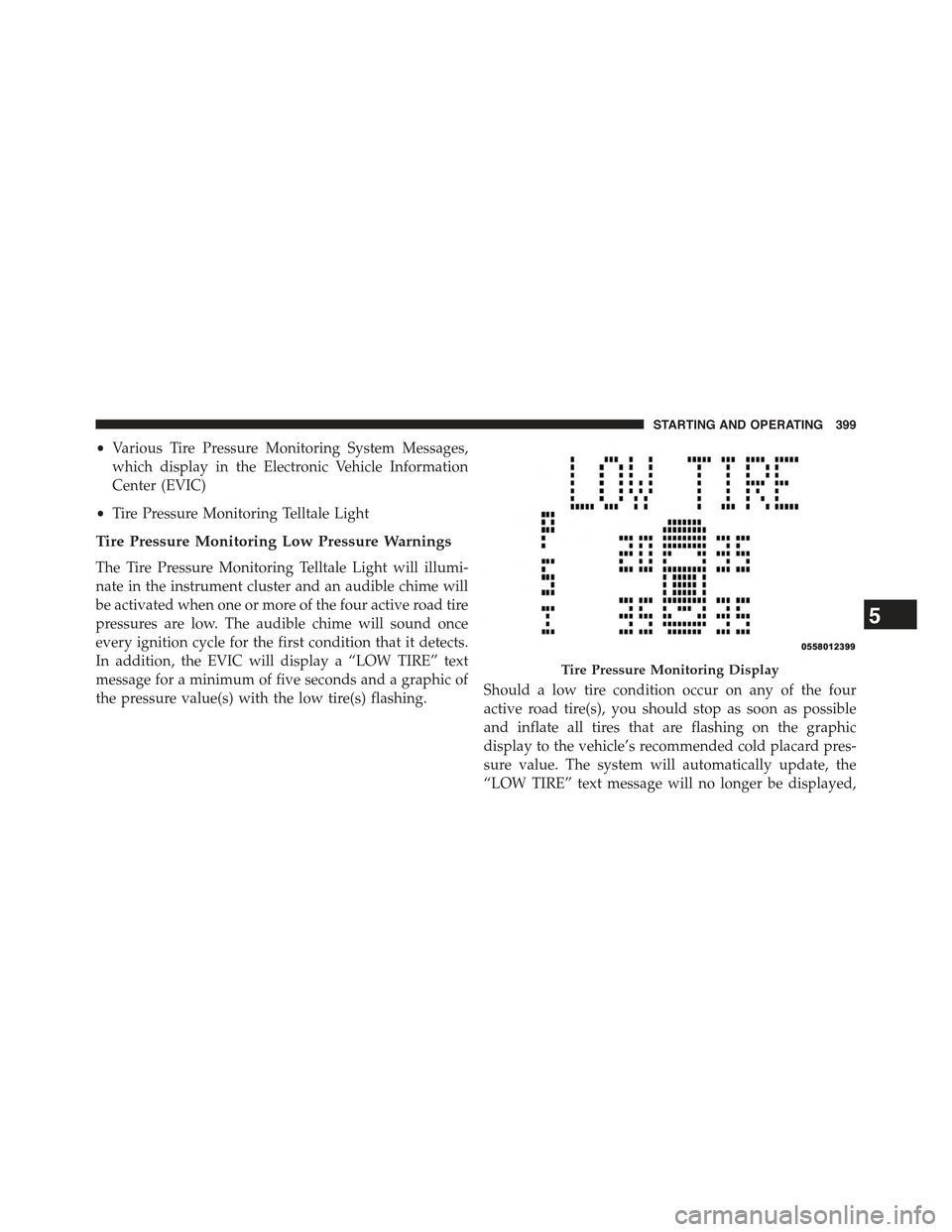
In addition, the EVIC will display a “LOW TIRE” text
message for a minimum of five seconds and a graphic of
the pressure value(s) with the low tire(s) flashing.Should a low tire condition occur on any of the four
active road tire(s), you should stop as soon as possible
and inflate all tires that are flashing on the graphic
display to the vehicle’s recommended cold placard pres-
sure value. The system will automatically update, the
“LOW TIRE” text message will no longer be displayed,
Tire Pressure Monitoring Display
5
STARTING AND OPERATING 399
Page 404 of 560

3. However, after driving the vehicle for up to 20 min-
utes above 15 mph (24 km/h), the Tire Pressure
Monitoring Telltale Light will flash on and off for
75 seconds and then remain on solid. In addition, the
EVIC will display a “SERVICE TPM SYSTEM” mes-
sage for a minimum of five seconds and then display
dashes (- -) in place of the pressure values.
4.For each subsequent ignition key cycle, a chime will
sound and the Tire Pressure Monitoring Telltale Light
will flash on and off for 75 seconds and then remain on
solid, and the EVIC will display a “SERVICE TPM
SYSTEM” message for a minimum of five seconds and
then display dashes (- -) in place of the pressure values.
5. Once you repair or replace the original road tire and
reinstall it on the vehicle in place of the compact spare
tire, the TPMS will update automatically and the Tire
Pressure Monitoring Telltale Light will turn OFF, as
long as no tire pressure is below the low-pressure
warning limit in any of the four active road tires. The
vehicle may need to be driven for up to 20 minutes
above 15 mph (24 km/h) in order for the TPMS to
receive this information.
General Information
This device complies with Part 15 of the FCC rules and
RSS 210 of Industry Canada. Operation is subject to the
following conditions:
•This device may not cause harmful interference.
•This device must accept any interference received,
including interference that may cause undesired op-
eration.
The tire pressure sensors are covered under one of the
following licenses:
United StatesMRXC4N3MF9
Canada2546A-C4N3MF9
402 STARTING AND OPERATING
Page 409 of 560

Carbon Monoxide Warnings
WARNING!
Carbon monoxide (CO) in exhaust gases is deadly.
Follow the precautions below to prevent carbon
monoxide poisoning:
•Do not inhale exhaust gases. They contain carbon
monoxide, a colorless and odorless gas, which can
kill. Never run the engine in a closed area, such as
a garage, and never sit in a parked vehicle with the
engine running for an extended period. If the
vehicle is stopped in an open area with the engine
running for more than a short period, adjust the
ventilation system to force fresh, outside air into
the vehicle.
(Continued)
WARNING!(Continued)
•Guard against carbon monoxide with proper main-
tenance. Have the exhaust system inspected every
time the vehicle is raised. Have any abnormal
conditions repaired promptly. Until repaired, drive
with all side windows fully open.
ADDING FUEL
Fuel Filler Cap (Gas Cap)
The gas cap is behind the fuel filler door, on the left side
of the vehicle. If the gas cap is lost or damaged, be sure
the replacement cap is for use with this vehicle.
After removing the gas cap, place the gas cap tether cable
over a hook on the inside of the fuel door. This keeps the
gas cap suspended away from and protects the vehicle’s
surface.
5
STARTING AND OPERATING 407
Page 410 of 560
CAUTION!
•Damage to the fuel system or emission control
system could result from using an improper fuel
tank filler cap (gas cap). A poorly fitting cap could
let impurities into the fuel system.
•A poorly fitting gas cap may cause the “Malfunc-
tion Indicator Light (MIL)” to turn on.
•To avoid fuel spillage and overfilling, do not “top
off” the fuel tank after filling.
WARNING!
•Never have any smoking materials lit in or near the
vehicle when the gas cap is removed or the tank is
being filled.
(Continued)
Fuel Filler Cap
408 STARTING AND OPERATING
Page 411 of 560

WARNING!(Continued)
•Never add fuel when the engine is running. This is
in violation of most state and federal fire regula-
tions and may cause the MIL to turn on.
•A fire may result if gasoline is pumped into a
portable container that is inside of a vehicle. You
could be burned. Always place gas containers on
the ground while filling.
NOTE:
•When the fuel nozzle “clicks” or shuts off, the fuel tank
is full.
•Tighten the gas cap about 1/4 turn until you hear one
click. This is an indication that cap is properly tight-
ened.
•If the gas cap is not tightened properly, the MIL will
come on. Be sure the gas cap is tightened every time
the vehicle is refueled.
Loose Fuel Filler Cap Message
If the vehicle diagnostic system determines that the fuel
filler cap is loose or improperly installed, a “gASCAP”
message will be displayed in the Odometer/Trip Odom-
eter in the instrument cluster. Refer to “Instrument
Cluster Description” in “Understanding Your Instrument
Panel” for further information. Tighten the fuel filler cap
properly and press the odometer/trip odometer RESET
button to turn the message off. If the problem continues,
the message will appear the next time the vehicle is
started. Refer to “Onboard Diagnostic System” in “Main-
taining Your Vehicle” for further information.
5
STARTING AND OPERATING 409
Page 415 of 560

measure GTW is to put your fully loaded trailer on a
vehicle scale. The entire weight of the trailer must be
supported by the scale.
Gross Combination Weight Rating (GCWR)
The GCWR is the total permissible weight of your vehicle
and trailer when weighed in combination.
Gross Axle Weight Rating (GAWR)
The GAWR is the maximum capacity of the front and rear
axles. Distribute the load over the front and rear axles
evenly. Make sure that you do not exceed either front or
rear GAWR. Refer to “Vehicle Loading/Vehicle Certifica-
tion Label” in “Starting and Operating” for further
information.
WARNING!
It is important that you do not exceed the maximum
front or rear GAWR. A dangerous driving condition
can result if either rating is exceeded. You could lose
control of the vehicle and have a collision.
Tongue Weight (TW)
The tongue weight is the downward force exerted on the
hitch ball by the trailer. The recommended tongue weight
is 10% to 15% for a conventional hitch. You must consider
this as part of the load on your vehicle.
Frontal Area
The frontal area is the maximum height multiplied by the
maximum width of the front of a trailer.
5
STARTING AND OPERATING 413
Page 416 of 560

Trailer Sway Control
The trailer sway control is a telescoping link that can be
installed between the hitch receiver and the trailer tongue
that typically provides adjustable friction associated with
the telescoping motion to dampen any unwanted trailer
swaying motions while traveling.
Weight-Carrying Hitch
A weight-carrying hitch supports the trailer tongue weight,
just as if it were luggage located at a hitch ball or some other
connecting point of the vehicle. These kinds of hitches are
the most popular on the market today and they are com-
monly used to tow small and medium sized trailers.
Weight-Distributing Hitch
A weight-distributing system works by applying lever-
age through spring (load) bars. They are typically used
for heavier loads to distribute trailer tongue weight to the
tow vehicle’s front axle and the trailer axle(s). When used
in accordance with the manufacturer’s directions, it pro-
vides for a more level ride, offering more consistent
steering and brake control thereby enhancing towing
safety. The addition of a friction/hydraulic sway control
also dampens sway caused by traffic and crosswinds and
contributes positively to tow vehicle and trailer stability.
Trailer sway control and a weight distributing (load
equalizing) hitch are recommended for heavier Tongue
Weights (TW) and may be required depending on vehicle
and trailer configuration/loading to comply with Gross
Axle Weight Rating (GAWR) requirements.
WARNING!
•An improperly adjusted Weight Distributing Hitch
system may reduce handling, stability, braking
performance, and could result in a collision.
(Continued)
414 STARTING AND OPERATING
Page 417 of 560

WARNING!(Continued)
•Weight Distributing Systems may not be compatible
with Surge Brake Couplers. Consult with your hitch
and trailer manufacturer or a reputable Recreational
Vehicle dealer for additional information.
Trailer Hitch Classification
The following chart provides the industry standard for
the maximum trailer weight a given trailer hitch class can
tow and should be used to assist you in selecting the
correct trailer hitch for your intended towing condition.
Trailer Hitch Classification Definitions
ClassMax. Trailer Hitch
Industry Standards
Class I - Light Duty 2,000 lbs (907 kg)
Class II - Medium Duty 3,500 lbs (1 587 kg)
Class III - Heavy Duty 5,000 lbs (2 268 kg)
Class IV - Extra Heavy
Duty
10,000 lbs (4 540 kg)
Refer to the “Trailer Towing Weights (Maximum
Trailer Weight Ratings)” chart for the Maximum
Gross Trailer Weight (GTW) towable for your given
drivetrain.
All trailer hitches should be professionally installed
on your vehicle.
5
STARTING AND OPERATING 415
