Page 178 of 772
Interior Lights
The interior lights come on when a door is opened.
To protect the battery, the interior lights will turn off
automatically 10 minutes after the ignition is moved to
the LOCK position. This will occur if the interior lights
were switched on manually or are on because a door is
open. This includes the glove box light, but not the trunk
light. To restore interior light operation, either place the
ignition in the ON/RUN position or cycle the light
switch.
Instrument Panel Dimmer Control
The instrument panel dimmer control is part of the
headlight switch and is located on the drivers side of the
instrument panel.
With the parking lights or headlights on, rotating the
instrument panel dimmer control upward will increase
the brightness of the instrument panel lights and lighted
cupholders — if equipped.
Instrument Panel Dimmer
176 UNDERSTANDING THE FEATURES OF YOUR VEHICLE
Page 180 of 772
Battery Saver Feature
To protect the battery, the interior lights will turn off
automatically 10 minutes after the ignition switch is
moved to the LOCK position. This will occur if the
interior lights were switched on manually or are on
because a door is open.
WINDSHIELD WIPERS AND WASHERS
The windshield wiper/washer controls are located on the
windshield wiper/washer lever on the right side of the
steering column. The front wipers are operated by rotat-
ing a switch, located on the end of the lever. For infor-
mation on the rear wiper/washer, refer to “Rear Window
Features” in “Understanding The Features Of Your Ve-
hicle”.
Windshield Wiper/Washer Lever
178 UNDERSTANDING THE FEATURES OF YOUR VEHICLE
Page 187 of 772
Remote Start Mode Inhibit— On vehicles equipped
with Remote Starting system, Rain Sensing wipers are
not operational when the vehicle is in the remote start
mode. Once the operator is in the vehicle and has placed
the ignition switch in the RUN position, rain sensing
wiper operation can resume, if it has been selected, and
no other inhibit conditions (mentioned previously) exist.
TILT/TELESCOPING STEERING COLUMN
This feature allows you to tilt the steering column
upward or downward. It also allows you to lengthen or
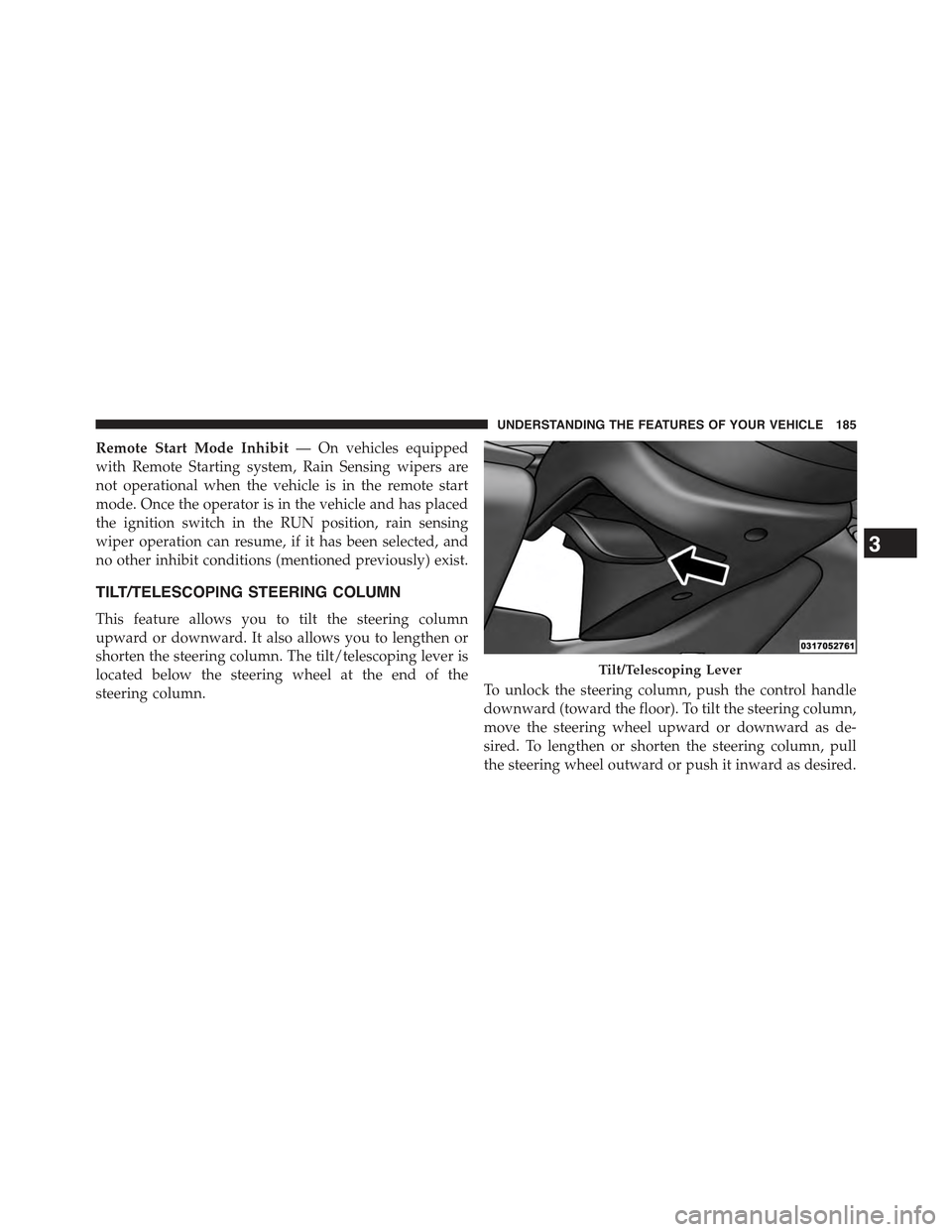
shorten the steering column. The tilt/telescoping lever is
located below the steering wheel at the end of the
steering column.To unlock the steering column, push the control handle
downward (toward the floor). To tilt the steering column,
move the steering wheel upward or downward as de-
sired. To lengthen or shorten the steering column, pull
the steering wheel outward or push it inward as desired.
Tilt/Telescoping Lever
3
UNDERSTANDING THE FEATURES OF YOUR VEHICLE 185
Page 188 of 772

To lock the steering column in position, push the control
handle upward until fully engaged.
WARNING!
Do not adjust the steering column while driving.
Adjusting the steering column while driving or driv-
ing with the steering column unlocked, could cause
the driver to lose control of the vehicle. Failure to
follow this warning may result in serious injury or
death.
HEATED STEERING WHEEL — IF EQUIPPED
The steering wheel contains a heating element that helps
warm your hands in cold weather. The heated steering
wheel has only one temperature setting. Once the heated
steering wheel has been turned on it will operate for up
to 80 minutes before automatically shutting off. The
heated steering wheel can shut off early or may not turn
on when the steering wheel is already warm.
The heated steering wheel control button is located
within the Uconnect® system. You can gain access to the
control button through the climate screen or the controls
screen.
•Press the heated steering wheel buttononce to
turn the heating element ON.
•Press the heated steering wheel buttona second
time to turn the heating element OFF.
NOTE:The engine must be running for the heated
steering wheel to operate.
186 UNDERSTANDING THE FEATURES OF YOUR VEHICLE
Page 199 of 772

WARNING!
Leaving the Adaptive Cruise Control (ACC) system
on when not in use is dangerous. You could acciden-
tally set the system or cause it to go faster than you
want. You could lose control and have a collision.
Always leave the system off when you are not using
it.
To Set A Desired ACC Speed
When the vehicle reaches the speed desired, push the
SET+button or the SET-button and release. The
EVIC/DID will display the set speed.
If the system is Set when the vehicle speed is below
20 mph (32 km/h), the Set Speed shall be defaulted to
20 mph (32 km/h). If the system is Set when the vehicle
speed is above 20 mph (32 km/h), the Set Speed shall be
the current speed of the vehicle.
NOTE:ACC cannot be set if there is a stationary vehicle
in front of your vehicle in close proximity.
Remove your foot from the accelerator pedal. If you do
not, the vehicle may continue to accelerate beyond the set
speed. If this occurs:
•The message “DRIVER OVERRIDE” will display in
the EVIC/DID.
•The system will not be controlling the distance be-
tween your vehicle and the vehicle ahead. The vehicle
speed will only be determined by the position of the
accelerator pedal.
To Cancel
The following conditions cancel the system:
•The brake pedal is applied.
•The CANCEL button is pressed.
•An Anti-Lock Brake System (ABS) event occurs.
3
UNDERSTANDING THE FEATURES OF YOUR VEHICLE 197
Page 211 of 772

•Installing a snow plow, front-end protector, an after-
market grille or modifying the grille is not recom-
mended. Doing so may block the sensor and inhibit
ACC/FCW operation.
“Clean Front Windshield” Warning
The “ACC/FCW Limited Functionality Clean Front
Windshield” warning will display and also a chime will
indicate when conditions temporarily limit system per-
formance. This most often occurs at times of poor visibil-
ity, such as in snow or heavy rain and fog. The ACC
system may also become temporarily blinded due to
obstructions, such as mud, dirt, or ice on windshield and
fog on the inside of glass. In these cases, the EVIC/DID
will display “ACC/FCW Limited Functionality Clean
Front Windshield” and the system will have degraded
performance.
The “ACC/FCW Limited Functionality Clean Front
Windshield” message can sometimes be displayed while
driving in adverse weather conditions. The ACC/FCW
system will recover after the vehicle has left these areas.
Under rare conditions, when the camera is not tracking
any vehicles or objects in its path this warning may
temporarily occur.
If weather conditions are not a factor, the driver should
examine the windshield and the camera located on the
back side of the inside rear view mirror. They may
require cleaning or removal of an obstruction.
When the condition that created limited functionality is
no longer present, the system will return to full function-
ality.
NOTE:If the “ACC/FCW Limited Functionality Clean
Front Windshield” message occurs frequently (e.g. more
than once on every trip) without any snow, rain, mud, or
other obstruction, have the windshield and forward
facing camera inspected at your authorized dealer.
3
UNDERSTANDING THE FEATURES OF YOUR VEHICLE 209
Page 236 of 772

Changing LaneSense Status
The LaneSense system has settings to adjust the intensity
of the torque warning and the warning zone sensitivity
(early/late) that you can configure through the
Uconnect® system screen. Refer to “Uconnect® Settings”
in “Understanding Your Instrument Panel” for further
information.
NOTE:
•When enabled the system operates above 37 mph
(60 km/h) and below 112 mph (180 km/h).
•Use of the turn signal suppresses the warnings.
•The system will not apply torque to the steering wheel
whenever a safety system engages. (anti-lock brakes,
traction control system, electronic stability control,
forward collision warning, etc.).
PARKSENSE® REAR PARK ASSIST — IF
EQUIPPED
The ParkSense® Rear Park Assist system provides visual
and audible indications of the distance between the rear
fascia and a detected obstacle when backing up, e.g.
during a parking maneuver. Refer to ParkSense® System
Usage Precautions for limitations of this system and
recommendations.
ParkSense® will retain the last system state (enabled or
disabled) from the last ignition cycle when the ignition is
changed to the ON/RUN position.
ParkSense® can be active only when the shift lever/gear
selector is in REVERSE. If ParkSense® is enabled at this
shift lever/gear selector position, the system will remain
active until the vehicle speed is increased to approxi-
mately 7 mph (11 km/h) or above. When in REVERSE
and above the system’s operating speed, a warning will
appear within the Electronic Vehicle Information Center
234 UNDERSTANDING THE FEATURES OF YOUR VEHICLE
Page 265 of 772

To enable the ParkSense® Active Park Assist system,
press the ParkSense® Active Park Assist switch once
(LED turns on).
To disable the ParkSense® Active Park Assist system,
press the ParkSense® Active Park Assist switch again
(LED turns off).
The ParkSense® Active Park Assist system will turn off
automatically for any of the following conditions:
•The parking maneuver is completed.
•Vehicle speed greater than 18 mph (30 km/h) when
searching for a parking space.
•Vehicle speed greater than 5 mph (7 km/h) during
active steering guidance into the parking space.
•Touching the steering wheel during active steering
guidance into the parking space.
•Pressing the ParkSense® Front and Rear Park Assist
switch.
•Driver’s door is opened.
•Rear liftgate is opened.
•Electronic Stability Control/Anti-lock Braking System
intervention.
•The ParkSense® Active Park Assist system will allow a
maximum of six shifts between DRIVE (automatic
transmission) or forward gear (manual transmission)
and REVERSE. If the maneuver cannot be completed
within six shifts, the system will cancel and the EVIC/
DID will instruct the driver to complete the maneuver
manually.
3
UNDERSTANDING THE FEATURES OF YOUR VEHICLE 263

