Page 218 of 554

Front-side view
Guiding lines
Guiding lines that indicate the width and the front
end of the vehicle are displayed on the monitor.
The front-of-vehicle line
�1shows the front part
of the vehicle.
The side-of-vehicle line
�2shows the vehicle
width including the outside mirrors.
The extensions
�3of both the front�1and side
�2lines are shown with a green dotted line.
The corner sonar indicator
�4will appear when a
corner of the vehicle moves closer to an object. The corner sonar indicator
�4can be turned off.
For additional information, refer to “Around
View® Monitor” in this section.
CAUTION
The turn signal light may look like the
side-of-vehicle line. This is not a
malfunction.
Front-wide and rear-wide view
The front-wide and rear-wide view shows a wider
area on the entire screen and allows the checking
of the blind corners on right and left sides. The
rear-wide view displays an approximately 180-
degree area while the front-view and rearview
display an approximately 150-degree area. The
predictive course lines are not displayed when
using the front-wide and rear-wide view.
SAA1842
Front-wide view
LHA2318
Monitor, climate, audio, phone and voice recognition systems4-31
Page 219 of 554

Distance guide lines:
Indicates distances from the vehicle body:● Red line
�1: approximately 1.5 ft (0.5 m)
● Yellow line
�2: approximately 3 ft (1 m)
● Green line
�3: approximately 7 ft (2 m)
● Green line
�4: approximately 10 ft (3 m)
Vehicle width guide lines
�5:
Indicate the vehicle width when backing up.
The corner sonar indicator
�6will appear when a
corner of the vehicle moves closer to an object.
DIFFERENCE BETWEEN
PREDICTIVE AND ACTUAL
DISTANCES
The distance guide line and the vehicle width
guide line should be used as a reference only
when the vehicle is on a level, paved surface. The
distance viewed on the monitor is for reference
only and may be different than the actual distance
between the vehicle and displayed objects.
Backing up on a steep uphill
When backing up the vehicle up a hill, the dis-
tance guide lines and the vehicle width guide
lines are shown closer than the actual distance.
For example, the display shows 1.0 m (3 ft) to the
place
�A, but the actual 1.0 m (3 ft) distance on
Rear-wide view
SAA2629
LHA3145
4-32Monitor, climate, audio, phone and voice recognition systems
Page 220 of 554
the hill is the place�B. Note that any object on
the hill is further than it appears on the monitor.
Backing up on a steep downhill
When backing up the vehicle down a hill, the
distance guide lines and the vehicle width guide
lines are shown farther than the actual distance.
For example, the display shows 3 ft (1.0 m) to the
place
�A, but the actual 3 ft (1.0 m) distance on the hill is the place
�B. Note that any object on
the hill is closer than it appears on the monitor.
LHA3146
Monitor, climate, audio, phone and voice recognition systems4-33
Page 221 of 554
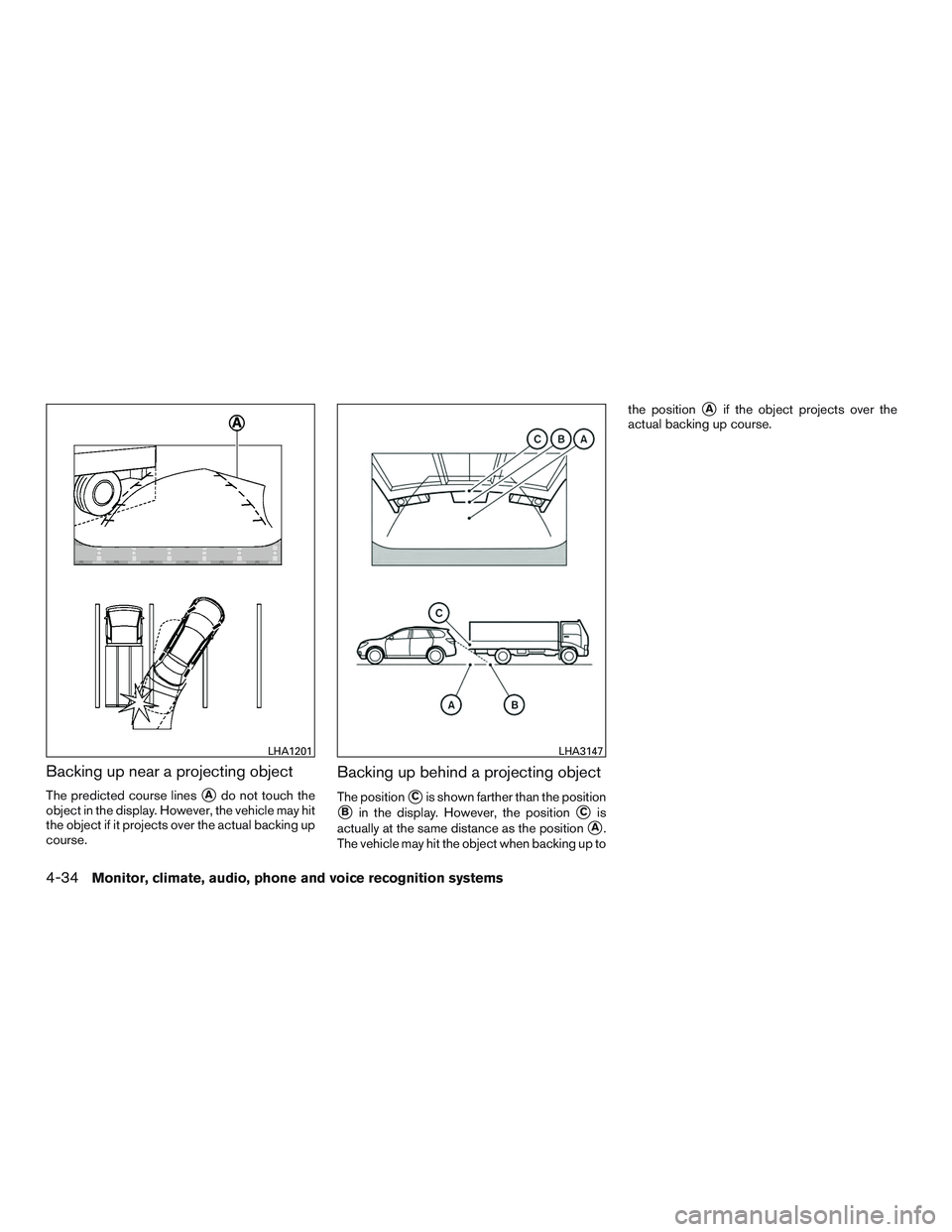
Backing up near a projecting object
The predicted course lines�Ado not touch the
object in the display. However, the vehicle may hit
the object if it projects over the actual backing up
course.
Backing up behind a projecting object
The position�Cis shown farther than the position
�Bin the display. However, the position�Cis
actually at the same distance as the position
�A.
The vehicle may hit the object when backing up to the position
�Aif the object projects over the
actual backing up course.
LHA1201LHA3147
4-34Monitor, climate, audio, phone and voice recognition systems
Page 222 of 554

HOW TO SWITCH THE DISPLAY
With the ignition switch in the ON position, press
the CAMERA button or move the shift lever to the
R (Reverse) position to operate the Around View
Monitor.
The Around View® Monitor can display two split
view as well as a single view of the front-wide
view or rear-wide view. Select the “Change View”
key to switch between the available views.
If the shift lever is not in the R (Reverse) position,
the available views are:● Front-view/bird’s-eye view split screen
● Front-view/front-side view split screen ●
Front-wide view
If the shift lever is in the R (Reverse) position, the
available views are: ● Rearview/bird’s-eye view split screen
● Rearview/front-side view split screen
● Rear-wide view
The display automatically changes to the Around
View Monitor displaying front-view/bird’s-eye
view when: ● The shift lever is in the D (Drive) position and
the sonar detects the vehicle is approaching
an object.
The display will switch from the Around View
Monitor screen when: ● When the shift lever is in the D (Drive) posi-
tion and the vehicle speed increases above
approximately 6 mph (10 km/h).
● When the sonar no longer detects an object
the screen will automatically switch back the
previously displayed screen.
● When a different screen is selected.
PARKING SENSOR (if so equipped)
REAR CENTER SONAR (if so
equipped)
The sonar (parking sensor) sounds a tone to
inform the driver of obstacles near the bumper.
WARNING
●The sonar (parking sensor) is a conve-
nience feature. It is not a substitute for
proper parking.
● The system is deactivated at speeds
above 10 km/h (6 mph) . It is reactivated
at lower speeds.
LHA2319LHA2320
Monitor, climate, audio, phone and voice recognition systems4-35
Page 223 of 554
●The driver is always responsible for
safety during parking and other
maneuvers.
● Always look around and check that it is
safe to move before parking.
● Read and understand the limitations of
the sonar (parking sensor) as contained
in this section.
● The colors of the sonar indicators and
the distance guide lines in the front,
front-wide, rear and rear-wide views in-
dicate different distances to the object.
● Inclement weather or Ultrasonic
sources such as an automatic car wash,
a truck’s compressed-air brakes or a
pneumatic drill may affect the function
of the system; this may include reduced
performance or a false activation.
● This function is designed as an aid to
the driver in detecting large stationary
objects to help avoid damaging the
vehicle.
● The system is not designed to prevent
contact with small or moving objects. ●
The system will not detect small objects
below the bumper, and may not detect
objects close to the bumper or on the
ground.
● The system may not detect the follow-
ing objects:
– Fluffy objects such as snow, cloth, cotton, glass or wool.
– Thin objects such as rope, wire or chain.
– Wedge-shaped objects.
● If your vehicle sustains damage to the
bumper fascia, leaving it misaligned or
bent, the sensing zone may be altered
causing inaccurate measurement of ob-
jects or false alarms.
CAUTION
●Excessive noise (such as audio system
volume or an open vehicle window) will
interfere with the tone and it may not be
heard. ●
Keep the surface of the sonar sensors
(located on the front and rear bumper
fascia) free from accumulations of
snow, ice and dirt. Do not scratch the
surface of the sonar sensors when
cleaning. If the sensors are covered, the
accuracy of the sonar function will be
diminished.
The system gives the tone for front objects when
the shift lever is in the D (Drive) position and both
front and rear objects when the shift lever is in the
R (Reverse) position.
When the camera image is shown on the display,
the system shows the sonar indicator regardless
of the shift selector position.
The system is deactivated at speeds above
10 km/h (6 mph) . It is reactivated at lower
speeds.
When the objects are detected, the indicator
(green) appears and blinks and the tone sounds
intermittently. When the vehicle moves closer to
the object, the color of the indicator turns yellow
and the rate of the blinking and the rate of the
tone increase. When the vehicle is very close to
the object, the indicator stops blinking and turns
red, and the tone sounds continuously.
4-36Monitor, climate, audio, phone and voice recognition systems
Page 224 of 554
The intermittent tone will stop after 3 seconds
when an object is detected by only the corner
sonar and the distance does not change.
The tone will stop when the object gets away
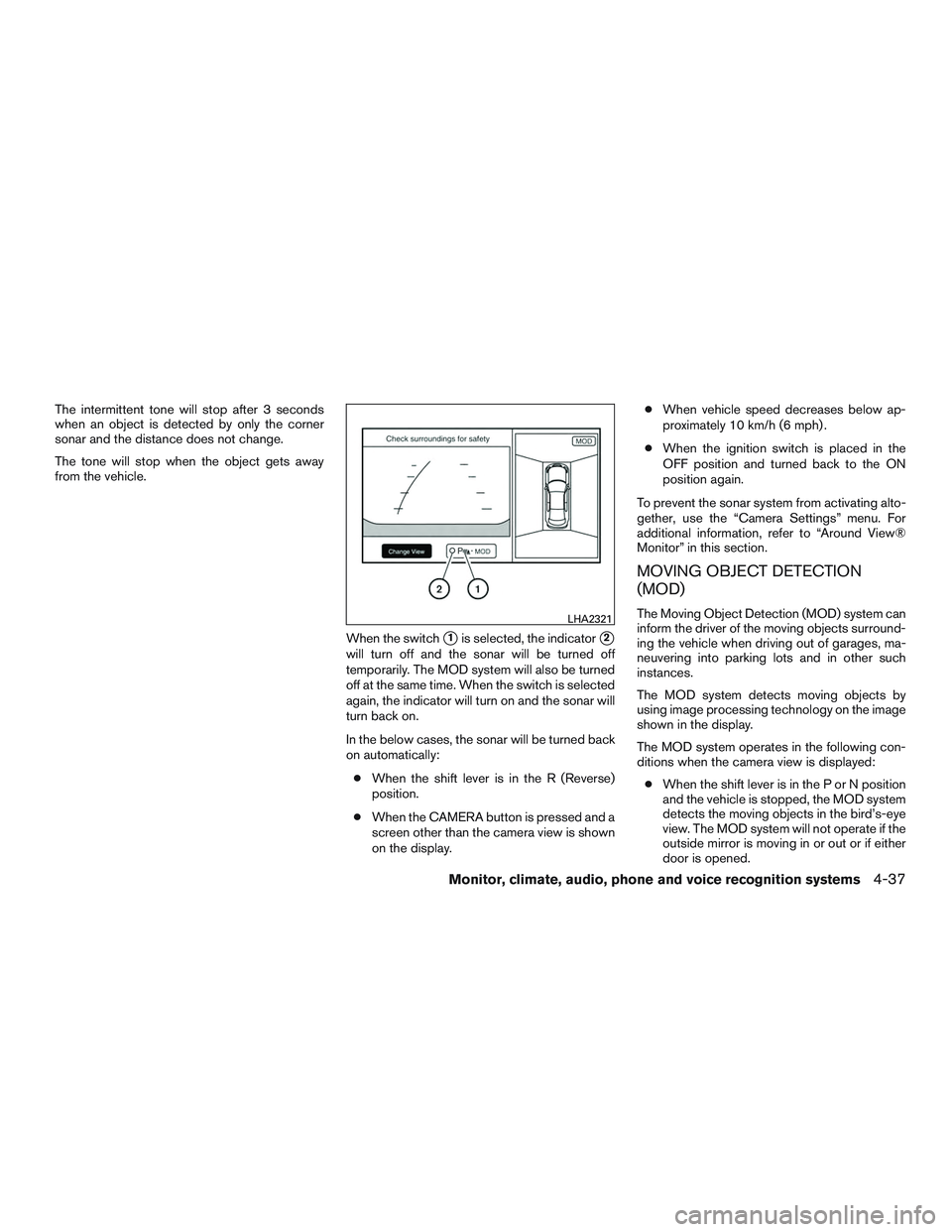
from the vehicle.When the switch
�1is selected, the indicator�2
will turn off and the sonar will be turned off
temporarily. The MOD system will also be turned
off at the same time. When the switch is selected
again, the indicator will turn on and the sonar will
turn back on.
In the below cases, the sonar will be turned back
on automatically:● When the shift lever is in the R (Reverse)
position.
● When the CAMERA button is pressed and a
screen other than the camera view is shown
on the display. ●
When vehicle speed decreases below ap-
proximately 10 km/h (6 mph) .
● When the ignition switch is placed in the
OFF position and turned back to the ON
position again.
To prevent the sonar system from activating alto-
gether, use the “Camera Settings” menu. For
additional information, refer to “Around View®
Monitor” in this section.
MOVING OBJECT DETECTION
(MOD)
The Moving Object Detection (MOD) system can
inform the driver of the moving objects surround-
ing the vehicle when driving out of garages, ma-
neuvering into parking lots and in other such
instances.
The MOD system detects moving objects by
using image processing technology on the image
shown in the display.
The MOD system operates in the following con-
ditions when the camera view is displayed: ● When the shift lever is in the P or N position
and the vehicle is stopped, the MOD system
detects the moving objects in the bird’s-eye
view. The MOD system will not operate if the
outside mirror is moving in or out or if either
door is opened.LHA2321
Monitor, climate, audio, phone and voice recognition systems4-37
Page 225 of 554
●When the shift lever is in the D position and
the vehicle speed is below approximately
8 km/h (5 mph) , the MOD system detects
moving objects in the front view or front-
wide view.
● When the shift lever is in the R position and
the vehicle speed is below approximately
8 km/h (5 mph) , the MOD system detects
moving objects in the rearview or rear-wide
view. The MOD system will not operate if the
liftgate is open.
The MOD system does not detect the moving
object during the period from when the “Park-
Guide” key is pressed and the target parking
space selected.
The MOD system does not detect moving ob-
jects in the front-side view. The MOD icon is not
displayed on the screen when in this view.WARNING
● The MOD system is not a substitute for
proper vehicle operation and is not de-
signed to prevent contact with the ob-
jects surrounding the vehicle. When
maneuvering, always use the outside
mirror and rear view mirror and turn and
check the surrounding to ensure it is
safe to maneuver.
● The system is deactivated at speeds
above 6 mph (10 km/h). It is reactivated
at lower speeds.
● The system is not designed to prevent
contact with all objects.
● The MOD system does not have the
function to detect the surrounding sta-
tionary objects.
4-38Monitor, climate, audio, phone and voice recognition systems