Page 171 of 653
3-85
Convenient features of your vehicle
3
Front lamps
(1) Front Map Lamp
(2) Front Door Lamp
Front Map Lamp:
Press either the right or left lens to
turn the map lamp on or off. This light
produces a spot beam for convenientuse as a map lamp at night or as a
personal lamp for the driver and the
front passenger.Front Door Lamp:
The Front Door Lamp Switch acti-
vates the front and rear room lamps
when the switch is pressed in either of
the three positions indicated below: DOOR:
With the switch in this position, the front and rear room lamps come onwhen the front or rear doors areopened, or when the doors are
unlocked by the remote key or smart
key. Once all doors are closed, the room
lamps will go out gradually after about
30 seconds.
If a door is open with the ignition switch
in the ACC position or the LOCK/OFF
position, the lamps will remain on for
about 20 minutes. If a door is open with
the ignition switch in the ON position,
the lamps will stay on continuously. ON :
With the Front Door Room Lamp in this position, the front and rear room lamps
remain on at all times. OFF :
With the Front Door Room Lamp in this position the front and rear room lamps
remain off at all times.
Rear lamps
(1) Rear Room Lamp
Rear ROOM Lamp Switch:
Press this switch to turn the room
lamps on and off.
OLMB043277OLMB043273
Page 185 of 653
3-99
Convenient features of your vehicle
3
System operation
Ventilation
1. Set the mode to the position.
2. Set the air intake control to theoutside (fresh) air position.
3. Set the temperature control to the desired position.
4. Set the fan speed control to the desired speed.
Heating
1. Set the mode to the position.
2. Set the air intake control to theoutside (fresh) air position.
3. Set the temperature control to the desired position.
4. Set the fan speed control to the desired speed.
5. If dehumidified heating is desired, turn the air conditioning system on.
If the windshield fogs up, set the mode to the or position.
Operation Tips
To keep dust or unpleasant odorfrom entering the car through the
ventilation system, temporarily set
the air intake control to the recircu-
lated air position. Be sure to returnthe control to the fresh air positionwhen the unpleasant odor has
passed to keep fresh air in the
vehicle. This will help keep the driv-
er alert and comfortable.
Air for the heating/cooling system is drawn in through the grilles just
ahead of the windshield. Care
should be taken that the grille open-
ings are not blocked by leaves,
snow, ice or other obstructions.
To prevent the inside of the wind- shied from fogging, set the air intakecontrol to the fresh air position and
fan speed to the desired position,
turn on the air conditioning system,
and adjust the temperature control
to desired temperature.
Air conditioning
HYUNDAI Air Conditioning Systems
are filled with environmentally friendly
R-134a refrigerant.
1. Start the engine. Push the air con- ditioning button.
2. Set the mode to the position.
3. Set the air intake control to the out- side air or recirculated air position.
4. Adjust the fan speed control and temperature control to maintain
the desired comfort.
When maximum cooling is desired, set the temperature con-
trol to the extreme left position, setthe mode control to the MAX A/C
position, then set the fan speedcontrol to the highest speed.
Page 193 of 653
3-107
Convenient features of your vehicle
3
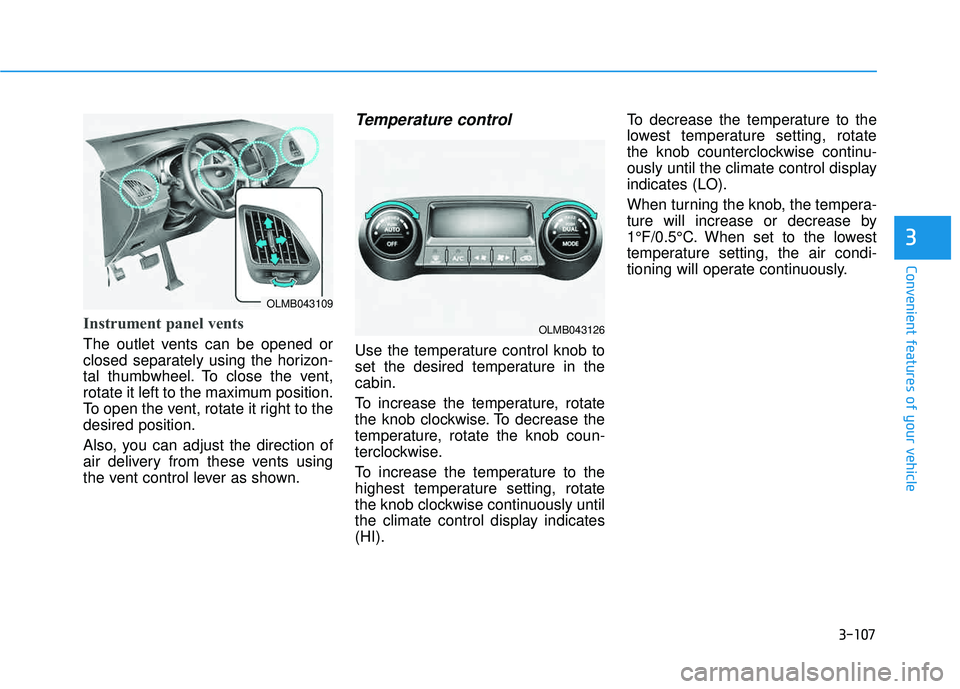
Instrument panel vents
The outlet vents can be opened or
closed separately using the horizon-
tal thumbwheel. To close the vent,
rotate it left to the maximum position.
To open the vent, rotate it right to thedesired position.
Also, you can adjust the direction of
air delivery from these vents using
the vent control lever as shown.
Temperature control
Use the temperature control knob to
set the desired temperature in thecabin.
To increase the temperature, rotate
the knob clockwise. To decrease the
temperature, rotate the knob coun-
terclockwise.
To increase the temperature to the
highest temperature setting, rotate
the knob clockwise continuously until
the climate control display indicates(HI).To decrease the temperature to the
lowest temperature setting, rotate
the knob counterclockwise continu-
ously until the climate control displayindicates (LO).
When turning the knob, the tempera-
ture will increase or decrease by
1°F/0.5°C. When set to the lowest
temperature setting, the air condi-
tioning will operate continuously.
OLMB043109
OLMB043126
Page 198 of 653
3-112
Convenient features of your vehicle
For maximum defrosting, set thetemperature control to the maxi-
mum clockwise setting (hot), and
the fan speed control to the highestspeed.
If warm air to the floor is desired while defrosting or defogging, setthe mode to the floor-defrost posi-tion.
Before driving, clear all snow and ice from the windshield, rear win-
dow, outside rear view mirrors, and
all side windows.
Clear all snow and ice from the hood and air inlet in the cowl grill to
improve heater and defroster effi-ciency and to reduce the probabili-
ty of fogging up the inside of thewindshield.Manual climate control system
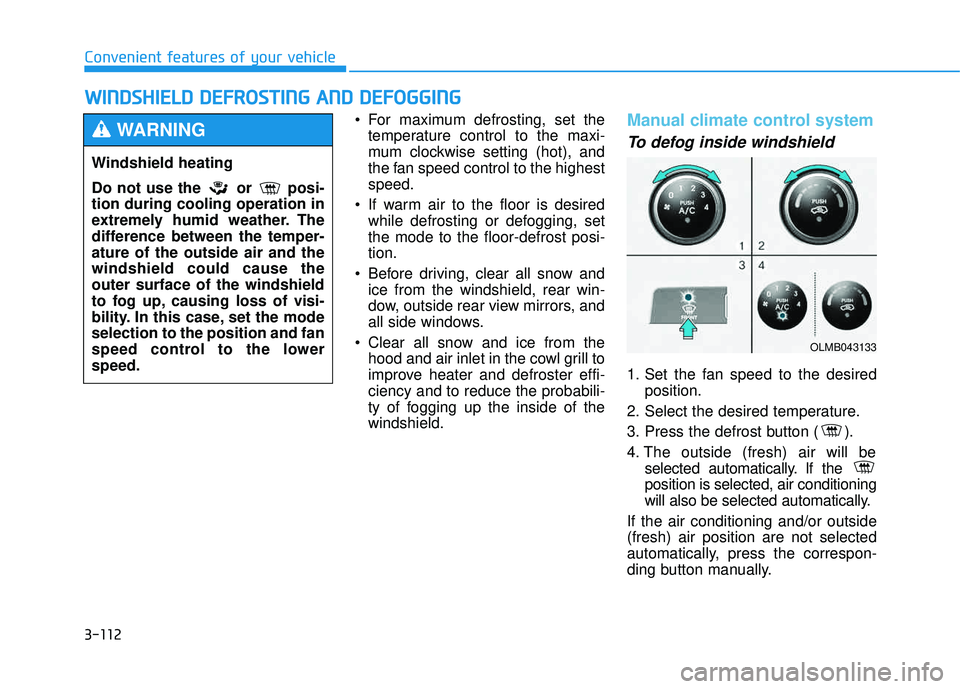
To defog inside windshield
1. Set the fan speed to the desired position.
2. Select the desired temperature.
3. Press the defrost button ( ).
4. The outside (fresh) air will be selected automatically. If the position is selected, air conditioning
will also be selected automatically.
If the air conditioning and/or outside(fresh) air position are not selected
automatically, press the correspon-
ding button manually.
WW IINN DDSSHH IIEE LLDD DD EEFFRR OO SSTT IINN GG AA NN DD DD EEFFOO GGGGIINN GG
Windshield heating
Do not use the or posi- tion during cooling operation in
extremely humid weather. The
difference between the temper-ature of the outside air and thewindshield could cause theouter surface of the windshield
to fog up, causing loss of visi-
bility. In this case, set the modeselection to the position and fan
speed control to the lowerspeed.
WARNING
OLMB043133
Page 199 of 653
3-113
Convenient features of your vehicle
3
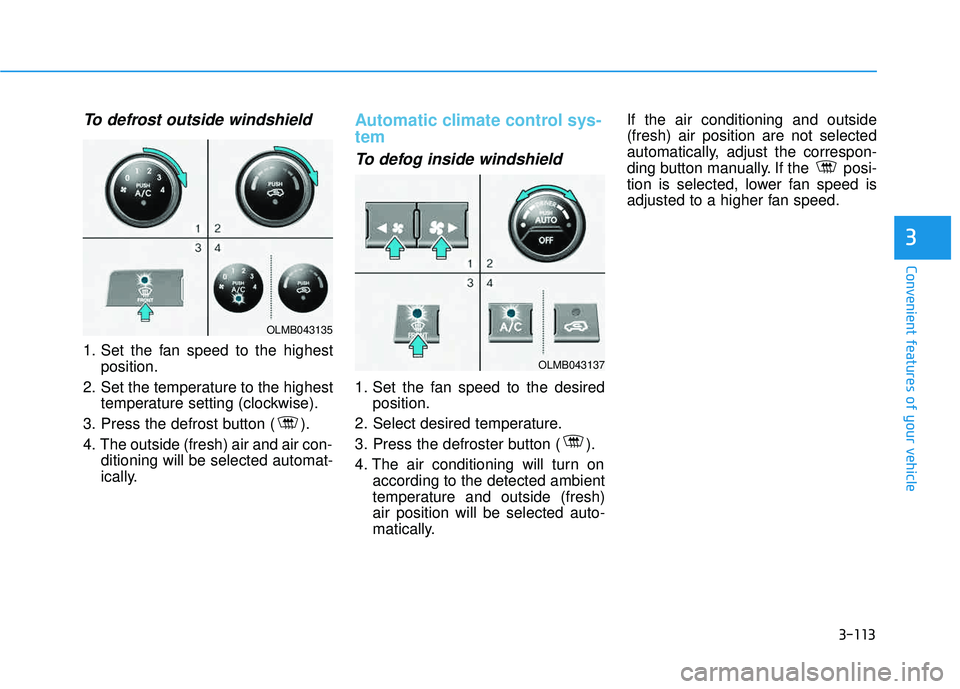
To defrost outside windshield
1. Set the fan speed to the highestposition.
2. Set the temperature to the highest temperature setting (clockwise).
3. Press the defrost button ( ).
4. The outside (fresh) air and air con- ditioning will be selected automat-
ically.
Automatic climate control sys- tem
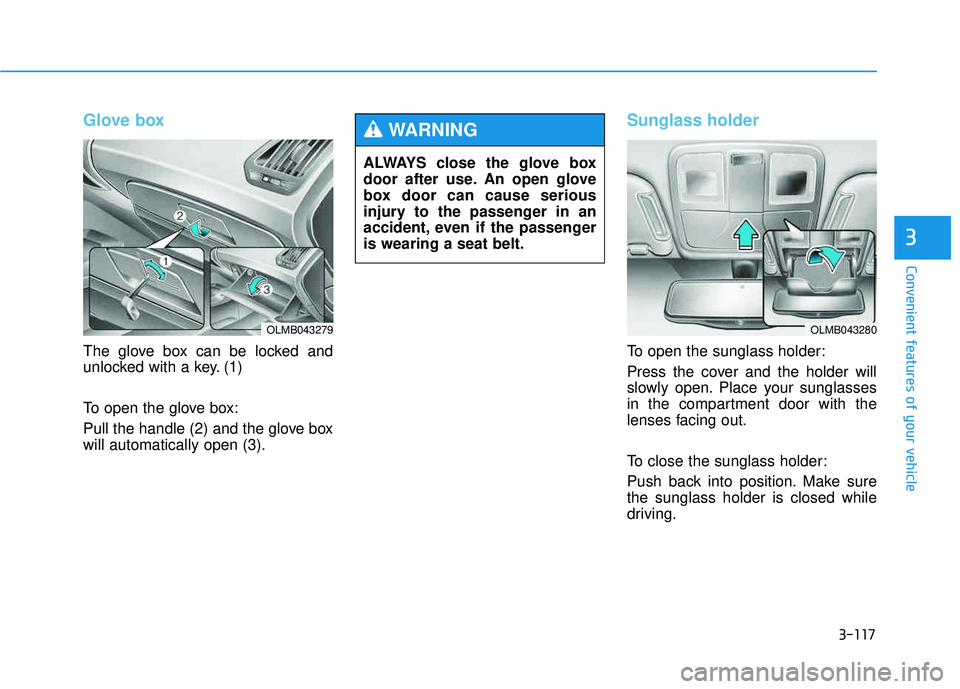
To defog inside windshield
1. Set the fan speed to the desiredposition.
2. Select desired temperature.
3. Press the defroster button ( ).
4. The air conditioning will turn on according to the detected ambient
temperature and outside (fresh)air position will be selected auto-
matically. If the air conditioning and outside(fresh) air position are not selected
automatically, adjust the correspon-
ding button manually. If the posi-
tion is selected, lower fan speed is
adjusted to a higher fan speed.
OLMB043135
OLMB043137
Page 200 of 653
3-114
Convenient features of your vehicle
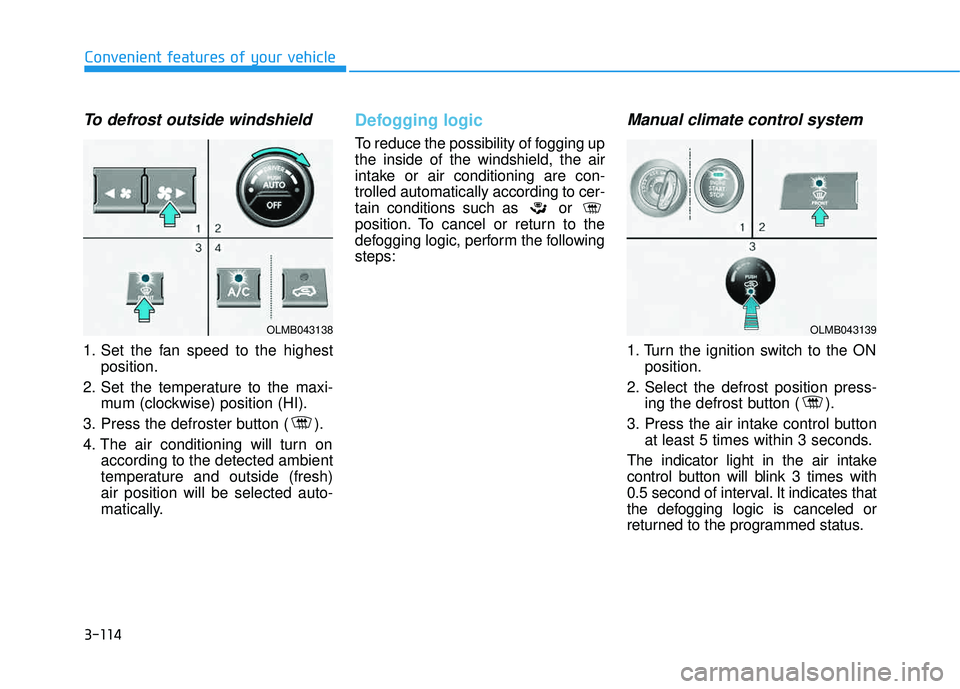
To defrost outside windshield
1. Set the fan speed to the highestposition.
2. Set the temperature to the maxi- mum (clockwise) position (HI).
3. Press the defroster button ( ).
4. The air conditioning will turn on according to the detected ambient
temperature and outside (fresh)air position will be selected auto-
matically.
Defogging logic
To reduce the possibility of fogging up the inside of the windshield, the air
intake or air conditioning are con-trolled automatically according to cer-
tain conditions such as or
position. To cancel or return to the
defogging logic, perform the followingsteps:
Manual climate control system
1. Turn the ignition switch to the ONposition.
2. Select the defrost position press- ing the defrost button ( ).
3. Press the air intake control button at least 5 times within 3 seconds.
The indicator light in the air intake
control button will blink 3 times with
0.5 second of interval. It indicates that
the defogging logic is canceled or
returned to the programmed status.
OLMB043138OLMB043139
Page 203 of 653
3-117
Convenient features of your vehicle
3
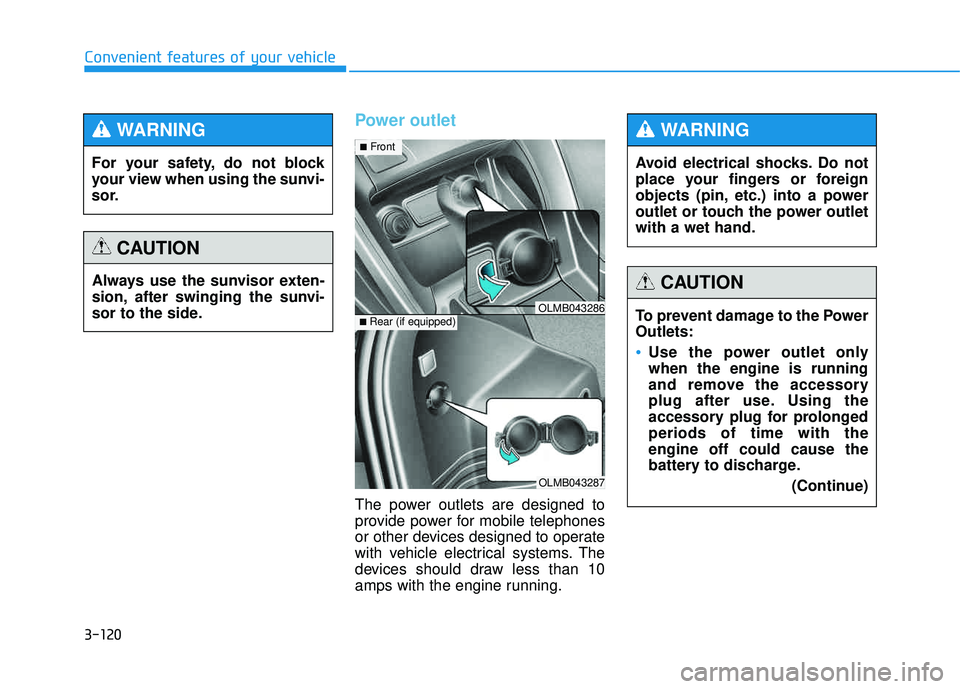
Glove box
The glove box can be locked and
unlocked with a key. (1)
To open the glove box:
Pull the handle (2) and the glove box will automatically open (3).
Sunglass holder
To open the sunglass holder:
Press the cover and the holder will
slowly open. Place your sunglasses
in the compartment door with the
lenses facing out.
To close the sunglass holder:
Push back into position. Make sure the sunglass holder is closed while
driving.
ALWAYS close the glove box
door after use. An open glove
box door can cause serious
injury to the passenger in an
accident, even if the passengeris wearing a seat belt.
WARNING
OLMB043279OLMB043280
Page 206 of 653
3-120
Convenient features of your vehicle
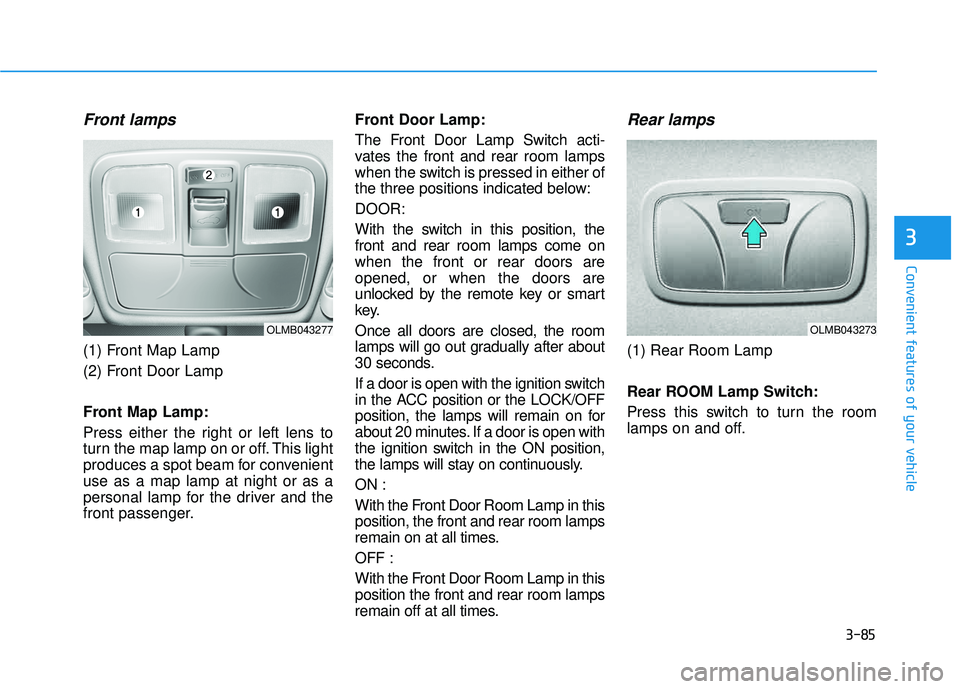
Power outlet
The power outlets are designed to
provide power for mobile telephones
or other devices designed to operate
with vehicle electrical systems. The
devices should draw less than 10
amps with the engine running.
OLMB043287
■Rear (if equipped)OLMB043286
■ Front
For your safety, do not block
your view when using the sunvi-
sor.
WARNING
Always use the sunvisor exten-
sion, after swinging the sunvi-
sor to the side.
CAUTION
Avoid electrical shocks. Do not
place your fingers or foreign
objects (pin, etc.) into a power
outlet or touch the power outletwith a wet hand.
WARNING
To prevent damage to the Power Outlets:
Use the power outlet only when the engine is running
and remove the accessory
plug after use. Using the
accessory plug for prolongedperiods of time with theengine off could cause the
battery to discharge.
(Continue)
CAUTION