Page 375 of 653
4-164
Multimedia System
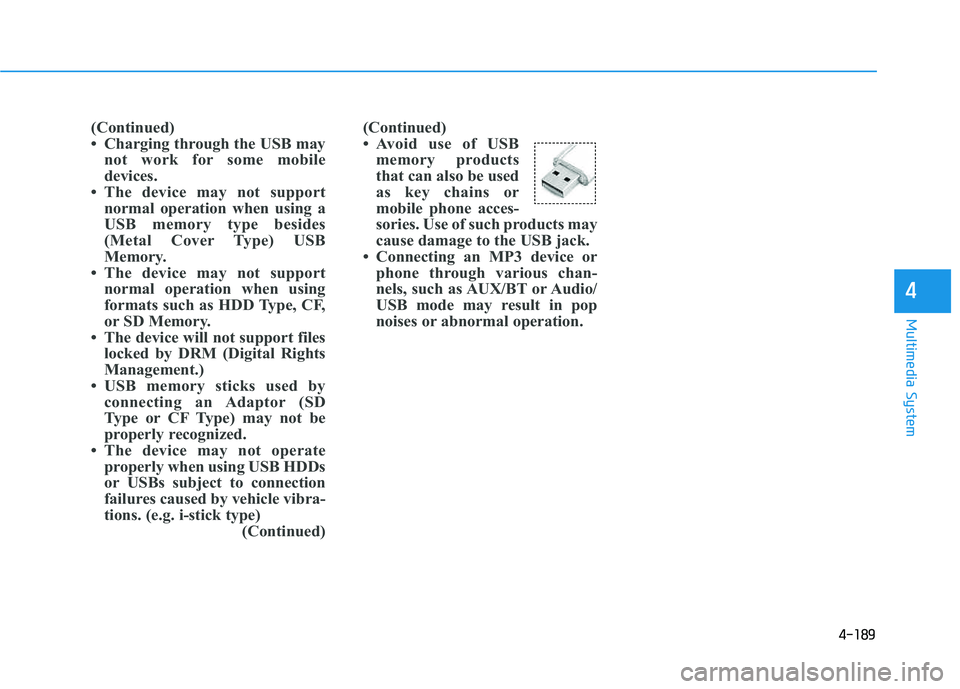
Command Function
AM Preset 1~6 Plays the broadcast saved in AM Preset 1~6.
FM 87.5~107.9 Plays the FM broadcast of the corresponding
frequency.
AM 530~1710 Plays the AM broadcast of the corresponding
frequency.
XM (Satellite)
When currently listening to the XM, main-
tains the current state.
When listening to a different mode, displaysthe most recently played XM screen.
XM (Satellite) 1~3Displays the selected XM screen.
XM Channel Plays the selected XM channel.
Media Moves to the most recently played mediascreen.
CD Plays the music saved in the CD.
USB Plays USB music.
iPod®Plays iPod music.
Command Function
My Music Plays the music saved in My Music.
AUX (Auxiliary) Plays the connected external device. Bluetooth
®Audio Plays the music saved in connected Bluetooth®
device.
Please repeat Repeats the most recent comment.
Mute Mutes the sound.
Cancel (Exit) Ends voice command.
0~255
Page 377 of 653
4-166
Multimedia System
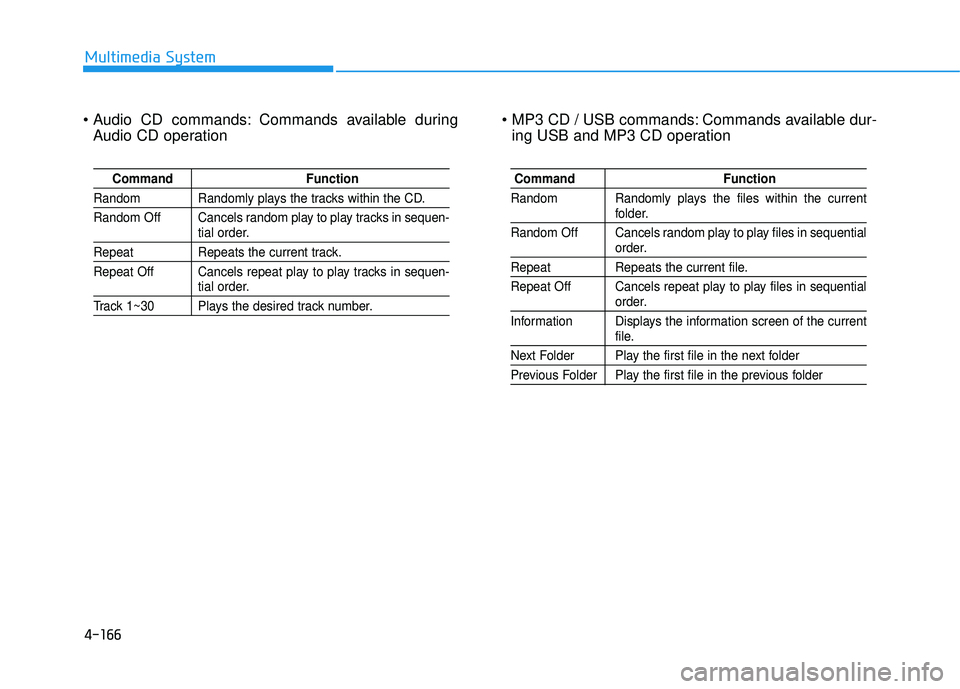
Commands available duringAudio CD operation Commands available dur-
ing USB and MP3 CD operation
Command Function
Random Randomly plays the tracks within the CD.
Random Off Cancels random play to play tracks in sequen-
tial order.
Repeat Repeats the current track.
Repeat Off Cancels repeat play to play tracks in sequen-
tial order.
Track 1~30 Plays the desired track number.
Command Function
Random Randomly plays the files within the current
folder.
Random Off Cancels random play to play files in sequential
order.
Repeat Repeats the current file.
Repeat Off Cancels repeat play to play files in sequential
order.
Information Displays the information screen of the current
file.
Next Folder Play the first file in the next folder
Previous Folder Play the first file in the previous folder
Page 381 of 653
4-170
Multimedia System
SSYY SSTT EEMM CC OO NNTTRR OO LLLL EE RR SS AA NN DD
F
F UU NNCCTT IIOO NNSS
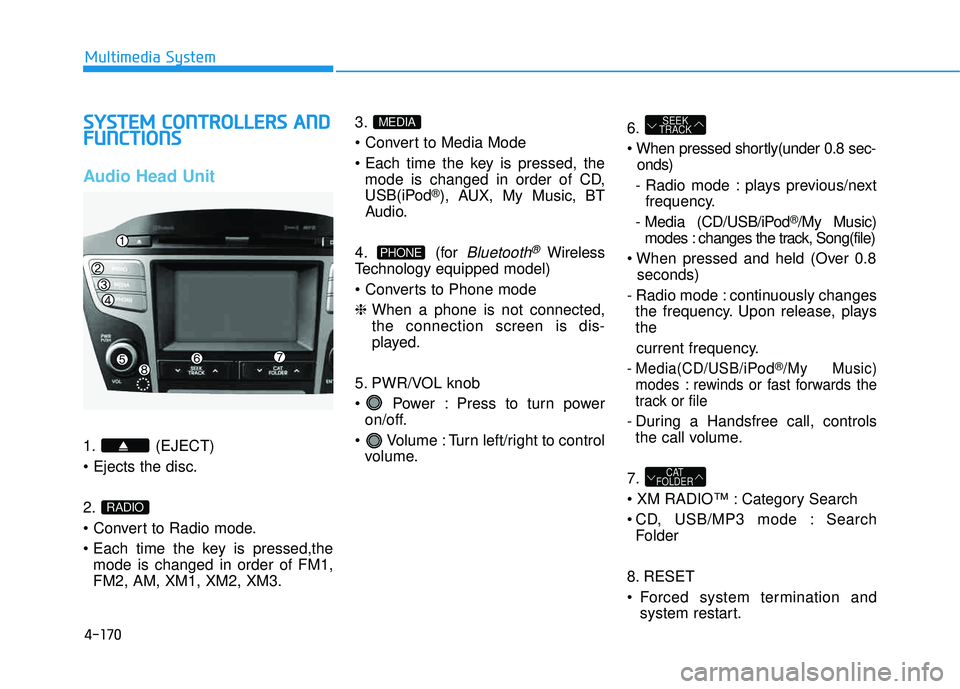
Audio Head Unit
1. (EJECT) 2.
mode is changed in order of FM1, FM2, AM, XM1, XM2, XM3. 3.
mode is changed in order of CD,
USB(iPod
®), AUX, My Music, BT
Audio.
4. (for
Bluetooth®Wireless
Technology equipped model)
❈ When a phone is not connected, the connection screen is dis-
played.
5. PWR/VOL knob
Power : Press to turn power on/off.
Volume : Turn left/right to control volume. 6.
onds)
- Radio mode : plays previous/next frequency.
- Media (CD/USB/iPod
®/My Music)
modes : changes the track, Song(file)
seconds)
- Radio mode : continuously changes the frequency. Upon release, plays the
current frequency.
- Media(CD/USB/iPod®/My Music)
modes : rewinds or fast forwards the
track or file
- During a Handsfree call, controls the call volume.
7.
Category Search
CD, USB/MP3 mode : Search Folder
8. RESET
Forced system termination and system restart.
CAT
FOLDER
SEEK
TRACK
PHONE
MEDIA
RADIO
Page 382 of 653
4-171
Multimedia System
4
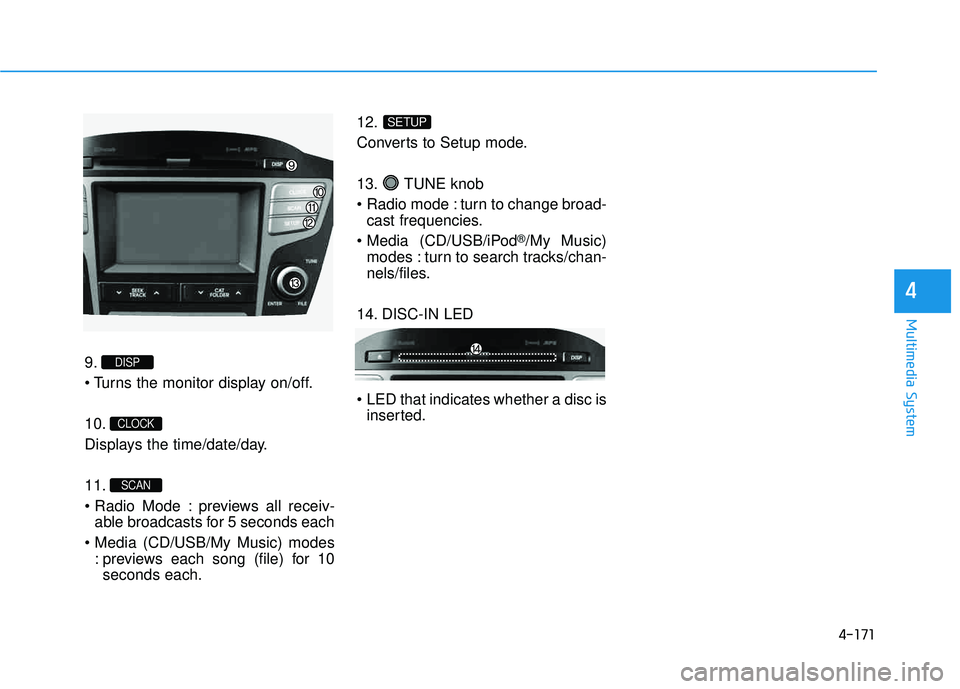
9.
10.
Displays the time/date/day. 11.
previews all receiv-able broadcasts for 5 seconds each
: previews each song (file) for 10seconds each. 12.
Converts to Setup mode.
13. TUNE knob
turn to change broad-
cast frequencies.
(CD/USB/iPod
®/My Music)
modes : turn to search tracks/chan-
nels/files.
14. DISC-IN LED
LED that indicates whether a disc is inserted.
SETUP
SCAN
CLOCK
DISP
Page 383 of 653
4-172
Multimedia System
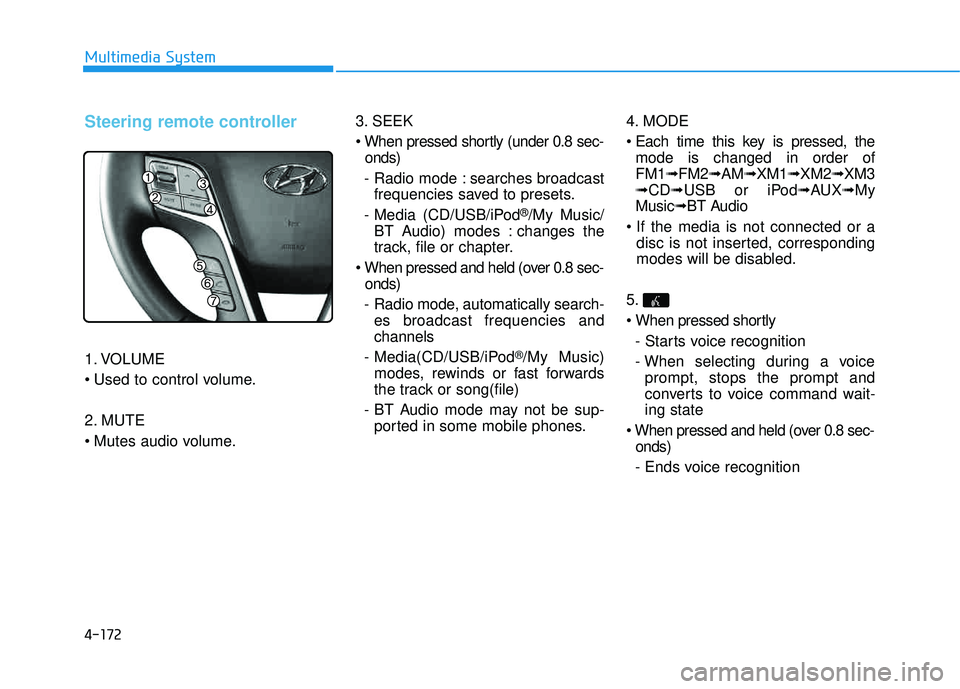
Steering remote controller
1. VOLUME
2. MUTE
3. SEEK
onds)
- Radio mode : searches broadcast frequencies saved to presets.
- Media (CD/USB/iPod
®/My Music/
BT Audio) modes : changes the
track, file or chapter.
onds)
- Radio mode, automatically search- es broadcast frequencies andchannels
- Media(CD/USB/iPod
®/My Music)
modes, rewinds or fast forwards
the track or song(file)
- BT Audio mode may not be sup- ported in some mobile phones. 4. MODE
mode is changed in order of FM1 ➟FM2 ➟AM ➟XM1 ➟XM2 ➟XM3
➟ CD ➟USB or iPod ➟AUX ➟My
Music ➟BT Audio
disc is not inserted, corresponding
modes will be disabled.
5.
- Starts voice recognition
- When selecting during a voice prompt, stops the prompt and
converts to voice command wait-ing state
onds)
- Ends voice recognition
Page 391 of 653
4-180
Multimedia System
MMEEDD IIAA MM OODDEE
Pressing the key will change
the operating mode in order ofCD
➟USB(iPod®)➟AUX➟My Music ➟
BT Audio.
If [Mode Pop up] is turned on within
[Display], then pressing the
key will display the Media
Pop-up Mode screen.
Turn the TUNE knob to move the
focus. Press the knob to select.
✽✽ NOTICE
The media mode pop up screen can
be displayed only when there are two
or more media modes turned on.
Title Icon
When a Bluetooth®Wireless
Technology, iPod®, USB, or AUX
device is connected or a CD is
inserted, the corresponding mode
icon will be displayed.
Icon Title
Bluetooth®Wireless Technology
CD
iPod®
USB
AUX
MEDIA
SETUP
MEDIA
Page 399 of 653
4-188
Multimedia System
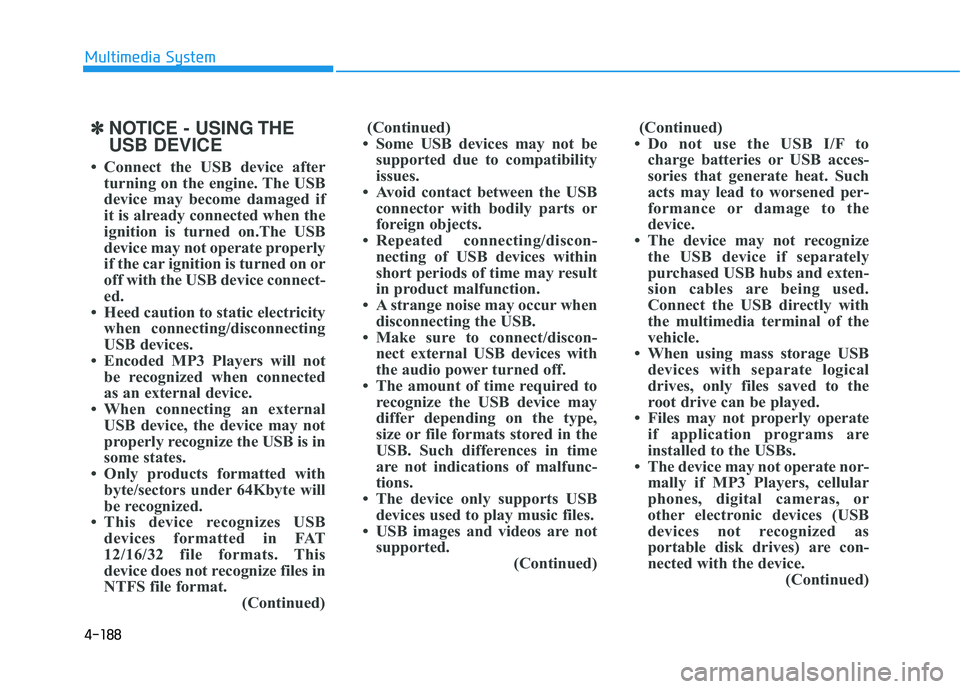
✽✽NOTICE - USING THE USB DEVICE
Connect the USB device after turning on the engine. The USB
device may become damaged if
it is already connected when the
ignition is turned on.The USB
device may not operate properly
if the car ignition is turned on or
off with the USB device connect-
ed.
Heed caution to static electricity when connecting/disconnecting
USB devices.
Encoded MP3 Players will not be recognized when connected
as an external device.
When connecting an external USB device, the device may not
properly recognize the USB is in
some states.
Only products formatted with byte/sectors under 64Kbyte will
be recognized.
This device recognizes USB devices formatted in FAT
12/16/32 file formats. This
device does not recognize files in
NTFS file format. (Continued)(Continued)
Some USB devices may not be supported due to compatibility
issues.
Avoid contact between the USB connector with bodily parts or
foreign objects.
Repeated connecting/discon- necting of USB devices within
short periods of time may result
in product malfunction.
A strange noise may occur when disconnecting the USB.
Make sure to connect/discon- nect external USB devices with
the audio power turned off.
The amount of time required to recognize the USB device may
differ depending on the type,
size or file formats stored in the
USB. Such differences in time
are not indications of malfunc-
tions.
The device only supports USB devices used to play music files.
USB images and videos are not supported. (Continued)(Continued)
Do not use the USB I/F to charge batteries or USB acces-
sories that generate heat. Such
acts may lead to worsened per-
formance or damage to the
device.
The device may not recognize the USB device if separately
purchased USB hubs and exten-
sion cables are being used.
Connect the USB directly with
the multimedia terminal of the
vehicle.
When using mass storage USB devices with separate logical
drives, only files saved to the
root drive can be played.
Files may not properly operate if application programs are
installed to the USBs.
The device may not operate nor- mally if MP3 Players, cellular
phones, digital cameras, or
other electronic devices (USB
devices not recognized as
portable disk drives) are con-
nected with the device. (Continued)
Page 400 of 653
4-189
Multimedia System
4
(Continued)
Avoid use of USBmemory products
that can also be used
as key chains or
mobile phone acces-
sories. Use of such products may
cause damage to the USB jack.
Connecting an MP3 device or phone through various chan-
nels, such as AUX/BT or Audio/
USB mode may result in pop
noises or abnormal operation.
(Continued)
Charging through the USB may
not work for some mobile
devices.
The device may not support normal operation when using a
USB memory type besides
(Metal Cover Type) USB
Memory.
The device may not support normal operation when using
formats such as HDD Type, CF,
or SD Memory.
The device will not support files locked by DRM (Digital Rights
Management.)
USB memory sticks used by connecting an Adaptor (SD
Type or CF Type) may not be
properly recognized.
The device may not operate properly when using USB HDDs
or USBs subject to connection
failures caused by vehicle vibra-
tions. (e.g. i-stick type) (Continued)
![HYUNDAI TUCSON 2015 Owners Manual 4-180
Multimedia System
MMEEDD IIAA MM OODDEE
Pressing the key will change
the operating mode in order ofCD
➟USB(iPod®)➟AUX➟My Music ➟
BT Audio.
If [Mode Pop up] is turned on within
[Dis](/manual-img/35/56202/w960_56202-390.png "HYUNDAI TUCSON 2015 Owners Manual 4-180
Multimedia System
MMEEDD IIAA MM OODDEE
Pressing the key will change
the operating mode in order ofCD
➟USB(iPod®)➟AUX➟My Music ➟
BT Audio.
If [Mode Pop up] is turned on within
[Dis")