Page 145 of 653
3-59
Convenient features of your vehicle
3
4. Firmly press, hold for 5 secondsand release the programmed HomeLink ®
button up to two sepa-
rate times to activate the door. If the
door does not activate, press and
hold the just-trained HomeLink ®
but-
ton and observe the indicator light.
stantly, programming is complete
and your device should activatewhen the HomeLink ®
button is
pressed and released.
for 2 seconds and then turns to a
constant light, continue with
"Programming" steps 5-7 to com-
plete the programming of a rolling
code equipped device (most com-
monly a garage door opener).
5. At the garage door opener receiv- er (motor-head unit) in the garage,
locate the "learn" or "smart" but-
ton. This can usually be foundwhere the hanging antenna wire isattached to the motor-head unit. 6. Firmly press and release the
"learn" or "smart" button. (The
name and color of the button vary
by manufacturer). There are 30seconds to initiate step 7.
7. Return to the vehicle and firmly press, hold for 2 seconds and
release the programmedHomeLink ®
button. Repeat the
"press/hold/release" sequence a
second time, and, depending on
the brand of the garage dooropener (or other rolling code
equipped device), repeat thissequence a third time to complete
the programming process.
HomeLink ®
should now activate your
rolling code equipped device.Gate operator & Canadian program-
ming
During programming, your handheld
transmitter may automatically stop
transmitting. Continue to press the
Integrated HomeLink ®
Wireless
Control System button (note steps 2
through 3 in the Programming portion
of this document) while you press
and re-press ("cycle") your handheld
transmitter every two seconds untilthe frequency signal has been
learned. The indicator light will flash
slowly and then rapidly after several
seconds upon successful training.
Operating HomeLink ®
To operate, simply press and release
the programmed HomeLink
®
button.
Activation will now occur for the
trained device (i.e. garage door
opener, gate operator, security sys-
tem, entry door lock, home/office
lighting, etc.). For convenience, the
hand-held transmitter of the device
may also be used at any time.
Page 149 of 653
3-63
Convenient features of your vehicle
3
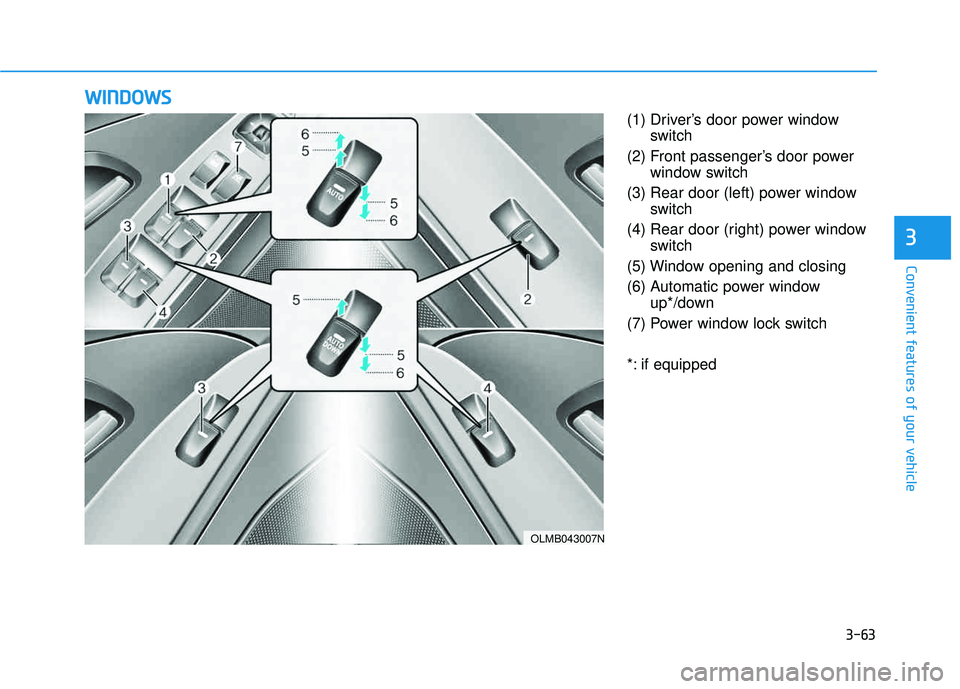
(1) Driver’s door power windowswitch
(2) Front passenger’s door power window switch
(3) Rear door (left) power window switch
(4) Rear door (right) power window switch
(5) Window opening and closing
(6) Automatic power window up*/down
(7) Power window lock switch
*: if equipped
WW IINN DDOO WW SS
OLMB043007N
Page 150 of 653
3-64
Convenient features of your vehicle
Power windows
The ignition switch must be in the ON
position to be able to raise or lower
the windows.
Each door has a Power Window
switch to control that door's window.
The driver has a Power Window Lock
switch which can block the operation
of passenger windows. The power
windows will operate for approxi-mately 30 seconds after the ignition
switch is placed in the ACC or
LOCK/OFF position. However, if the
front doors are opened, the Power
Windows cannot be operated even
within the 30 second period.
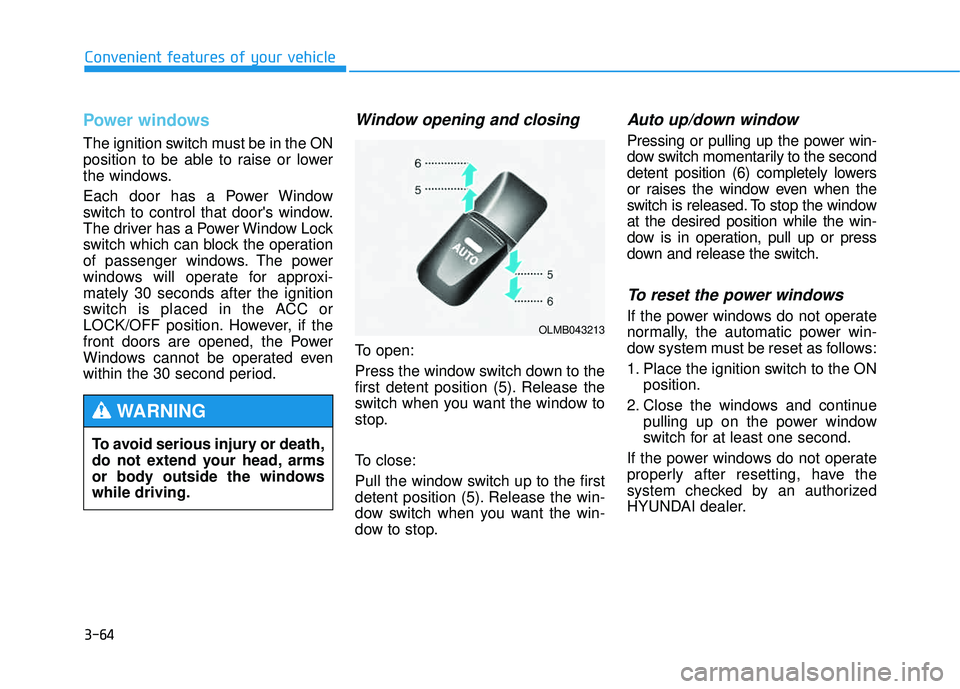
Window opening and closing
To open:
Press the window switch down to the
first detent position (5). Release the
switch when you want the window to
stop.
To close:
Pull the window switch up to the first
detent position (5). Release the win-
dow switch when you want the win-
dow to stop.
Auto up/down window
Pressing or pulling up the power win-
dow switch momentarily to the second
detent position (6) completely lowers
or raises the window even when the
switch is released. To stop the windowat the desired position while the win-
dow is in operation, pull up or press
down and release the switch.
To reset the power windows
If the power windows do not operate
normally, the automatic power win-
dow system must be reset as follows:
1. Place the ignition switch to the ONposition.
2. Close the windows and continue pulling up on the power window
switch for at least one second.
If the power windows do not operate
properly after resetting, have the
system checked by an authorized
HYUNDAI dealer.
To avoid serious injury or death,
do not extend your head, arms
or body outside the windowswhile driving.
WARNING
OLMB043213
Page 151 of 653
3-65
Convenient features of your vehicle
3
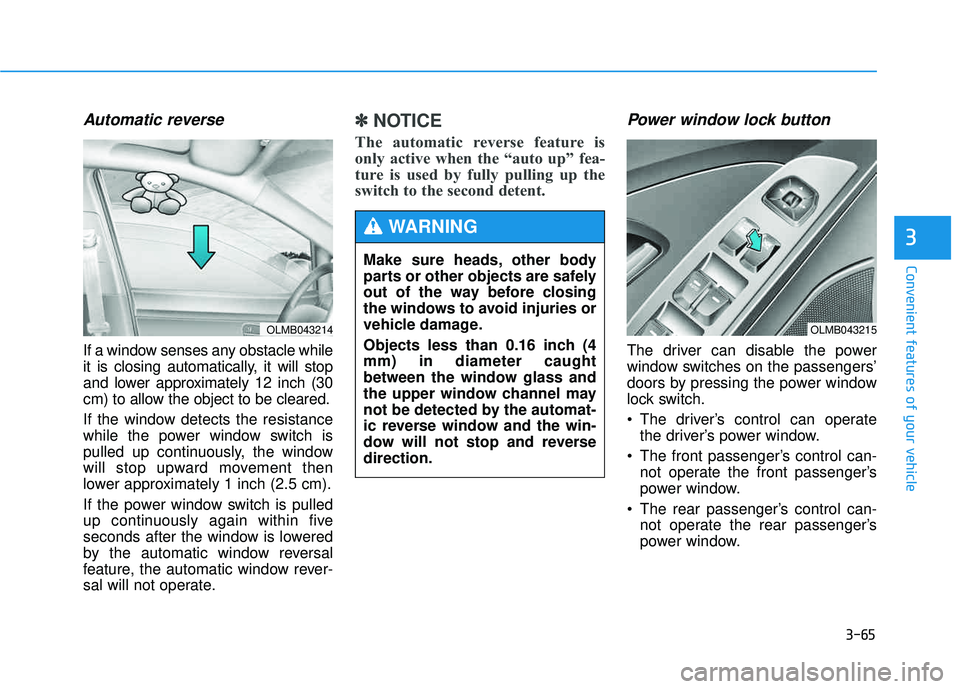
Automatic reverse
If a window senses any obstacle while
it is closing automatically, it will stop
and lower approximately 12 inch (30
cm) to allow the object to be cleared.
If the window detects the resistance
while the power window switch is
pulled up continuously, the window
will stop upward movement then
lower approximately 1 inch (2.5 cm).
If the power window switch is pulled
up continuously again within five
seconds after the window is lowered
by the automatic window reversal
feature, the automatic window rever-
sal will not operate.
✽✽NOTICE
The automatic reverse feature is
only active when the “auto up” fea-
ture is used by fully pulling up the
switch to the second detent. Power window lock button
The driver can disable the power
window switches on the passengers’
doors by pressing the power window
lock switch.
The driver’s control can operate the driver’s power window.
The front passenger’s control can- not operate the front passenger’s
power window.
The rear passenger’s control can- not operate the rear passenger’s
power window.
OLMB043214
Make sure heads, other body
parts or other objects are safely
out of the way before closing
the windows to avoid injuries or
vehicle damage.
Objects less than 0.16 inch (4 mm) in diameter caught
between the window glass and
the upper window channel may
not be detected by the automat-
ic reverse window and the win-
dow will not stop and reversedirection.
WARNING
OLMB043215
Page 152 of 653
3-66
Convenient features of your vehicle
Do not allow children to play
with the power windows. Keep
the driver’s door power window
lock switch in the LOCK position
(indicator illuminating). Serious
injury or death can result from
unintentional window operation
by a child.
WARNING
To prevent possible damage
to the power window system,
do not open or close two win-
dows or more at the same
time. This will also ensure the
longevity of the fuse.
Never try to operate the main
switch on the driver's door and
the individual door window
switch in opposing directions
at the same time. If this is
done, the window will stop and
cannot be opened or closed.
CAUTION
Page 160 of 653
3-74
Convenient features of your vehicle
✽✽NOTICE
In cold and wet climates, door lock
and door mechanisms may not work
properly due to freezing conditions. Emergency tailgate safety release
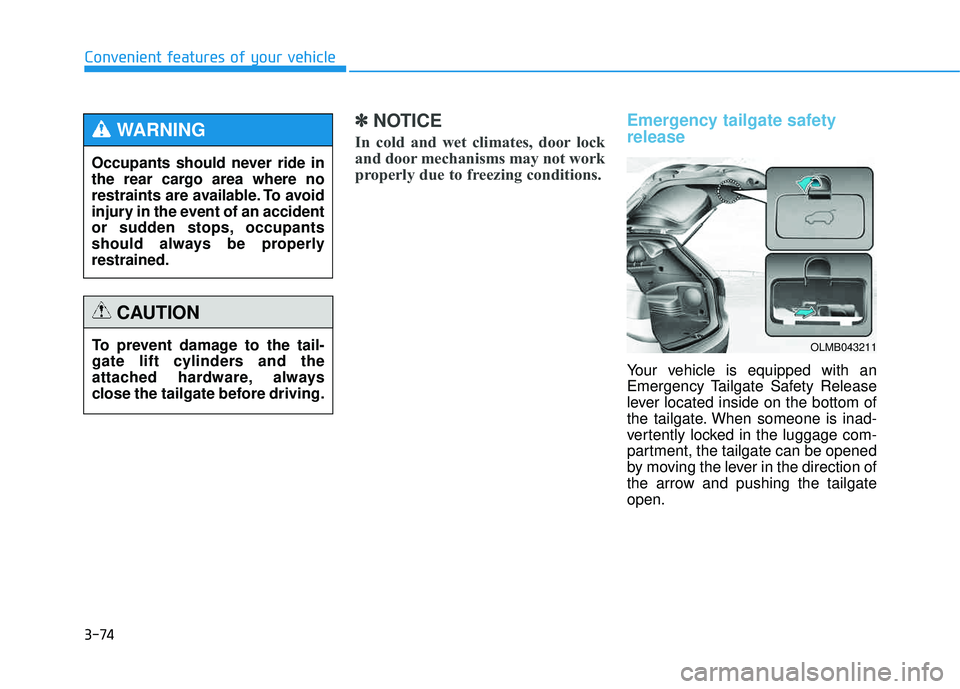
Your vehicle is equipped with an
Emergency Tailgate Safety Release
lever located inside on the bottom of
the tailgate. When someone is inad-
vertently locked in the luggage com-
partment, the tailgate can be opened
by moving the lever in the direction of
the arrow and pushing the tailgateopen.
Occupants should never ride in
the rear cargo area where no
restraints are available. To avoid
injury in the event of an accident
or sudden stops, occupants
should always be properlyrestrained.
WARNING
To prevent damage to the tail-
gate lift cylinders and the
attached hardware, always
close the tailgate before driving.
CAUTION
OLMB043211
Page 162 of 653
3-76
Convenient features of your vehicle
Opening the fuel filler door
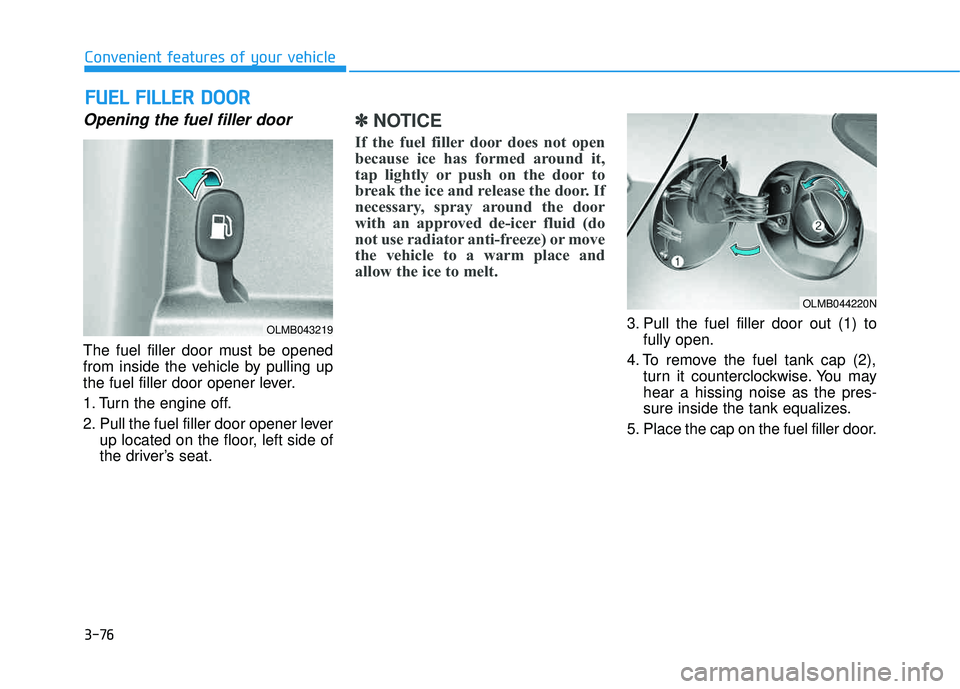
The fuel filler door must be opened
from inside the vehicle by pulling up
the fuel filler door opener lever.
1. Turn the engine off.
2. Pull the fuel filler door opener leverup located on the floor, left side of
the driver’s seat.
✽✽ NOTICE
If the fuel filler door does not open
because ice has formed around it,
tap lightly or push on the door to
break the ice and release the door. If
necessary, spray around the door
with an approved de-icer fluid (do
not use radiator anti-freeze) or move
the vehicle to a warm place and
allow the ice to melt.
3. Pull the fuel filler door out (1) to fully open.
4. To remove the fuel tank cap (2), turn it counterclockwise. You may hear a hissing noise as the pres-
sure inside the tank equalizes.
5. Place the cap on the fuel filler door.
FF UU EELL FF IILL LLEE RR DD OO OORR
OLMB043219
OLMB044220N
Page 163 of 653
3-77
Convenient features of your vehicle
3
Closing the fuel filler door
1. To install the fuel tank cap, turn itclockwise until it clicks one time.
2. Close the fuel filler door until it is latched securely.
If the Malfunction Indicator Light ( )
comes ON, turn the engine off and
check or retighten the fuel filler cap
until it clicks one time. If the
Malfunction Indicator Light ( ) does
not go off, have your vehicle checked
by your HYUNDAI dealer.
Gasoline is highly flammable
and explosive. Failure to follow
these guidelines may result in
SERIOUS INJURY or DEATH:
Read and follow all warnings posted at the gas station.
Before refueling, note the
location of the Emergency
Gasoline Shut-Off, if available,at the gas station.
Before touching the fuel noz-
zle, you should eliminate the
potential build-up of static
electricity by touching a metal
part of the vehicle, a safe dis-
tance away from the fuel filler
neck, nozzle, or other gas
source, with your bare hand.
Do not use cellular phones
while refueling. Electric cur-
rent and/or electronic interfer-
ence from cellular phones can
potentially ignite fuel vapors
and cause a fire. (Continued)
WARNING (Continued)
Do not get back into a vehicle
once you have begun refuel-
ing. You can generate a build-
up of static electricity by
touching, rubbing or sliding
against any item or fabric
capable of producing static
electricity. Static electricity
discharge can ignite fuel
vapors causing a fire. If you
must re-enter the vehicle, you
should once again eliminate
potentially dangerous static
electricity discharge by touch-
ing a metal part of the vehicle,
away from the fuel filler neck,
nozzle or other gasoline source,
with your bare hand.(Continued)