Page 484 of 653
5-38
Driving your vehicle
VSM operation
VSM ON condition
The VSM operates when:
The Electronic Stability Control(ESC) is on.
Vehicle speed is approximately above 9mph (15 km/h) on curve
roads.
Vehicle speed is approximately above 18mph (30 km/h) when the
vehicle is braking on rough roads.
When operating
When you apply your brakes under
conditions which may activate the
ESC, you may hear sounds from the
brakes, or feel a corresponding sen-
sation in the brake pedal. This is nor-
mal and it means your VSM is active.
✽✽ NOTICE
The VSM does not operate when:
Driving rearward.
ESC OFF indicator light is on.
EPS (Electric Power Steering) warning light ( ) is on. VSM OFF condition
To cancel VSM operation, press the
ESC OFF button. ESC OFF indicator
light ( ) will illuminate.
To turn on VSM, press the ESC OFF
button again. The ESC OFF indicatorlight will go out.
If ESC indicator light ( ) or EPS
warning light ( ) stays on,
your vehicle may have a mal-
function with the VSM system.When the warning light illumi-
nates, have your vehicle
checked by an authorized
HYUNDAI dealer as soon as pos-
sible.
WARNING
Page 485 of 653
5-39
Driving your vehicle
5
Hill-Start Assist Control (HAC)
The Hill-Start Assist Control (HAC)
prevents the vehicle from rolling
backwards when starting a vehicle
from a stop on a hill. The system
operates the brakes automatically for
approximately 2 seconds and releas-
es the brake when the acceleratorpedal is depressed or after 2 sec-
onds.
✽✽NOTICE
The HAC does not operate when the shift lever is in P (Park) or N
(Neutral)
The HAC activates even though the ESC (Electronic Stability
Control) is off but does not acti-
vate when the ESC has malfunc-
tioned.
Always be ready to depress the
accelerator pedal when starting
off on a incline. The HAC acti-
vates only for approximately 2seconds.
WARNING
Driving with varying tire or
wheel sizes may cause the ESC
system to malfunction. When
replacing tires, make sure they
are the same size as your origi-
nal tires for this vehicle.
CAUTION
Page 486 of 653
5-40
Driving your vehicle
Downhill Brake Control (DBC)
The Downhill Brake Control (DBC)
supports the driver come down asteep hill without depressing the
brake pedal. It slows down the vehi-cle under 5mph (8 km/h) and lets the
driver concentrate on steering the
vehicle.
✽✽NOTICE
The DBC defaults to the OFF posi- tion whenever the ignition switch
is placed in the ON position.
Noise or vibration may occur from the brakes when the DBC is acti-
vated.
The rear stop light comes on when DBC is activated.
Always turn off the DBC on nor-
mal roads. The DBC might acti-
vate inadvertently from the
standby mode when driving
through speed bumps or mak-
ing sharp curves.
WARNING
OLMB053030
Page 487 of 653
5-41
Driving your vehicle
5✽✽NOTICE
The DBC may not deactivate on steep inclines even though the
brake or accelerator pedal is
depressed.
The DBC does not operate when: - The shift lever is in P (Park).
- The ESC is activated.
Standby Press the DBC button when vehicle speed is under
25mph (40km/h). The DBC system will turn ON and
enter the standby mode.
The system does not turn ON if vehicle speed is over 25mph (40km/h).
In the standby mode, if vehicle speed is under 22mph
(35km/h) while driving down a steep hill, the DBC will
activate automatically.
In the activated mode, the DBC will temporarily deacti-
vate under the following conditions:
The brake pedal or accelerator pedal is depressed.
If the above conditions are not met, the DBC will auto-
matically activate again.
The DBC will turn OFF under the following conditions:
Activated
Temporarily deactivated
OFF
Mode Indicator light Description
blinks
illuminated
not
illuminated
illuminated
If the DBC red indicator light
illuminates, the system may
have overheated or have mal-
functioned. When the warning
light illuminates even though
the DBC system has cooled off,
have your vehicle checked by
an authorized HYUNDAI dealer
as soon as possible.
WARNING DBC operation
Page 488 of 653
5-42
Driving your vehicle
Good braking practices Wet brakes can be dangerous! The
brakes may get wet if the vehicle is
driven through standing water or if it
is washed. Your vehicle will not stop
as quickly if the brakes are wet. Wet
brakes may cause the vehicle to pull
to one side.
To dry the brakes, apply the brakes
lightly until the braking action returns
to normal, taking care to keep the
vehicle under control at all times. If the
braking action does not return to nor-
mal, stop as soon as it is safe to do so
and call an authorized HYUNDAI
dealer for assistance.
DO NOT drive with your foot resting
on the brake pedal. Even light, butconstant pedal pressure can result in
the brakes overheating, brake wear,
and possibly even brake failure.If a tire goes flat while you are driv-
ing, apply the brakes gently and
keep the vehicle pointed straight
ahead while you slow down. When
you are moving slowly enough for it
to be safe to do so, pull off the road
and stop in a safe location.
Keep your foot firmly on the brake
pedal when the vehicle is stopped to
prevent the vehicle from rolling for-
ward.
Whenever leaving the vehicle or
parking, always come to a com-
plete stop and continue to
depress the brake pedal. Move
the shift lever into the P (Park)
position, then apply the parking
brake, and place the ignition
switch in the LOCK/OFF posi-tion.
Vehicles with the parking brake
not fully engaged are at risk for
moving inadvertently and caus-
ing injury to yourself or others.
WARNING
Page 490 of 653
5-44
Driving your vehicle
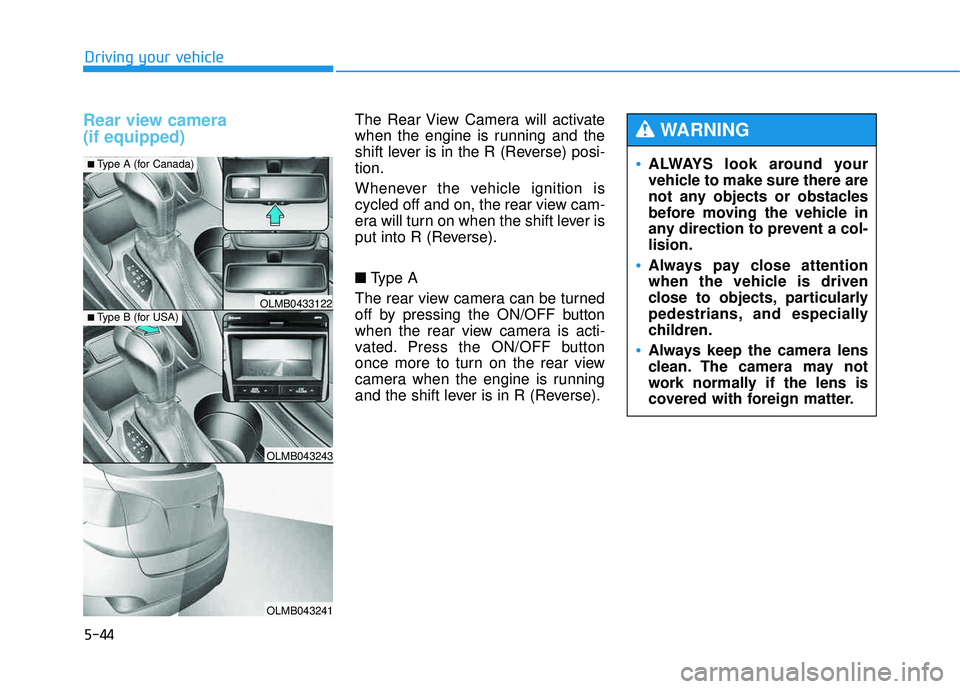
Rear view camera (if equipped) The Rear View Camera will activate
when the engine is running and the
shift lever is in the R (Reverse) posi-tion.
Whenever the vehicle ignition is
cycled off and on, the rear view cam-
era will turn on when the shift lever is
put into R (Reverse). ■Type A
The rear view camera can be turned
off by pressing the ON/OFF button
when the rear view camera is acti-
vated. Press the ON/OFF button
once more to turn on the rear view
camera when the engine is running
and the shift lever is in R (Reverse).
OLMB043243
OLMB043241
OLMB0433122
■ Type A (for Canada)
■Type B (for USA)
ALWAYS look around your
vehicle to make sure there are
not any objects or obstacles
before moving the vehicle in
any direction to prevent a col-lision.
Always pay close attention
when the vehicle is driven
close to objects, particularly
pedestrians, and especially
children.
Always keep the camera lens
clean. The camera may not
work normally if the lens is
covered with foreign matter.
WARNING
Page 491 of 653
5-45
Driving your vehicle
5
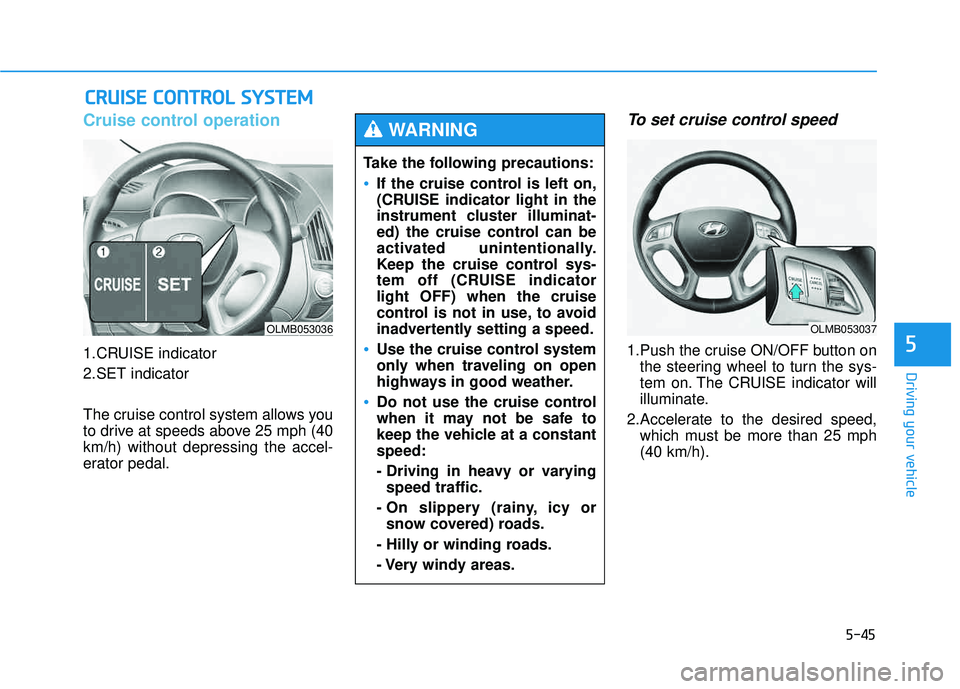
Cruise control operation
1.CRUISE indicator
2.SET indicator
The cruise control system allows you
to drive at speeds above 25 mph (40km/h) without depressing the accel-
erator pedal.
To set cruise control speed
1.Push the cruise ON/OFF button onthe steering wheel to turn the sys-
tem on. The CRUISE indicator will
illuminate.
2.Accelerate to the desired speed, which must be more than 25 mph(40 km/h).
CCRR UU IISS EE CC OO NNTTRR OO LL SS YY SSTT EEMM
OLMB053036
Take the following precautions:
If the cruise control is left on,
(CRUISE indicator light in the
instrument cluster illuminat-
ed) the cruise control can be
activated unintentionally.
Keep the cruise control sys-
tem off (CRUISE indicatorlight OFF) when the cruise
control is not in use, to avoid
inadvertently setting a speed.
Use the cruise control system
only when traveling on open
highways in good weather.
Do not use the cruise control
when it may not be safe to
keep the vehicle at a constantspeed:
- Driving in heavy or varying
speed traffic.
- On slippery (rainy, icy or snow covered) roads.
- Hilly or winding roads.
- Very windy areas.
WARNING
OLMB053037
Page 495 of 653
5-49
Driving your vehicle
5
Hazardous driving conditions
When hazardous driving conditions
are encountered such as water,
snow, ice, mud or sand:
Drive cautiously and allow extra dis-
tance for braking.
Avoid sudden movements in braking
or steering.
If stuck in snow, mud, or sand, use
second gear. Accelerate slowly to
avoid spinning the drive wheels.
Use sand, rock salt, or other non-slip
material under the drive wheels to
provide traction when stalled in ice,
snow, or mud.
Rocking the vehicle
If it is necessary to rock the vehicle
to free it from snow, sand, or mud,
first turn the steering wheel right and
left to clear the area around your
front wheels. Then, shift back and
forth between R (Reverse) and a for-
ward gear. Try to avoid spinning the
wheels, and do not race the engine.
To prevent transaxle wear, wait until
the wheels stop spinning before
shifting gears. Release the accelera-tor pedal while shifting, and press
lightly on the accelerator pedal while
the transaxle is in gear. Slowly spin-
ning the wheels in forward and
reverse directions causes a rocking
motion that may free the vehicle.
SSPP EECCIIAA LL DD RRIIVV IINN GG CC OO NNDDIITT IIOO NNSS
Downshifting with an automatic
transaxle, while driving on slip-
pery surfaces can cause an
accident. The sudden change intire speed could cause the tires
to skid. Be careful when down-
shifting on slippery surfaces.
WARNING
If the tires spin at high speed
the tires can explode, and you
or others may be injured. Do not
attempt this procedure if people
or objects are anywhere near
the vehicle.
The vehicle can overheat caus-
ing an engine compartment fire
or other damage. Spin the
wheels as little as possible and
avoid spinning the wheels at
speeds over 35 mph (56 km/h)as indicated on the speedome-
ter.
WARNING