Page 381 of 653
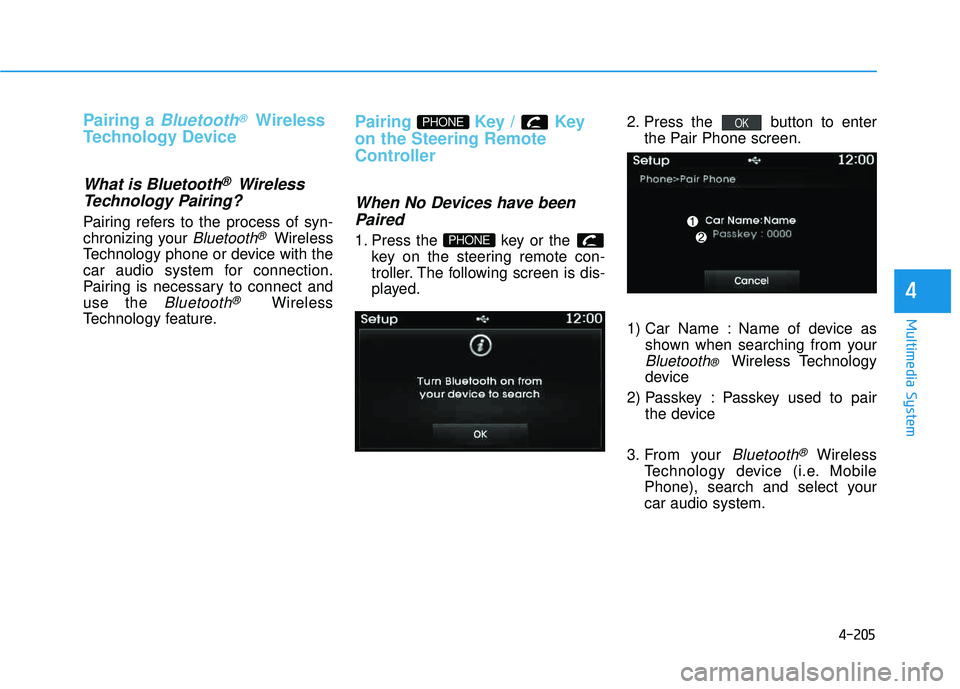
4-170
Multimedia System
SSYY SSTT EEMM CC OO NNTTRR OO LLLL EE RR SS AA NN DD
F
F UU NNCCTT IIOO NNSS
Audio Head Unit
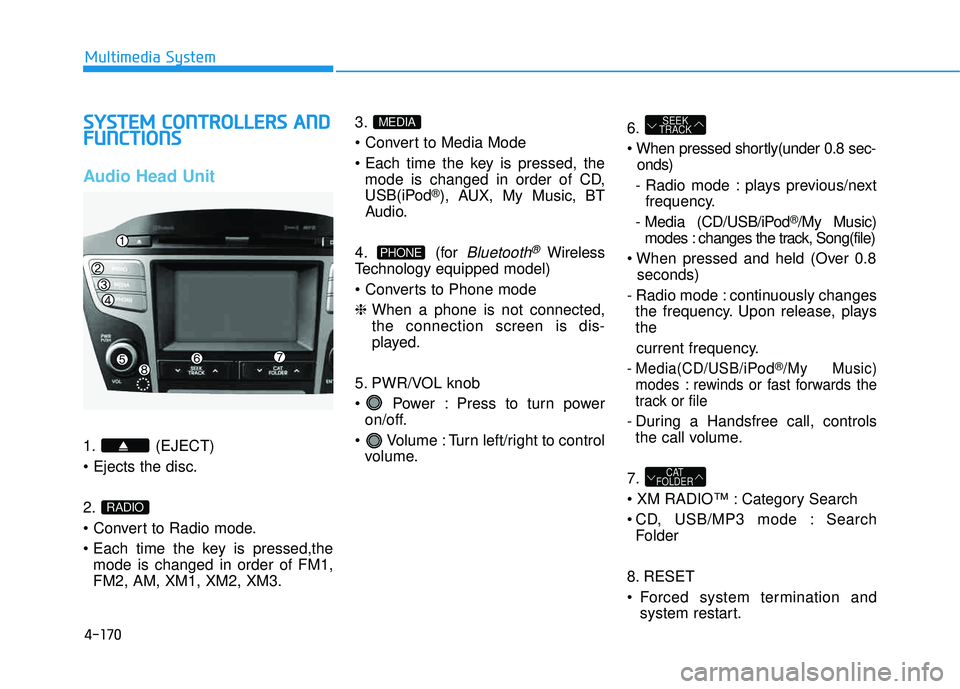
1. (EJECT) 2.
mode is changed in order of FM1, FM2, AM, XM1, XM2, XM3. 3.
mode is changed in order of CD,
USB(iPod
®), AUX, My Music, BT
Audio.
4. (for
Bluetooth®Wireless
Technology equipped model)
❈ When a phone is not connected, the connection screen is dis-
played.
5. PWR/VOL knob
Power : Press to turn power on/off.
Volume : Turn left/right to control volume. 6.
onds)
- Radio mode : plays previous/next frequency.
- Media (CD/USB/iPod
®/My Music)
modes : changes the track, Song(file)
seconds)
- Radio mode : continuously changes the frequency. Upon release, plays the
current frequency.
- Media(CD/USB/iPod®/My Music)
modes : rewinds or fast forwards the
track or file
- During a Handsfree call, controls the call volume.
7.
Category Search
CD, USB/MP3 mode : Search Folder
8. RESET
Forced system termination and system restart.
CAT
FOLDER
SEEK
TRACK
PHONE
MEDIA
RADIO
Page 384 of 653
4-173
Multimedia System
4
6.
- When pressed in the phone screen,displays call history screen
- When pressed in the dial screen, makes a call
- When pressed in the incoming call screen, answers the call
- When pressed during call waiting, switches to waiting call (Call
Waiting)
seconds)
- When pressed in the
Bluetooth®
Wireless Technology Handsfree
wait mode, redials the last call
- When pressed during a
Bluetooth®
Wireless Technology Handsfree
call, switches call back to mobile
phone (Private)
- When pressed while calling on the mobile phone, switches call back to
Bluetooth®Wireless Technology
Handsfree (Operates only when
Bluetooth®Wireless Technology
Handsfree is connected) 7.
Page 391 of 653
4-180
Multimedia System
MMEEDD IIAA MM OODDEE
Pressing the key will change
the operating mode in order ofCD
➟USB(iPod®)➟AUX➟My Music ➟
BT Audio.
If [Mode Pop up] is turned on within
[Display], then pressing the
key will display the Media
Pop-up Mode screen.
Turn the TUNE knob to move the
focus. Press the knob to select.
✽✽ NOTICE
The media mode pop up screen can
be displayed only when there are two
or more media modes turned on.
Title Icon
When a Bluetooth®Wireless
Technology, iPod®, USB, or AUX
device is connected or a CD is
inserted, the corresponding mode
icon will be displayed.
Icon Title
Bluetooth®Wireless Technology
CD
iPod®
USB
AUX
MEDIA
SETUP
MEDIA
Page 405 of 653
4-194
Multimedia System
✽✽NOTICE - USING THE
iPod ®
DEVICE
iPod ®
is a registered trademark
of Apple Inc.
In order to use the iPod ®
while
operating the keys, you must use
a dedicated iPod ®
cable. (the
cable that is supplied when pur-
chasing iPod ®
/iPhone ®
prod-
ucts)
If the iPod ®
is connected to the
vehicle while it is playing, a high
pitch sound could occur for
approximately 1-2 seconds
immediately after connecting. If
possible, connect the iPod to the
vehicle with the iPod ®
stopped/paused.
During ACC ON state, connect- ing the iPod ®
through the iPod ®
cable will charge the iPod ®
through the car audio system.
When connecting with the iPod ®
cable, make sure to fully insert
the jack to prevent communica-
tion interference. (Continued)(Continued)
When the EQ features of an
external device, such as the
iPod ®
, and the audio system are
both active, EQ effects could
overlap and cause sound deteri-
oration and distortion.
Whenever possible, turn off the
EQ feature within the external
device upon use by connecting
with the audio system.
Noise may occur when an iPod ®
or AUX device is connected.
When such devices are not
being used, disconnect the
device for storage.
When the iPod ®
or AUX device
power is connected to the power
jack, playing the external device
may result in noise. In such
cases, disconnect the power con-
nection before use.
Skipping or improper operation may occur depending on the
characteristics of your iPod ®
/Phone ®
device.
(Continued) (Continued)
If your iPhone
®
is connected to
both the Bluetooth®
Wireless
Technology and USB, the sound
may not be properly played. In
your iPhone ®
, select the Dock
connector or Bluetooth®
Wireless Technology to change
the sound output (source).
iPod ®
mode cannot be operated
when the iPod ®
cannot be recog-
nized due to versions that do not
support communication proto-
cols.
For fifth generation iPod ®
Nano
devices, the iPod ®
may not be
recognized when the battery
level is low. Please charge the
iPod ®
for use.
Search/play orders shown within the iPod ®
device may differ with
the orders shown within the
audio system.
If the iPod ®
malfunctions due to
an iPod ®
device defect, reset the
iPod ®
and try again. (To learn
more, refer to your iPod®
manu-
al) (Continued)
Page 414 of 653
4-203
Multimedia System
4
After selecting the files you want to
delete, press the button to
delete the selected files.
✽✽NOTICE
If there is memory available, up to 6,000 files can be saved.
Identical files cannot be copied more than 1,000 times.
To check memory information, go to [System] [Memory
Information] ✽
✽
NOTICE - USING THE
Bluetooth®Wireless
Technology Audio Mode
Bluetooth ®
Wireless Technology
Audio Mode can be used only
when a Bluetooth®
Wireless
Technology phone has been con-
nected.
Bluetooth ®
Wireless Technology
Audio Mode will not be available
when connecting mobile phones
that do not support this feature.
While Bluetooth®
Wireless
Technology Audio is playing, if the
Bluetooth ®
Wireless Technology
phone is connected, then the music
will also stop.
Moving the Track up/down while playing Bluetooth®
Wireless
Technology audio mode may
result in pop noises in some mobile
phones.
Bluetooth ®
Wireless Technology
streaming audio may not be sup-
ported in some mobile phones. (Continued)(Continued)
When returning to Bluetooth®
Wireless Technology Audio mode
after ending a call, the mode may
not automatically restart in some
mobile phones.
Receiving an incoming call or mak- ing an outgoing call while playing
Bluetooth ®
Wireless Technology
Audio may result in audio interfer-
ence.
SETUP
Delete
Page 415 of 653
4-204
Multimedia System
BBlluu eettoo ootthh®®WW iirr ee llee ssss
T
T eecchh nnoo lloo ggyy AAUU DDIIOO MM OODDEE
Using Bluetooth®Wireless
Technology Audio Mode
Playing/Pausing Bluetooth®
Wireless TechnologyAudio
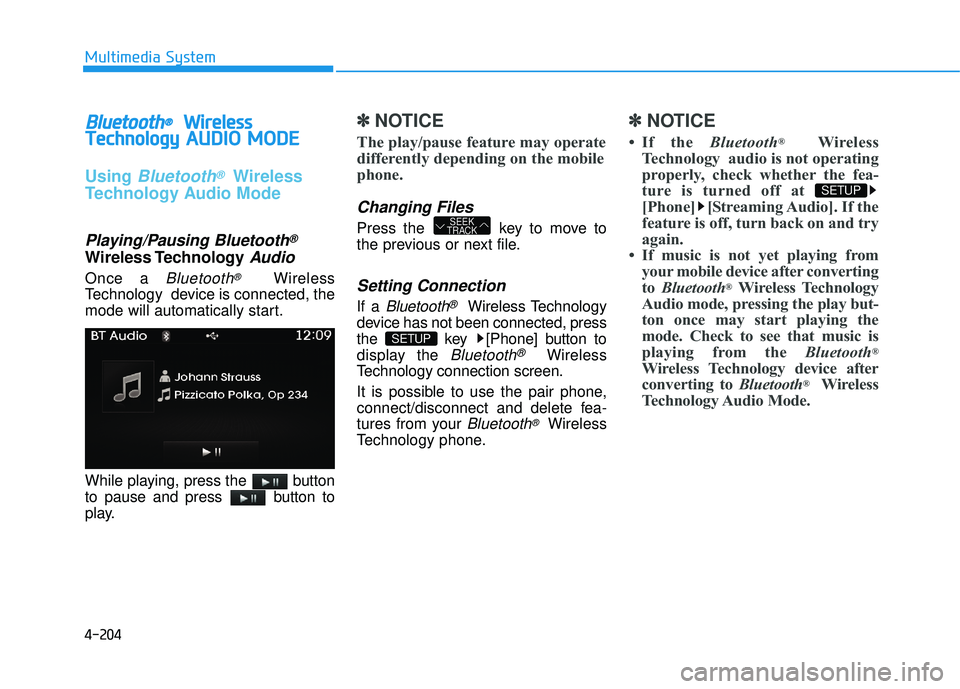
Once a Bluetooth®Wireless
Technology device is connected, the
mode will automatically start.
While playing, press the button
to pause and press button to
play.
✽✽ NOTICE
The play/pause feature may operate
differently depending on the mobile
phone.
Changing Files
Press the key to move to
the previous or next file.
Setting Connection
If a Bluetooth®Wireless Technology
device has not been connected, press
the key [Phone] button to
display the
Bluetooth®Wireless
Technology connection screen.
It is possible to use the pair phone,
connect/disconnect and delete fea-
tures from your
Bluetooth®Wireless
Technology phone.
✽✽ NOTICE
If the Bluetooth®
Wireless
Technology audio is not operating
properly, check whether the fea-
ture is turned off at
[Phone] [Streaming Audio]. If the
feature is off, turn back on and try
again.
If music is not yet playing from your mobile device after convertingto Bluetooth ®
Wireless Technology
Audio mode, pressing the play but-
ton once may start playing the
mode. Check to see that music is
playing from the Bluetooth®
Wireless Technology device after
converting to Bluetooth®
Wireless
Technology Audio Mode.
SETUP
SETUP
SEEK
TRACK
Page 416 of 653
4-205
Multimedia System
4
Pairing a Bluetooth®Wireless
Technology Device
What is Bluetooth® Wireless
Technology Pairing?
Pairing refers to the process of syn-
chronizing your
Bluetooth®Wireless
Technology phone or device with the
car audio system for connection.
Pairing is necessary to connect anduse the
Bluetooth®Wireless
Technology feature.
Pairing Key / Key
on the Steering Remote
Controller
When No Devices have been
Paired
1. Press the key or the key on the steering remote con-
troller. The following screen is dis-
played. 2. Press the button to enter
the Pair Phone screen.
1) Car Name : Name of device as shown when searching from your
Bluetooth® Wireless Technology
device
2) Passkey : Passkey used to pair the device
3. From your
Bluetooth®Wireless
Technology device (i.e. Mobile
Phone), search and select yourcar audio system.
OK
PHONE
PHONE
Page 417 of 653
![HYUNDAI TUCSON 2015 Owners Manual 4-206
Multimedia System
[Non SSP supported device]
(SSP: Secure Simple Pairing)
4. After a few moments, a screen isdisplayed where the passkey is entered.
Hear, enter the passkey “0000” to
pair y](/manual-img/35/56202/w960_56202-416.png "HYUNDAI TUCSON 2015 Owners Manual 4-206
Multimedia System
[Non SSP supported device]
(SSP: Secure Simple Pairing)
4. After a few moments, a screen isdisplayed where the passkey is entered.
Hear, enter the passkey “0000” to
pair y")
4-206
Multimedia System
[Non SSP supported device]
(SSP: Secure Simple Pairing)
4. After a few moments, a screen isdisplayed where the passkey is entered.
Hear, enter the passkey “0000” to
pair your
Bluetooth®Wireless
Technology device with the caraudio system.
[SSP supported device]
4. After a few moments, a screen is displayed 6 digits passkey.
Hear, check the passkey on your
Bluetooth®Wireless Technology
device and confirm.
5. Once pairing is complete, the fol- lowing screen is displayed.
✽✽ NOTICE
If Bluetooth ®
Wireless Technology
devices are paired but none are cur-
rently connected, pressing the key or the key on the
steering wheel displays the following
screen. Press the [Pair] button to
pair a new device or press the
[Connect] to connect a previously
paired device.Pairing through [PHONE] Setup
Press the key Select
[Phone] Select [Pair Phone]
Select TUNE knob
1. The following steps are the same as those described in the section
"When No Devices have been
Paired" on the previous page.SETUP
PHONE
![HYUNDAI TUCSON 2015 Owners Manual 4-180
Multimedia System
MMEEDD IIAA MM OODDEE
Pressing the key will change
the operating mode in order ofCD
➟USB(iPod®)➟AUX➟My Music ➟
BT Audio.
If [Mode Pop up] is turned on within
[Dis](/manual-img/35/56202/w960_56202-390.png "HYUNDAI TUCSON 2015 Owners Manual 4-180
Multimedia System
MMEEDD IIAA MM OODDEE
Pressing the key will change
the operating mode in order ofCD
➟USB(iPod®)➟AUX➟My Music ➟
BT Audio.
If [Mode Pop up] is turned on within
[Dis")