Page 362 of 603
5-4
Driving your vehicle
Before Entering the Vehicle
• Be sure all windows, outside mir-ror(s), and outside lights are clean
and unobstructed.
Remove frost, snow, or ice.
Visually check the tires for uneven wear and damage.
Check under the vehicle for any sign of leaks.
Be sure there are no obstacles behind you if you intend to back up.
Before Starting
Make sure the hood, the trunk, andthe doors are securely closed and
locked.
Adjust the position of the seat and steering wheel.
Adjust the inside and outside rearview mirrors.
Verify all the lights work.
Fasten your seatbelt. Check that all passengers have fastened their
seatbelts.
Check the gauges and indicators in the instrument panel and the mes-
sages on the instrument display
when the ignition switch is in the
ON position.
Check that any items you are car- rying are stored properly or fas-
tened down securely.
CALIFORNIA PROPOSITION 65
WARNING
Engine exhaust and a wide vari-
ety of automobile components
including components found in
the interior furnishings in a
vehicle, contain or emit harmful
chemicals known to the State of
California to cause cancer and
birth defects and reproductive
harm. In addition, certain fluids
contained in vehicles and cer-
tain products of components
contain or emit chemicals
known to the State of California
to cause cancer and birth
defects or other reproductive
harm.WARNING
B B
E
EF
FO
O R
RE
E
D
D R
RI
IV
V I
IN
N G
G
Page 387 of 603
5-29
Driving your vehicle
5
Disc Brakes Wear Indicator
When your brake pads are worn and
new pads are required, you will hear
a high pitched warning sound from
your front or rear brakes. You may
hear this sound come and go or it
may occur whenever you depress
the brake pedal.
Please remember some driving con-
ditions or climates may cause a
brake squeal when you first apply (or
lightly apply) the brakes. This is nor-
mal and does not indicate a problem
with your brakes.
To avoid costly brake repairs, do
not continue to drive with worn
brake pads.
Information
Always replace brake pads as com-
plete front or rear axle sets.
Foot Parking Brake
(if equipped)
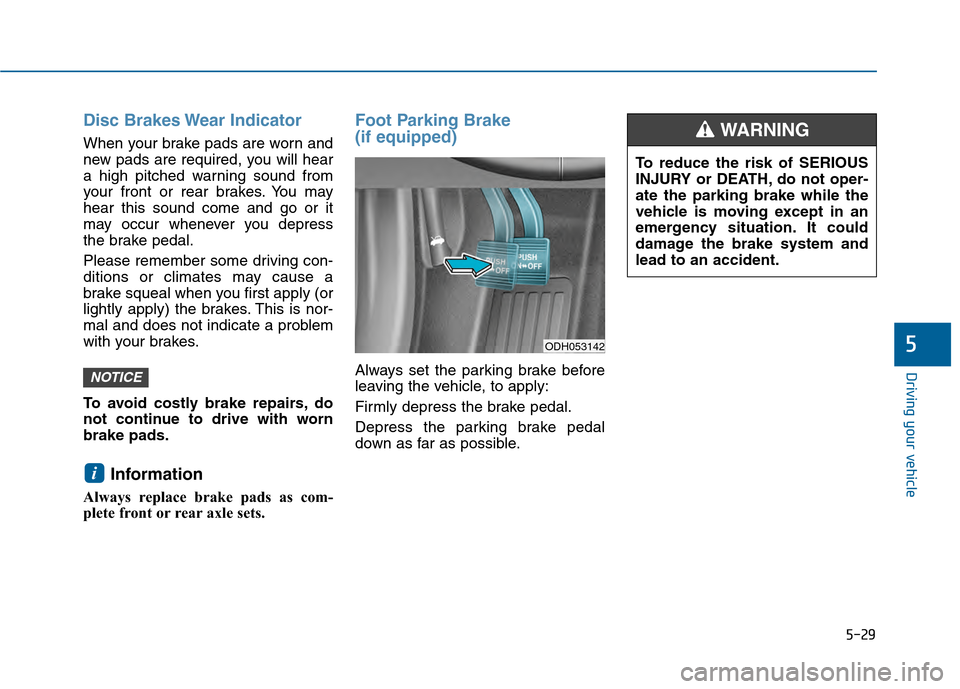
Always set the parking brake before
leaving the vehicle, to apply:
Firmly depress the brake pedal.
Depress the parking brake pedal
down as far as possible.
i
NOTICE
ODH053142
To reduce the risk of SERIOUS
INJURY or DEATH, do not oper-
ate the parking brake while the
vehicle is moving except in an
emergency situation. It could
damage the brake system and
lead to an accident.
WARNING
Page 390 of 603
5-32
Driving your vehicle
Releasing the parking brake
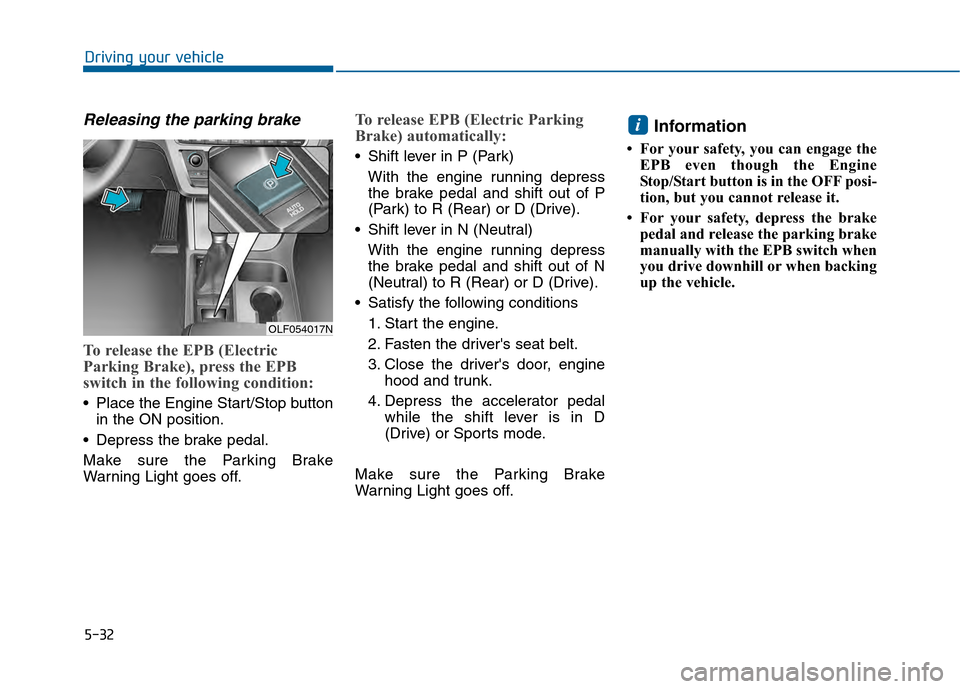
To release the EPB (Electric
Parking Brake), press the EPB
switch in the following condition:
Place the Engine Start/Stop buttonin the ON position.
Depress the brake pedal.
Make sure the Parking Brake
Warning Light goes off.
To release EPB (Electric Parking
Brake) automatically:
Shift lever in P (Park) With the engine running depress
the brake pedal and shift out of P
(Park) to R (Rear) or D (Drive).
Shift lever in N (Neutral) With the engine running depress
the brake pedal and shift out of N
(Neutral) to R (Rear) or D (Drive).
Satisfy the following conditions 1. Start the engine.
2. Fasten the driver's seat belt.
3. Close the driver's door, engine hood and trunk.
4. Depress the accelerator pedal while the shift lever is in D
(Drive) or Sports mode.
Make sure the Parking Brake
Warning Light goes off.
Information
• For your safety, you can engage the EPB even though the Engine
Stop/Start button is in the OFF posi-
tion, but you cannot release it.
• For your safety, depress the brake pedal and release the parking brake
manually with the EPB switch when
you drive downhill or when backing
up the vehicle.
i
OLF054017N
Page 430 of 603
5-72
Driving your vehicle
(Continued)
The camera cannot detect the lane because of fog, heavy rain,
or heavy snow.
The surrounding of the inside rear view mirror temperature is
high due to direct sun light.
The lane is very wide or narrow.
The windshield is fogged by humid air in the vehicle.
A shadow is on the lane line.
There is a mark that looks like a lane line.
There is a boundary structure, such as a concrete barrier.
The distance from the vehicle ahead is very short or the vehi-
cle ahead drives covering the
lane line.
The vehicle vibrates heavily due to road conditions.
The number of lanes increases or decreases or the lane lines
are crossing.
Putting something on the dash- board.
(Continued)(Continued)
Driving with the sun in front of
you.
Driving in areas under construc- tion.
There are more than two lane lines.
Page 435 of 603
5-77
Driving your vehicle
5
BSD (Blind Spot Detection) /
LCA (Lane Change Assist)
Operating conditions
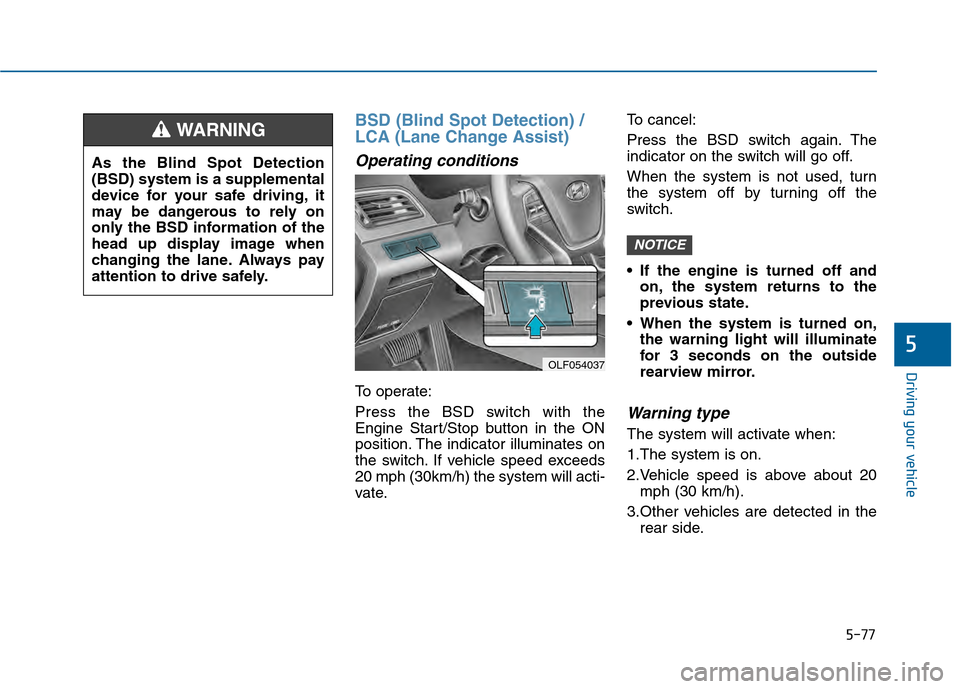
To operate:
Press the BSD switch with the
Engine Start/Stop button in the ON
position. The indicator illuminates on
the switch. If vehicle speed exceeds
20 mph (30km/h) the system will acti-
vate.To cancel:
Press the BSD switch again. The
indicator on the switch will go off.
When the system is not used, turn
the system off by turning off the
switch.
If the engine is turned off and
on, the system returns to the
previous state.
When the system is turned on, the warning light will illuminate
for 3 seconds on the outside
rearview mirror.
Warning type
The system will activate when:
1.The system is on.
2.Vehicle speed is above about 20mph (30 km/h).
3.Other vehicles are detected in the rear side.
NOTICE
OLF054037
As the Blind Spot Detection
(BSD) system is a supplemental
device for your safe driving, it
may be dangerous to rely on
only the BSD information of the
head up display image when
changing the lane. Always pay
attention to drive safely.
WARNING
Page 436 of 603
5-78
Driving your vehicle
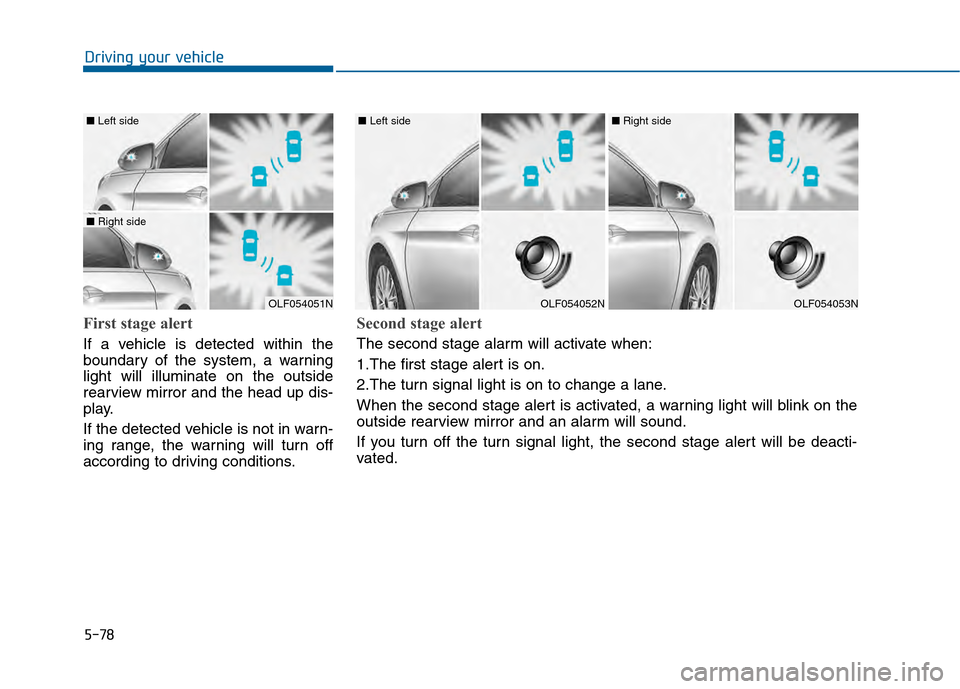
First stage alert
If a vehicle is detected within the
boundary of the system, a warning
light will illuminate on the outside
rearview mirror and the head up dis-
play.
If the detected vehicle is not in warn-
ing range, the warning will turn off
according to driving conditions.
OLF054051N
■ Left side
■ Right side
OLF054052N
■ Left side
OLF054053N
■ Right side
Second stage alert
The second stage alarm will activate when:
1.The first stage alert is on.
2.The turn signal light is on to change a lane.
When the second stage alert is activated, a warning light will blink on the
outside rearview mirror and an alarm will sound.
If you turn off the turn signal light, the second stage alert will be deacti-
vated.
Page 437 of 603
5-79
Driving your vehicle
5
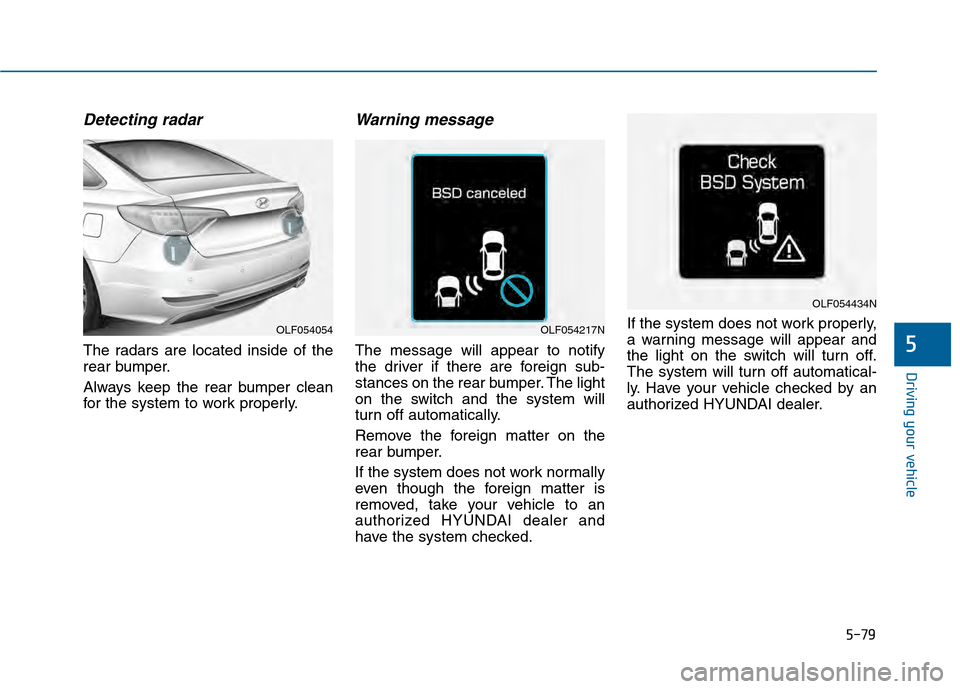
Detecting radar
The radars are located inside of the
rear bumper.
Always keep the rear bumper clean
for the system to work properly.
Warning message
The message will appear to notify
the driver if there are foreign sub-
stances on the rear bumper. The light
on the switch and the system will
turn off automatically.
Remove the foreign matter on the
rear bumper.
If the system does not work normally
even though the foreign matter is
removed, take your vehicle to an
authorized HYUNDAI dealer and
have the system checked.If the system does not work properly,
a warning message will appear and
the light on the switch will turn off.
The system will turn off automatical-
ly. Have your vehicle checked by an
authorized HYUNDAI dealer.
OLF054054OLF054217N
OLF054434N
Page 438 of 603
5-80
Driving your vehicle
RCTA (Rear Cross Traffic Alert)
Operating conditions
To operate:
Go to the User Settings Mode
(Driving Assist) and select RCTA
(Rear Cross Traffic Alert) on the LCD
display (For more details, refer to
"LCD Display" in chapter 3.) . The
system will turn on and standby to
activate. The system will activate
when vehicle speed is below 6 mph
(10 km/h) with the shift lever in R
(Reverse). The RCTA (Rear Cross Traffic
Alert) detecting range is about 1
feet (0.5 m) ~ 65 feet (20 m). A
vehicle will be detected if the vehi-
cle speed is 2.5 mph (4 km/h) ~ 22
mph (36 km/h) within the detecting
range. However, the detecting
range may change under different
conditions. Always pay attention
to the surroundings.
Warning type
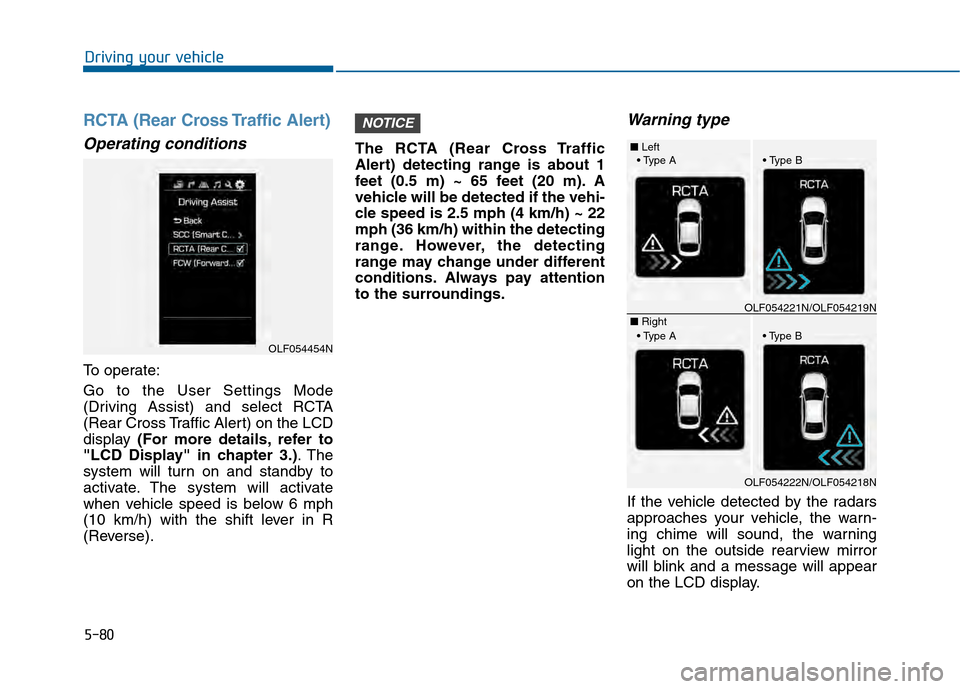
If the vehicle detected by the radars
approaches your vehicle, the warn-
ing chime will sound, the warning
light on the outside rearview mirror
will blink and a message will appear
on the LCD display.
NOTICE
OLF054454N
■
Left
■ RightOLF054221N/OLF054219N
OLF054222N/OLF054218N