Page 141 of 603
3-46
Convenient features of your vehicle
Auto up/down window (if equipped)
Pressing or pulling up the power win-
dow switch momentarily to the sec-
ond detent position (6) completely
lowers or lifts the window even when
the switch is released. To stop the
window at the desired position while
the window is in operation, pull up or
press down and release the switch.
To reset the power windows
If the power windows do not operate
normally, the automatic power win-
dow system must be reset as follows:
1. Place the ignition switch to the ON
position.
2. Close the window and continue pulling up on the power window
switch for at least one second.
If the power windows do not operate
properly after resetting, have the
system checked by an authorized
HYUNDAI dealer.
Automatic reverse (if equipped)
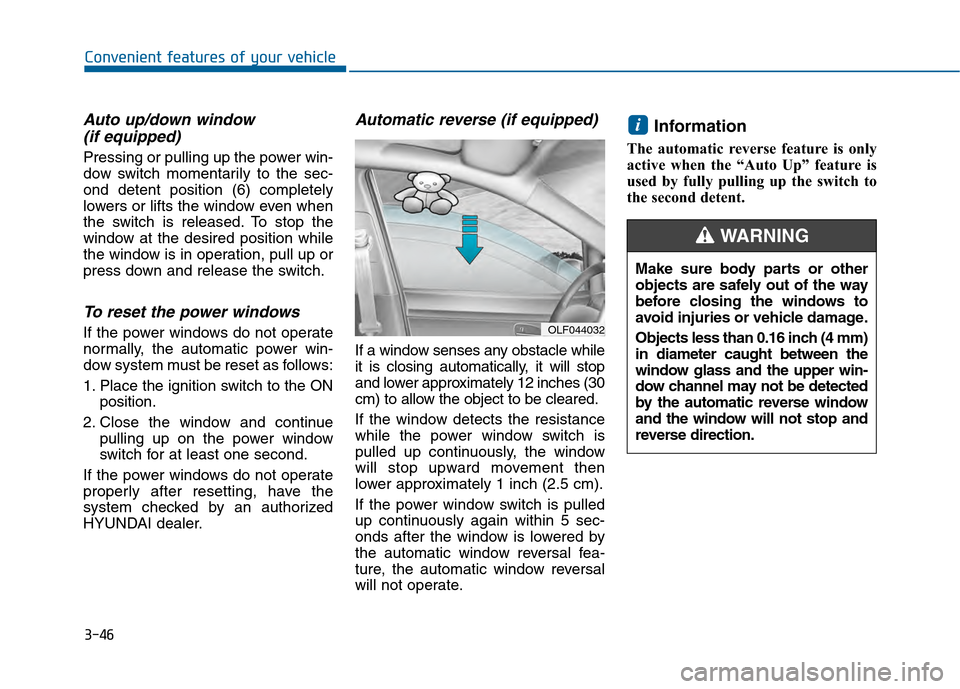
If a window senses any obstacle while
it is closing automatically, it will stop
and lower approximately 12 inches (30
cm) to allow the object to be cleared.
If the window detects the resistance
while the power window switch is
pulled up continuously, the window
will stop upward movement then
lower approximately 1 inch (2.5 cm).
If the power window switch is pulled
up continuously again within 5 sec-
onds after the window is lowered by
the automatic window reversal fea-
ture, the automatic window reversal
will not operate.
Information
The automatic reverse feature is only
active when the “Auto Up” feature is
used by fully pulling up the switch to
the second detent.
i
OLF044032
Make sure body parts or other
objects are safely out of the way
before closing the windows to
avoid injuries or vehicle damage.
Objects less than 0.16 inch (4 mm)
in diameter caught between the
window glass and the upper win-
dow channel may not be detected
by the automatic reverse window
and the window will not stop and
reverse direction.
WARNING
Page 142 of 603
3-47
Convenient features of your vehicle
3
Power window lock switch
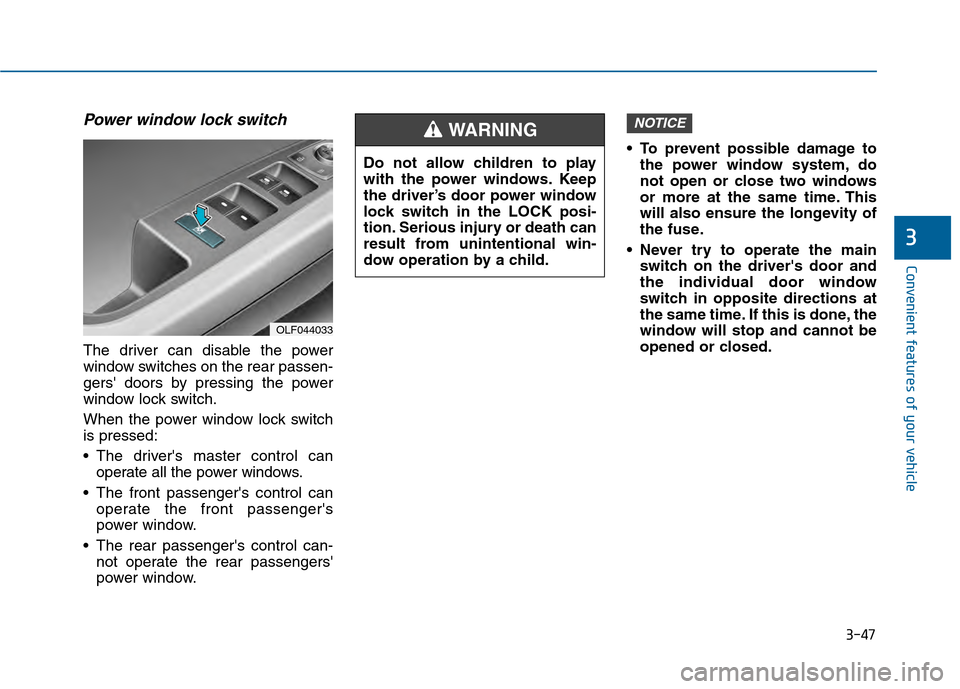
The driver can disable the power
window switches on the rear passen-
gers' doors by pressing the power
window lock switch.
When the power window lock switch
is pressed:
The driver's master control canoperate all the power windows.
The front passenger's control can operate the front passenger's
power window.
The rear passenger's control can- not operate the rear passengers'
power window. To prevent possible damage to
the power window system, do
not open or close two windows
or more at the same time. This
will also ensure the longevity of
the fuse.
Never try to operate the main switch on the driver's door and
the individual door window
switch in opposite directions at
the same time. If this is done, the
window will stop and cannot be
opened or closed.
NOTICE
OLF044033
Do not allow children to play
with the power windows. Keep
the driver’s door power window
lock switch in the LOCK posi-
tion. Serious injury or death can
result from unintentional win-
dow operation by a child.
WARNING
Page 192 of 603
3-97
Convenient features of your vehicle
3
Malfunction IndicatorLamp (MIL)
This warning light illuminates:
Once you set the ignition switch or
Engine Start/Stop button to the ON
position.
- It remains on until the engine isstarted.
When there is a malfunction with the emission control system.
In this case, have your vehicle
inspected by an authorized
HYUNDAI dealer. - Malfunction Indicator Lamp (MIL)
Driving with the Malfunction
Indicator Lamp (MIL) on may cause
damage to the emission control
systems which could affect dri-
vability and/or fuel economy.
If the Malfunction Indicator Lamp
(MIL) illuminates, potential catalyt-
ic converter damage is possible
which could result in loss of
engine power.
In this case, have your vehicle
inspected by an authorized
HYUNDAI dealer.
Charging System
Warning Light
If this warning light comes on while
the engine is running, the battery is
not being charged. Immediately turn
off all electrical accessories. Try not
to use electrically operated controls,
such as the power windows. Keep the
engine running; starting the engine
will quickly discharge the battery.
If there is a malfunction with either
the alternator or electrical charging
system:
1.Drive carefully to the nearest safe
location and stop your vehicle.
2.Turn the engine off and check the alternator drive belt for looseness
or breakage.
If the belt is adjusted properly,
there may be a problem in the elec-
trical charging system.
In this case, have your vehicle
inspected by an authorized
HYUNDAI dealer.
NOTICE
NOTICE
Page 248 of 603
3-153
Convenient features of your vehicle
3
Sunvisor
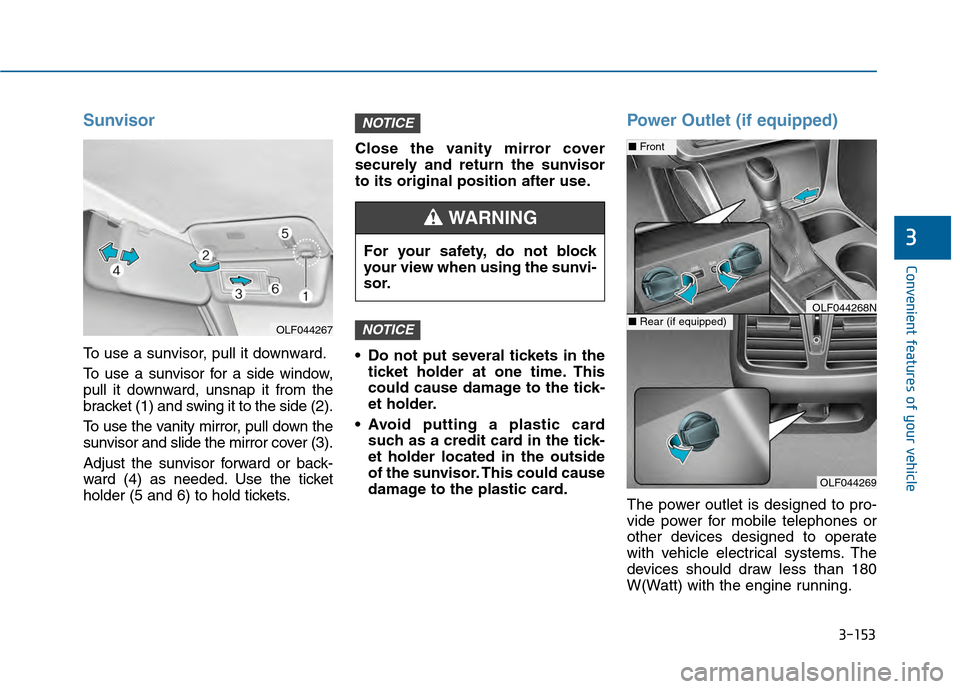
To use a sunvisor, pull it downward.
To use a sunvisor for a side window,
pull it downward, unsnap it from the
bracket (1) and swing it to the side (2).
To use the vanity mirror, pull down the
sunvisor and slide the mirror cover (3).
Adjust the sunvisor forward or back-
ward (4) as needed. Use the ticket
holder (5 and 6) to hold tickets.Close the vanity mirror cover
securely and return the sunvisor
to its original position after use.
Do not put several tickets in the
ticket holder at one time. This
could cause damage to the tick-
et holder.
Avoid putting a plastic card such as a credit card in the tick-
et holder located in the outside
of the sunvisor. This could cause
damage to the plastic card.
Power Outlet (if equipped)
The power outlet is designed to pro-
vide power for mobile telephones or
other devices designed to operate
with vehicle electrical systems. The
devices should draw less than 180
W(Watt) with the engine running.
NOTICE
NOTICE
OLF044267
For your safety, do not block
your view when using the sunvi-
sor.
WARNING
OLF044269
■ Front
■Rear (if equipped)OLF044268N
Page 269 of 603

4-16
Multimedia System
(Continued)
• Park the vehicle when connectingthe head unit with the mobile phone.
• Bluetooth
®connection may become
intermittently disconnected in some
mobile phones. Follow these steps to
try again.
1. Within the mobile phone, turn the Bluetooth
®function off/on and try
again.
2. Turn the mobile phone power Off/On and try again.
3. Completely remove the mobile phone battery, reboot, and then
again.
4. Reboot the Audio System and try again.
5. Delete all paired devices, pair and try again.
• Handsfree call quality and volume may differ depending on the model
of your mobile phone.
Information - Using the voicerecognition
• When using the voice recognition feature, only commands listed with-
in the user's manual are supported.
• Be aware that during the operation of the voice recognition system,
pressing any key other than the
key terminate voice recognition
mode.
• For superior voice recognition per- formance, position the microphone
used for voice recognition above the
head of the driver’s seat and main-
tain a proper position when saying
commands.
• Within the following situations, voice recognition may not function
properly due to external sound.
- When the windows and sunroofare open
- When the wind of the cooling / heating device is strong
- When entering and passing through tunnels
(Continued)(Continued)
- When driving on rugged anduneven roads
- During severe rain (heavy rains, windstorms)
• Phone related voice commands can be used only when a Bluetooth
®
Wireless Technology device is con-
nected.
• When making calls by stating a name, the corresponding contact
must be downloaded and stored
within the audio system.
• After downloading the Bluetooth
®
Wireless Technology phone book, it
takes some times to convert the
phone book data into voice informa-
tion. During this time, voice recogni-
tion may not properly operate.
• Pronounce the voice commands nat- urally and clearly as if in a normal
conversation.
i
Page 526 of 603
7-40
Maintenance
By jump starting
After a jump start from a good bat-
tery, drive the vehicle for 20-30 min-
utes before it is shutoff. The vehicle
may not restart if you shut it off
before the battery had a chance to
adequately recharge. See “Jump
Starting” in chapter 6 for more infor-
mation on jump starting procedures.
Information
An inappropriately dis-posed battery can be
harmful to the environ-
ment and human health.
Dispose the battery according to
your local law(s) or regulation.
Reset features
Some items need to be reset after
the battery has been discharged or
the battery has been disconnected.
See chapter 3 for:
Power Windows
Trip Computer
Climate Control System
Clock
Audio System
Sunroof
i
(Continued)
Watch the battery during
charging, and stop or reduce
the charging rate if the battery
cells begin boiling violently.
The negative battery cable
must be removed first and
installed last when the battery
is disconnected. Disconnect
the battery charger in the fol-
lowing order:
(1) Turn off the battery charger main switch.
(2) Unhook the negative
clamp from the negative
battery terminal.
(3) Unhook the positive clamp from the positive battery
terminal.
Always use a genuine HYUNDAI
approved battery when you
replace the battery.
Page 548 of 603

7-62
Maintenance
Instrument panel fuse panel
Fuse Name Fuse rating Protected Component
SAFETY WINDOW LH25ADriver Safety Power Window Module
P/SEAT PASS30APassenger Seat Manual Switch
P/WDW LH20APower Window Main Switch, Rear Power Window Module LH
P/WDW RH25APower Window Main Switch, Rear Power Window Module RH, Passenger Door Module,
Passenger Power Window Switch
DR LOCK20ADoor Lock Relay, Door Unlock Relay
S/HEATER FRT25AFront Air Ventilation Seat Module, Front Seat Warmer Module
BRAKE SWITCH10AStop Lamp Switch, Immobilizer Module, Smart Key Control Module
8 MODULE7.5ABCM, Smart Key Control Module
SAFETY POWER WINDOWRH25APassenger Safety Power Window Module
SMART KEY15ASmart Key Control Module
TRUNK10ATrunk Lid Relay, Fuel Filler Door & Trunk Lid Switch
7 MODULE10ADigital Clock, Driver/Passenger Door Module
INTERIOR LAMP10A
Glove Box Lamp, Ignition Key Illumination & Door Warning Switch,
Front Vanity Lamp Switch LH/RH, Overhead Console Lamp, Room Lamp,
Rear Personal Lamp LH/RH, Trunk Room Lamp, Driver/Passenger Smart Key Outside Handle,
Driver/Passenger Door Lamp
2 MEMORY7.5A-
P/SEAT DRV30ADriver Seat Manual Switch, Driver IMS Module
CLUSTER10AInstrument Cluster
Page 552 of 603
![Hyundai Sonata 2015 Owners Manual 7-66
Maintenance
Engine compartment main fuse panel
Fuse NameFuse rating Protected Component
MULTIFUSE
(TYPE A)
IG230A[Without Smart Key] Relay 8 (Start Relay), Ignition Switch,
[With Smart Key] Rela](/manual-img/35/16796/w960_16796-551.png "Hyundai Sonata 2015 Owners Manual 7-66
Maintenance
Engine compartment main fuse panel
Fuse NameFuse rating Protected Component
MULTIFUSE
(TYPE A)
IG230A[Without Smart Key] Relay 8 (Start Relay), Ignition Switch,
[With Smart Key] Rela")
7-66
Maintenance
Engine compartment main fuse panel
Fuse NameFuse rating Protected Component
MULTIFUSE
(TYPE A)
IG230A[Without Smart Key] Relay 8 (Start Relay), Ignition Switch,
[With Smart Key] Relay 8 (Start Relay), PCB Block (IG2 Relay)
3 TCU40A[G4FJ - DCT] TCM
BLOWER40ARelay 3 (Blower Relay)
1 ABS40AESC Module
REAR HEATED50ARelay 1 (Rear Heated Relay)
1 B+50ASmart Junction Block (IPS2 (4CH), IPS3 (4CH), Fuse - F28/F29)
1 COOLING FAN50A[G4KH/G4FJ] Relay 11 (Cooling Fan Relay), [G4KJ] Relay 12 (Cooling Fan Relay)
2 COOLING FAN60A[G4KH/G4FJ] Relay 12 (Cooling Fan Relay)
1 MDPS80AMDPS Unit (Column Type)
MULTI FUSE
(TYPE B)
2 ABS30AESC Module, Multipurpose Check Connector
IG140A[Without Smart Key] Ignition Switch, [With Smart Key] PCB Block (IG1/ACC Relay)
4 TCU40A[G4FJ - DCT] TCM
3 POWER OUTLET40ARelay 5 (Power Outlet Relay)
2 B+50ASmart Junction Block (IPS1 (4CH), IPS4 (4CH), IPS5 (4CH), Fuse - F36)
5 B+60APCB Block (Engine Control Relay, Fuse - F4/F5/F6/F13/F14/F22)
1 B+60ASmart Junction Block (Power Window Relay, Fuse -
F1/F2/F3/F4/F10/F13/F17/F23/F24/F30)
2 MDPS100AMDPS Unit (Rack Type)