4-92
Multimedia System
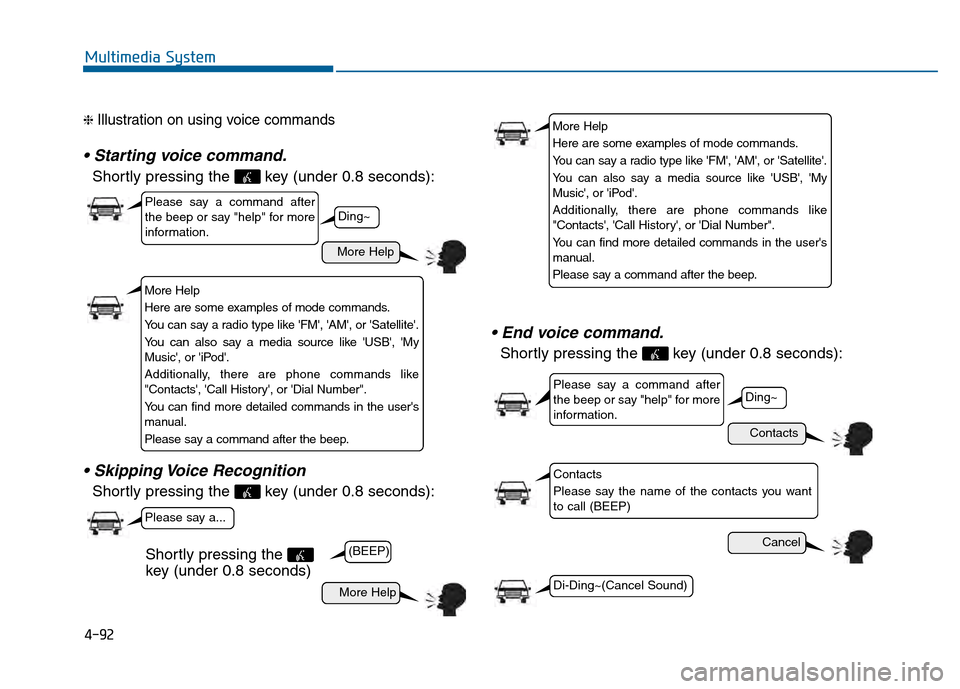
❈ Illustration on using voice commands
Shortly pressing the key (under 0.8 seconds):
Shortly pressing the key (under 0.8 seconds):
Shortly pressing the key (under 0.8 seconds):
More Help
Contacts
Cancel
More Help
Please say a command after
the beep or say "help" for more
information.
Please say a command after
the beep or say "help" for more
information.
Please say a...
Contacts
Please say the name of the contacts you want
to call (BEEP)
Ding~
(BEEP)
Ding~
Di-Ding~(Cancel Sound)
Shortly pressing the
key (under 0.8 seconds)
More Help
Here are some examples of mode commands.
You can say a radio type like 'FM', 'AM', or 'Satellite'.
You can also say a media source like 'USB', 'My
Music', or 'iPod'.
Additionally, there are phone commands like
"Contacts', 'Call History', or 'Dial Number".
You can find more detailed commands in the user's
manual.
Please say a command after the beep.
More Help
Here are some examples of mode commands.
You can say a radio type like 'FM', 'AM', or 'Satellite'.
You can also say a media source like 'USB', 'My
Music', or 'iPod'.
Additionally, there are phone commands like
"Contacts', 'Call History', or 'Dial Number".
You can find more detailed commands in the user's
manual.
Please say a command after the beep.
4-100
Multimedia System
Voice Recognition Volume
Press the key Select [Sound]Select [Voice Recognition Vol.]
Turn the TUNE knob to adjust the
Voice Recognition volume.
Touch Screen Beep
Press the key Select [Sound] Select [Touch Screen Beep]
This feature is used to turn the touch
screen beep on/off.
Blue Link Voice Volume
Press the key Select [Sound] Select [Blue Link Voice Vol.]
Turn the TUNE knob to adjust the
Blue Link Voice Volume.
❈ Blue Link
®may differ depending
on the selected audio.
SETUP SETUP SETUP
![Hyundai Sonata 2015 Owners Manual 4-100
Multimedia System
Voice Recognition Volume
Press the key Select [Sound]Select [Voice Recognition Vol.]
Turn the TUNE knob to adjust the
Voice Recognition volume.
Touch Screen Beep
Press the k](/manual-img/35/16796/w960_16796-352.png "Hyundai Sonata 2015 Owners Manual 4-100
Multimedia System
Voice Recognition Volume
Press the key Select [Sound]Select [Voice Recognition Vol.]
Turn the TUNE knob to adjust the
Voice Recognition volume.
Touch Screen Beep
Press the k")