2015 Hyundai Santa Fe Sport washer
[x] Cancel search: washerPage 19 of 785
Your vehicle at a glance
6 2
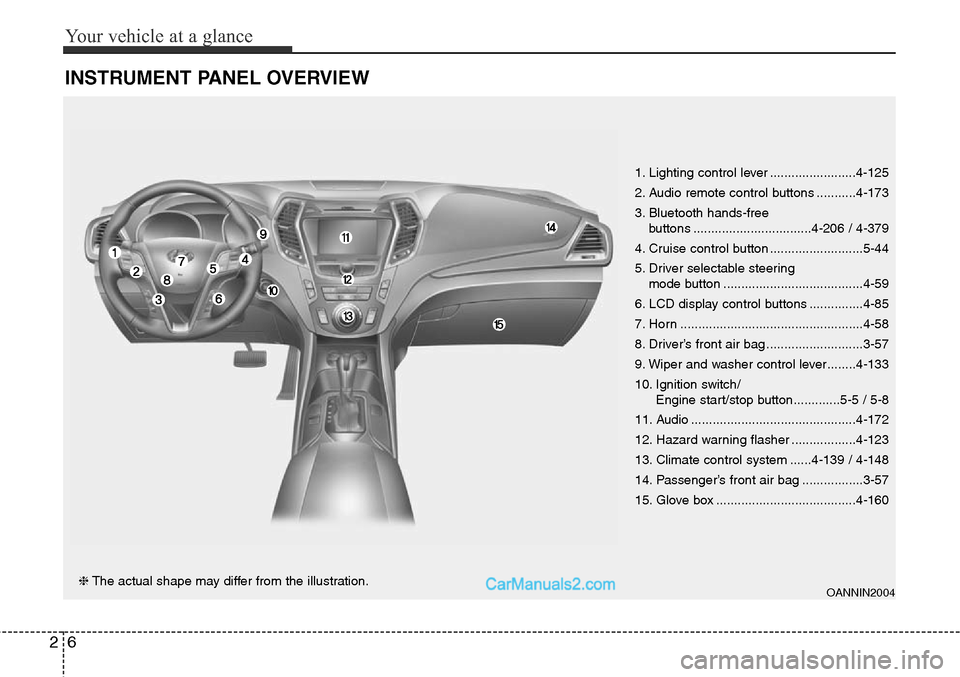
INSTRUMENT PANEL OVERVIEW
OANNIN2004❈The actual shape may differ from the illustration.1. Lighting control lever ........................4-125
2. Audio remote control buttons ...........4-173
3. Bluetooth hands-free
buttons .................................4-206 / 4-379
4. Cruise control button ..........................5-44
5. Driver selectable steering
mode button .......................................4-59
6. LCD display control buttons ...............4-85
7. Horn ...................................................4-58
8. Driver’s front air bag ...........................3-57
9. Wiper and washer control lever........4-133
10. Ignition switch/
Engine start/stop button.............5-5 / 5-8
11. Audio ..............................................4-172
12. Hazard warning flasher ..................4-123
13. Climate control system ......4-139 / 4-148
14. Passenger’s front air bag .................3-57
15. Glove box .......................................4-160
Page 20 of 785
27
Your vehicle at a glance
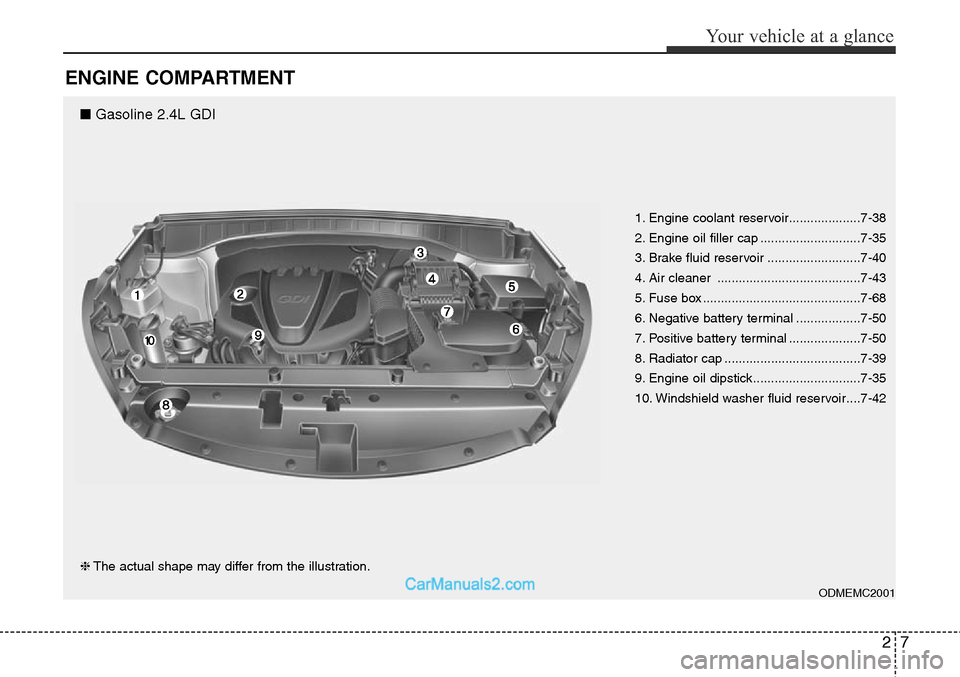
ENGINE COMPARTMENT
ODMEMC2001
❈The actual shape may differ from the illustration.1. Engine coolant reservoir....................7-38
2. Engine oil filler cap ............................7-35
3. Brake fluid reservoir ..........................7-40
4. Air cleaner ........................................7-43
5. Fuse box ............................................7-68
6. Negative battery terminal ..................7-50
7. Positive battery terminal ....................7-50
8. Radiator cap ......................................7-39
9. Engine oil dipstick..............................7-35
10. Windshield washer fluid reservoir....7-42
■ Gasoline 2.4L GDI
Page 21 of 785
Your vehicle at a glance
8 2
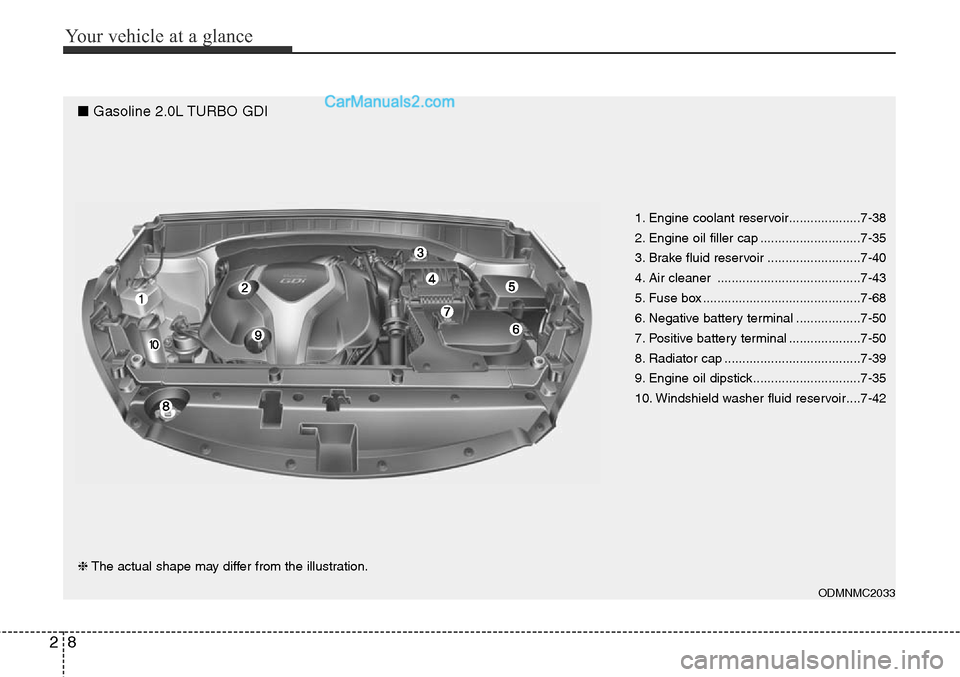
ODMNMC2033
❈The actual shape may differ from the illustration.1. Engine coolant reservoir....................7-38
2. Engine oil filler cap ............................7-35
3. Brake fluid reservoir ..........................7-40
4. Air cleaner ........................................7-43
5. Fuse box ............................................7-68
6. Negative battery terminal ..................7-50
7. Positive battery terminal ....................7-50
8. Radiator cap ......................................7-39
9. Engine oil dipstick..............................7-35
10. Windshield washer fluid reservoir....7-42
■ Gasoline 2.0L TURBO GDI
Page 95 of 785
Mirrors . . . . . . . . . . . . . . . . . . . . . . . . . . . . . . . . . . 4-62
• Inside rearview mirror . . . . . . . . . . . . . . . . . . . . . . . . 4-62
• Outside rearview mirror. . . . . . . . . . . . . . . . . . . . . . . 4-81
Instrument cluster . . . . . . . . . . . . . . . . . . . . . . . . . 4-84
• Instrument Cluster Control . . . . . . . . . . . . . . . . . . . . 4-85
• LCD Display Control . . . . . . . . . . . . . . . . . . . . . . . . . 4-85
• Gauges . . . . . . . . . . . . . . . . . . . . . . . . . . . . . . . . . . . . . 4-86
• Transaxle Shift Indicator . . . . . . . . . . . . . . . . . . . . . . 4-89
LCD display . . . . . . . . . . . . . . . . . . . . . . . . . . . . . . 4-90
• LCD Modes . . . . . . . . . . . . . . . . . . . . . . . . . . . . . . . . . 4-90
• Service Mode . . . . . . . . . . . . . . . . . . . . . . . . . . . . . . . . 4-91
• User Settings Mode . . . . . . . . . . . . . . . . . . . . . . . . . . . 4-92
• A/V Mode . . . . . . . . . . . . . . . . . . . . . . . . . . . . . . . . . . . 4-95
• Turn By Turn Mode . . . . . . . . . . . . . . . . . . . . . . . . . . 4-95
• Warning Messages . . . . . . . . . . . . . . . . . . . . . . . . . . . . 4-96
Trip computer . . . . . . . . . . . . . . . . . . . . . . . . . . . . 4-103
• Overview . . . . . . . . . . . . . . . . . . . . . . . . . . . . . . . . . . 4-103
• Trip A/B . . . . . . . . . . . . . . . . . . . . . . . . . . . . . . . . . . . 4-104
• Fuel Economy . . . . . . . . . . . . . . . . . . . . . . . . . . . . . . 4-105
Warning and indicator lights . . . . . . . . . . . . . . . 4-107
• Warning lights . . . . . . . . . . . . . . . . . . . . . . . . . . . . . . 4-107
• Indicator Lights . . . . . . . . . . . . . . . . . . . . . . . . . . . . . 4-114
Rear parking assist system . . . . . . . . . . . . . . . . . 4-118
• Operation . . . . . . . . . . . . . . . . . . . . . . . . . . . . . . . . . . 4-118
• Non-operational conditions . . . . . . . . . . . . . . . . . . . 4-119• Self-diagnosis . . . . . . . . . . . . . . . . . . . . . . . . . . . . . . . 4-121
Rearview camera . . . . . . . . . . . . . . . . . . . . . . . . . 4-122
Hazard warning flasher . . . . . . . . . . . . . . . . . . . . 4-123
Lighting . . . . . . . . . . . . . . . . . . . . . . . . . . . . . . . . . 4-124
• Battery saver function. . . . . . . . . . . . . . . . . . . . . . . . 4-124
• Headlamp delay function . . . . . . . . . . . . . . . . . . . . . 4-124
• Daytime running light . . . . . . . . . . . . . . . . . . . . . . . . 4-125
• Lighting control . . . . . . . . . . . . . . . . . . . . . . . . . . . . . 4-125
• High - beam operation . . . . . . . . . . . . . . . . . . . . . . . 4-127
• Turn signals and lane change signals . . . . . . . . . . . 4-128
• Front fog light . . . . . . . . . . . . . . . . . . . . . . . . . . . . . . 4-129
Wipers and washers . . . . . . . . . . . . . . . . . . . . . . . 4-130
• Windshield wipers (front) . . . . . . . . . . . . . . . . . . . . . 4-130
• Windshield washers (front) . . . . . . . . . . . . . . . . . . . 4-132
• Rear window wiper and washer switch. . . . . . . . . . 4-133
Interior light . . . . . . . . . . . . . . . . . . . . . . . . . . . . . 4-134
• Interior lamp AUTO cut . . . . . . . . . . . . . . . . . . . . . . 4-134
• Map lamp . . . . . . . . . . . . . . . . . . . . . . . . . . . . . . . . . . 4-134
• Room lamp . . . . . . . . . . . . . . . . . . . . . . . . . . . . . . . . . 4-135
• Luggage room lamp . . . . . . . . . . . . . . . . . . . . . . . . . 4-136
• Vanity mirror lamp . . . . . . . . . . . . . . . . . . . . . . . . . . 4-136
Welcome system . . . . . . . . . . . . . . . . . . . . . . . . . . 4-137
• Headlamp welcome . . . . . . . . . . . . . . . . . . . . . . . . . . 4-137
• Interior light. . . . . . . . . . . . . . . . . . . . . . . . . . . . . . . . 4-137
• Puddle lamp and pocket lamp . . . . . . . . . . . . . . . . . 4-137
4
Page 183 of 785
Features of your vehicle
90 4
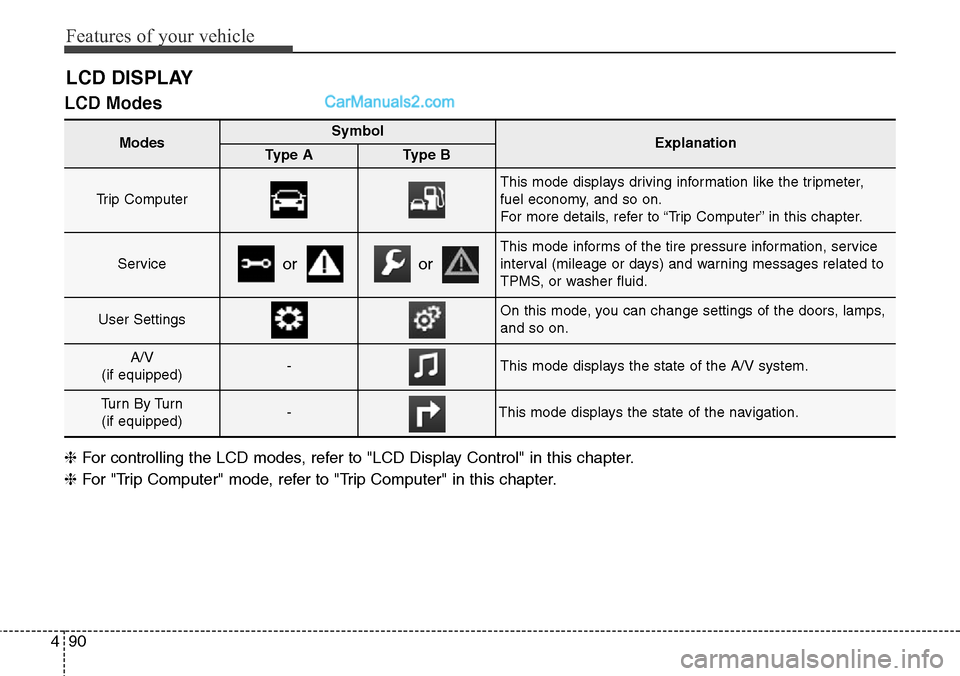
LCD Modes
LCD DISPLAY
Modes SymbolExplanationType AType B
Trip Computer
This mode displays driving information like the tripmeter,
fuel economy, and so on.
For more details, refer to “Trip Computer” in this chapter.
Service
This mode informs of the tire pressure information, service
interval (mileage or days) and warning messages related to
TPMS, or washer fluid.
User SettingsOn this mode, you can change settings of the doors, lamps,
and so on.
A/V
(if equipped)-This mode displays the state of the A/V system.
Tu r n B y Tu r n
(if equipped)-This mode displays the state of the navigation.
oror
❈For controlling the LCD modes, refer to "LCD Display Control" in this chapter.
❈For "Trip Computer" mode, refer to "Trip Computer" in this chapter.
Page 194 of 785
4101
Features of your vehicle
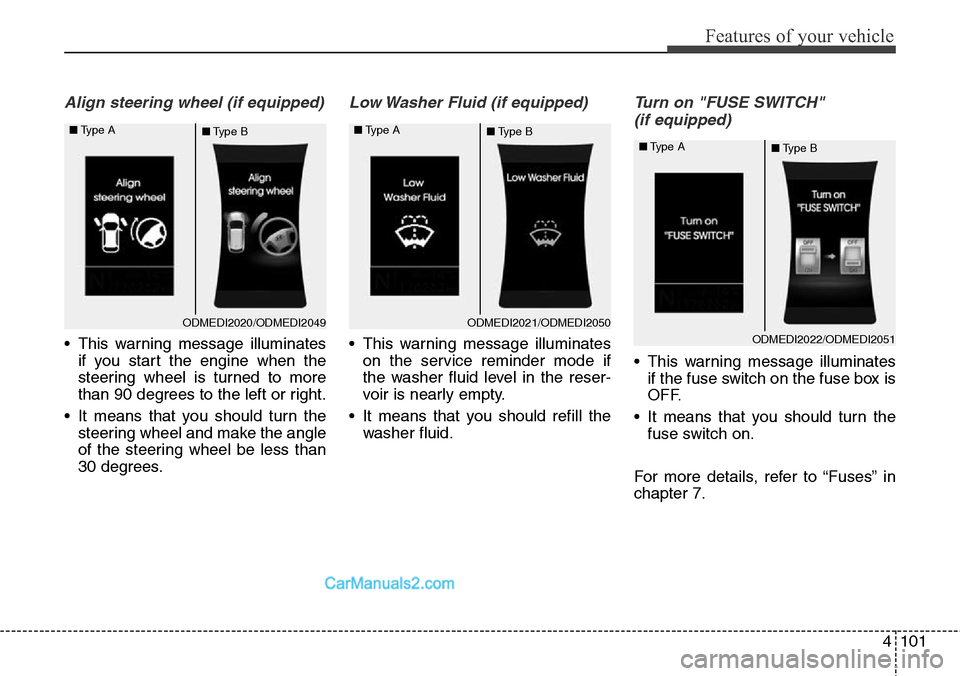
Align steering wheel (if equipped)
• This warning message illuminates
if you start the engine when the
steering wheel is turned to more
than 90 degrees to the left or right.
• It means that you should turn the
steering wheel and make the angle
of the steering wheel be less than
30 degrees.
Low Washer Fluid (if equipped)
• This warning message illuminates
on the service reminder mode if
the washer fluid level in the reser-
voir is nearly empty.
• It means that you should refill the
washer fluid.
Turn on "FUSE SWITCH"
(if equipped)
• This warning message illuminates
if the fuse switch on the fuse box is
OFF.
• It means that you should turn the
fuse switch on.
For more details, refer to “Fuses” in
chapter 7.
ODMEDI2020/ODMEDI2049 ■Type A
■Type BODMEDI2021/ODMEDI2050 ■Type A
■Type B
ODMEDI2022/ODMEDI2051 ■Type A
■Type B
Page 223 of 785
Features of your vehicle
130 4
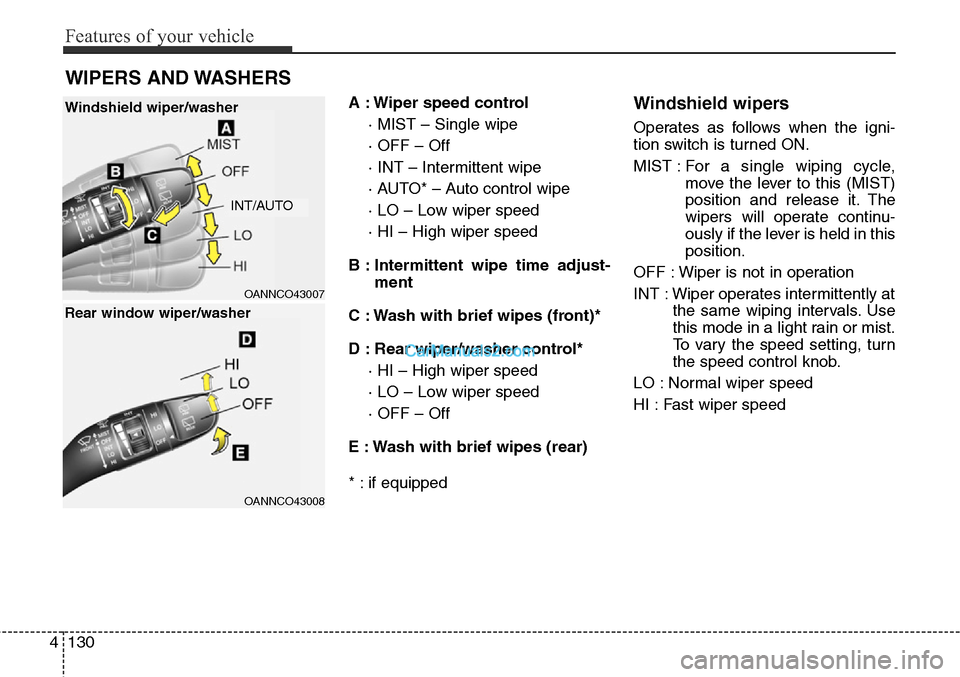
A : Wiper speed control
· MIST – Single wipe
· OFF – Off
· INT – Intermittent wipe
· AUTO* – Auto control wipe
· LO – Low wiper speed
· HI – High wiper speed
B : Intermittent wipe time adjust-
ment
C : Wash with brief wipes (front)*
D : Rear wiper/washer control*
· HI – High wiper speed
· LO – Low wiper speed
· OFF – Off
E : Wash with brief wipes (rear)
* : if equippedWindshield wipers
Operates as follows when the igni-
tion switch is turned ON.
MIST : For a single wiping cycle,
move the lever to this (MIST)
position and release it. The
wipers will operate continu-
ously if the lever is held in this
position.
OFF : Wiper is not in operation
INT : Wiper operates intermittently at
the same wiping intervals. Use
this mode in a light rain or mist.
To vary the speed setting, turn
the speed control knob.
LO : Normal wiper speed
HI : Fast wiper speed
WIPERS AND WASHERS
OANNCO43007
OANNCO43008
Windshield wiper/washer
Rear window wiper/washer
INT/AUTO
Page 225 of 785
Features of your vehicle
132 4
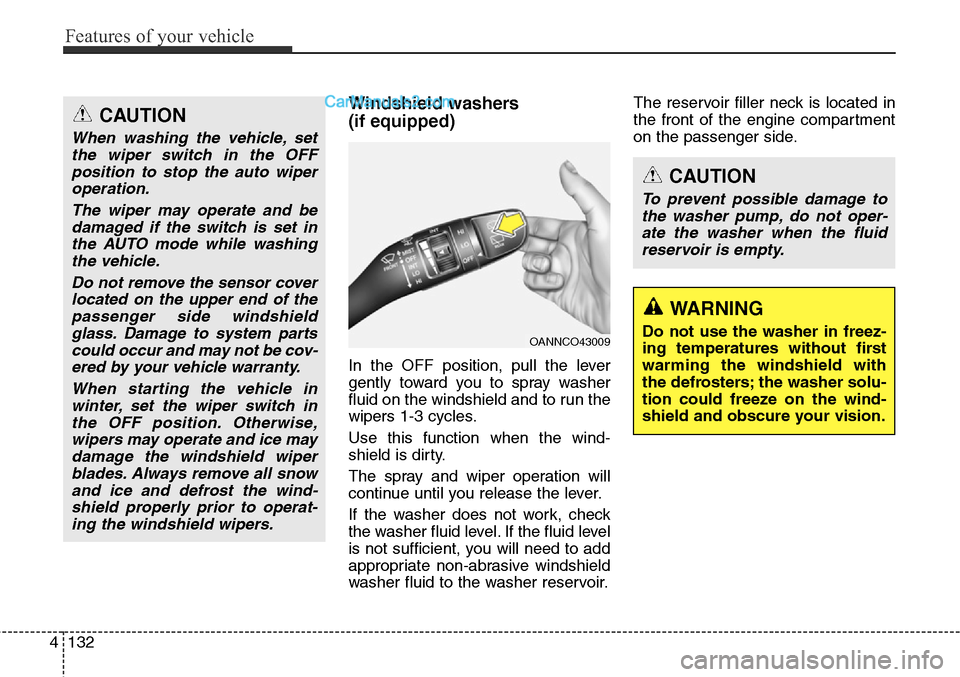
Windshield washers
(if equipped)
In the OFF position, pull the lever
gently toward you to spray washer
fluid on the windshield and to run the
wipers 1-3 cycles.
Use this function when the wind-
shield is dirty.
The spray and wiper operation will
continue until you release the lever.
If the washer does not work, check
the washer fluid level. If the fluid level
is not sufficient, you will need to add
appropriate non-abrasive windshield
washer fluid to the washer reservoir.The reservoir filler neck is located in
the front of the engine compartment
on the passenger side.
OANNCO43009
CAUTION
To prevent possible damage to
the washer pump, do not oper-
ate the washer when the fluid
reservoir is empty.
WARNING
Do not use the washer in freez-
ing temperatures without first
warming the windshield with
the defrosters; the washer solu-
tion could freeze on the wind-
shield and obscure your vision.
CAUTION
When washing the vehicle, set
the wiper switch in the OFF
position to stop the auto wiper
operation.
The wiper may operate and be
damaged if the switch is set in
the AUTO mode while washing
the vehicle.
Do not remove the sensor cover
located on the upper end of the
passenger side windshield
glass. Damage to system parts
could occur and may not be cov-
ered by your vehicle warranty.
When starting the vehicle in
winter, set the wiper switch in
the OFF position. Otherwise,
wipers may operate and ice may
damage the windshield wiper
blades. Always remove all snow
and ice and defrost the wind-
shield properly prior to operat-
ing the windshield wipers.