Page 285 of 785
Features of your vehicle
192 4
Calendar Settings
This menu is used to set the date
(MM/DD/YYYY).
Select [Calendar Settings]] Set
through
TUNE knob Press
TUNE knob
❈ Adjust the number currently in
focus to make the settings and
press the tune knob to move to the
next setting. (Set in order of
Year/Month/Day)
Time Format
This function is used to set the 12/24
hour time format of the audio system.
Select [Time Format] Set 12Hr /
24Hr through
TUNEknob
Clock Display when Power is
OFF
Select [Clock Disp.(Pwr Off)]Set
/ through TUNE knob
• : Displays time/date on screen
• : Turn off.
Off
On
OffOn
Page 308 of 785
4 215
Features of your vehicle
✽NOTICE
• When an incoming call pop-up is
displayed, most Audio and SETUP
mode features are disabled. Only
the call volume will operate.
• The telephone number may not be
properly displayed in some mobile
phones.
• When a call is answered with the
mobile phone, the call mode will
automatically revert to Private
mode.
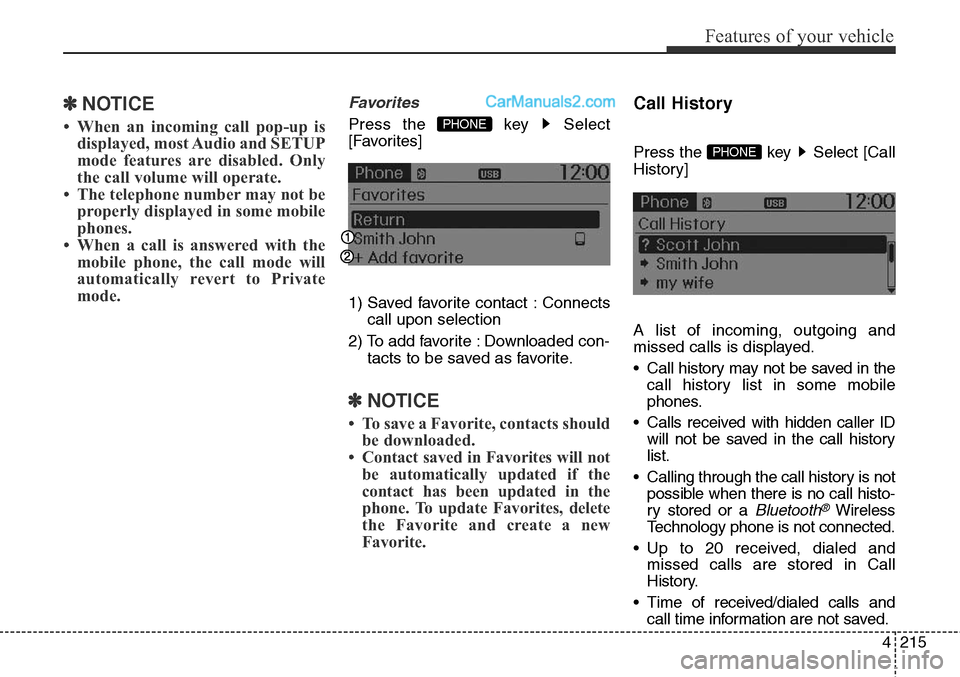
Favorites
Press the key Select
[Favorites]
1) Saved favorite contact : Connects
call upon selection
2) To add favorite : Downloaded con-
tacts to be saved as favorite.
✽NOTICE
• To save a Favorite, contacts should
be downloaded.
• Contact saved in Favorites will not
be automatically updated if the
contact has been updated in the
phone. To update Favorites, delete
the Favorite and create a new
Favorite.
Call History
Press the key Select [Call
History]
A list of incoming, outgoing and
missed calls is displayed.
• Call history may not be saved in the
call history list in some mobile
phones.
• Calls received with hidden caller ID
will not be saved in the call history
list.
• Calling through the call history is not
possible when there is no call histo-
ry stored or a
Bluetooth®Wireless
Technology phone is not connected.
• Up to 20 received, dialed and
missed calls are stored in Call
History.
• Time of received/dialed calls and
call time information are not saved.
PHONE
PHONE
Page 329 of 785
Features of your vehicle
236 4
✽NOTICE
• When an incoming call pop-up is
displayed, most Audio and SETUP
mode features are disabled. Only
the call volume will operate.
• The telephone number may not be
properly displayed in some mobile
phones.
• When a call is answered with the
mobile phone, the call mode will
automatically revert to Private
mode.
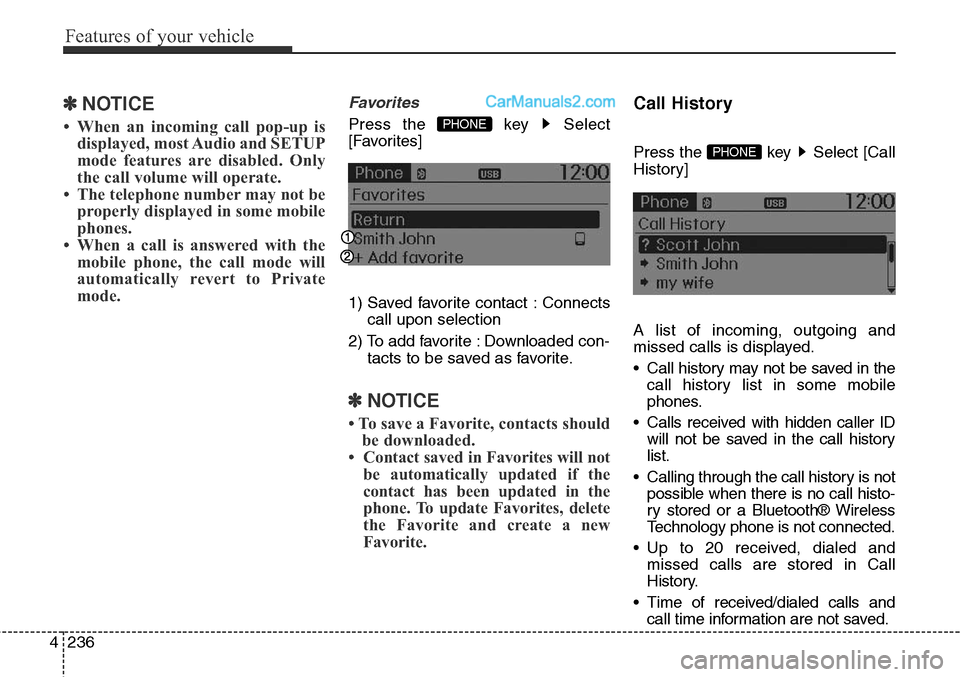
Favorites
Press the key Select
[Favorites]
1) Saved favorite contact : Connects
call upon selection
2) To add favorite : Downloaded con-
tacts to be saved as favorite.
✽NOTICE
• To save a Favorite, contacts should
be downloaded.
• Contact saved in Favorites will not
be automatically updated if the
contact has been updated in the
phone. To update Favorites, delete
the Favorite and create a new
Favorite.
Call History
Press the key Select [Call
History]
A list of incoming, outgoing and
missed calls is displayed.
• Call history may not be saved in the
call history list in some mobile
phones.
• Calls received with hidden caller ID
will not be saved in the call history
list.
• Calling through the call history is not
possible when there is no call histo-
ry stored or a Bluetooth® Wireless
Technology phone is not connected.
• Up to 20 received, dialed and
missed calls are stored in Call
History.
• Time of received/dialed calls and
call time information are not saved.PHONE
PHONE
Page 349 of 785
Features of your vehicle
256 4
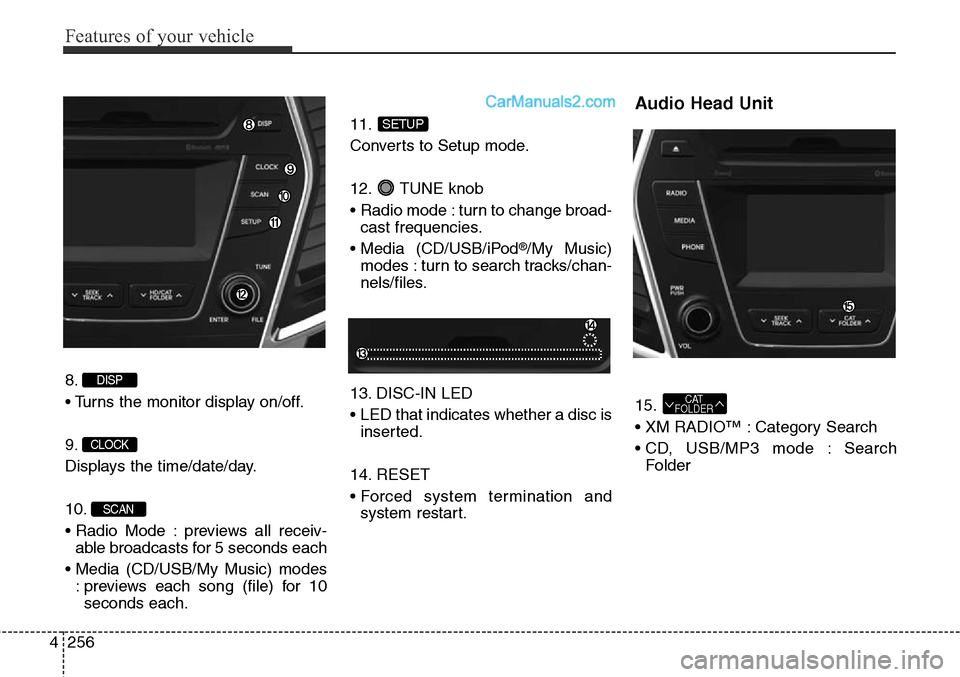
8.
• Turns the monitor display on/off.
9.
Displays the time/date/day.
10.
• Radio Mode : previews all receiv-
able broadcasts for 5 seconds each
• Media (CD/USB/My Music) modes
: previews each song (file) for 10
seconds each.11.
Converts to Setup mode.
12. TUNE knob
• Radio mode : turn to change broad-
cast frequencies.
• Media (CD/USB/iPod
®/My Music)
modes : turn to search tracks/chan-
nels/files.
13. DISC-IN LED
• LED that indicates whether a disc is
inserted.
14. RESET
• Forced system termination and
system restart.
Audio Head Unit
15.
• XM RADIO™ : Category Search
• CD, USB/MP3 mode : Search
FolderCAT
FOLDER
SETUP
SCAN
CLOCK
DISP
Page 393 of 785
Features of your vehicle
300 4
USING Bluetooth®Wireless
Technology
Phone Menu Screen
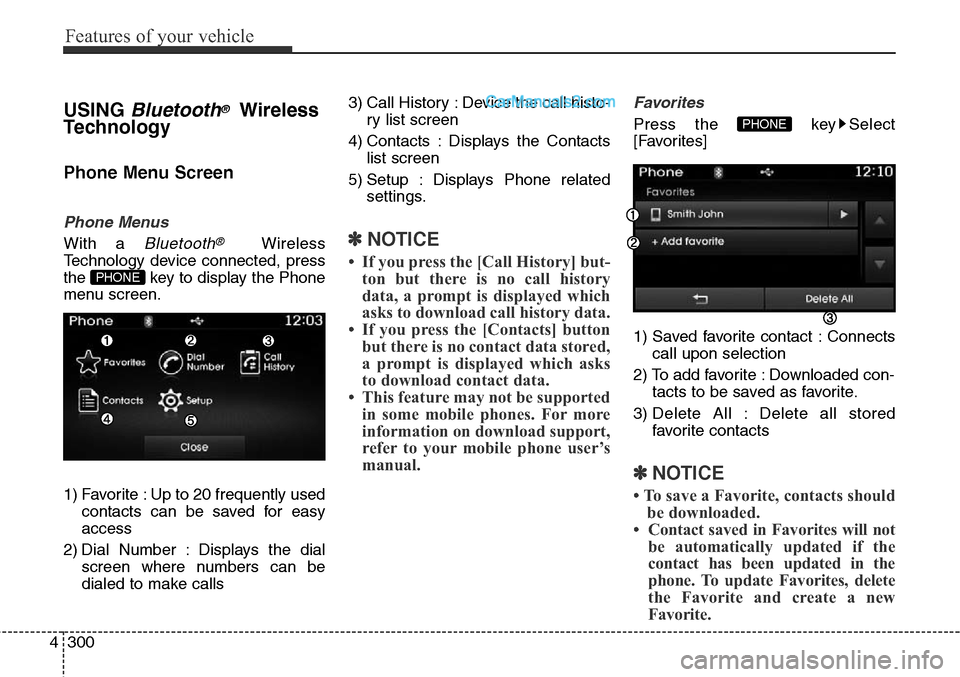
Phone Menus
With a Bluetooth®Wireless
Technology device connected, press
the key to display the Phone
menu screen.
1) Favorite : Up to 20 frequently used
contacts can be saved for easy
access
2) Dial Number : Displays the dial
screen where numbers can be
dialed to make calls3) Call History : Device the call histo-
ry list screen
4) Contacts : Displays the Contacts
list screen
5) Setup : Displays Phone related
settings.✽NOTICE
• If you press the [Call History] but-
ton but there is no call history
data, a prompt is displayed which
asks to download call history data.
• If you press the [Contacts] button
but there is no contact data stored,
a prompt is displayed which asks
to download contact data.
• This feature may not be supported
in some mobile phones. For more
information on download support,
refer to your mobile phone user’s
manual.
Favorites
Press the key Select
[Favorites]
1) Saved favorite contact : Connects
call upon selection
2) To add favorite : Downloaded con-
tacts to be saved as favorite.
3) Delete All : Delete all stored
favorite contacts
✽NOTICE
• To save a Favorite, contacts should
be downloaded.
• Contact saved in Favorites will not
be automatically updated if the
contact has been updated in the
phone. To update Favorites, delete
the Favorite and create a new
Favorite.
PHONE
PHONE
Page 413 of 785
Features of your vehicle
320 4
USING Bluetooth®Wireless
Technology
Phone Menu Screen
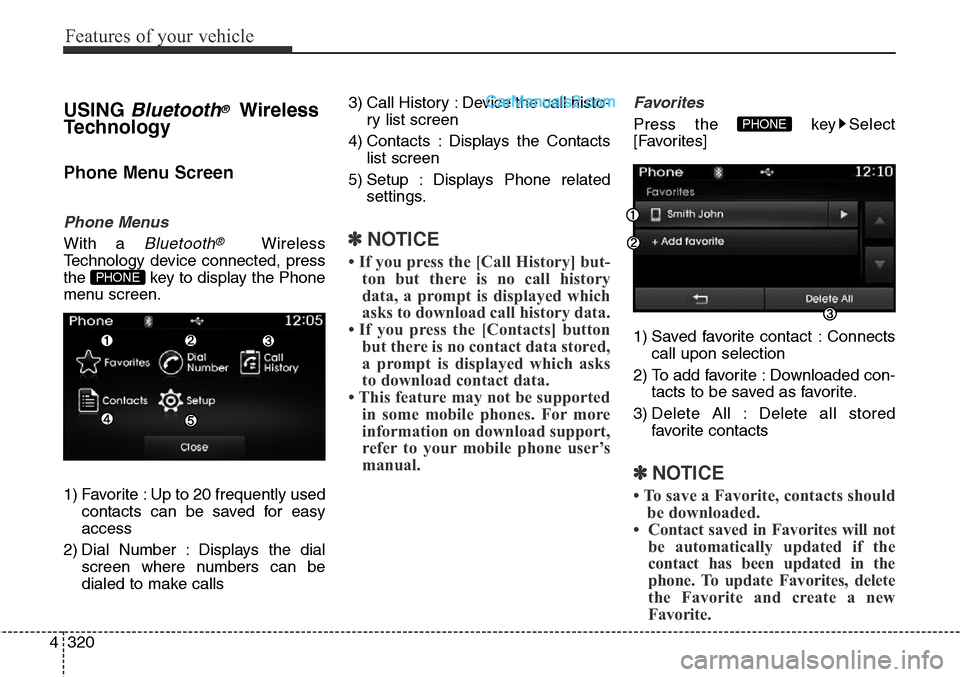
Phone Menus
With a Bluetooth®Wireless
Technology device connected, press
the key to display the Phone
menu screen.
1) Favorite : Up to 20 frequently used
contacts can be saved for easy
access
2) Dial Number : Displays the dial
screen where numbers can be
dialed to make calls3) Call History : Device the call histo-
ry list screen
4) Contacts : Displays the Contacts
list screen
5) Setup : Displays Phone related
settings.✽NOTICE
• If you press the [Call History] but-
ton but there is no call history
data, a prompt is displayed which
asks to download call history data.
• If you press the [Contacts] button
but there is no contact data stored,
a prompt is displayed which asks
to download contact data.
• This feature may not be supported
in some mobile phones. For more
information on download support,
refer to your mobile phone user’s
manual.
Favorites
Press the key Select
[Favorites]
1) Saved favorite contact : Connects
call upon selection
2) To add favorite : Downloaded con-
tacts to be saved as favorite.
3) Delete All : Delete all stored
favorite contacts
✽NOTICE
• To save a Favorite, contacts should
be downloaded.
• Contact saved in Favorites will not
be automatically updated if the
contact has been updated in the
phone. To update Favorites, delete
the Favorite and create a new
Favorite.
PHONE
PHONE
Page 458 of 785
4365
Features of your vehicle
Calendar Settings
This menu is used to set the date
(MM/DD/YYYY).
Select [Calendar Settings]] Set
through
TUNE knob Press
TUNE knob
❈Adjust the number currently in
focus to make the settings and
press the tune knob to move to the
next setting. (Set in order of
Year/Month/Day)
Time Format
This function is used to set the 12/24
hour time format of the audio system.
Select [Time Format] Set 12Hr /
24Hr through
TUNEknob
Clock Display when Power is
OFF
Select [Clock Disp.(Pwr Off)]Set
/ through TUNE knob
• : Displays time/date on screen
• : Turn off.
Off
On
OffOn
Page 481 of 785
Features of your vehicle
388 4
✽NOTICE
• When an incoming call pop-up is
displayed, most Audio and SETUP
mode features are disabled. Only
the call volume will operate.
• The telephone number may not be
properly displayed in some mobile
phones.
• When a call is answered with the
mobile phone, the call mode will
automatically revert to Private
mode.
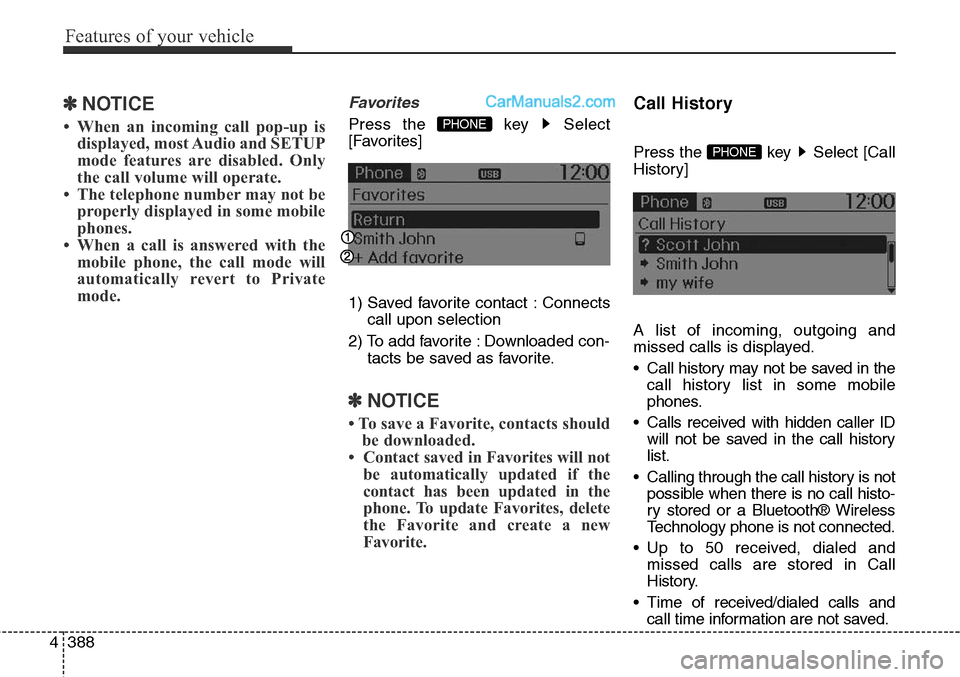
Favorites
Press the key Select
[Favorites]
1) Saved favorite contact : Connects
call upon selection
2) To add favorite : Downloaded con-
tacts be saved as favorite.
✽NOTICE
• To save a Favorite, contacts should
be downloaded.
• Contact saved in Favorites will not
be automatically updated if the
contact has been updated in the
phone. To update Favorites, delete
the Favorite and create a new
Favorite.
Call History
Press the key Select [Call
History]
A list of incoming, outgoing and
missed calls is displayed.
• Call history may not be saved in the
call history list in some mobile
phones.
• Calls received with hidden caller ID
will not be saved in the call history
list.
• Calling through the call history is not
possible when there is no call histo-
ry stored or a Bluetooth® Wireless
Technology phone is not connected.
• Up to 50 received, dialed and
missed calls are stored in Call
History.
• Time of received/dialed calls and
call time information are not saved.PHONE
PHONE
![Hyundai Santa Fe Sport 2015 Owners Manual Features of your vehicle
192 4
Calendar Settings
This menu is used to set the date
(MM/DD/YYYY).
Select [Calendar Settings]] Set
through
TUNE knob Press
TUNE knob
❈ Adjust the number currently in](/manual-img/35/16759/w960_16759-284.png "Hyundai Santa Fe Sport 2015 Owners Manual Features of your vehicle
192 4
Calendar Settings
This menu is used to set the date
(MM/DD/YYYY).
Select [Calendar Settings]] Set
through
TUNE knob Press
TUNE knob
❈ Adjust the number currently in")
![Hyundai Santa Fe Sport 2015 Owners Manual 4365
Features of your vehicle
Calendar Settings
This menu is used to set the date
(MM/DD/YYYY).
Select [Calendar Settings]] Set
through
TUNE knob Press
TUNE knob
❈Adjust the number currently in
fo](/manual-img/35/16759/w960_16759-457.png "Hyundai Santa Fe Sport 2015 Owners Manual 4365
Features of your vehicle
Calendar Settings
This menu is used to set the date
(MM/DD/YYYY).
Select [Calendar Settings]] Set
through
TUNE knob Press
TUNE knob
❈Adjust the number currently in
fo")