Page 219 of 550
Features of your vehicle134
4STORAGE COMPARTMENTThese compartments can be used to
store small items required by the driver
or passengers.
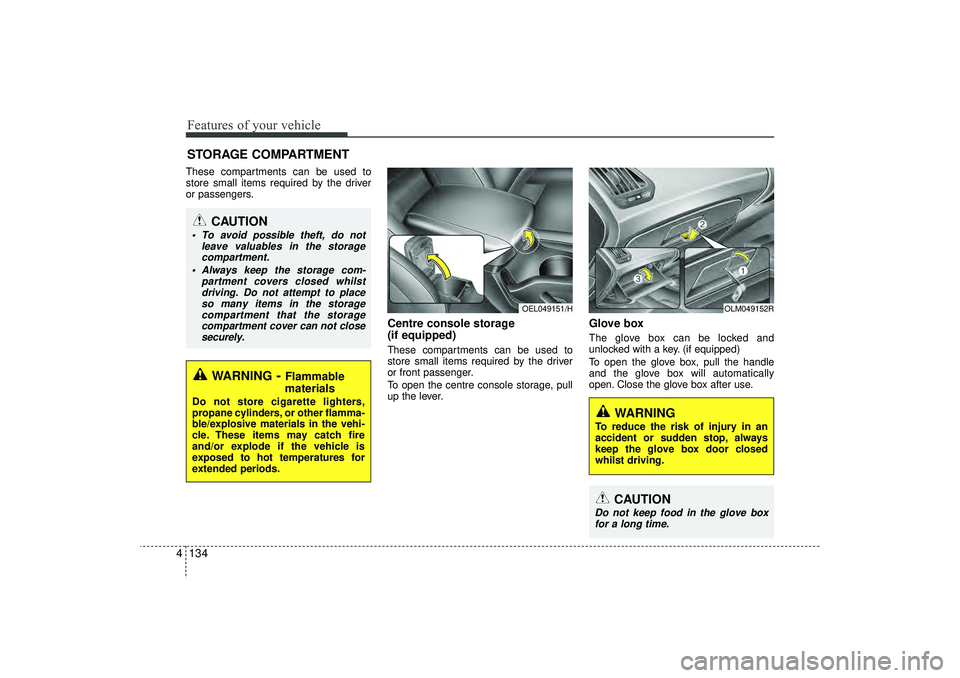
Centre console storage
(if equipped)These compartments can be used to
store small items required by the driver
or front passenger.
To open the centre console storage, pull
up the lever.
Glove box The glove box can be locked and
unlocked with a key. (if equipped)
To open the glove box, pull the handle
and the glove box will automatically
open. Close the glove box after use.
OEL049151/H
OLM049152R
WARNING
To reduce the risk of injury in an
accident or sudden stop, always
keep the glove box door closed
whilst driving.
CAUTION
Do not keep food in the glove box
for a long time.
WARNING
- Flammable
materials
Do not store cigarette lighters,
propane cylinders, or other flamma-
ble/explosive materials in the vehi-
cle. These items may catch fire
and/or explode if the vehicle is
exposed to hot temperatures for
extended periods.
CAUTION
To avoid possible theft, do not
leave valuables in the storagecompartment.
Always keep the storage com- partment covers closed whilstdriving. Do not attempt to placeso many items in the storage compartment that the storagecompartment cover can not closesecurely.
EL(FL) UK 4A.QXP 2/9/2015 9:09 PM Page 134
Page 220 of 550
4 135
Features of your vehicle
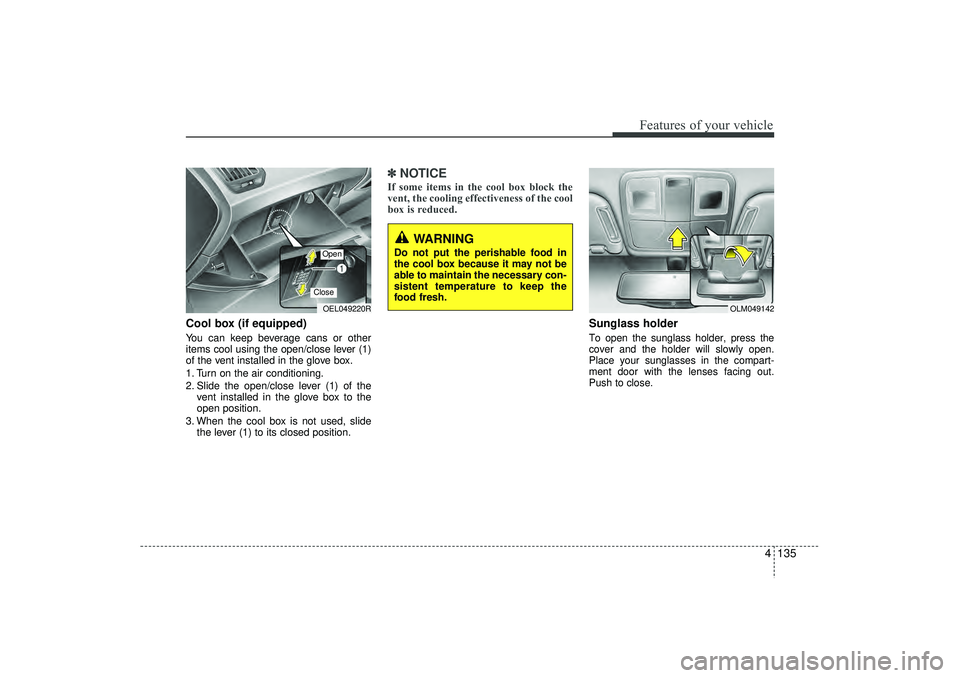
Cool box (if equipped)You can keep beverage cans or other
items cool using the open/close lever (1)
of the vent installed in the glove box.
1. Turn on the air conditioning.
2. Slide the open/close lever (1) of thevent installed in the glove box to the
open position.
3. When the cool box is not used, slide the lever (1) to its closed position.
✽ ✽NOTICEIf some items in the cool box block the
vent, the cooling effectiveness of the cool
box is reduced.
Sunglass holder To open the sunglass holder, press the
cover and the holder will slowly open.
Place your sunglasses in the compart-
ment door with the lenses facing out.
Push to close.
OEL049220ROpenClose
OLM049142
WARNING
Do not put the perishable food in
the cool box because it may not be
able to maintain the necessary con-
sistent temperature to keep the
food fresh.
EL(FL) UK 4A.QXP 2/9/2015 9:09 PM Page 135
Page 221 of 550
Features of your vehicle136
4
WARNING
Do not keep objects except sun-
glasses inside the sunglass hold-
er. Such objects can be thrown
from the holder in the event of a
sudden stop or an accident, pos-
sibly injuring the passengers in
the vehicle.
Do not open the sunglasses hold- er whilst the vehicle is moving.
The rear view mirror of the vehi-
cle can be blocked by an open
sunglass holder.
Do not put the glasses forcibly into a sunglass holder to prevent
breakage or deformation of
glasses. It may cause personal
injury if you try to open it forcibly
when the glasses are jammed in
holder.
EL(FL) UK 4A.QXP 2/9/2015 9:09 PM Page 136
Page 225 of 550
Features of your vehicle140
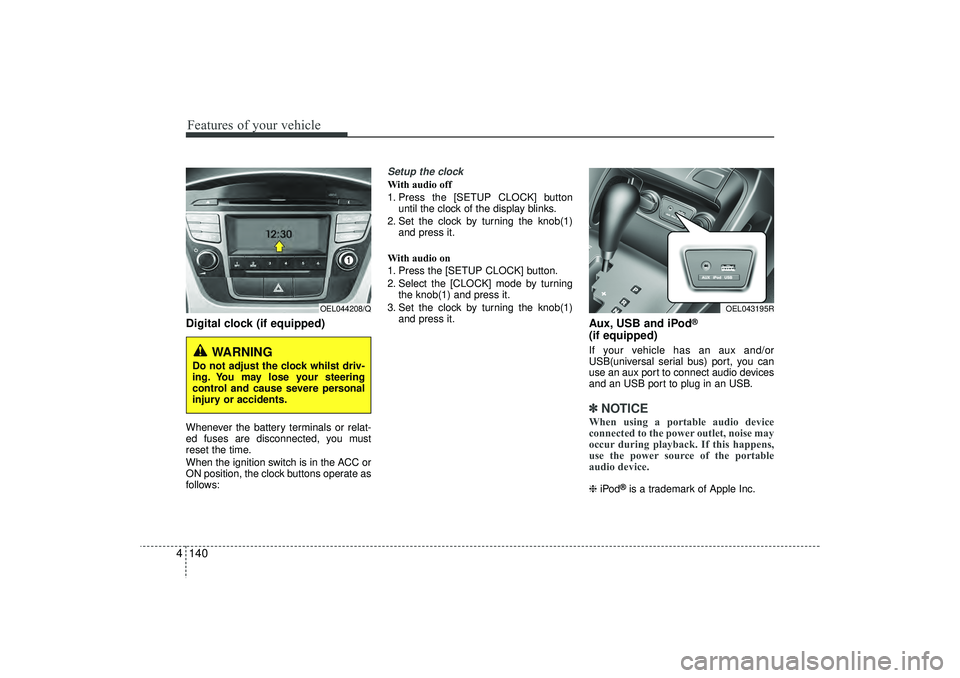
4Digital clock (if equipped)Whenever the battery terminals or relat-
ed fuses are disconnected, you must
reset the time.
When the ignition switch is in the ACC or
ON position, the clock buttons operate as
follows:
Setup the clockWith audio off
1. Press the [SETUP CLOCK] button
until the clock of the display blinks.
2. Set the clock by turning the knob(1) and press it.
With audio on
1. Press the [SETUP CLOCK] button.
2. Select the [CLOCK] mode by turning the knob(1) and press it.
3. Set the clock by turning the knob(1) and press it.
Aux, USB and iPod
®
(if equipped)If your vehicle has an aux and/or
USB(universal serial bus) port, you can
use an aux port to connect audio devices
and an USB port to plug in an USB.✽ ✽NOTICEWhen using a portable audio device
connected to the power outlet, noise may
occur during playback. If this happens,
use the power source of the portable
audio device. ❈ iPod
®is a trademark of Apple Inc.
WARNING
Do not adjust the clock whilst driv-
ing. You may lose your steering
control and cause severe personal
injury or accidents.
OEL044208/Q
OEL043195R
EL(FL) UK 4A.QXP 2/9/2015 9:09 PM Page 140
Page 230 of 550
4 145
Features of your vehicle
✽
✽NOTICE• If you install an aftermarket HID
head lamp, your vehicle’s audio and
electronic device may malfunction.
• Prevent chemicals such as perfume, cosmetic oil, sun cream, hand cleaner,
and air freshener from contacting the
interior parts because they may cause
damage or discoloration.
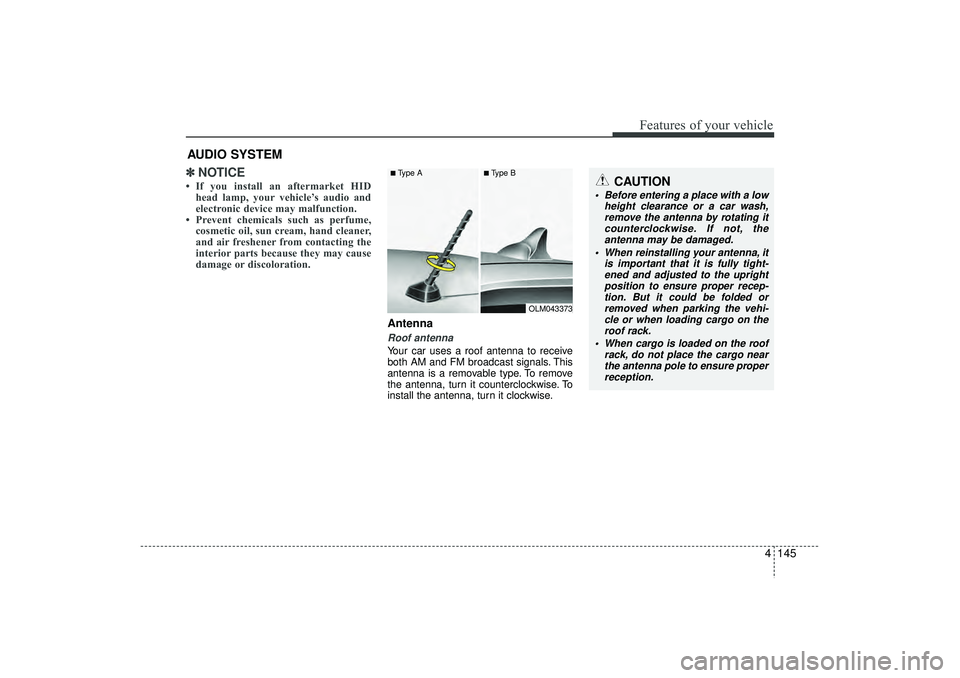
AntennaRoof antenna Your car uses a roof antenna to receive
both AM and FM broadcast signals. This
antenna is a removable type. To remove
the antenna, turn it counterclockwise. To
install the antenna, turn it clockwise.
AUDIO SYSTEM
CAUTION
• Before entering a place with a low
height clearance or a car wash,remove the antenna by rotating itcounterclockwise. If not, theantenna may be damaged.
When reinstalling your antenna, it is important that it is fully tight-ened and adjusted to the upright position to ensure proper recep-tion. But it could be folded or removed when parking the vehi-cle or when loading cargo on the roof rack.
When cargo is loaded on the roof rack, do not place the cargo nearthe antenna pole to ensure properreception.
■Type A
■Type B
OLM043373
EL(FL) UK 4B AUDIO.QXP 3/13/2015 4:18 PM Page 145
Page 233 of 550
Features of your vehicle148
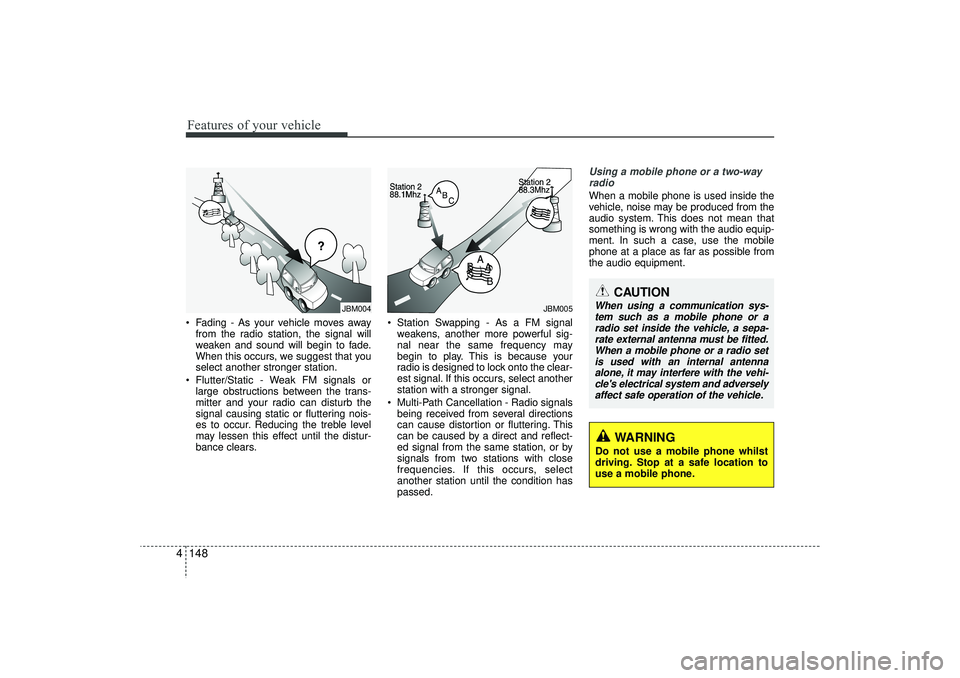
4 Fading - As your vehicle moves away
from the radio station, the signal will
weaken and sound will begin to fade.
When this occurs, we suggest that you
select another stronger station.
Flutter/Static - Weak FM signals or large obstructions between the trans-
mitter and your radio can disturb the
signal causing static or fluttering nois-
es to occur. Reducing the treble level
may lessen this effect until the distur-
bance clears. Station Swapping - As a FM signal
weakens, another more powerful sig-
nal near the same frequency may
begin to play. This is because your
radio is designed to lock onto the clear-
est signal. If this occurs, select another
station with a stronger signal.
Multi-Path Cancellation - Radio signals being received from several directions
can cause distortion or fluttering. This
can be caused by a direct and reflect-
ed signal from the same station, or by
signals from two stations with close
frequencies. If this occurs, select
another station until the condition has
passed.
Using a mobile phone or a two-wayradio When a mobile phone is used inside the
vehicle, noise may be produced from the
audio system. This does not mean that
something is wrong with the audio equip-
ment. In such a case, use the mobile
phone at a place as far as possible from
the audio equipment.
JBM004
JBM005
CAUTION
When using a communication sys-tem such as a mobile phone or a radio set inside the vehicle, a sepa-rate external antenna must be fitted.When a mobile phone or a radio set is used with an internal antennaalone, it may interfere with the vehi- cle's electrical system and adverselyaffect safe operation of the vehicle.
WARNING
Do not use a mobile phone whilst
driving. Stop at a safe location to
use a mobile phone.
EL(FL) UK 4B AUDIO.QXP 3/13/2015 4:19 PM Page 148
Page 242 of 550
4 157
Features of your vehicle
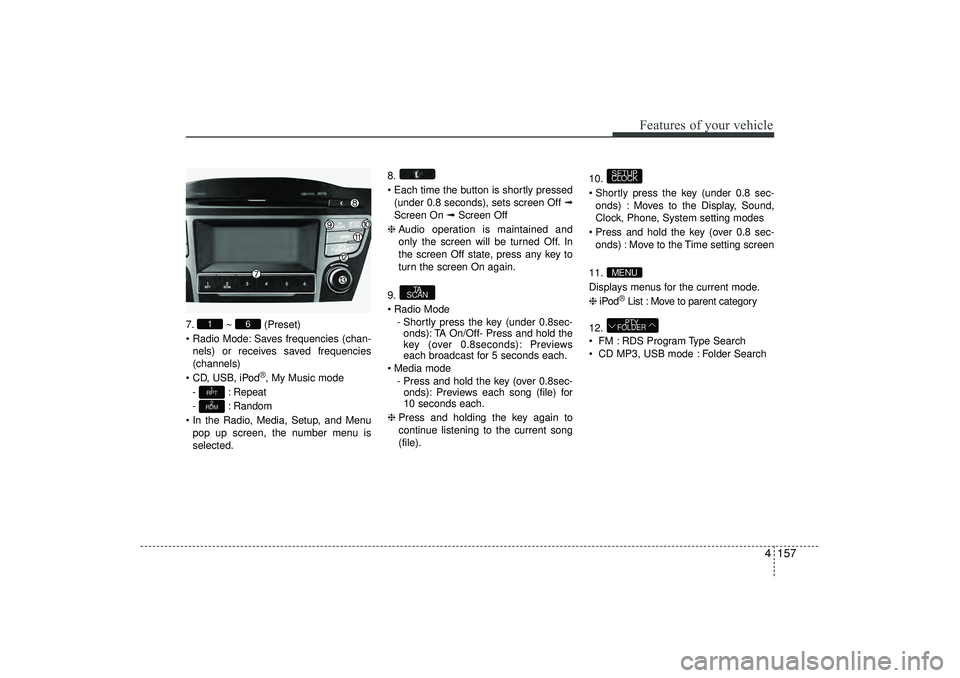
7.~ (Preset)
Radio Mode: Saves frequencies (chan- nels) or receives saved frequencies
(channels)
CD, USB, iPod
®, My Music mode
- : Repeat
- : Random
In the Radio, Media, Setup, and Menu pop up screen, the number menu is
selected. 8.
Each time the button is shortly pressed
(under 0.8 seconds), sets screen Off ➟
Screen On ➟ Screen Off
❈ Audio operation is maintained and
only the screen will be turned Off. In
the screen Off state, press any key to
turn the screen On again.
9.
Radio Mode - Shortly press the key (under 0.8sec-onds): TA On/Off- Press and hold the
key (over 0.8seconds): Previews
each broadcast for 5 seconds each.
Media mode - Press and hold the key (over 0.8sec-onds): Previews each song (file) for
10 seconds each.
❈ Press and holding the key again to
continue listening to the current song
(file). 10.
Shortly press the key (under 0.8 sec-
onds) : Moves to the Display, Sound,
Clock, Phone, System setting modes
Press and hold the key (over 0.8 sec- onds) : Move to the Time setting screen
11.
Displays menus for the current mode.
❈ iPod
®List : Move to parent category
12.
FM : RDS Program Type Search
CD MP3, USB mode : Folder SearchPTY
FOLDER
MENUSETUP
CLOCK
TA
SCAN
2
RDM1
RPT
6
1
EL(FL) UK 4B AUDIO.QXP 3/13/2015 4:19 PM Page 157
Page 244 of 550
4 159
Features of your vehicle
SETUP - AC100ELEE, AC110ELEE
Display SettingsPress the key Select [Display]
through TUNE knob or key
Select menu through TUNE knob
Mode Pop up[Mode Pop up] Changes . selec-
tion mode
During On state, press the orkey to display the mode
change pop up screen.
When the pop up screen is displayed, use the TUNE knob or keys
~ to select the desired mode.Scroll text [Scroll text] Set / : Maintains scroll
: Scrolls only one (1) time.
Song InfoWhen playing an MP3 file, select the
desired display info from ‘Folder/File’ or
‘Album/Artist/Song’.
Sound SettingsPress the key Select [Sound]
through TUNE knob or key
Select menu through TUNE knob
2
RDM
SETUP
CLOCK
OffOn
Off
On
6
1
MEDIA
RADIOOn
1
RPT
SETUP
CLOCK
EL(FL) UK 4B AUDIO.QXP 3/13/2015 4:19 PM Page 159
![HYUNDAI IX35 2015 Owners Manual 4 159
Features of your vehicle
SETUP - AC100ELEE, AC110ELEE
Display SettingsPress the key Select [Display]
through TUNE knob or key
Select menu through TUNE knob
Mode Pop up[Mode Pop up] Changes](/manual-img/35/56236/w960_56236-243.png "HYUNDAI IX35 2015 Owners Manual 4 159
Features of your vehicle
SETUP - AC100ELEE, AC110ELEE
Display SettingsPress the key Select [Display]
through TUNE knob or key
Select menu through TUNE knob
Mode Pop up[Mode Pop up] Changes")