2015 HYUNDAI IX35 air condition
[x] Cancel search: air conditionPage 217 of 550
Features of your vehicle132
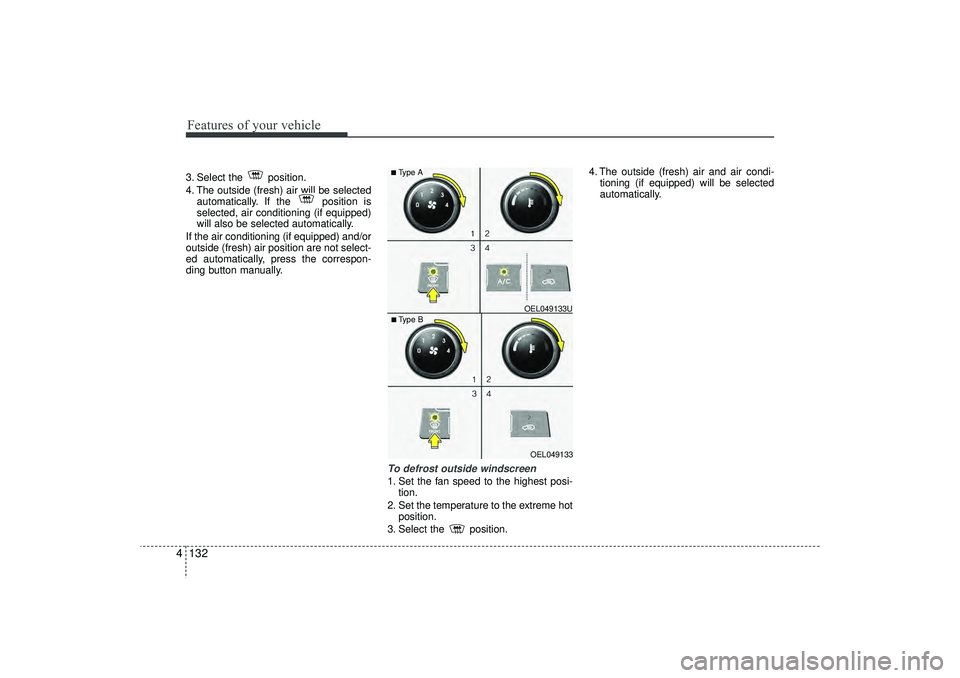
43. Select the position.
4. The outside (fresh) air will be selected
automatically. If the position is
selected, air conditioning (if equipped)
will also be selected automatically.
If the air conditioning (if equipped) and/or
outside (fresh) air position are not select-
ed automatically, press the correspon-
ding button manually.
To defrost outside windscreen 1. Set the fan speed to the highest posi- tion.
2. Set the temperature to the extreme hot position.
3. Select the position. 4. The outside (fresh) air and air condi-
tioning (if equipped) will be selected
automatically.
OEL049133
■Type B OEL049133U■Type A
EL(FL) UK 4A.QXP 2/9/2015 9:08 PM Page 132
Page 218 of 550
4 133
Features of your vehicle
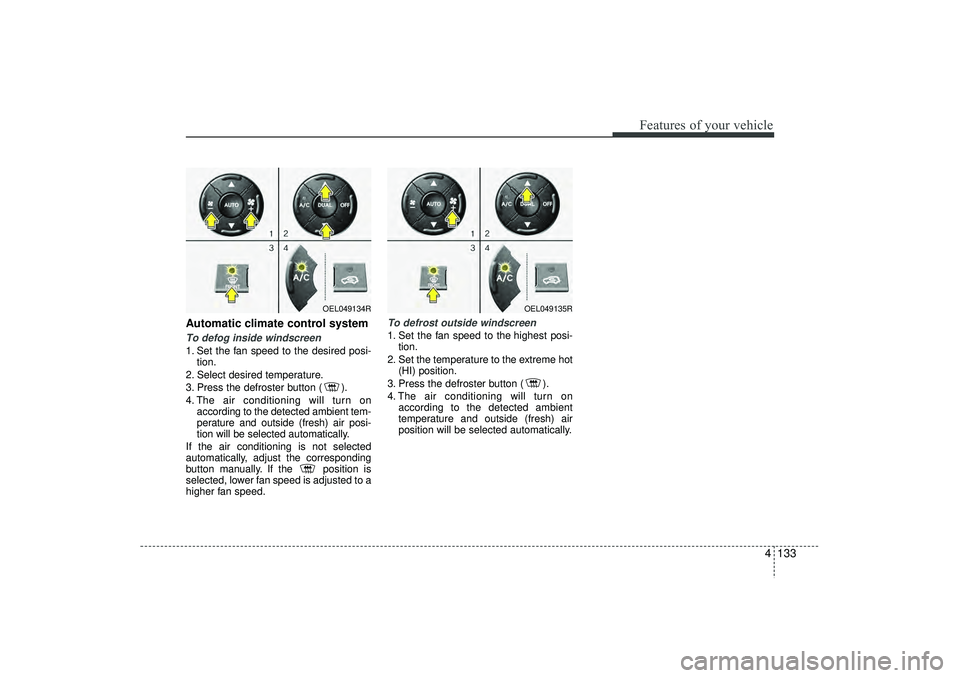
Automatic climate control systemTo defog inside windscreen 1. Set the fan speed to the desired posi-tion.
2. Select desired temperature.
3. Press the defroster button ( ).
4. The air conditioning will turn on according to the detected ambient tem-
perature and outside (fresh) air posi-
tion will be selected automatically.
If the air conditioning is not selected
automatically, adjust the corresponding
button manually. If the position is
selected, lower fan speed is adjusted to a
higher fan speed.
To defrost outside windscreen 1. Set the fan speed to the highest posi- tion.
2. Set the temperature to the extreme hot (HI) position.
3. Press the defroster button ( ).
4. The air conditioning will turn on according to the detected ambient
temperature and outside (fresh) air
position will be selected automatically.
OEL049134R
OEL049135R
EL(FL) UK 4A.QXP 2/9/2015 9:08 PM Page 133
Page 220 of 550
4 135
Features of your vehicle
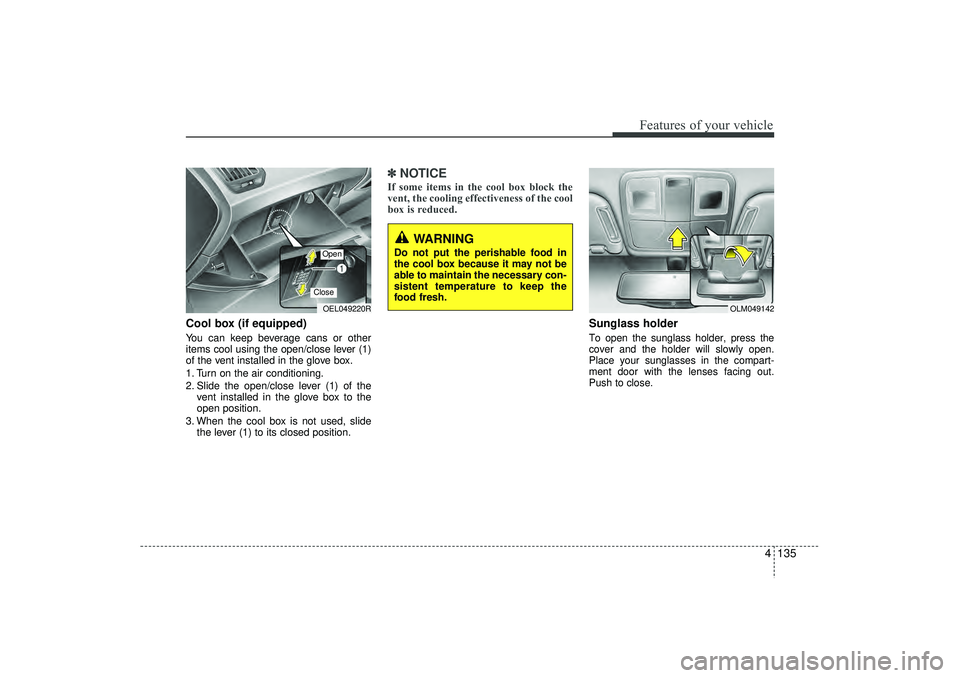
Cool box (if equipped)You can keep beverage cans or other
items cool using the open/close lever (1)
of the vent installed in the glove box.
1. Turn on the air conditioning.
2. Slide the open/close lever (1) of thevent installed in the glove box to the
open position.
3. When the cool box is not used, slide the lever (1) to its closed position.
✽ ✽NOTICEIf some items in the cool box block the
vent, the cooling effectiveness of the cool
box is reduced.
Sunglass holder To open the sunglass holder, press the
cover and the holder will slowly open.
Place your sunglasses in the compart-
ment door with the lenses facing out.
Push to close.
OEL049220ROpenClose
OLM049142
WARNING
Do not put the perishable food in
the cool box because it may not be
able to maintain the necessary con-
sistent temperature to keep the
food fresh.
EL(FL) UK 4A.QXP 2/9/2015 9:09 PM Page 135
Page 224 of 550
4 139
Features of your vehicle
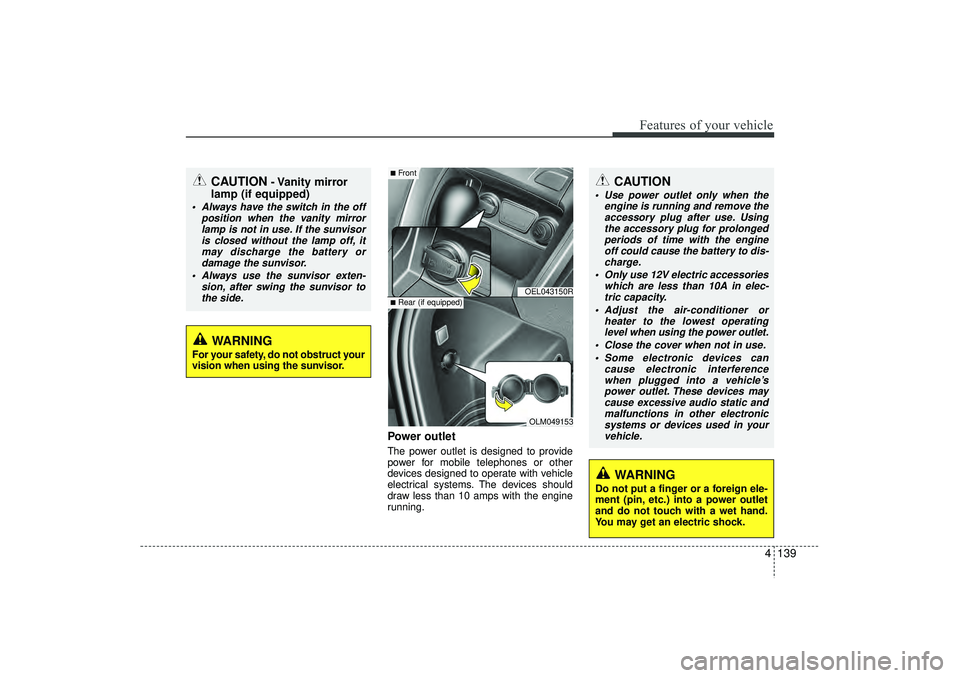
Power outletThe power outlet is designed to provide
power for mobile telephones or other
devices designed to operate with vehicle
electrical systems. The devices should
draw less than 10 amps with the engine
running.
CAUTION
- Vanity mirror
lamp (if equipped)
Always have the switch in the off
position when the vanity mirrorlamp is not in use. If the sunvisoris closed without the lamp off, itmay discharge the battery or damage the sunvisor.
Always use the sunvisor exten- sion, after swing the sunvisor tothe side.
CAUTION
Use power outlet only when the engine is running and remove theaccessory plug after use. Using the accessory plug for prolongedperiods of time with the engineoff could cause the battery to dis- charge.
Only use 12V electric accessories which are less than 10A in elec-tric capacity.
Adjust the air-conditioner or heater to the lowest operatinglevel when using the power outlet.
Close the cover when not in use. Some electronic devices can cause electronic interferencewhen plugged into a vehicle’s power outlet. These devices maycause excessive audio static and malfunctions in other electronicsystems or devices used in yourvehicle.
WARNING
Do not put a finger or a foreign ele-
ment (pin, etc.) into a power outlet
and do not touch with a wet hand.
You may get an electric shock.
WARNING
For your safety, do not obstruct your
vision when using the sunvisor.
OEL043150ROLM049153
■Front■Rear (if equipped)
EL(FL) UK 4A.QXP 2/9/2015 9:09 PM Page 139
Page 266 of 550
4 181
Features of your vehicle
✽
✽NOTICE -
USING THE
Bluetooth
®Wireless Technology
MOBILE PHONE
• Do not use a mobile phone or perform Bluetooth® Wireless Technology set-
tings (e.g. pairing a phone) whilst
driving.
• Some Bluetooth
®Wireless Technology
-enabled phones may not be recog-
nized by the system or fully compati-
ble with the system.
• Before using Bluetooth
®
Wireless
Technology related features of the
audio system, refer your phone’s
User’s Manual for phone-side
Bluetooth
®Wireless Technology oper-
ations.
• The phone must be paired to the audio system to use Bluetooth
®Wireless
Technology related features.
• You will not be able to use the hands- free feature when your phone (in the
car) is outside of the mobile service
area (e.g. in a tunnel, in a under-
ground, in a mountainous area, etc.). (Continued)(Continued)
• If the mobile phone signal is poor or
the vehicles interior noise is too loud,
it may be difficult to hear the other
person’s voice during a call.
• Do not place the phone near or inside metallic objects, otherwise communi-
cations with Bluetooth
®
Wireless
Technology system or mobile service
stations can be disturbed.
• Whilst a phone is connected through Bluetooth
®Wireless Technology your
phone may discharge quicker than
usual for additional Bluetooth
®
Wireless Technology-related opera-
tions.
• Some mobile phones or other devices may cause interference noise or mal-
function to audio system. In this case,
store the device in a different location
may resolve the condition.
• Phone contact names should be saved in English or they may not be dis-
played correctly. (Continued)(Continued)
• If Priority is set upon vehicle igni-
tion(IGN/ACC ON), the Bluetooth
®
Wireless Technology phone will be
automatically connected.
Even if you are outside, the Bluetooth
®
Wireless Technology phone will be
automatically connected once you are
in the vicinity of the vehicle.
If you do not want automatic
Bluetooth
®Wireless Technology con-
nection, turn the Bluetooth
®Wireless
Technology feature off.
• The hands-free call volume and quali- ty may differ depending on the mobile
phone type.
• Bluetooth
®Wireless Technology fea-
tures can be used only when the
mobile phone has been paired and
connected with the device. For more
information on pairing and connect-
ing Bluetooth
®Wireless Technology
enabled mobile phones, refer to the
“Phone Setup” section. (Continued)
EL(FL) UK 4B AUDIO.QXP 3/13/2015 4:19 PM Page 181
Page 351 of 550

53
Driving your vehicle
WARNING
- ENGINE EXHAUST CAN BE DANGEROUS!
Engine exhaust gases are potentially lethal. If at any time engine exhaust gas is detected within the passenger compartment,
move the vehicle to an open area and open all windows.
• Never inhale exhaust gas.
Exhaust gases contain Carbon Monoxide which is colourless and odourless. Carbon Monoxide is poisonous and can cause
unconsciousness and death by asphyxiation.
Exhaust System Maintenance.
Ensure that the exhaust system is maintained in good condition and is free from excessive corrosion and damage which may
result in leakage. If the vehicle is driven over an object which strikes the exhaust system, ensure that the exhaust system is
inspected at the first available opportunity to ensure that no leakage exists.
Confined Areas.
Do not run the engine in confined spaces, allowing the engine to idle in a garage, even when the doors are open is dangerous
practice. Only start the engine immediately prior to moving the vehicle out of the garage.
Prolonged Idling.
If it is necessary to allow the vehicle to idle for prolonged periods, ensure that the heating system air intake control is set to the
"Fresh" position, the blower is set to high speed operation and that the vehicle is standing in an open area.
Load Carrying.
If it is necessary to carry long objects which do not permit the tailgate door to be fully closed, the side windows must remain
closed and the heating air intake control set to the "Fresh" position with the blower running at the highest speed setting.
To ensure correct operation of the heater system, the air intake grilles at the base of the windscreen must not be obstructed by
snow leaves etc.
EL(FL) UK 5.QXP 12/16/2014 8:08 PM Page 3
Page 364 of 550
Driving your vehicle16
5✽
✽
NOTICE • You must reach a speed of at least 10
km/h since last idle stop.
• If you unfasten the seat belt or open the driver’s door (engine bonnet) in
auto stop mode, the light on the ISG
OFF button will illuminate and ISG
system is deactivated. If your vehicle
is equipped with a supervision cluster,
the notice will illuminate on the LCD
display.
Turn the ignition switch to the START
position to start the engine manually.
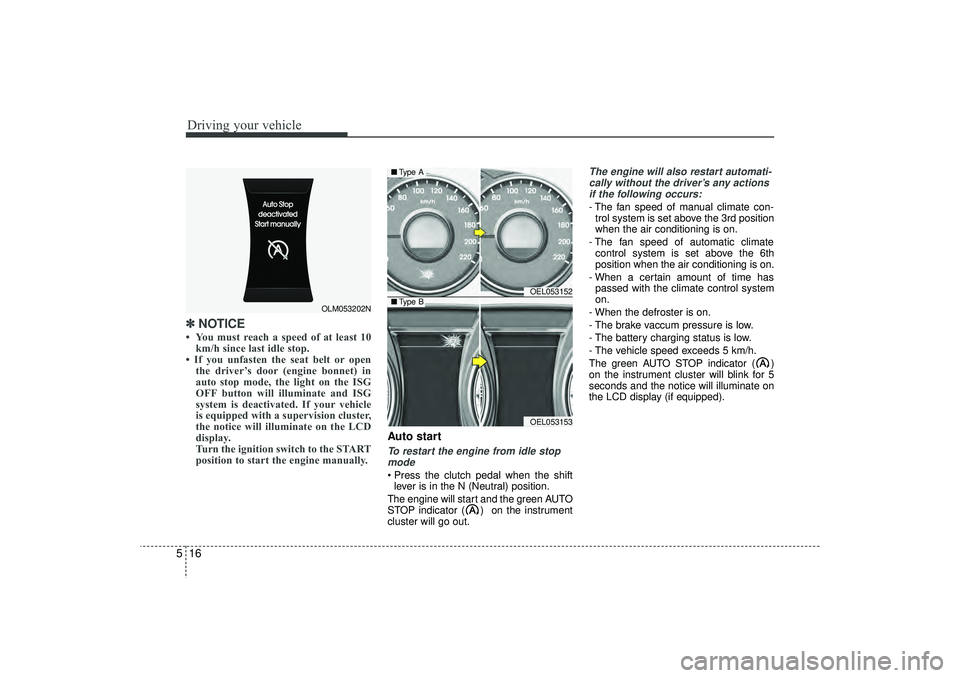
Auto startTo restart the engine from idle stop
mode Press the clutch pedal when the shift lever is in the N (Neutral) position.
The engine will start and the green AUTO
STOP indicator ( ) on the instrument
cluster will go out.
The engine will also restart automati- cally without the driver’s any actionsif the following occurs:- The fan speed of manual climate con- trol system is set above the 3rd position
when the air conditioning is on.
- The fan speed of automatic climate control system is set above the 6th
position when the air conditioning is on.
- When a certain amount of time has passed with the climate control system
on.
- When the defroster is on.
- The brake vaccum pressure is low.
- The battery charging status is low.
- The vehicle speed exceeds 5 km/h.
The green AUTO STOP indicator ( )
on the instrument cluster will blink for 5
seconds and the notice will illuminate on
the LCD display (if equipped).
OLM053202N
OEL053152OEL053153
■ Type A■Type B
EL(FL) UK 5.QXP 12/16/2014 8:08 PM Page 16
Page 376 of 550
Driving your vehicle28
5Engine power can be delivered to all front
and rear wheels for maximum traction.
4WD is useful when extra traction is
required on road, such as, when driving
on slippery, muddy, wet, or snow-covered
roads. These vehicles are not designed
for challenging off-road use. Occasional
off-road use such as established
unpaved roads and trails are OK. It is
always important when travelling off-
highway that the driver carefully reduces
the speed to a level that does not exceed
the safe operating speed for those condi-
tions. In general, off-road conditions pro-
vide less traction and braking effective-
ness than normal road conditions. The
driver must be especially alert to avoid
driving on slopes which tilt the vehicle to
either side.
These factors must be carefully consid-
ered when driving off-road. Keeping the
vehicle in contact with the driving surface
and under control in these conditions is
always the driver's responsibility for the
safety of him/herself and his or her pas-
sengers.
Tight corner brake effectTight corner brake effect is a unique
characteristic of four-wheel drive vehicles
caused by the difference in tyre rotation
at the four wheels and the zero-degree
alignment of the front wheels and sus-
pension.
Sharp turns at low speeds should be car-
ried out with caution.
FOUR WHEEL DRIVE (4WD) (IF EQUIPPED)
WARNING
- Off road driving
This vehicle is designed primarily
for on road use although it can oper-
ate effectively off road. However, it
was not designed to drive in chal-
lenging off-road conditions. Driving
in conditions that exceed the vehi-
cle's intended design or the driver's
experience level may result in
severe injury or death.
CAUTION -
4WD
When turning sharply on a paved
road at low speed whilst in four-wheel drive, steering control will be difficult.
WARNING
If the 4WD system warning light
( ) illuminates, this indicates that
there is a malfunction in the 4WD
system.
If this occurs, we recommend that
the system be checked by a
HYUNDAI authorised repairer.
EL(FL) UK 5.QXP 12/16/2014 8:09 PM Page 28