Page 16 of 385
23
Your vehicle at a glance
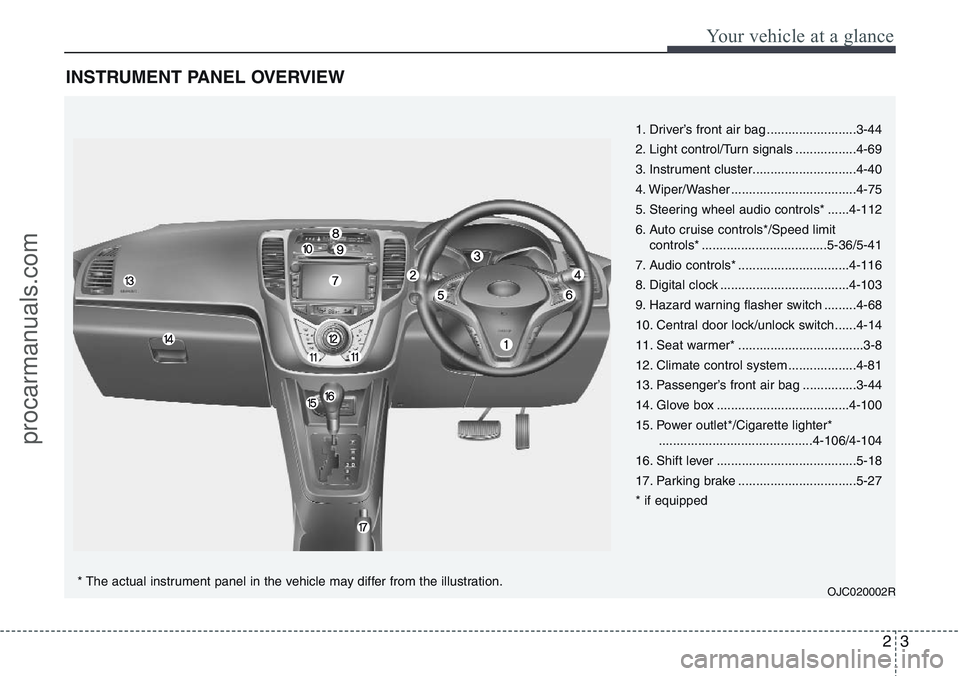
INSTRUMENT PANEL OVERVIEW
1. Driver’s front air bag .........................3-44
2. Light control/Turn signals .................4-69
3. Instrument cluster.............................4-40
4. Wiper/Washer ...................................4-75
5. Steering wheel audio controls* ......4-112
6. Auto cruise controls*/Speed limit
controls* ...................................5-36/5-41
7. Audio controls* ...............................4-116
8. Digital clock ....................................4-103
9. Hazard warning flasher switch .........4-68
10. Central door lock/unlock switch......4-14
11. Seat warmer* ...................................3-8
12. Climate control system ...................4-81
13. Passenger’s front air bag ...............3-44
14. Glove box .....................................4-100
15. Power outlet*/Cigarette lighter*
...........................................4-106/4-104
16. Shift lever .......................................5-18
17. Parking brake .................................5-27
* if equipped
OJC020002R* The actual instrument panel in the vehicle may differ from the illustration.
procarmanuals.com
Page 77 of 385
4
Keys / 4-2
Remote keyless entry / 4-5
Smart key / 4-8
Theft-alarm system / 4-11
Door locks / 4-13
Tailgate / 4-17
Windows / 4-19
Bonnet / 4-24
Fuel filler lid / 4-26
Panorama sunroof / 4-29
Steering wheel / 4-33
Mirrors / 4-35
Instrument cluster / 4-40
Rear parking assist system / 4-63
Rearview camera / 4-67
Hazard warning flasher / 4-68
Lighting / 4-69
Wipers and washers / 4-75
Interior light / 4-79
Defroster / 4-80
Manual climate control system / 4-81
Automatic climate control system / 4-90
Windscreen defrosting and defogging / 4-98
Storage compartment / 4-100
Interior features / 4-103
Audio system / 4-111
Features of your vehicle
procarmanuals.com
Page 151 of 385

475
Features of your vehicle
A : Wiper speed control (front)
· 2 – High wiper speed
· 1 – Low wiper speed
· --- – Intermittent wipe
· AUTO* – Automatic control wipe
· O – Off
· – Single wipe
B : Intermittent control wipe time
adjustment
C : Wash with brief wipes (front)
D : Rear wiper/washer control
· – Continuous wipe
· --- – Intermittent wipe
· O – Off
E : Wash with brief wipes (rear)
* : if equippedWindscreen wipers (front)
Operates as follows when the ignition
switch is turned ON.
: For a single wiping cycle, move the
lever to thisposition and release it.
The wipers will operate continuously if
the lever is held in this position.
O : Wiper is not in operation
--- : Wiper operates intermittently at the
same wiping intervals. Use this mode
in light rain or mist. To vary the speed
setting, turn the speed control knob.
1 : Normal wiper speed
2 : Fast wiper speed
✽NOTICE
If there is heavy accumulation of snow
or ice on the windscreen, defrost the
windscreen for about 10 minutes, or
until the snow and/or ice is removed
before using the windscreen wipers to
ensure proper operation.
WIPERS AND WASHERS
OXM049230L/OAM049048L
■Front
■Rear (if equipped)
procarmanuals.com
Page 152 of 385
Features of your vehicle
76 4
AUTO (Automatic) control
(if equipped)
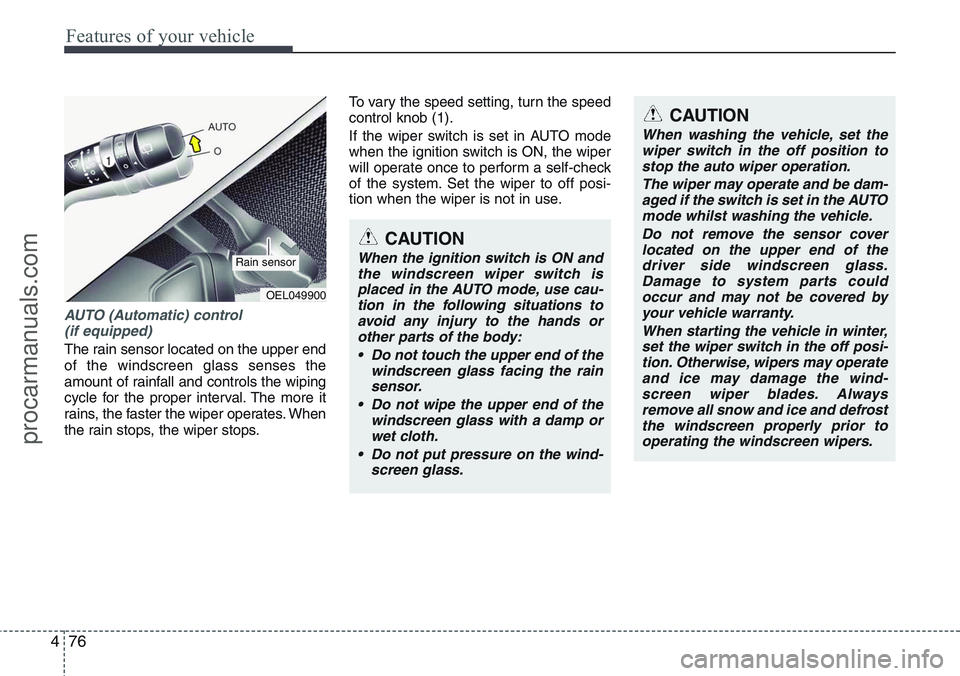
The rain sensor located on the upper end
of the windscreen glass senses the
amount of rainfall and controls the wiping
cycle for the proper interval. The more it
rains, the faster the wiper operates. When
the rain stops, the wiper stops.To vary the speed setting, turn the speed
control knob (1).
If the wiper switch is set in AUTO mode
when the ignition switch is ON, the wiper
will operate once to perform a self-check
of the system. Set the wiper to off posi-
tion when the wiper is not in use.
CAUTION
When the ignition switch is ON and
the windscreen wiper switch is
placed in the AUTO mode, use cau-
tion in the following situations to
avoid any injury to the hands or
other parts of the body:
• Do not touch the upper end of the
windscreen glass facing the rain
sensor.
• Do not wipe the upper end of the
windscreen glass with a damp or
wet cloth.
• Do not put pressure on the wind-
screen glass.
OEL049900
Rain sensor
CAUTION
When washing the vehicle, set the
wiper switch in the off position to
stop the auto wiper operation.
The wiper may operate and be dam-
aged if the switch is set in the AUTO
mode whilst washing the vehicle.
Do not remove the sensor cover
located on the upper end of the
driver side windscreen glass.
Damage to system parts could
occur and may not be covered by
your vehicle warranty.
When starting the vehicle in winter,
set the wiper switch in the off posi-
tion. Otherwise, wipers may operate
and ice may damage the wind-
screen wiper blades. Always
remove all snow and ice and defrost
the windscreen properly prior to
operating the windscreen wipers.
procarmanuals.com
Page 153 of 385

477
Features of your vehicle
Windscreen washers (front)
In the O (Off) position, pull the lever gen-
tly toward you to spray washer fluid on
the windscreen and to run the wipers 1-3
cycles.
Use this function when the windscreen is
dirty.
The spray and wiper operation will con-
tinue until you release the lever.
If the washer does not work, check the
washer fluid level. If the fluid level is not
sufficient, you will need to add appropri-
ate non-abrasive windscreen washer
fluid to the washer reservoir.
The reservoir filler neck is located in the
front of the engine compartment on the
driver side.
OXM049048E
WARNING
Do not use the washer in freezing
temperatures without first warming
the windscreen with the defrosters;
the washer solution could freeze on
the windscreen and obscure your
vision.
CAUTION
• To prevent possible damage to
the wipers or windscreen, do not
operate the wipers when the
windscreen is dry.
• To prevent damage to the wiper
blades, do not use petrol,
kerosene, paint thinner, or other
solvents on or near them.
• To prevent damage to the wiper
arms and other components, do
not attempt to move the wipers
manually.
CAUTION
To prevent possible damage to the
washer pump, do not operate the
washer when the fluid reservoir is
empty.
procarmanuals.com
Page 154 of 385
Features of your vehicle
78 4
Rear window wiper and washer
switch
The rear window wiper and washer
switch is located at the end of the wiper
and washer switch lever. Turn the switch
to desired position to operate the rear
wiper and washer.
- Normal wiper operation
--- - Intermittent wipe
O - Wiper is not in operationPush the lever away from you to spray
rear washer fluid and to run the rear
wipers 1~3 cycles. The spray and wiper
operation will continue until you release
the lever.
OXM049103EOXM049125L
procarmanuals.com
Page 266 of 385

Driving your vehicle
48 5
• Adjust your mirrors to reduce the glare
from other driver's headlights.
• Keep your headlights clean and prop-
erly aimed on vehicles not equipped
with the automatic headlight aiming
feature. Dirty or improperly aimed
headlights will make it much more diffi-
cult to see at night.
• Avoid staring directly at the headlights
of oncoming vehicles. You could be
temporarily blinded, and it will take
several seconds for your eyes to read-
just to the darkness.
Driving in the rain
Rain and wet roads can make driving
dangerous, especially if you’re not pre-
pared for the slick pavement. Here are a
few things to consider when driving in the
rain:
• A heavy rainfall will make it harder to
see and will increase the distance
needed to stop your vehicle, so slow
down.
• Keep your windscreen wiping equip-
ment in good shape. Replace your
windscreen wiper blades when they
show signs of streaking or missing
areas on the windscreen.• If your tyres are not in good condition,
making a quick stop on wet pavement
can cause a skid and possibly lead to
an accident. Be sure your tyres are in
good shape.
• Turn on your headlights to make it eas-
ier for others to see you.
• Driving too fast through large puddles
can affect your brakes. If you must go
through puddles, try to drive through
them slowly.
• If you believe you may have gotten
your brakes wet, apply them lightly
whilst driving until normal braking
operation returns.
Driving in flooded areas
Avoid driving through flooded areas
unless you are sure the water is no high-
er than the bottom of the wheel hub.
Drive through any water slowly. Allow
adequate stopping distance because
brake performance may be affected.
After driving through water, dry the
brakes by gently applying them several
times whilst the vehicle is moving slowly.
1JBB3303/H
procarmanuals.com
Page 312 of 385
7
Engine compartment / 7-2
Maintenance services / 7-3
Owner maintenance / 7-5
Scheduled maintenance service / 7-7
Explanation of scheduled maintenance items / 7-8
Engine oil / 7-12
Engine coolant / 7-13
Brake/clutch fluid / 7-16
Automatic transaxle fluid / 7-17
Washer fluid / 7-19
Parking brake / 7-19
Fuel filter / 7-20
Air cleaner / 7-21
Wiper blades / 7-22
Battery / 7-25
Tyres and wheels / 7-28
Fuses / 7-38
Light bulbs / 7-49
Appearance care / 7-57
Emission control system / 7-63
Maintenance
procarmanuals.com


