2015 HYUNDAI IX20 check engine light
[x] Cancel search: check engine lightPage 138 of 385

Features of your vehicle
62 4
Check steering wheel lock
If the steering
wheel does not
lock normally
when the ENGINE
START/STOP but-
ton turns to the
OFF position, the
warning illuminates for 10 seconds on
the LCD display. Also, the warning chime
sounds for 3 seconds and the ENGINE
START/STOP button light blinks for 10
seconds.Press start button with smart key
If you press the
ENGINE START/
STOP button
whilst the warning
“Key is not detect-
ed” illuminates the
warning “Please
press the start button with smart key” illu-
minates for 10 seconds on the LCD dis-
play. Also, the immobiliser indicator blinks
for 10 seconds.Check stop lamp fuse
When the stop
lamp fuse is dis-
connected, the
warning illumi-
nates for 10 sec-
onds on the LCD
display.
Replace the fuse with a new one. If that
is not possible you can start the engine
by pressing the ENGINE START/STOP
button for 10 seconds in ACC.
procarmanuals.com
Page 164 of 385
Features of your vehicle
88 4
• During air conditioning system opera-
tion, you may occasionally notice a
slight change in engine speed as the
air conditioning compressor cycles.
This is a normal system operation
characteristic.
• Use the air conditioning system every
month only for a few minutes to ensure
maximum system performance.
• When using the air conditioning sys-
tem, you may notice clear water drip-
ping (or even puddling) on the ground
under the passenger side of the vehi-
cle. This is a normal system operation
characteristic.
• Operating the air conditioning system
in the recirculated air position provides
maximum cooling, however, continual
operation in this mode may cause the
air inside the vehicle to become stale.
• During cooling operation, you may
occasionally notice a misty air flow
because of rapid cooling and humid air
intake. This is a normal system opera-
tion characteristics.
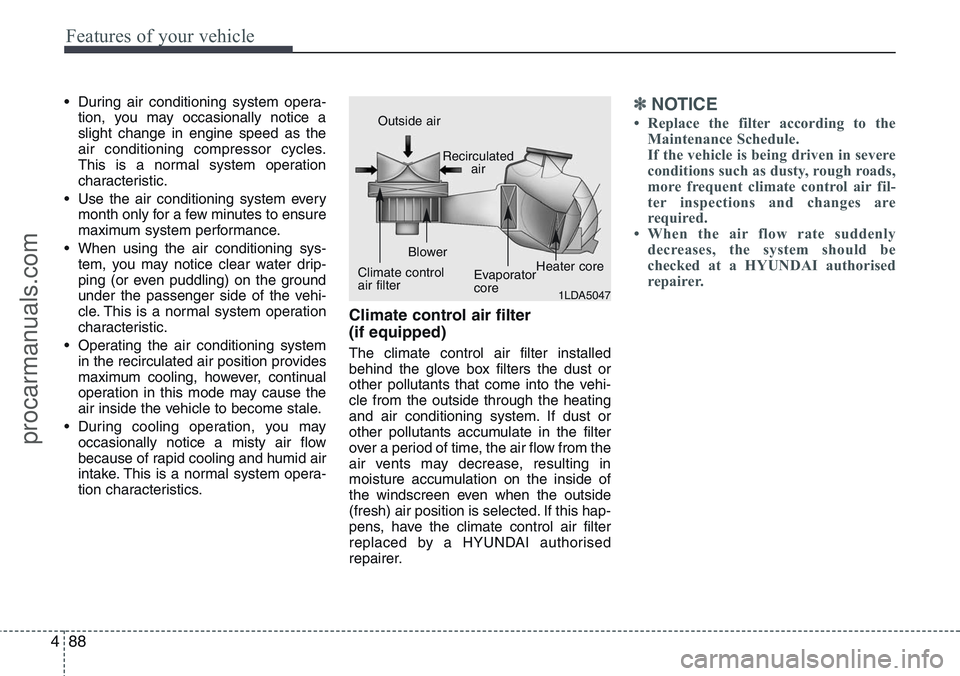
Climate control air filter
(if equipped)
The climate control air filter installed
behind the glove box filters the dust or
other pollutants that come into the vehi-
cle from the outside through the heating
and air conditioning system. If dust or
other pollutants accumulate in the filter
over a period of time, the air flow from the
air vents may decrease, resulting in
moisture accumulation on the inside of
the windscreen even when the outside
(fresh) air position is selected. If this hap-
pens, have the climate control air filter
replaced by a HYUNDAI authorised
repairer.
✽NOTICE
• Replace the filter according to the
Maintenance Schedule.
If the vehicle is being driven in severe
conditions such as dusty, rough roads,
more frequent climate control air fil-
ter inspections and changes are
required.
• When the air flow rate suddenly
decreases, the system should be
checked at a HYUNDAI authorised
repairer.
1LDA5047
Outside air
Recirculated
air
Climate control
air filterBlower
Evaporator
coreHeater core
procarmanuals.com
Page 221 of 385

53
Driving your vehicle
Before entering vehicle
• Be sure that all windows, outside mir-
ror(s), and outside lights are clean.
• Check the condition of the tyres.
• Check under the vehicle for any sign of
leaks.
• Be sure there are no obstacles behind
you if you intend to back up.
Necessary inspections
Fluid levels, such as engine oil, engine
coolant, brake fluid, and washer fluid
should be checked on a regular basis,
with the exact interval depending on the
fluid. Further details are provided in sec-
tion 7, “Maintenance”.
Before starting
• Close and lock all doors.
• Position the seat so that all controls are
easily reached.
• Adjust the inside and outside rearview
mirrors.
• Be sure that all lights work.
• Check all gauges.
• Check the operation of warning lights
when the ignition switch is turned to
the ON position.
• Release the parking brake and make
sure the brake warning light goes out.
For safe operation, be sure you are famil-
iar with your vehicle and its equipment.
BEFORE DRIVING
WARNING
All passengers must be properly
belted whenever the vehicle is mov-
ing. Refer to “Seat belts” in section
3 for more information on their
proper use.
WARNING
Always check the surrounding
areas near your vehicle for people,
especially children, before putting a
car into D (Drive) or R (Reverse).
WARNING- Driving under
the influence of alcohol or
drugs
Drinking and driving is dangerous.
Drunk driving is the number one
contributor to the highway death
toll each year. Even a small amount
of alcohol will affect your reflexes,
perceptions and judgment. Driving
whilst under the influence of drugs
is as dangerous or more dangerous
than driving drunk.
You are much more likely to have a
serious accident if you drink or
take drugs and drive.
If you are drinking or taking drugs,
don’t drive. Do not ride with a driv-
er who has been drinking or taking
drugs. Choose a designated driver
or call a cab.
WARNING
When you intend to park or stop the
vehicle with the engine on, be care-
ful not to depress the accelerator
pedal for a long period of time. It
may overheat the engine or exhaust
system and cause fire.
procarmanuals.com
Page 222 of 385

Driving your vehicle
4 5
Illuminated ignition switch
(if equipped)
Whenever a front door is opened, the
ignition switch will be illuminated for your
convenience, provided the ignition switch
is not in the ON position. The light will go
off immediately when the ignition switch
is turned on or go off after about 30 sec-
onds when the door is closed.
Ignition switch position
LOCK
The steering wheel locks to protect
against theft. The ignition key can be
removed only in the LOCK position.
When turning the ignition switch to the
LOCK position, push the key inward at
the ACC position and turn the key toward
the LOCK position.
ACC (Accessory)
The steering wheel is unlocked and elec-
trical accessories are operative.
✽NOTICE
If difficulty is experienced turning the
ignition switch to the ACC position, turn
the key whilst turning the steering wheel
right and left to release the tension.
ON
The warning lights can be checked
before the engine is started. This is the
normal running position after the engine
is started.
Do not leave the ignition switch ON if the
engine is not running to prevent battery
discharge.
START
Turn the ignition switch to the START
position to start the engine. The engine
will crank until you release the key; then
it returns to the ON position. The brake
warning light can be checked in this posi-
tion.
KEY POSITIONS
OED046001OED046002 ACCON
START
LOCK
procarmanuals.com
Page 226 of 385
Driving your vehicle
8 5
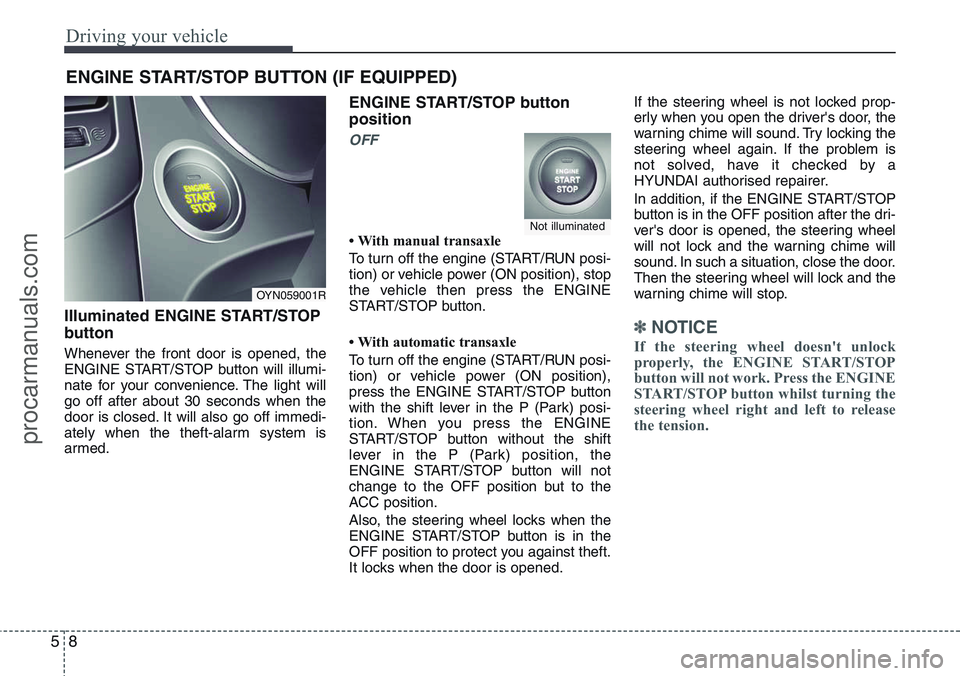
Illuminated ENGINE START/STOP
button
Whenever the front door is opened, the
ENGINE START/STOP button will illumi-
nate for your convenience. The light will
go off after about 30 seconds when the
door is closed. It will also go off immedi-
ately when the theft-alarm system is
armed.
ENGINE START/STOP button
position
OFF
• With manual transaxle
To turn off the engine (START/RUN posi-
tion) or vehicle power (ON position), stop
the vehicle then press the ENGINE
START/STOP button.
• With automatic transaxle
To turn off the engine (START/RUN posi-
tion) or vehicle power (ON position),
press the ENGINE START/STOP button
with the shift lever in the P (Park) posi-
tion. When you press the ENGINE
START/STOP button without the shift
lever in the P (Park) position, the
ENGINE START/STOP button will not
change to the OFF position but to the
ACC position.
Also, the steering wheel locks when the
ENGINE START/STOP button is in the
OFF position to protect you against theft.
It locks when the door is opened.If the steering wheel is not locked prop-
erly when you open the driver's door, the
warning chime will sound. Try locking the
steering wheel again. If the problem is
not solved, have it checked by a
HYUNDAI authorised repairer.
In addition, if the ENGINE START/STOP
button is in the OFF position after the dri-
ver's door is opened, the steering wheel
will not lock and the warning chime will
sound. In such a situation, close the door.
Then the steering wheel will lock and the
warning chime will stop.
✽ NOTICE
If the steering wheel doesn't unlock
properly, the ENGINE START/STOP
button will not work. Press the ENGINE
START/STOP button whilst turning the
steering wheel right and left to release
the tension.
ENGINE START/STOP BUTTON (IF EQUIPPED)
OYN059001R
Not illuminated
procarmanuals.com
Page 227 of 385
59
Driving your vehicle
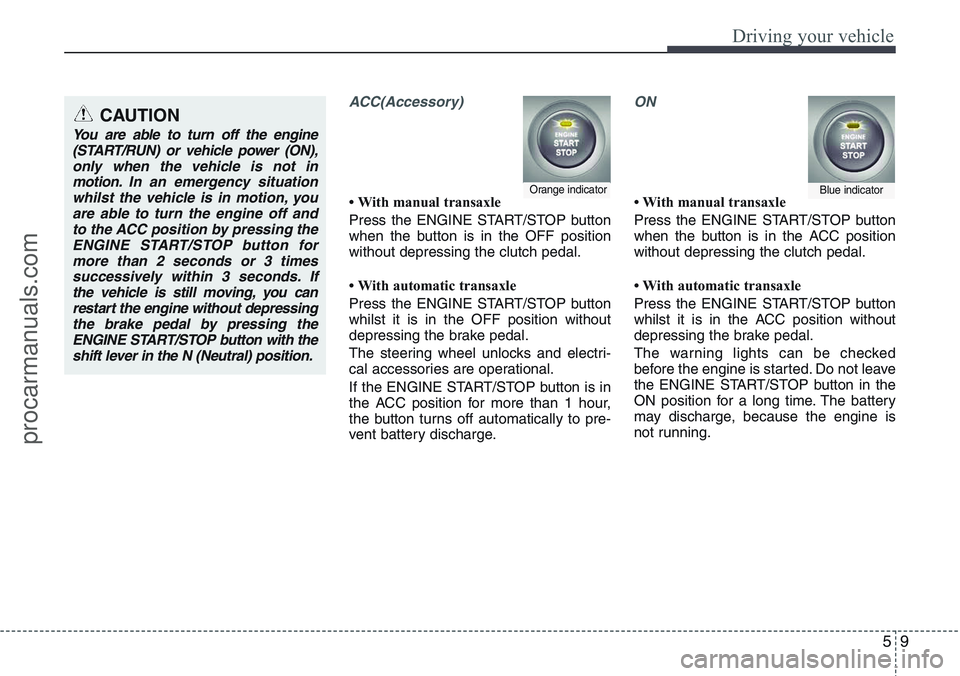
ACC(Accessory)
• With manual transaxle
Press the ENGINE START/STOP button
when the button is in the OFF position
without depressing the clutch pedal.
• With automatic transaxle
Press the ENGINE START/STOP button
whilst it is in the OFF position without
depressing the brake pedal.
The steering wheel unlocks and electri-
cal accessories are operational.
If the ENGINE START/STOP button is in
the ACC position for more than 1 hour,
the button turns off automatically to pre-
vent battery discharge.
ON
• With manual transaxle
Press the ENGINE START/STOP button
when the button is in the ACC position
without depressing the clutch pedal.
• With automatic transaxle
Press the ENGINE START/STOP button
whilst it is in the ACC position without
depressing the brake pedal.
The warning lights can be checked
before the engine is started. Do not leave
the ENGINE START/STOP button in the
ON position for a long time. The battery
may discharge, because the engine is
not running.Orange indicatorBlue indicator
CAUTION
You are able to turn off the engine
(START/RUN) or vehicle power (ON),
only when the vehicle is not in
motion. In an emergency situation
whilst the vehicle is in motion, you
are able to turn the engine off and
to the ACC position by pressing the
ENGINE START/STOP button for
more than 2 seconds or 3 times
successively within 3 seconds. If
the vehicle is still moving, you can
restart the engine without depressing
the brake pedal by pressing the
ENGINE START/STOP button with the
shift lever in the N (Neutral) position.
procarmanuals.com
Page 230 of 385

Driving your vehicle
12 5
3. Press the ENGINE START/STOP but-
ton whilst depressing the brake pedal.
4. Continue depressing the brake pedal
until the illuminated glow indicator
goes off. (approximately 5 seconds)
5. The engine starts running when the
glow indicator goes off.
✽ NOTICE
If the ENGINE START/STOP button is
pressed once more whilst the engine is
pre-heating, the engine may start.
Starting and stopping the engine for tur-
bocharger intercooler
1. Do not race or accelerate the engine
immediately after starting.
If the engine is cold, idle for several
seconds before sufficient lubrication is
ensured in the turbocharger unit.
2. After high speed or extended driving,
requiring a heavy engine load, idle the
engine about 1 minute before turning it
off.
This idle time will allow the tur-
bocharger to cool prior to shutting the
engine off.• Even if the smart key is in the vehicle,
if it is far away from you, the engine
may not start.
• When the ENGINE START/STOP but-
ton is in the ACC position or above, if
any door is opened, the system checks
for the smart key. If the smart key is not
in the vehicle, the " " indicator will
blink on the instrument cluster. And if
all doors are closed, the chime will
sound for 5 seconds. The indicator or
warning will turn off whilst the vehicle is
moving. Always have the smart key
with you.
WARNING
The engine will start, only when the
smart key is in the vehicle.
Never allow children or any person
who is unfamiliar with the vehicle
touch the ENGINE START/STOP
button or related parts.
W-60 Glow indicator light
CAUTION
Do not turn the engine off immedi-
ately after it has been subjected to
a heavy load. Doing so may cause
severe damage to the engine or tur-
bocharger unit.
procarmanuals.com
Page 234 of 385
Driving your vehicle
16 5
Condition of ISG system opera-
tion
The ISG system will operate under
the following condition:
- The driver’s seat belt is fastened.
- The driver’s door and bonnet are
closed.
- The brake vaccum pressure is ade-
quate.
- The battery is sufficiently charged.
- The outside temperature is between
2°C to 35°C.
- The engine coolant temperature is not
too low.
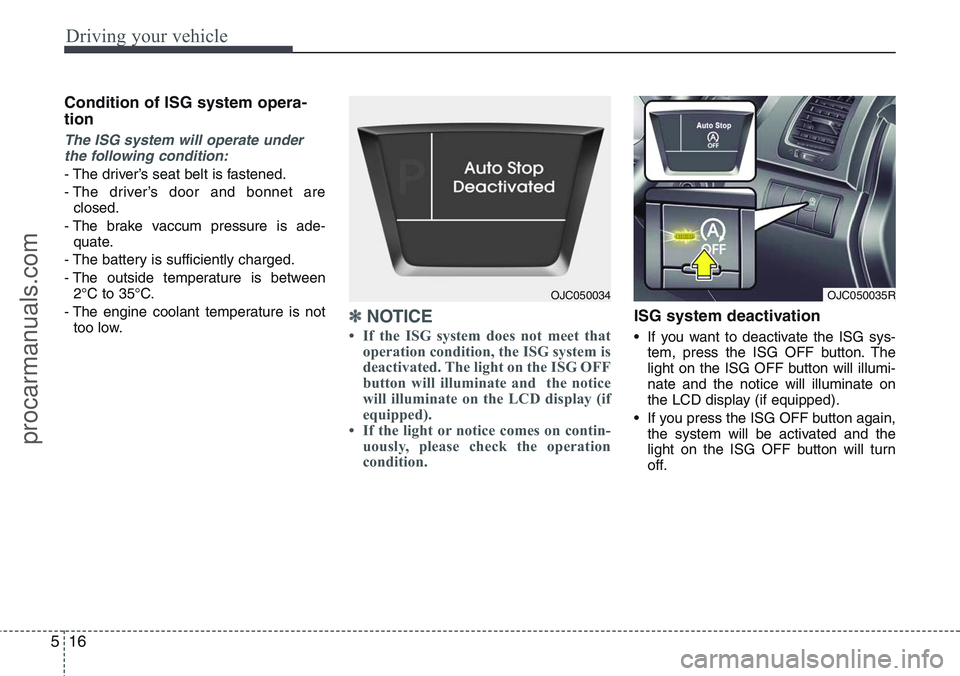
✽NOTICE
• If the ISG system does not meet that
operation condition, the ISG system is
deactivated. The light on the ISG OFF
button will illuminate and the notice
will illuminate on the LCD display (if
equipped).
• If the light or notice comes on contin-
uously, please check the operation
condition.
ISG system deactivation
• If you want to deactivate the ISG sys-
tem, press the ISG OFF button. The
light on the ISG OFF button will illumi-
nate and the notice will illuminate on
the LCD display (if equipped).
• If you press the ISG OFF button again,
the system will be activated and the
light on the ISG OFF button will turn
off.
OJC050035ROJC050034
procarmanuals.com