2015 HYUNDAI IX20 ESP
[x] Cancel search: ESPPage 134 of 385

Features of your vehicle
58 4
Fuel filter warning light
(Diesel engine)
This warning light illuminates for 3 sec-
onds after the ignition switch is set to the
ON position and then it will go off. If it
lights up whilst the engine is running, it
indicates that water has accumulated
inside the fuel filter. If this happens,
remove the water from the fuel filter. For
more information, refer to “Fuel filter” in
section 7.
LCD display warning (if equipped)
Door open ! (if equipped)
It displays the cor-
responding door or
tailgate that is not
closed securely.
Rear parking assist warning (if equipped)
It displays the area
an obstacle is
detected whilst
moving rearward.
For details, refer to
“Rear parking
assist system” in
section 4.Low Tire Pressure (if equipped)
It displays the cor-
responding tyre
that is low with
pressure. For
details, refer to
“TPMS” in section
6.
❈The actual indicator in LCD display may dif-
fer from the illustration.
CAUTION
When the fuel filter warning light
illuminates, engine power (vehicle
speed & idle speed) may decrease.
If you keep driving with the warning
light on, you can damage your vehi-
cle's engine parts and injection sys-
tem of the Common Rail.
If this occurs, have your vehicle
checked by a HYUNDAI authorised
repairer as soon as possible.
procarmanuals.com
Page 139 of 385

463
Features of your vehicle
The rear parking assist system assists
the driver during backward movement of
the vehicle by chiming if any object is
sensed within a distance of 47 in. (120
cm) behind the vehicle. This system is a
supplemental system and it is not intend-
ed to nor does it replace the need for
extreme care and attention of the driver.
The sensing range and objects
detectable by the back sensors are limit-
ed. Whenever backing-up, pay as much
attention to what is behind you as you
would in a vehicle without a rear parking
assist system.Operation of the rear parking
assist system
Operating condition
• This system will activate when the indi-
cator on the rear parking assist OFF
button is not illuminated.
If you desire to deactivate the rear
parking assist system, press the rear
parking assist OFF button again. (The
indicator on the button will illuminate.)
To turn the system on, press the button
again. (The indicator on the button will
go off.)
• This system will activate when backing
up with the ignition switch ON.
If the vehicle is moving at a speed over
3 mph (5 km/h), the system may not be
activated correctly.
REAR PARKING ASSIST SYSTEM (IF EQUIPPED)
WARNING
The rear parking assist system is a
supplementary function only. The
operation of the rear parking assist
system can be affected by several
factors (including environmental
conditions). It is the responsibility
of the driver to always check the
area behind the vehicle before and
whilst backing up.
OJC040052 SensorsOYN049128R
procarmanuals.com
Page 142 of 385
Features of your vehicle
66 4
✽NOTICE
This system can only sense objects with-
in the range and location of the sensors;
it can not detect objects in other areas
where sensors are not installed. Also,
small or slim objects, such as poles or
objects located between sensors may not
be detected by the sensors.
Always visually check behind the vehi-
cle when backing up.
Be sure to inform any drivers of the
vehicle that may be unfamiliar with the
system regarding the systems capabili-
ties and limitations.
Self-diagnosis
When you shift the gear to the R
(Reverse) position and if one or more of
the below occurs you may have a mal-
function in the rear parking assist sys-
tem.
• You don't hear an audible warning
sound or if the buzzer sounds intermit-
tently.
If this occurs, have your vehicle checked
by a HYUNDAI authorised repairer as
soon as possible.
WARNING
Pay close attention when the vehi-
cle is driven close to objects on the
road, particularly pedestrians, and
especially children. Be aware that
some objects may not be detected
by the sensors, due to the object’s
distance, size or material, all of
which can limit the effectiveness of
the sensor. Always perform a visu-
al inspection to make sure the vehi-
cle is clear of all obstructions
before moving the vehicle in any
direction.
WARNING
Your new vehicle warranty does not
cover any accidents or damage to
the vehicle or injuries to its occu-
pants due to a rear parking assist
system malfunction. Always drive
safely and cautiously.
(blinks)
• is displayed. (if equipped)
procarmanuals.com
Page 143 of 385

467
Features of your vehicle
REARVIEW CAMERA (IF EQUIPPED)
The rearview camera will activate when
the back-up light is ON with the ignition
switch ON and the shift lever in the R
(Reverse) position.
This system is a supplemental system
that shows behind the vehicle through
the rearview display mirror whilst back-
ing-up.
The rearview camera may be turned off
by pressing the ON/OFF button (1) when
the rearview camera is activated.
To turn the camera on again, press the
ON/OFF button (1) again when the igni-
tion switch is on and the shift lever in R
(Reverse). Also, the camera will turn on
automatically whenever the ignition
switch is turned off and on again.
Detailed information for the rearview
camera (Type B) is described in a sepa-
rately supplied manual.
WARNING
• This system is a supplementary
function only. It is the responsi-
bility of the driver to always
check the inside/outside rearview
mirror and the area behind the
vehicle before and whilst backing
up because there is a dead zone
that can't be seen through the
camera.
• Always keep the camera lens
clean. If lens is covered with for-
eign matter, the camera may not
operate normally.
OJC040053
OJC040054R
■Type BOYN049135R
■Type A
Rear view display
Rear view display
procarmanuals.com
Page 149 of 385
473
Features of your vehicle
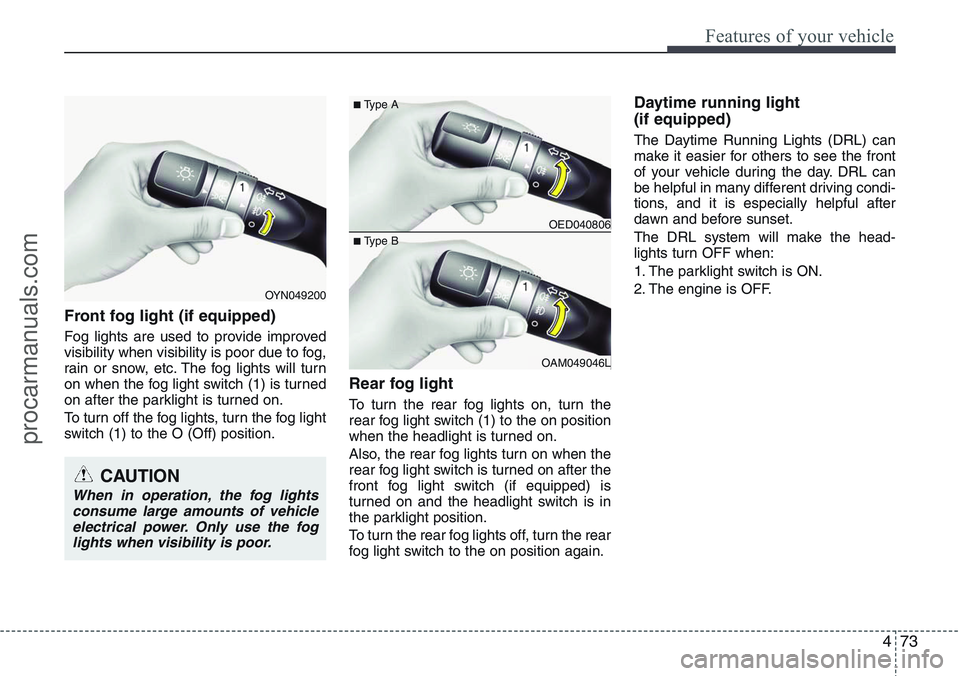
Front fog light (if equipped)
Fog lights are used to provide improved
visibility when visibility is poor due to fog,
rain or snow, etc. The fog lights will turn
on when the fog light switch (1) is turned
on after the parklight is turned on.
To turn off the fog lights, turn the fog light
switch (1) to the O (Off) position.
Rear fog light
To turn the rear fog lights on, turn the
rear fog light switch (1) to the on position
when the headlight is turned on.
Also, the rear fog lights turn on when the
rear fog light switch is turned on after the
front fog light switch (if equipped) is
turned on and the headlight switch is in
the parklight position.
To turn the rear fog lights off, turn the rear
fog light switch to the on position again.
Daytime running light
(if equipped)
The Daytime Running Lights (DRL) can
make it easier for others to see the front
of your vehicle during the day. DRL can
be helpful in many different driving condi-
tions, and it is especially helpful after
dawn and before sunset.
The DRL system will make the head-
lights turn OFF when:
1. The parklight switch is ON.
2. The engine is OFF.
OED040806
OAM049046L
■Type A
■Type B
OYN049200
CAUTION
When in operation, the fog lights
consume large amounts of vehicle
electrical power. Only use the fog
lights when visibility is poor.
procarmanuals.com
Page 174 of 385

Features of your vehicle
98 4
• For maximum defrosting, set the tem-
perature control to the extreme
right/hot position and the fan speed
control to the highest speed.
• If warm air to the floor is desired whilst
defrosting or defogging, set the mode
to the floor-defrost position.
• Before driving, clear all snow and ice
from the windscreen, rear window, out-
side rear view mirrors, and all side win-
dows.
• Clear all snow and ice from the bonnet
and air inlet in the cowl grill to improve
heater and defroster efficiency and to
reduce the probability of fogging up
inside of the windscreen.
Manual climate control system
To defog inside windscreen
1. Select any fan speed except “0” posi-
tion.
2. Select desired temperature.
3. Select the or position.
4. The outside (fresh) air will be selected
automatically. Additionally, the air con-
ditioning will automatically operate if
the mode is selected to the posi-
tion.
If the air conditioning and outside (fresh)
air position are not selected automatical-
ly, press the corresponding button manu-
ally.
WINDSCREEN DEFROSTING AND DEFOGGING
WARNING- Windscreen
heating
Do not use the or position
during cooling operation in
extremely humid weather. The dif-
ference between the temperature of
the outside air and that of the wind-
screen could cause the outer sur-
face of the windscreen to fog up,
causing loss of visibility. In this
case, set the mode selection knob
or button to the position and
fan speed control knob or button to
lower speed.
OJC040075
procarmanuals.com
Page 193 of 385

4117
Features of your vehicle
Using RADIO, SETUP, VOLUME
and AUDIO CONTROL
1. Button
Turns on FM mode. Each press of the
button will change the band in
the order of FM1
➟FM2➟FMA➟FM1...
2. Button
Turns on AM mode. Each press of the
button will change the band in
the order of AM
➟AMA➟AM...
3. Button
TA (Traffic announcement) Channels in
FM, CD, AUX mode, turns on/off the
reception of TA channels of RDS.
4. Button
• When the is pressed, it will
automatically tune to the next lower
station.
• When the is pressed, it will
automatically tune to the next higher
station.
5. Button & Knob
• Turns the audio system on/off when
the ignition switch is on ACC or ON.
• If the knob is turned clockwise/counter-
clockwise, the volume will increase
/decrease.
• Depending on the model if the ignition
switch is not on ACC or ON position.
the “Battery Discharge” warning
appears on LCD after 10 seconds of
power-up, and automatically turns off
after 1 hours of operation.
6. PRESET Buttons
• Press ~ buttons less
than 0.8 seconds to play the station
saved in each button.
• Press ~ buttons more
than 0.8 seconds or longer to save the
current station to the respective button
with a beep.
7. Button
Turn the LCD Display&Backlight ON/OFF
when button press.DARK
DARK
61
61
VOLPOWER
SEEK
TRACK
SEEK
TRACKSEEK
TA
AM
AM
FM
FM
JC_PA710JCE_AUDIO
JC_PA710JCE_AUDIO
procarmanuals.com
Page 209 of 385

4133
Features of your vehicle
✽NOTICE
• The phone must be paired to the sys-
tem before using Bluetooth®features.
• Only one selected (linked) mobile
phone can be used with the system at
a time.
• Some phones are not fully compatible
with this system.
• The Bluetooth
® word mark and logos
are registered trademarks owned by
Bluetooth
®SIG, Inc. and any use of
such marks by Hyundai is under
license. A Bluetooth enabled cell
phone is required to use Bluetooth
®
wireless technology.
■Bluetooth®Language Setting
The system language can be changed by
the following steps:
1. Power on the audio system with the
volume set to an audible level.
2. Press and hold button on the
steering wheel until the audio displays
“Please Wait”.
- The Bluetooth
®system will reply in
currently selected language that it is
changing to the next language.
- System language cycles between
FRENCH/ GERMAN/ UK ENGLISH
SPANISH/ DUTCH/ ITALIAN/
DANISH/ RUSSIAN/ POLISH/
SWEDISH.
3. When completed, the audio display
returns to normal.
4. Repeat steps 2 and 3 for the next lan-
guage selection.
NOTE:
The phone needs to be paired again
after changing system language.
- Avoid resting your thumb or finger
on the button as the language
could unintentionally change.
■Voice Recognition Activation
• The voice recognition engine contained
in the Bluetooth®System can be acti-
vated in the following conditions:
- Button Activation
The voice recognition system will be
active when the button is pressed
and after the sound of a Beep.
- Active Listening
The voice recognition system will be
active for a period of time when the
Voice Recognition system has asked
for a customer response.
• The system can recognize single digits
from zero to nine whilst number greater
than ten will not be recognized.
• If the command is not recognized, the
system will announce "Pardon" or No
input voice signal from microphone. (No
response)
• The system shall cancel voice recogni-
tion mode in following cases : When
pressing the button and saying
cancel following the beep. When not
making a call and pressing the
button. When voice recognition has
failed 3 consecutive times.
procarmanuals.com