2015 Hyundai H350 steering
[x] Cancel search: steeringPage 288 of 473

5-17
Driving your vehicle
5
Good driving practices
Never take the vehicle out of gearand coast down a hill. This is
extremely hazardous. Always leave
the vehicle in gear.
Don't "ride" the brakes. This can cause them to overheat and mal-
function. Instead, when you are
driving down a long hill, slow down
and shift to a lower gear. When you
do this, engine braking will help
slow down the vehicle.
Slow down before shifting to a lower gear. This will help avoid
over-revving the engine, which can
cause damage.
Slow down when you encounter cross winds. This gives you much
better control of your vehicle.
Be sure the vehicle is completely stopped before you attempt to shift
into reverse. The transmission can
be damaged if you do not. To shift
into reverse, depress the clutch,
move the shift lever to neutral, wait
three seconds, then shift to the
reverse position. Exercise extreme caution when
driving on a slippery surface. Be
especially careful when braking,
accelerating or shifting gears. On a
slippery surface, an abrupt change
in vehicle speed can cause the
drive wheels to lose traction and
the vehicle to go out of control.
Always buckle-up! In a colli-
sion, an unbelted occupant is
significantly more likely to be
seriously injured or killed
than a properly belted occu-pant.
Avoid high speeds when cor- nering or turning.
Do not make quick steering
wheel movements, such as
sharp lane changes or fast,sharp turns.
The risk of rollover is greatly
increased if you lose control
of your vehicle at highwayspeeds.
(Continued)
WARNING
(Continued)
Loss of control often occurs if
two or more wheels drop off
the roadway and the driver
oversteers to reenter the road-
way.
In the event your vehicle
leaves the roadway, do not
steer sharply. Instead, slow
down before pulling back into
the travel lanes.
Never exceed posted speed limits.
Page 289 of 473

5-18
Driving your vehicle
Power brakes
Your vehicle has power-assisted
brakes that adjust automatically
through normal usage.
In the event that the power-assisted
brakes lose power because of astalled engine or some other reason,
you can still stop your vehicle by
applying greater force to the brake
pedal than you normally would. The
stopping distance, however, will be
longer.
When the engine is not running, the
reserve brake power is partially
depleted each time the brake pedal
is applied. Do not pump the brake
pedal when the power assist has
been interrupted.
Pump the brake pedal only when
necessary to maintain steering con-
trol on slippery surfaces.
BBRRAA KKEE SS YY SSTT EEMM
Brakes
Do not drive with your foot resting on the brake pedal.This will create abnormal high
brake temperatures, exces-sive brake lining and pad
wear, and increased stoppingdistances.
When descending a long or
steep hill, shift to a lower gear
and avoid continuous applica-
tion of the brakes. Continuousbrake application will cause
the brakes to overheat and
could result in a temporary
loss of braking performance.
Wet brakes may impair the
vehicle’s ability to safely slow
down; the vehicle may alsopull to one side when the
brakes are applied. Applying
the brakes lightly will indicate
whether they have been
affected in this way.
(Continued)
WARNING (Continued)Always test your brakes in this fashion after driving
through deep water. To dry the
brakes, apply them lightly
while maintaining a safe for-
ward speed until brake per-
formance returns to normal.
Always, confirm the position of the brake and accelerator
pedal before driving. If you
don't check the position of theaccelerator and brake pedal
before driving, you maydepress the accelerator
instead of the brake pedal. It
may cause a serious accident.
Page 295 of 473

5-24
Driving your vehicle
Vehicle Dynamic Control (VDC) (if equipped)
The Vehicle Dynamic Control (VDC)
system helps to stabilize the vehicle
during cornering maneuvers.
VDC checks where you are steering
and where the vehicle is actually
going. VDC applies braking pressure
to any one of the vehicle’s brakes
and intervenes in the engine man-
agement system to assist the driver
with keeping the vehicle on the
intended path. It is not a substitute
for safe driving practices. Always
adjust your speed and driving to the
road conditions.
VDC operation
VDC ON condition
When the ignition switch is in the ON
position, the VDC and the VDC OFF
indicator lights illuminate for approxi-
mately three seconds and goes off,
then the VDC is turned on.
OEU044196Never drive too fast for the road
conditions or too quickly when
cornering. The VDC system will
not prevent accidents.
Excessive speed in turns, abrupt
maneuvers, and hydroplaningon wet surfaces can result in
severe accidents.
WARNING
Page 302 of 473
5-31
Driving your vehicle
5
During normal cruise control
operation, when the SET switch is
activated or reactivated after
applying the brakes, the cruise
control will energize after approxi-
mately 3 seconds. This delay isnormal.
To activate cruise control, depress the brake pedal at least once after
turning the ignition switch to the
ON position or starting the
engine. This is to check if the
brake switch which is important
part to cancel cruise control is innormal condition.
Cruise control operation
To set cruise control speed:
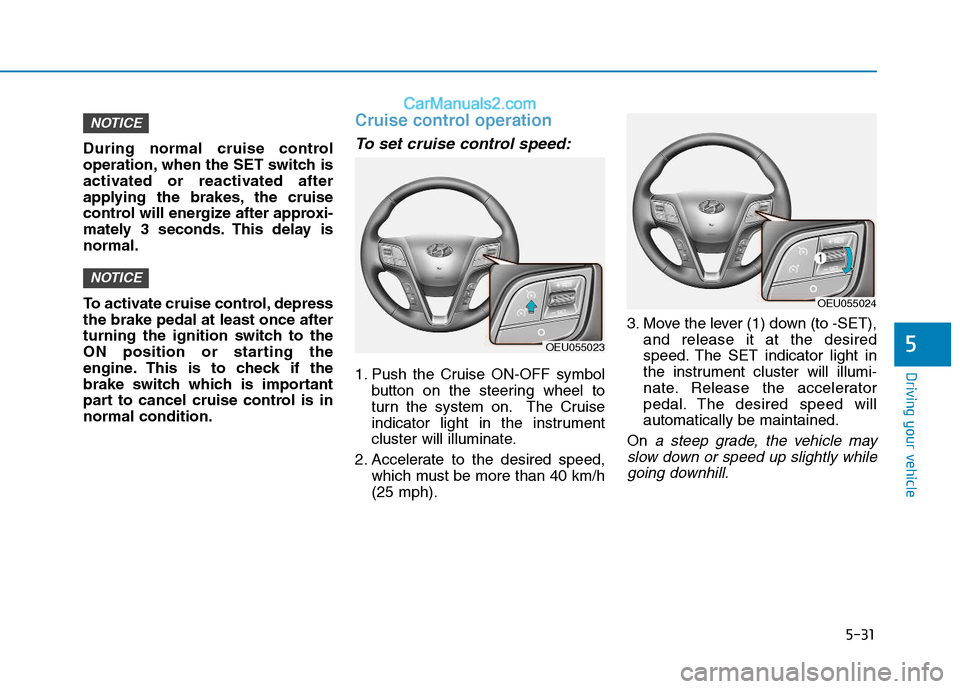
1. Push the Cruise ON-OFF symbolbutton on the steering wheel to
turn the system on. The Cruise
indicator light in the instrument
cluster will illuminate.
2. Accelerate to the desired speed, which must be more than 40 km/h(25 mph). 3. Move the lever (1) down (to -SET),
and release it at the desired
speed. The SET indicator light in
the instrument cluster will illumi-
nate. Release the accelerator
pedal. The desired speed willautomatically be maintained.
On
a steep grade, the vehicle may
slow down or speed up slightly while going downhill.
NOTICE
NOTICE
OEU055023
OEU055024
Page 304 of 473
5-33
Driving your vehicle
5
To cancel cruise control, do oneof the following:
Press the brake pedal.
Press the clutch pedal with a man- ual transmission.
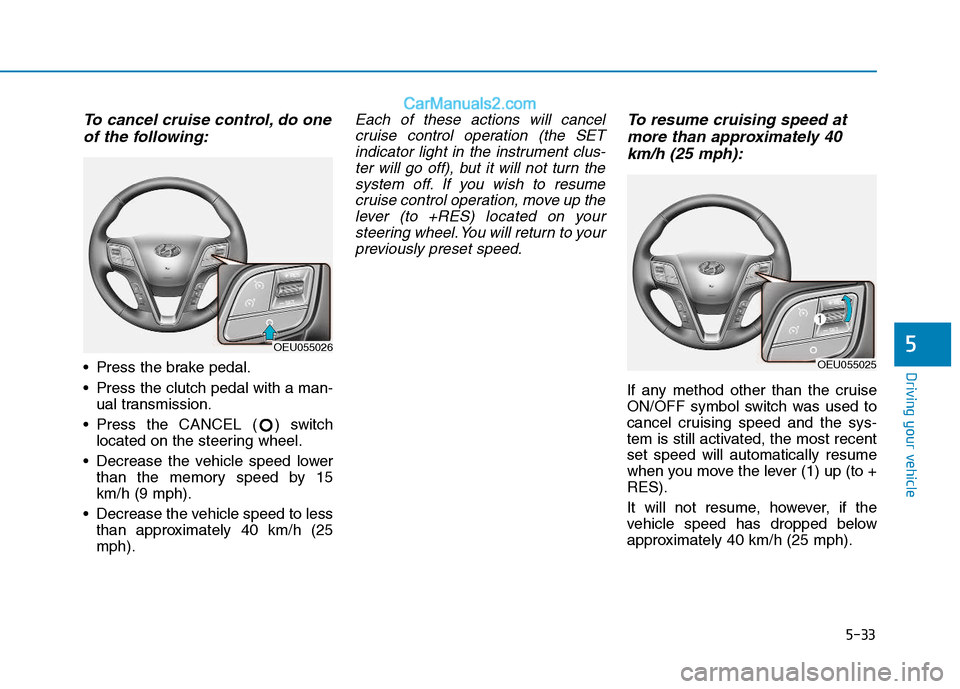
Press the CANCEL ( ) switch located on the steering wheel.
Decrease the vehicle speed lower than the memory speed by 15 km/h (9 mph).
Decrease the vehicle speed to less than approximately 40 km/h (25mph).
Each of these actions will cancel
cruise control operation (the SETindicator light in the instrument clus- ter will go off), but it will not turn thesystem off. If you wish to resumecruise control operation, move up the lever (to +RES) located on yoursteering wheel. You will return to yourpreviously preset speed.To resume cruising speed at
more than approximately 40
km/h (25 mph):
If any method other than the cruise
ON/OFF symbol switch was used to
cancel cruising speed and the sys-
tem is still activated, the most recentset speed will automatically resume
when you move the lever (1) up (to +RES).
It will not resume, however, if the
vehicle speed has dropped below
approximately 40 km/h (25 mph).
OEU055026
OEU055025
Page 305 of 473

5-34
Driving your vehicle
To turn cruise control off, doone of the following:
Push the Cruise ON-OFF symbol button (the Cruise indicator light in
the instrument cluster will go off).
Turn the ignition off.
Both of these actions cancel cruise control operation. If you want toresume cruise control operation, repeat the steps provided in “To setcruise control speed” on the previouspage.
You can set the speed limit when you
do not want to drive over a specificspeed.
If you drive over the preset speed
limit, the warning system operates
(set speed limit will blink and chime
will sound) until the vehicle speed
returns within the speed limit.
While speed limit control is in
operation, the cruise control sys-
tem cannot be activated.To set speed limit :
1. Press ASLD set button twice on the steering wheel, to turn the sys- tem on.
NOTICE
OEU055023
AADDJJUU SSTT AA BBLLEE SS PP EEEEDD LL IIMM IITT DD EEVV IICC EE (( AA SSLLDD )) (( IIFF EE QQ UUIIPP PP EEDD ))
OEU055027
Page 308 of 473

5-37
Driving your vehicle
5
This Lane Departure Warning System detects the lane with thesensor at the front windshield and
warns you when your vehicle leaves
the lane.
LLAA NN EE DD EEPP AA RRTTUU RREE WW AARRNN IINN GG SS YY SSTT EEMM (( LL DD WW SS)) (( IIFF EE QQ UUIIPP PPEEDD ))
OEU054015
OEU044192
Take the following precautions
when using the Lane Departure
Warning System (LDWS):
The LDWS is only the supple-
mental system. Pay attention
to the road conditions while
driving with the LDWS activat-
ed. It is the driver's responsi-
bility to control and steer the
vehicle.
ALWAYS check the road con-
ditions. The LDWS does not
make the vehicle changelanes.
Do not turn the steering wheel
suddenly if the LDWS warns
that your vehicle is leaving the
lane.
If the sensor cannot detect the
lane or if the vehicle speed
does not exceed 60 km/h (38
mph), the LDWS will not be
able to notify you if the vehi-
cle leaves the lane.
(Continued)
WARNING (Continued)
If your vehicle has window tint or other types of coating and
accessory on the front wind-
shield, the LDWS may not
work properly.
Do not allow any water or liq-
uid to contact the LDWS sen-
sor or the sensor may be dam-
aged.
Do not remove the LDWS
parts and do not damage the
sensor by a strong impact.
Do not put objects that reflect
light on the dash board.
The operation of the LDWS
can be affected by several fac-
tors (including environmental
conditions). It is the responsi-
bility of the driver to pay
attention to the roadway and
to maintain the vehicle in itslane at all times.
Page 314 of 473

5-43
Driving your vehicle
5
Keep your vehicle in good condi-tion. For better fuel economy and
reduced maintenance costs, main-
tain your vehicle in accordancewith the maintenance schedule in
Section 7. If you drive your vehicle
in severe conditions, more frequentmaintenance is required (see
Section 7 for details).
Keep your vehicle clean. For maxi- mum service, your vehicle should
be kept clean and free of corrosive
materials. It is especially important
that mud, dirt, ice, etc. not be
allowed to accumulate on the
underside of the vehicle. This extra
weight can result in increased fuel
consumption and also contribute tocorrosion.
Travel lightly. Don't carry unneces- sary weight in your vehicle. Weight
reduces fuel economy.
Don't let the engine idle longer than necessary. If you are waiting
(and not in traffic), turn off your
engine and restart only when
you're ready to go. Remember, your vehicle does not
require extended warm-up. After
the engine has started, allow the
engine to run for 10 to 20 seconds
prior to placing the vehicle in gear.
In very cold weather, however, give
your engine a slightly longer warm-
up period.
Don't "lug" or "over-rev" the engine. Lugging is driving too slowly in too
high a gear resulting engine buck-
ing. If this happens, shift to a lower
gear. Over-revving is racing the
engine beyond its safe limit. This
can be avoided by shifting at the
recommended speeds.
Use your air conditioning sparingly. The air conditioning system is
operated by engine power so your
fuel economy is reduced when youuse it.
Open windows at high speeds can reduce fuel economy.
Fuel economy is less in crosswinds and headwinds. To help offset
some of this loss, slow down when
driving in these conditions. Keeping a vehicle in good operating
condition is important both for econ-
omy and safety. Therefore, we rec-
ommend that you contact an author-
ized HYUNDAI dealer to performscheduled inspections and mainte-
nance.
Engine off during motion
Never turn the engine off to
coast down hills or anytime the
vehicle is in motion. The power
steering and power brakes will
not function properly without
the engine running. Instead,
keep the engine on and down-
shift to an appropriate gear for
engine braking effect. In addi-
tion, turning off the ignition
while driving could engage the
steering wheel lock resulting in
loss of vehicle steering which
could cause serious injury ordeath.
WARNING