Page 109 of 473

3-47
Convenient features of your vehicle
3
Information
The fuel tank capacity is given in section 8.
The fuel gauge is supplemented by a low fuel warning light, which will
illuminate when the fuel tank is
nearly empty.
On inclines or curves, the fuel gauge pointer may fluctuate or the low fuel
warning light may come on earlier
than usual due to the movement of
fuel in the tank.i
Fuel vapors are dangerous.
Before refueling, always stop
the engine and never allowsparks or open flames near the
filler area. If you need to replace
the filler cap, we recommend
that you use parts for replace-
ment from an authorized
HYUNDAI dealer. If you open thefuel filler cap during high ambi-
ent temperatures, a slight “pres-
sure sound” may be heard. This
is normal and not a cause forconcern.
Whenever you open the fuel
filler cap, turn it slowly.
WARNING
Fuel gauge
Running out of fuel can expose
vehicle occupants to danger.
You must stop and obtain addi-
tional fuel as soon as possibleafter the warning light comes
on or when the gauge indicator
comes close to the O (Empty)
level.
WARNING
Avoid driving with a extremely
low fuel level. Running out offuel could cause the engine to
misfire damaging the catalytic
converter.
CAUTION
Be sure to fill with the speci- fied fuel.(Diesel)
Be sure to lock the fuel filler
cap with the key after fillingwith the specified fuel.
CAUTION
Page 112 of 473
3-50
Convenient features of your vehicle
Main display
MMUULLTT II-- DD IISS PP LLAA YY (( IIFF EE QQ UUIIPP PPEEDD ))
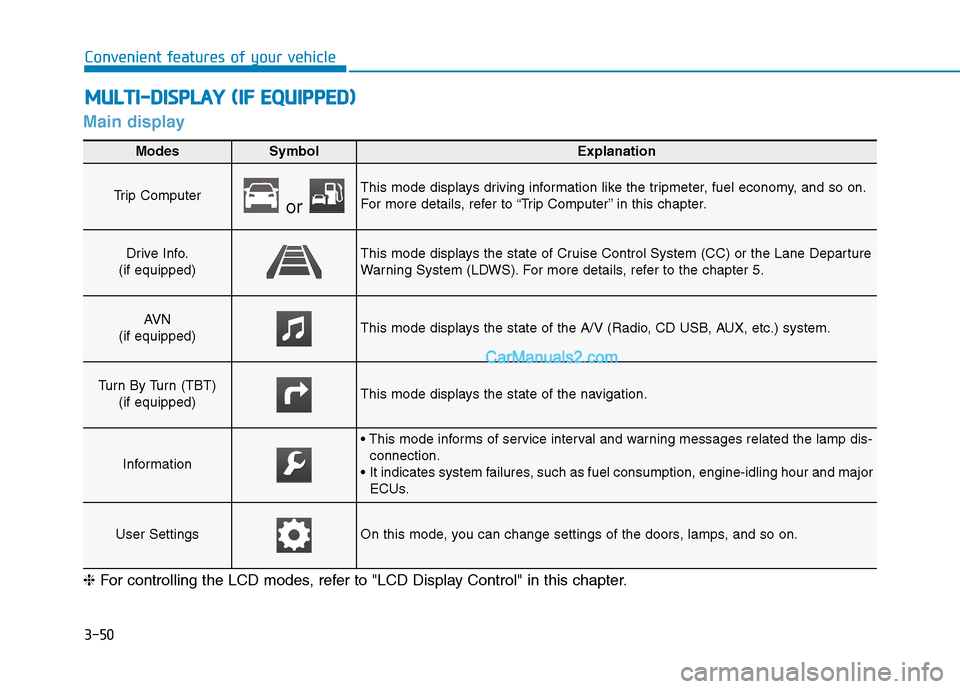
ModesSymbolExplanation
Trip Computer or
This mode displays driving information like the tripmeter, fuel economy, and so on.
For more details, refer to “Trip Computer” in this chapter.
Drive Info.
(if equipped)This mode displays the state of Cruise Control System (CC) or the Lane Departure
Warning System (LDWS). For more details, refer to the chapter 5.
AV N
(if equipped)This mode displays the state of the A/V (Radio, CD USB, AUX, etc.) system.
Turn By Turn (TBT) (if equipped)This mode displays the state of the navigation.
Information
connection.
It indicates system failures, such as fuel consumption, engine-idling hour and major ECUs.
User SettingsOn this mode, you can change settings of the doors, lamps, and so on.
❈ For controlling the LCD modes, refer to "LCD Display Control" in this chapter.
Page 114 of 473
3-52
Convenient features of your vehicle
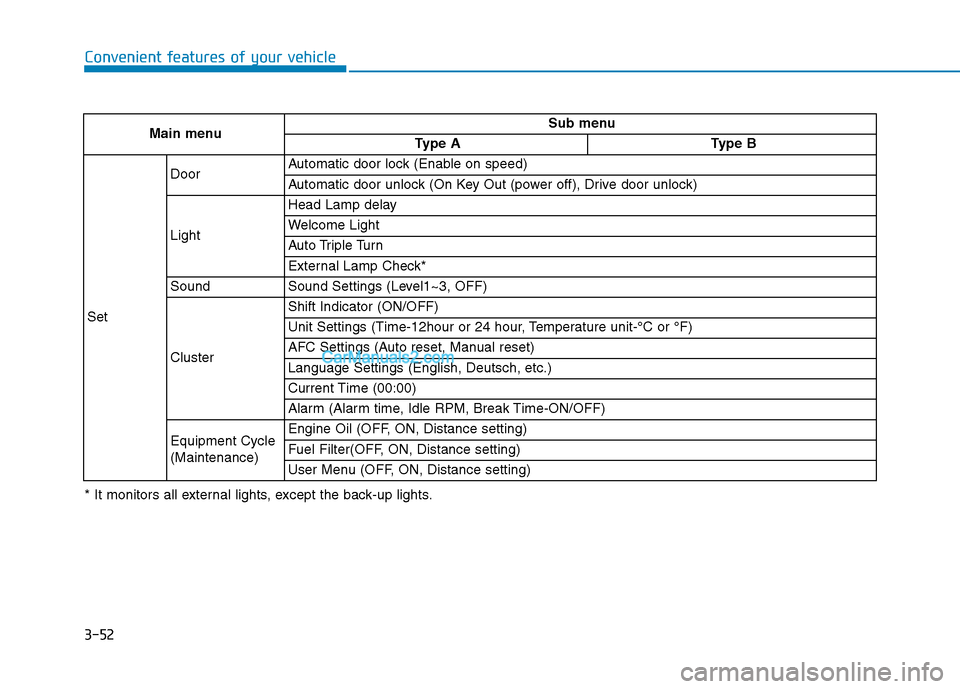
Main menuSub menu
Type AType B
Set
DoorAutomatic door lock (Enable on speed)
Automatic door unlock (On Key Out (power off), Drive door unlock)
Light
Head Lamp delay
Welcome Light
Auto Triple Turn
External Lamp Check*
SoundSound Settings (Level1~3, OFF)
Cluster
Shift Indicator (ON/OFF)
Unit Settings (Time-12hour or 24 hour, Temperature unit-°C or °F)
AFC Settings (Auto reset, Manual reset)
Language Settings (English, Deutsch, etc.)
Current Time (00:00)
Alarm (Alarm time, Idle RPM, Break Time-ON/OFF)
Equipment Cycle (Maintenance)Engine Oil (OFF, ON, Distance setting)
Fuel Filter(OFF, ON, Distance setting)
User Menu (OFF, ON, Distance setting)
* It monitors all external lights, except the back-up lights.
Page 117 of 473
3-55
Convenient features of your vehicle
3
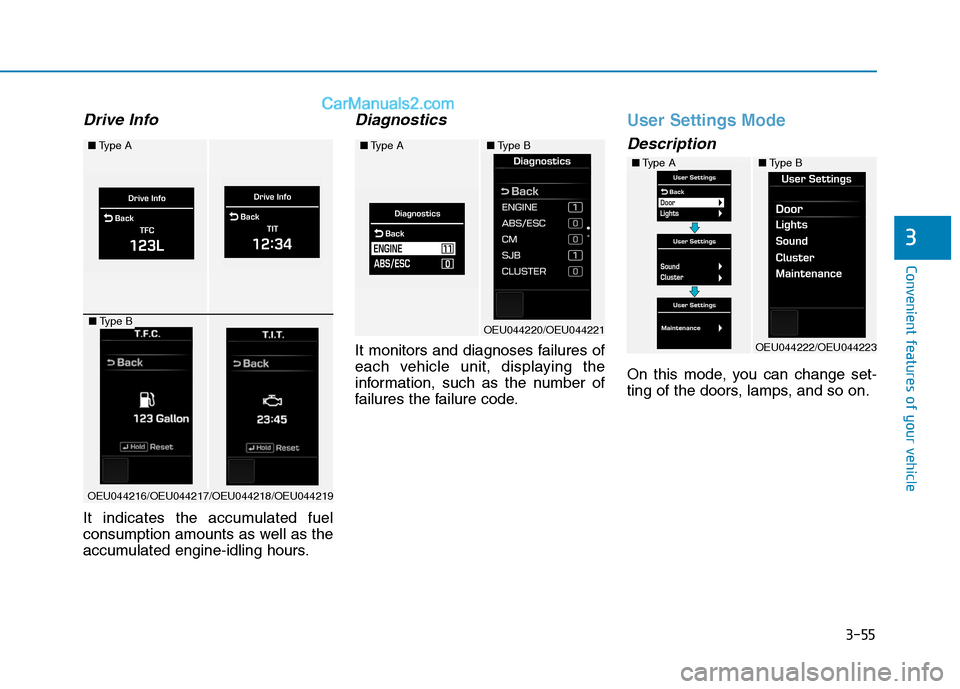
Drive Info
It indicates the accumulated fuel
consumption amounts as well as the
accumulated engine-idling hours.
Diagnostics
It monitors and diagnoses failures of
each vehicle unit, displaying the
information, such as the number of
failures the failure code.
User Settings Mode
Description
On this mode, you can change set-
ting of the doors, lamps, and so on.
■Type A
OEU044216/OEU044217/OEU044218/OEU044219
■Type B
■Type A
OEU044220/OEU044221
■Type B
■Type A
OEU044222/OEU044223
■Type B
Page 119 of 473
3-57
Convenient features of your vehicle
3
AFC setting
It can be automatically or manually
reset to the default. ❇AFC : Average Fuel Consumption
Language setting
A preferred language can be chosen
on the LCD display.
Current time
The time can be adjusted.
Alarm
The alarm, idle-rpm time, break time can be set in.
Equipment cycle(Maintenance)
Engine oil, fuel filter
The maintenance alarm can be
turned ON or OFF. Also, the driving
distance for an oil/filter maintenance
alarm can be set in.
User Menu
The maintenance alarm message
displays on the LCD display, as arbi-
trarily set in.
Warning Messages
In below cases, the warning mes-
sage displays for 10 seconds. Some
messages will be saved in the infor-
mation group after few seconds dis-
playing for future reference.
Page 120 of 473
3-58
Convenient features of your vehicle
Lamp disconnection (CHECK LAMP)
This indicator displays which lamp is disconnected.
Doors open
This indicator displays which doorsare opened.
Parking Assist System (PAS) (if equipped)
When the engine is turned ON, and
when the PAS sensor detects an
obstacle, while driving either for-
wards or backwards, the PAS
informs the driver of a location and a
distance of/with the obstacle.
For further information, refer to the
Parking Assist System in the chapter3.
■ Type A
OEU044118/OEU044143
■Type B
■Type A
OEU044114/OEU044139
■Type B
OEU044141
■Type B
Page 124 of 473

3-62
Convenient features of your vehicle
In the trip computer mode on the
LCD display, the trip mode can be
adjusted by pressing the ( ) button.
By pressing the button ( ), you can
select the desired trip mode. ❈For controlling the LCD modes,
refer to "LCD Display Control" in
this chapter.Driving distance / Average
vehicle speed / Elapsed time
Driving distance (1)
This displays the total driving dis-
tance from the default setting (0.0)
Pressing the “Select” button for 1
second or over, when the driving
distance is displayed, resets the
driving distance. This also resets
the driving hours and the average
speed (Type B).
Distance range: 0 .0 ~ 9999.9 km
Average Vehicle Speed (2)
The average vehicle speed is cal- culated by the total driving dis-
tance and driving time since the
last average vehicle speed reset.
- Speed range: 0 ~ 999 km/h
To reset the average vehicle speed, press the SET button for more than 1 second when the
average vehicle speed is dis-
played.
Even if the vehicle is not in
motion, the average vehicle speedkeeps going while the engine isrunning.
NOTICE
OEU044123/OEU044124/ OEU044125/OEU044148
■
Type A ■Type B
Page 125 of 473

3-63
Convenient features of your vehicle
3
Elapsed Time (3)
The elapsed time is the total driv-ing time since the last elapsed time reset.
- Time range (hh:mm): 00:00 ~ 99:59
To reset the elapsed time, press the SET button for more than 1second when the elapsed time is
displayed.
Even if the vehicle is not in
motion, the elapsed time keepsgoing while the engine is running.
Fuel Economy
Distance To Empty (1)
The distance to empty is the esti- mated distance the vehicle can be
driven with the remaining fuel.
- Distance range: 50 ~ 9999 km or30 ~ 9999 mi.
If the estimated distance is below 50 km (30 mi.), the trip computer
will display “---” as distance to
empty. If the vehicle is not on level
ground or the battery power has
been interrupted, the distance to
empty function may not operate
correctly.
The distance to empty may differ from the actual driving distance
as it is an estimate of the avail-
able driving distance.
The trip computer may not regis- ter additional fuel if less than 6
liters (1.6 gallons) of fuel are
added to the vehicle.
The fuel economy and distance to empty may vary significantlybased on driving conditions,
driving habits, and condition of
the vehicle.
NOTICE
NOTICE
OEU044126/OEU044127/OEU044128/OEU044149
■
Type A ■Type B