2015 Hyundai H350 air condition
[x] Cancel search: air conditionPage 180 of 473
3-118
Convenient features of your vehicle
When using the air conditioningsystem, monitor the temperature
gauge closely while driving up
hills or in heavy traffic when out-
side temperatures are high. Airconditioning system operation
may cause engine overheating.
Continue to use the blower fan
but turn the air conditioning sys-
tem off if the temperature gauge
indicates engine overheating.
When opening the windows in humid weather air conditioning
may create water droplets inside
the vehicle. Since excessive
water droplets may cause dam-
age to electrical equipment, air
conditioning should only be run
with the windows closed.
Air conditioning system operation
tips
If the vehicle has been parked indirect sunlight during hot weather,
open the windows for a short time
to let the hot air inside the vehicle
escape.
To help reduce moisture inside of the windows on rainy or humid
days, decrease the humidity inside
the vehicle by operating the airconditioning system.
During air conditioning system operation, you may occasionallynotice a slight change in enginespeed as the air conditioning com-
pressor cycles. This is a normal
system operation characteristic.
Use the air conditioning system every month only for a few minutes
to ensure maximum system per-
formance. When using the air conditioning
system, you may notice clear water
dripping (or even puddling) on the
ground under the passenger rear
side of the vehicle. This is a normal
system operation characteristic.
Operating the air conditioning sys- tem in the recirculated air position
provides maximum cooling, how-
ever, continual operation in this
mode may cause the air inside the
vehicle to become stale.
During cooling operation, you may occasionally notice a misty air flow
because of rapid cooling and
humid air intake. This is a normal
system operation characteristics.
NOTICE
Page 181 of 473
3-119
Convenient features of your vehicle
3
Fuel-fired Heater (if equipped)
This fuel-fired heater supplies addi-
tional heat to the interior compart-
ment with a low fuel consumption to
compensate the heat provided by
engine alone. A cleaning process of the fuel-fired
heater will be performed automati-
cally when the heater is not operated
due to increase of coolant tempera-
ture and ignition off.
During cleaning process, supplied
fuel in the heater will be burnt com-
pletely and any smoke will be
expelled. It is a necessary process
for next operation and durability of
the heater and takes about 1~3 min-
utes. The following symptoms will
occur and it is normal.
- A white smoke may come outfrom the fuel-fired heater
exhaust pipe during operation
of the heater. However, when
an excessive black smoke is
discharged, the fuel-firedheater should be inspected.
- A “buk-buk” noise from the heater is a noise to form flame
for combustion.
- When the heater is operated at full load, a “Wooing” noise
occurs.
- When shutting off the engine during heater operation, a
“Wing” noise occurs to per-
form the cleaning process.
When refueling, stop operation of the fuel-fired heater by shut-
ting off the engine.
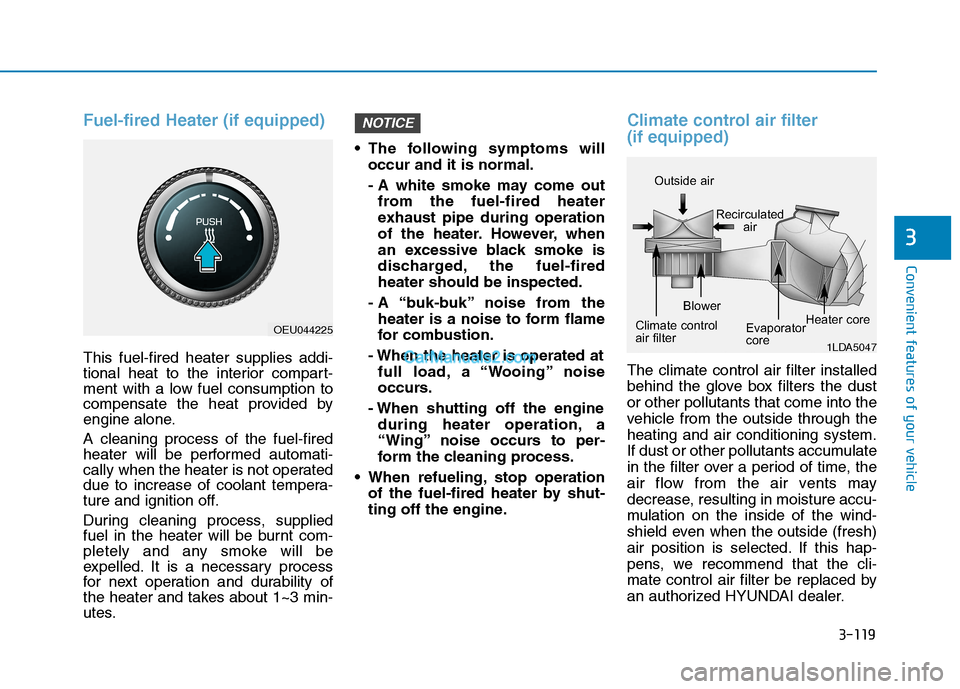
Climate control air filter (if equipped)
The climate control air filter installed
behind the glove box filters the dustor other pollutants that come into the
vehicle from the outside through theheating and air conditioning system.
If dust or other pollutants accumulate
in the filter over a period of time, the
air flow from the air vents may
decrease, resulting in moisture accu-
mulation on the inside of the wind-
shield even when the outside (fresh)
air position is selected. If this hap-
pens, we recommend that the cli-
mate control air filter be replaced by
an authorized HYUNDAI dealer.
NOTICE
1LDA5047
Outside air
Recirculatedair
Climate control
air filter Blower
Evaporator
coreHeater core
OEU044225
Page 182 of 473
3-120
Convenient features of your vehicle
Replace the filter according tothe Maintenance Schedule.
If the vehicle is being driven in
severe conditions such as dusty
or rough roads, more frequentair conditioner filter inspections
and changes are required.
When the air flow rate suddenly decreases, we recommend that
the system be checked by an
authorized HYUNDAI dealer.
Checking the amount of air
conditioner refrigerant andcompressor lubricant
When the amount of refrigerant is
low, the performance of the air con-
ditioning is reduced. Overfilling also
has a negative impact on the air con-ditioning system.
Therefore, we recommend that the
system be inspected by an author-
ized HYUNDAI dealer.
It is important when servicing the air conditioning system that thecorrect type and amount of oil and
refrigerant is used. Otherwise,
damage to the compressor and
abnormal system operation may
occur.
NOTICE
NOTICE
Improper service may cause
serious injury to the person per-
forming the service. For more
detailed information, we recom-
mend that you contact an
authorized HYUNDAI dealer.
WARNING
Page 183 of 473
3-121
Convenient features of your vehicle
3
For maximum defrosting, set thetemperature control to the extreme
right/hot position and the fan speedcontrol to the highest speed.
If warm air to the floor is desired while defrosting or defogging, setthe mode to the floor-defrost posi-tion.
Before driving, clear all snow and ice from the windshield, rear win-
dow, outside rear view mirrors, and
all side windows.
Clear all snow and ice from the hood and air inlet in the cowl grill to
improve heater and defroster effi-ciency and to reduce the probabili-
ty of fogging up the inside of thewindshield.To defog inside windshield
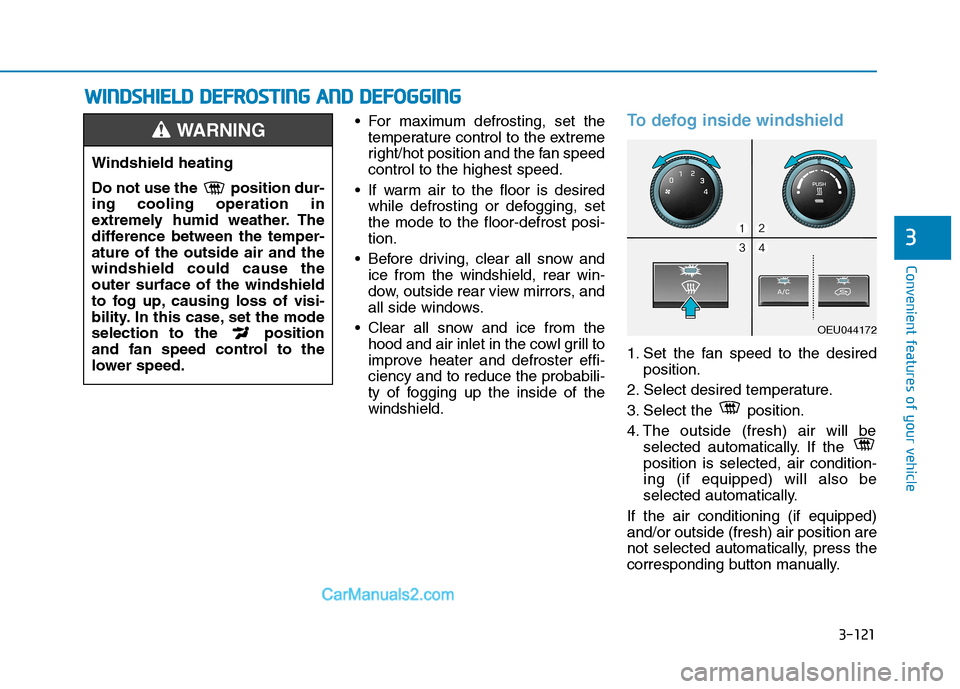
1. Set the fan speed to the desired position.
2. Select desired temperature.
3. Select the position.
4. The outside (fresh) air will be selected automatically. If the position is selected, air condition-ing (if equipped) will also be
selected automatically.
If the air conditioning (if equipped)and/or outside (fresh) air position are
not selected automatically, press the
corresponding button manually.
Windshield heating
Do not use the position dur- ing cooling operation in
extremely humid weather. The
difference between the temper-ature of the outside air and thewindshield could cause theouter surface of the windshield
to fog up, causing loss of visi-
bility. In this case, set the mode
selection to the position
and fan speed control to the
lower speed.
WARNING
WW IINN DDSSHH IIEE LLDD DD EEFFRR OO SSTT IINN GG AA NN DD DD EEFFOO GGGGIINN GG
OEU044172
Page 191 of 473
3-129
Convenient features of your vehicle
3
❇There is a cable hole which
enables the use of the power outlet
with the crash-pad console storage
cover being closed. To allow a
cable to pass through the hole,
open the crash-pad console stor-
age, connect to the power outlet,
and fit the cable into the hole
before closing the crash-pad con-
sole storage cover.
Some thick connectors may not
pass from the crash-pad to the
crash-pad console storage cover.
Do not store any volatile or inflam-
mable substance or liquid inside
the crash-pad console storage
while using the power outlet with
the cover closed. The heat gener-
ated by the power outlet may
cause a fire.
Use power outlet only when the engine is running and
remove the accessory plug
after use. Using the accessory
plug for prolonged periods oftime with the engine off could
cause the battery to dis-
charge.
(Continued)
CAUTION
(Continued)
Only use 12V electric acces-
sories which are less than
10A in electric capacity.
Adjust the air-conditioner or
heater to the lowest operating
level when using the poweroutlet.
Close the cover when not in
use.
Some electronic devices can
cause electronic interference
when plugged into a vehicle’s
power outlet. These devices
may cause excessive audiostatic and malfunctions in
other electronic systems or
devices used in your vehicle.
Do not put a finger or a foreign
element (pin, etc.) into a power
outlet and do not touch with a
wet hand. You may get an elec-
tric shock.
WARNING
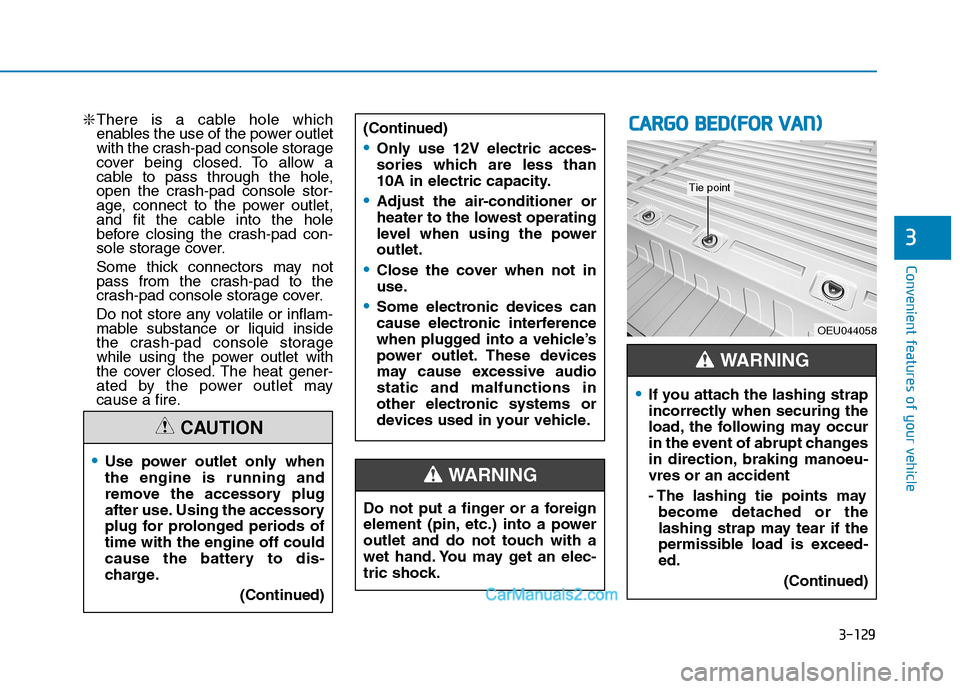
CCAA RRGG OO BB EEDD ((FF OO RR VV AA NN ))
OEU044058
If you attach the lashing strap
incorrectly when securing the
load, the following may occur
in the event of abrupt changes
in direction, braking manoeu-vres or an accident
- The lashing tie points may
become detached or the
lashing strap may tear if the
permissible load is exceed-ed.
(Continued)
WARNING
Tie point
Page 237 of 473
![Hyundai H350 2015 Owners Manual 4-45
Multimedia System
4
Phone Setup
Press the key Set [
Setup] through the TUNE knob orkey.
The
Bluetooth®Wireless Technology
mobile phone setup screen is dis-
played. For more information, refe](/manual-img/35/14886/w960_14886-236.png "Hyundai H350 2015 Owners Manual 4-45
Multimedia System
4
Phone Setup
Press the key Set [
Setup] through the TUNE knob orkey.
The
Bluetooth®Wireless Technology
mobile phone setup screen is dis-
played. For more information, refe")
4-45
Multimedia System
4
Phone Setup
Press the key Set [
Setup] through the TUNE knob orkey.
The
Bluetooth®Wireless Technology
mobile phone setup screen is dis-
played. For more information, refer to“Phone Setup”. Information - Using the
Bluetooth®
Wireless Technology CELLU- AR PHONE
Do not use a cellular phone or per- form Bluetooth ®
Wireless Technology
settings (e.g. pairing a phone) while
driving.
Some Bluetooth ®
Wireless Technology
-enabled phones may not be recog-
nized by the system or fully compati-
ble with the system.
Before using Bluetooth®
Wireless
Technology related features of the
audio system, refer your phone's
User's Manual for phone-side
Bluetooth ®
Wireless Technology oper-
ations.
The phone must be paired to the audio system to use Bluetooth®
Wireless Technology related features.
You will not be able to use the hands- free feature when your phone (in the
vehicle) is outside of the cellular serv-
ice area (e.g. in a tunnel, in a under-
ground, in a mountainous area, etc.).
(Continued)(Continued)
If the cellular phone signal is poor or
the vehicles interior noise is too loud,
it may be difficult to hear the other
person's voice during a call.
Do not place the phone near or inside metallic objects, otherwise communi-
cations with Bluetooth®
Wireless
Technology system or cellular service
stations can be disturbed.
While a phone is connected through Bluetooth ®
Wireless Technology your
phone may discharge quicker than
usual for additional Bluetooth®
Wireless Technology-related opera-
tions.
Some cellular phones or other devices may cause interference noise or mal-
function to audio system. In this case,
store the device in a different location
may resolve the condition.
Phone contact names should be saved in English or they may not be dis-
played correctly.
(Continued)
i
3
PHONE
Page 270 of 473
![Hyundai H350 2015 Owners Manual 4-78
Multimedia System
Phone Setup
Press the key Set [ Setup]
through the TUNE knob or
key. The
Bluetooth®Wireless Technology
mobile phone setup screen is dis-
played. For more information, ref](/manual-img/35/14886/w960_14886-269.png "Hyundai H350 2015 Owners Manual 4-78
Multimedia System
Phone Setup
Press the key Set [ Setup]
through the TUNE knob or
key. The
Bluetooth®Wireless Technology
mobile phone setup screen is dis-
played. For more information, ref")
4-78
Multimedia System
Phone Setup
Press the key Set [ Setup]
through the TUNE knob or
key. The
Bluetooth®Wireless Technology
mobile phone setup screen is dis-
played. For more information, refer to“Phone Setup”. Information
- using THE
Bluetooth®
Wireless Technology CELLU- LAR PHONE
Do not use a cellular phone or per- form Bluetooth ®
Wireless Technology
settings (e.g. pairing a phone) while
driving.
Some Bluetooth®
Wireless
Technology -enabled phones may not
be recognized by the system or fully
compatible with the system.
Before using Bluetooth®
Wireless
Technology related features of the
audio system, refer your phone’s
User’s Manual for phone-side
Bluetooth ®
Wireless Technology oper-
ations.
The phone must be paired to the audio system to use Bluetooth®
Wireless Technology related features.
You will not be able to use the hands- free feature when your phone (in the
vehicle) is outside of the cellular serv-
ice area (e.g. in a tunnel, in a under-
ground, in a mountainous area, etc.).
(Continued)(Continued)
If the cellular phone signal is poor or
the vehicles interior noise is too loud,
it may be difficult to hear the other
person’s voice during a call.
Do not place the phone near or inside metallic objects, otherwise communi-
cations with Bluetooth®
Wireless
Technology system or cellular service
stations can be disturbed.
While a phone is connected through Bluetooth ®
Wireless Technology your
phone may discharge quicker than
usual for additional Bluetooth®
Wireless Technology-related opera-
tions.
Some cellular phones or other devices may cause interference noise or mal-
function to audio system. In this case,
store the device in a different location
may resolve the condition.
Phone contact names should be saved in English or they may not be dis-
played correctly.
(Continued)
i
3
PHONE
Page 281 of 473

5-10
Driving your vehicle
(continued)
Also, a message "Auto Stop deac-
tivated. start manually will appear
on the LCD display. Turn the igni-
tion switch to the START position
to start the engine manually. Or if
you fasten the seat belt or closethe driver's door(or engine hood),
ISG system will be activate.Auto start
To restart the engine from idlestop mode
shift lever is in the N (Neutral) posi- tion.
The engine will start and the green
AUTO STOP indicator ( ) on the
instrument cluster will go out.
The engine will also restart automatically without the dri-
ver’s any actions if the followingoccurs:
- The fan speed of manual climate control system is set above the 3rdposition when the air conditioning ison.
- When a certain amount of time has passed with the climate control sys-tem on.
- The fan speed of manual climate control system is set above the 1stposition when the defroster is on.
- The brake vacuum pressure is low.
- The battery charging status is low.
- The vehicle speed exceeds 5 km/h.
The green AUTO STOP indicator
( ) on the instrument cluster will
blink for 5 seconds and a message
"Auto Start" will appear on the LCD
display.