2015 Hyundai Genesis trip computer
[x] Cancel search: trip computerPage 14 of 501

F14
LCD display ...........................................................3-67
LCD Modes ........................................................................3-67
Trip Computer Mode.......................................................3-68
Turn By Turn (TBT) Mode ............................................3-69
ASCC/LKAS Mode ...........................................................3-69
A/V Mode..........................................................................3-69
Information Mode ...........................................................3-70
User Settings Mode ........................................................3-72
Warning Messages..........................................................3-79
Trip computer .......................................................3-89
Overview............................................................................3-89
Trip A/B .............................................................................3-90
Fuel Economy...................................................................3-91
Digital Speedometer .......................................................3-93
Warning and indicator lights ..............................3-94
Warning lights ..................................................................3-94
Indicator Lights ..............................................................3-102
Head Up Display (HUD).....................................3-106
Description ......................................................................3-106
Head Up Display ON/OFF ...........................................3-107
Head Up Display Information .....................................3-107
Head Up Display Setting .............................................3-108
Light .....................................................................3-109
Exterior lights ................................................................3-109
Smart High Beam ..........................................................3-111
Welcome system ...........................................................3-116
Interior lights..................................................................3-117
Wipers and washers ..........................................3-122
Windshield wipers ........................................................3-122
Windshield washers ....................................................3-124
Driver assist system ..........................................3-125
Rear view camera .........................................................3-125
Parking Guide System ..................................................3-126
Parking Assist System .................................................3-127
Defroster .............................................................3-131
Rear window defroster ...............................................3-131
Automatic climate control system ...................3-133
Automatic heating and air conditioning ..................3-134
Manual heating and air conditioning .......................3-135
System operation ..........................................................3-143
Climate control air filter ............................................3-145
Air conditioner refrigerant and compressor
lubricant ..........................................................................3-146
Air Conditioning refrigerant label .............................3-146
Windshield defrosting and defogging ............3-147
Auto defogging system ON/OFF...............................3-149
F14
Page 95 of 501

Convenient features of your vehicle
Accessing your vehicle .........................................3-4
Smart key ...........................................................................3-4
Smart key precautions .....................................................3-7
Immobilizer System ..........................................................3-9
Door locks .............................................................3-11
Operating door locks from outside the vehicle ......3-11
Power Door Latch ...........................................................3-12
Operating door locks from inside the vehicle ........3-12
Auto door lock/unlock features ................................3-14
Child-protector rear door locks ..................................3-14
Theft-alarm system.............................................3-15
Driver position memory system .........................3-16
Storing positions into memory ...................................3-16
Easy access function .....................................................3-17
Steering wheel......................................................3-18
Electric power steering (EPS) ......................................3-18
Tilt steering / Telescope steering...............................3-18
Heated steering wheel ...................................................3-19
Horn ....................................................................................3-20
Mirrors ...................................................................3-21
Inside rearview mirror....................................................3-21
Outside rearview mirror ................................................3-35
Reverse parking aid function.......................................3-38
Windows ................................................................3-39
Power windows ................................................................3-40
Panorama sunroof ...............................................3-43
Sunshade ...........................................................................3-43
Sliding the sunroof ........................................................3-44
Tilting the sunroof ........................................................3-44
Closing the sunroof ........................................................3-45
Resetting the sunroof ....................................................3-46
Exterior features .................................................3-47
Hood ...................................................................................3-47
Trunk ..................................................................................3-48
Smart trunk.......................................................................3-54
Fuel filler door .................................................................3-58
Instrument cluster................................................3-61
Instrument Cluster Control............................................3-62
LCD Display Control ........................................................3-62
Gauges ...............................................................................3-63
LCD display ...........................................................3-67
LCD Modes ........................................................................3-67
Trip Computer Mode.......................................................3-68
Turn By Turn (TBT) Mode ............................................3-69
ASCC/LKAS Mode ...........................................................3-69
A/V Mode..........................................................................3-69
Information Mode ...........................................................3-70
User Settings Mode ........................................................3-72
Warning Messages..........................................................3-79
3
Page 96 of 501

Trip computer .......................................................3-89
Overview............................................................................3-89
Trip A/B .............................................................................3-90
Fuel Economy...................................................................3-91
Digital Speedometer .......................................................3-93
Warning and indicator lights ..............................3-94
Warning lights ..................................................................3-94
Indicator Lights ..............................................................3-102
Head Up Display (HUD).....................................3-106
Description ......................................................................3-106
Head Up Display ON/OFF ...........................................3-107
Head Up Display Information .....................................3-107
Head Up Display Setting .............................................3-108
Light .....................................................................3-109
Exterior lights ................................................................3-109
Smart High Beam ..........................................................3-111
Welcome system ...........................................................3-116
Interior lights..................................................................3-117
Wipers and washers ..........................................3-122
Windshield wipers ........................................................3-122
Windshield washers ....................................................3-124
Driver assist system ..........................................3-125
Rear view camera .........................................................3-125
Parking Guide System ..................................................3-126
Parking Assist System .................................................3-127
Defroster .............................................................3-131
Rear window defroster ...............................................3-131
Automatic climate control system ...................3-133
Automatic heating and air conditioning ..................3-134
Manual heating and air conditioning .......................3-135
System operation ..........................................................3-143
Climate control air filter ............................................3-145
Air conditioner refrigerant and compressor
lubricant ..........................................................................3-146
Air Conditioning refrigerant label .............................3-146
Windshield defrosting and defogging ............3-147
Auto defogging system ON/OFF...............................3-149
Climate control additional features.................3-150
Cluster ionizer ................................................................3-150
Smart ventilation ...........................................................3-150
Rear climate system ON/OFF ....................................3-151
CO2 control auto air conditioner ..............................3-151
Storage compartment ........................................3-152
Center console storage ...............................................3-152
Glove box ........................................................................3-153
Sunglass holder .............................................................3-153
3
Page 155 of 501

3-61
Convenient features of your vehicle
3
I IN
NS
ST
TR
RU
UM
ME
EN
NT
T
C
CL
LU
US
ST
TE
ER
R
1. Tachometer
2. Speedometer
3. Engine coolant temperature gauge
4. Fuel gauge
5. Warning and indicator lights
6. LCD display (including Trip computer)
ODH043051N/ODH043052N
■ ■
Type A
For more details, refer to the "Gauges"
in this chapter.
■ ■
Type B
The actual cluster in the vehicle may differ from the illustration.
Page 161 of 501

3-67
Convenient features of your vehicle
3
LCD Modes
L LC
CD
D
D
DI
IS
SP
PL
LA
AY
Y
Modes SymbolExplanation
Trip Computer This mode displays driving information like the tripmeter, fuel economy, and so on.
For more details, refer to "Trip Computer" in this chapter.
Turn By Turn (TBT)
(if equipped)This mode displays the state of the navigation.
ASCC/LKAS
(if equipped)
This mode displays the state of the Advanced Smart Cruise Control (ASCC)
and Lane Keeping Assist System (LKAS).
For more details, refer to "Advanced Smart Cruise Control (ASCC)" and
Lane Keeping Assist System (LKAS) in chapter 5.
A/VThis mode displays the state of the A/V system.
Information
This mode informs of the tire pressure information, service interval (mileage or days)
and warning messages related to the advanced smart cruise control system,
pre-safe seat belt, and so on.
User SettingsOn this mode, you can change settings of the doors, lamps, and so on.
For more information on controlling the LCD modes, refer to "LCD Display Control" in the previous pages of
this chapter.
or
Page 162 of 501
3-68
Convenient features of your vehicle
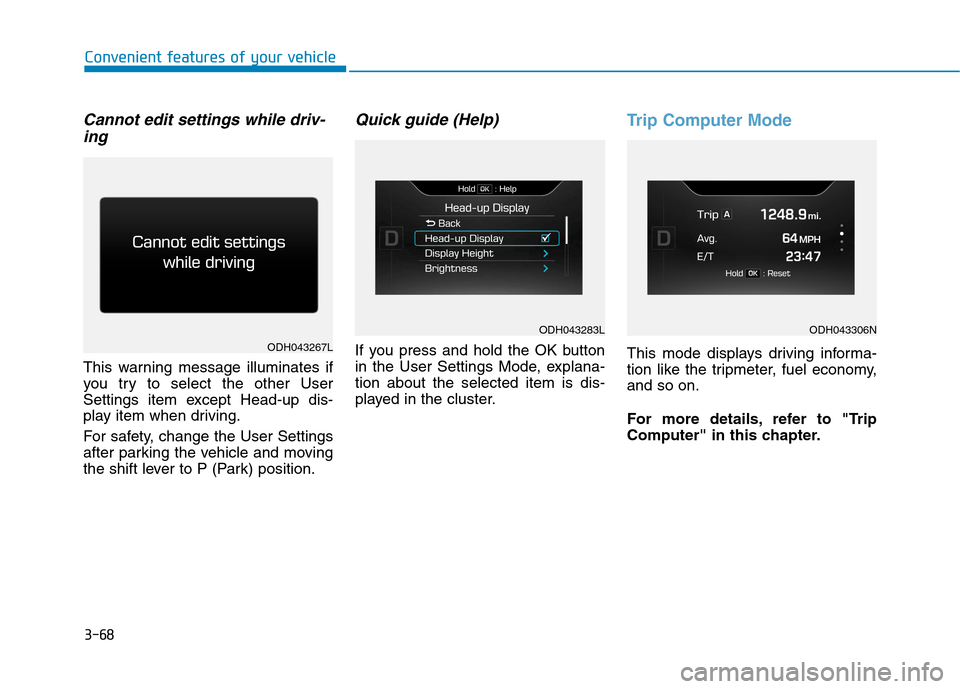
Cannot edit settings while driv-
ing
This warning message illuminates if
you try to select the other User
Settings item except Head-up dis-
play item when driving.
For safety, change the User Settings
after parking the vehicle and moving
the shift lever to P (Park) position.
Quick guide (Help)
If you press and hold the OK button
in the User Settings Mode, explana-
tion about the selected item is dis-
played in the cluster.
Trip Computer Mode
This mode displays driving informa-
tion like the tripmeter, fuel economy,
and so on.
For more details, refer to "Trip
Computer" in this chapter.ODH043267L
ODH043283LODH043306N
Page 172 of 501

3-78
Convenient features of your vehicle
Other Features
ItemsExplanation
Fuel Economy Auto Reset
The average fuel economy will not reset automatically whenever refueling.
The average fuel economy will reset automatically when refueling.
For more details, refer to "Trip Computer" in this chapter.
Traffic Information The traffic information will not be displayed on the LCD display.
The LCD display will show traffic information.
Wiper/Lights Display The wiper/lights information will not be displayed on the LCD display.
The LCD display will shortly show the selected wiper/lights information.
Fuel Economy UnitChoose the fuel economy unit. (US gallon, UK gallon)
Temperature UnitChoose the temperature unit. (°C,°F)
Tire Pressure UnitChoose the tire pressure unit. (psi, kPa, Bar)
Page 182 of 501

3-88
Convenient features of your vehicle
Check AEB system
This warning message illuminates
if the sensor or cover is dirty or
obscured with foreign matter such
as snow. Clean the sensor or cover
by using a soft cloth.
This warning message illuminates
if there is a malfunction with the
Autonomous Emergency Braking
(AEB) system. In this case, have
your vehicle inspected by an
authorized HYUNDAI dealer.
For more details, refer to
"Autonomous Emergency Braking
(AEB) System" in chapter 5.
Low Fuel
This warning message illuminates
if the fuel tank is nearly empty.
- When the low fuel level warning
light is illuminates.
- When the trip computer displays
“--- mile (or km)” as distance to
empty.
Add fuel as soon as possible.
Engine has overheated
This warning message illuminates
when the engine coolant tempera-
ture is above 248°F (120°C). This
means that the engine is overheat-
ed and may be damaged.
If your vehicle is overheated, refer
to "Overheating" in chapter 6.
ODH043256LODH043258LODH043252L