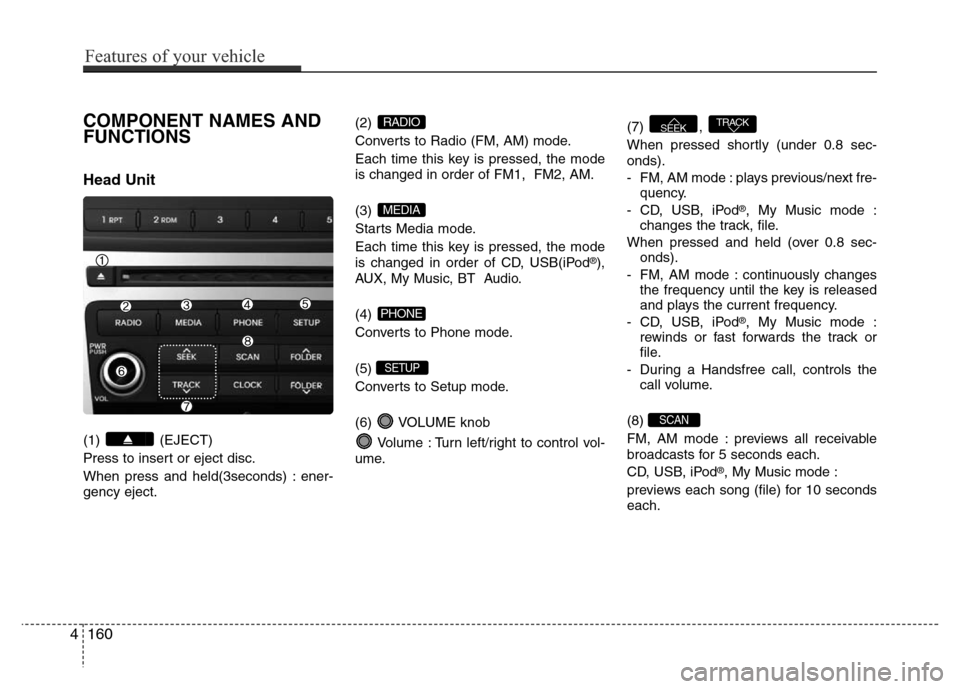
COMPONENT NAMES AND
FUNCTIONS
Head Unit
(1) (EJECT)
Press to insert or eject disc.
When press and held(3seconds) : ener-
gency eject.(2)
Converts to Radio (FM, AM) mode.
Each time this key is pressed, the mode
is changed in order of FM1, FM2, AM.
(3)
Starts Media mode.
Each time this key is pressed, the mode
is changed in order of CD, USB(iPod
®),
AUX, My Music, BT Audio.
(4)
Converts to Phone mode.
(5)
Converts to Setup mode.
(6) VOLUME knob
Volume : Turn left/right to control vol-
ume.(7) ,
When pressed shortly (under 0.8 sec-
onds).
- FM, AM mode : plays previous/next fre-
quency.
- CD, USB, iPod
®, My Music mode :
changes the track, file.
When pressed and held (over 0.8 sec-
onds).
- FM, AM mode : continuously changes
the frequency until the key is released
and plays the current frequency.
- CD, USB, iPod
®, My Music mode :
rewinds or fast forwards the track or
file.
- During a Handsfree call, controls the
call volume.
(8)
FM, AM mode : previews all receivable
broadcasts for 5 seconds each.
CD, USB, iPod
®, My Music mode :
previews each song (file) for 10 seconds
each.
SCAN
TRACKSEEK
SETUP
PHONE
MEDIA
RADIO
4160
Features of your vehicle