Page 239 of 473
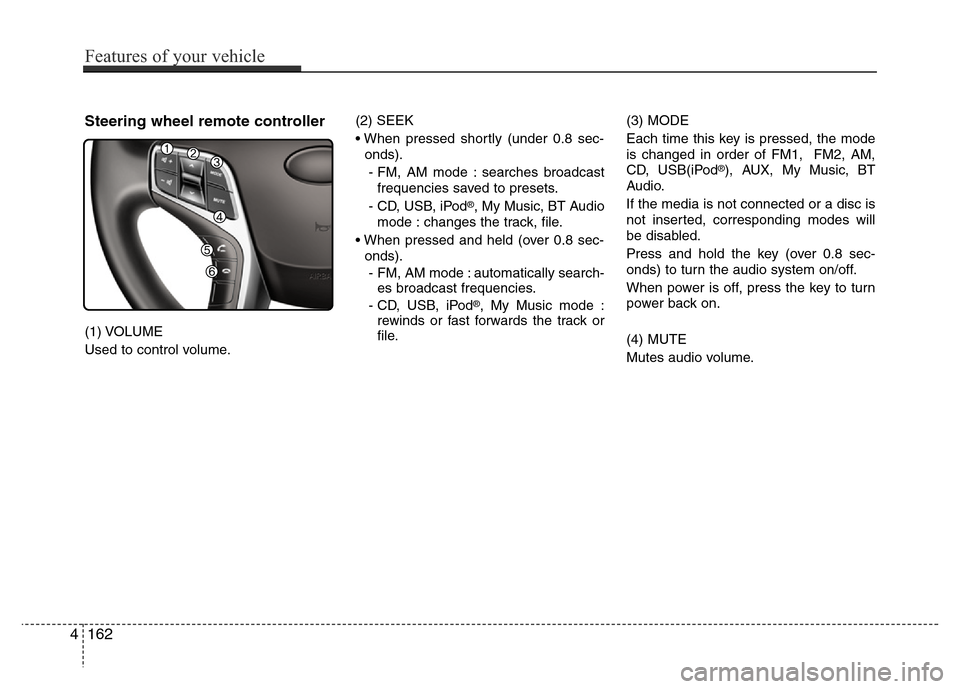
Steering wheel remote controller
(1) VOLUME
Used to control volume.(2) SEEK
• When pressed shortly (under 0.8 sec-
onds).
- FM, AM mode : searches broadcast
frequencies saved to presets.
- CD, USB, iPod
®, My Music, BT Audio
mode : changes the track, file.
• When pressed and held (over 0.8 sec-
onds).
- FM, AM mode : automatically search-
es broadcast frequencies.
- CD, USB, iPod
®, My Music mode :
rewinds or fast forwards the track or
file.(3) MODE
Each time this key is pressed, the mode
is changed in order of FM1, FM2, AM,
CD, USB(iPod
®), AUX, My Music, BT
Audio.
If the media is not connected or a disc is
not inserted, corresponding modes will
be disabled.
Press and hold the key (over 0.8 sec-
onds) to turn the audio system on/off.
When power is off, press the key to turn
power back on.
(4) MUTE
Mutes audio volume.
4162
Features of your vehicle
Page 241 of 473
RADIO MODE
Basic Mode Screen
(1) Mode Display
Displays currently operating mode.
(2) Frequency
Displays the current frequency.
(3) Preset
Displays currently playing preset number
[1] ~ [6].
(4) MENU
Displays Radio menus.(5) Preset Display
Displays saved presets.
(6) A.Store
Automatically saves frequencies with
superior reception to Preset buttons.
4164
Features of your vehicle
Page 242 of 473
Switching to Radio Mode
Pressing the key will change the
operating mode in order of FM1
➟ FM2
➟ AM .
If [Mode Pop up] is turned on within
[Display], then pressing the
key will display the Radio mode
pop up screen.
Use TUNE knob to move the focus.
Press the knob to select.
✽ NOTICE
If the key is pressed with the
system power off, then the power will
turn on and the most recently played
broadcast will be played.
Searching Radio Frequencies
Using Seek
Press the , key to play
the previous/next frequency.
Using TUNE
Turn the TUNE knob to select the fre-
quency.
Using Radio Mode
Selecting Presets
Press the key Select
The 6 presets are displayed.
Press the ~ key to play the
desired preset.
6 1
PresetMENU
TRACKSEEK
RADIO
RADIO
SETUP
RADIO
Features of your vehicle
165 4
Page 243 of 473

Features of your vehicle
166 4
Saving Presets
After selecting the frequency Press and
hold the desired preset ~ key.
A 'beep' will sound and the frequency is
saved to the selected preset button.
Auto Store
After pressing the key Select
the button to automatically
save receivable frequencies to Preset
buttons.
A total of 18 frequencies with six preset
frequencies each for FM1 / FM2 / AM
modes can be saved.
✽NOTICE
While Auto Store is operating, selecting
the button again will can-
cel the function and restore the previous
frequency.
Scan
Press the key to scan all radio
frequencies.
Press and hold the key (over
0.8 seconds) to scan preset buttons.
• Scan All :Scans frequencies with supe-
rior reception for 5 seconds each.
• Preset Scan : Scans broadcasts saved
to presets for 5 seconds each.
Once scan is complete, the previously
playing frequency is restored.
During Scan, pressing the key
again will cancel the scan operation and
restore the previously played frequency.
SCAN
SCAN
SCAN
Auto store
Auto store
MENU
6 1
Page 267 of 473
✽NOTICE
• Bluetooth®Wireless Technology fea-
tures supported within the vehicle are
as follows. Some features may not be
supported depending on your
Bluetooth
®Wireless Technology device.
- Outgoing/Incoming Handsfree calls
- Operations during a call (Switch to
Private, Switch to call waiting, MIC
on/off)
- Downloading Call History
- Downloading Mobile Contacts
-Bluetooth
®Wireless Technology
device auto connection
- Bluetooth Audio Streaming
• Up to five Bluetooth
®Wireless
Technology devices can be paired to
the Car Handsfree system.
• Only one Bluetooth
®Wireless
Technology device can be connected at
a time.
• Other devices cannot be paired while
a Bluetooth
®Wireless Technology
device is connected.
•Only Bluetooth
®Wireless Technology
Handsfree and Bluetooth audio relat-
ed features are supported.
(Continued)(Continued)
• Bluetooth related operations are pos-
sible only within devices that support
Handsfree or audio features, such as a
Bluetooth
®Wireless Technology
mobile phone or a Bluetooth audio
device.
• If a connected Bluetooth
®Wireless
Technology device becomes discon-
nected due to being out of communi-
cation range, turning the device OFF,
or a Bluetooth
®Wireless Technology
communication error, corresponding
Bluetooth
®Wireless Technology
devices are automatically searched
and reconnected.
• If the system becomes unstable due to
communication errors between the
car Handsfree and the Bluetooth
®
Wireless Technology device, reset the
device by turning off and back on
again. Upon resetting Bluetooth
®
Wireless Technology device, the sys-
tem will be restored.
(Continued)(Continued)
• After pairing is complete, a contacts
download request is sent once to the
mobile phone. Some mobile phones
may require confirmation upon
receiving a download request, ensure
your mobile phone accepts the con-
nection. Refer to your phones user’s
manual for additional information
regarding phone pairing and connec-
tions.
4190
Features of your vehicle
Page 275 of 473
![Hyundai Azera 2015 Owners Manual Features of your vehicle
198 4
USING SETUP
Starting Mode
Press the key to display the
Setup screen.
You can select and control options related
to [Display], [Sound], [Clock / Calendar],
[Phone] and [](/manual-img/35/14466/w960_14466-274.png "Hyundai Azera 2015 Owners Manual Features of your vehicle
198 4
USING SETUP
Starting Mode
Press the key to display the
Setup screen.
You can select and control options related
to [Display], [Sound], [Clock / Calendar],
[Phone] and [")
Features of your vehicle
198 4
USING SETUP
Starting Mode
Press the key to display the
Setup screen.
You can select and control options related
to [Display], [Sound], [Clock / Calendar],
[Phone] and [System].
✽NOTICE
Once settings have been changed, press
the key to return to the previ-
ous menu.
Display Settings
Adjusting the Brightness
Press the key Select [Display]
Select [Brightness]
Use the
TUNE knobto adjust the
screen brightness or set the Brightness
on Automatic, Daylight, or Nightmode.
select the button to reset.
(1) Automatic : Adjusts the brightness
automatically
(2) Day : Always maintains the bright-
ness on high
(3) Night : Always maintains the bright-
ness on low
Mode Pop-up
Press the key Select [Display]
Select [Mode Pop up]
This feature is used to display the Mode
Pop-up screen when entering radio and
media modes.
When this feature is turned on, pressing
the or key will display
the Mode Pop-up screen.
✽NOTICE
The media Mode Pop-up screen can be
displayed only when two or more media
modes have been connected.
MEDIA RADIO
SETUP
Default
SETUP
MENU
SETUP
Page 277 of 473
Features of your vehicle
200 4
After selecting the Bass / Middle / Treble,
use the TUNE knob to adjust the set-
ting.
After selecting the Fader / Balance, use
TUNE knob to move the cursor on the
control screen to the desired position.
Select the button to reset.
Surround Settings(if equipped)
Press the key Select [Sound]
Select [Surround]
• Innocente (Normal) : Natural sonud
optimized for front seats
• Forza (Dynamic) : Strong sound with
enhanced bass and stereo
• Concerto (Concert) : Surround sound
with concert hall ambience
SDVC (Speed Dependent Volume
Control)
Press the key Select [Sound]
Select [Speed Dependent Vol.]
The volume level is controlled automati-
cally according to the vehicle speed.
Use the TUNE knob to select from
On/Off.
Clock/Calendar Setting
Clock Setting
Press the key Select [Clock/
Calendar] Select [Clock Settings]
Use the TUNE knob to select the
Hour, Minutes and AM/PM setting and
press the TUNE knob to change set-
tings.SETUP
SETUP
SETUP
Default
Page 325 of 473
Driving your vehicle
42 5
Each of these actions will cancel cruise
control operation (the SET indicator light
in the instrument cluster will go off), but it
will not turn the system off. If you wish to
resume cruise control operation, push
the RES+ switch located on your steering
wheel. You will return to your previously
preset speed.
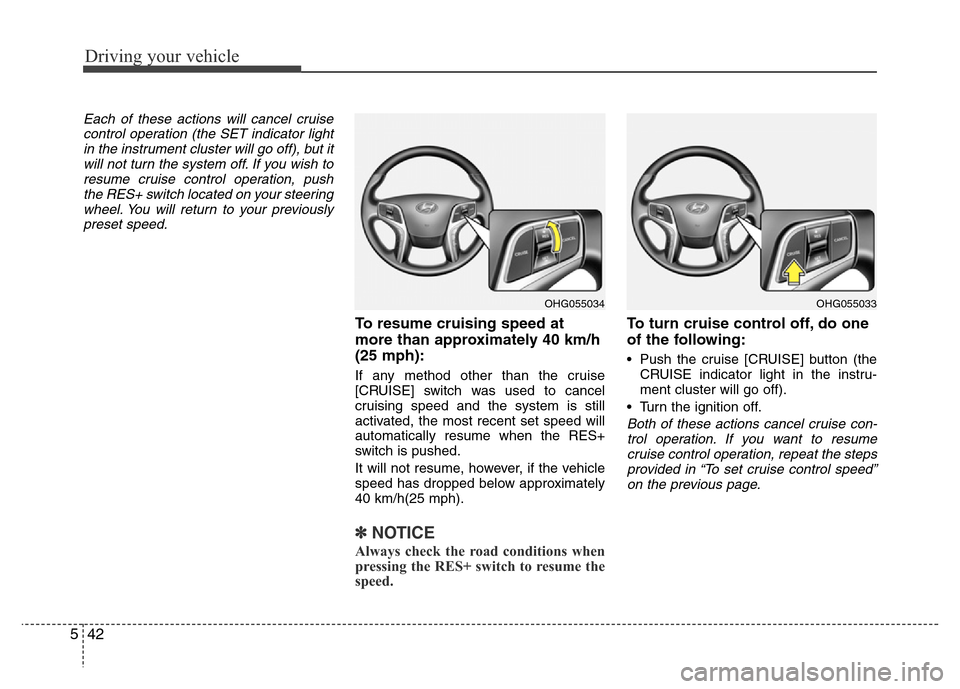
To resume cruising speed at
more than approximately 40 km/h
(25 mph):
If any method other than the cruise
[CRUISE] switch was used to cancel
cruising speed and the system is still
activated, the most recent set speed will
automatically resume when the RES+
switch is pushed.
It will not resume, however, if the vehicle
speed has dropped below approximately
40 km/h(25 mph).
✽NOTICE
Always check the road conditions when
pressing the RES+ switch to resume the
speed.
To turn cruise control off, do one
of the following:
• Push the cruise [CRUISE] button (the
CRUISE indicator light in the instru-
ment cluster will go off).
• Turn the ignition off.
Both of these actions cancel cruise con-
trol operation. If you want to resume
cruise control operation, repeat the steps
provided in “To set cruise control speed”
on the previous page.
OHG055034OHG055033
![Hyundai Azera 2015 Owners Manual RADIO MODE
Basic Mode Screen
(1) Mode Display
Displays currently operating mode.
(2) Frequency
Displays the current frequency.
(3) Preset
Displays currently playing preset number
[1] ~ [6].
(4) MENU
D](/manual-img/35/14466/w960_14466-240.png "Hyundai Azera 2015 Owners Manual RADIO MODE
Basic Mode Screen
(1) Mode Display
Displays currently operating mode.
(2) Frequency
Displays the current frequency.
(3) Preset
Displays currently playing preset number
[1] ~ [6].
(4) MENU
D")
![Hyundai Azera 2015 Owners Manual Switching to Radio Mode
Pressing the key will change the
operating mode in order of FM1
➟ FM2
➟ AM .
If [Mode Pop up] is turned on within
[Display], then pressing the
key will display the Radio](/manual-img/35/14466/w960_14466-241.png "Hyundai Azera 2015 Owners Manual Switching to Radio Mode
Pressing the key will change the
operating mode in order of FM1
➟ FM2
➟ AM .
If [Mode Pop up] is turned on within
[Display], then pressing the
key will display the Radio")
