2015 Hyundai Azera lock
[x] Cancel search: lockPage 78 of 473
4
Keys / 4-3
Smart key / 4-7
Remote keyless entry / 4-12
Theft-alarm system / 4-15
Door locks / 4-18
Trunk / 4-22
Smart trunk / 4-24
Windows / 4-28
Hood / 4-32
Fuel filler lid / 4-34
Panorama sunroof / 4-37
Driver position memory system / 4-41
Steering wheel / 4-43
Mirrors / 4-46
Instrument cluster / 4-50
LCD display / 4-55
Trip computer / 4-64
Warnings and indicators / 4-68
Rear parking assist system / 4-85
Parking assist system / 4-89
Rearview camera / 4-93
Hazard warning flasher / 4-93
Lighting / 4-94
Features of your vehicle
Page 80 of 473
43
Features of your vehicle
Record your key number
The key code number is
stamped on the key
code tag attached to the
key set. We recommend
that you contact an
authorized HYUNDAI dealer. Remove
the key code tag and store it in a safe
place. Also, record the key code number
and keep it in a safe and handy place, but
not in the vehicle.
Key operations
• Used to start the engine.
• Used to lock and unlock the doors.
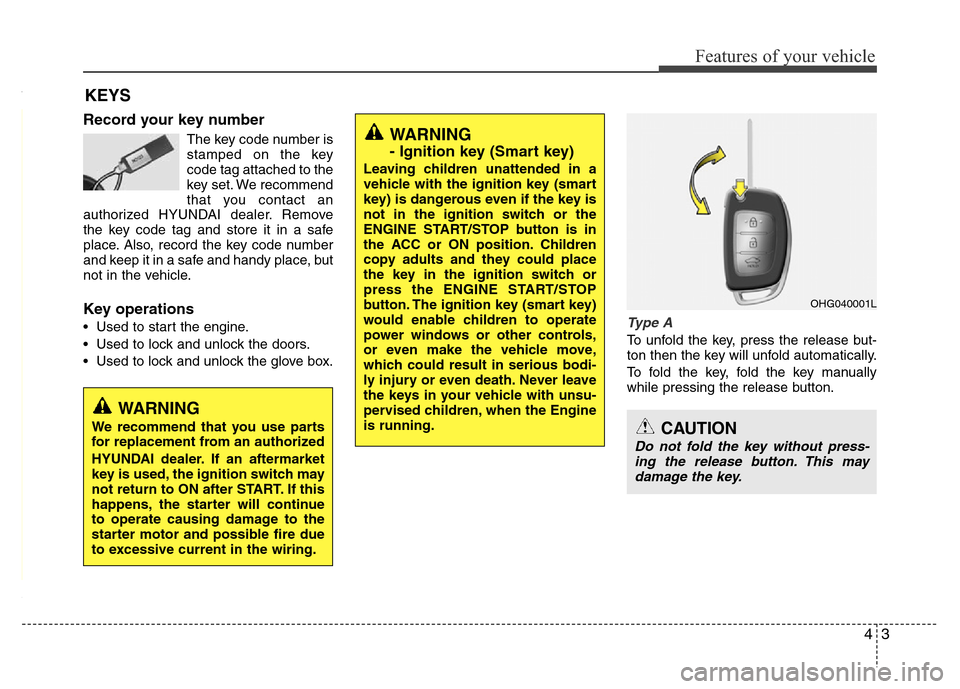
• Used to lock and unlock the glove box.Type A
To unfold the key, press the release but-
ton then the key will unfold automatically.
To fold the key, fold the key manually
while pressing the release button.
KEYS
WARNING
- Ignition key (Smart key)
Leaving children unattended in a
vehicle with the ignition key (smart
key) is dangerous even if the key is
not in the ignition switch or the
ENGINE START/STOP button is in
the ACC or ON position. Children
copy adults and they could place
the key in the ignition switch or
press the ENGINE START/STOP
button. The ignition key (smart key)
would enable children to operate
power windows or other controls,
or even make the vehicle move,
which could result in serious bodi-
ly injury or even death. Never leave
the keys in your vehicle with unsu-
pervised children, when the Engine
is running.
WARNING
We recommend that you use parts
for replacement from an authorized
HYUNDAI dealer. If an aftermarket
key is used, the ignition switch may
not return to ON after START. If this
happens, the starter will continue
to operate causing damage to the
starter motor and possible fire due
to excessive current in the wiring.
OHG040001L
CAUTION
Do not fold the key without press-
ing the release button. This may
damage the key.
Page 81 of 473
Features of your vehicle
4 4
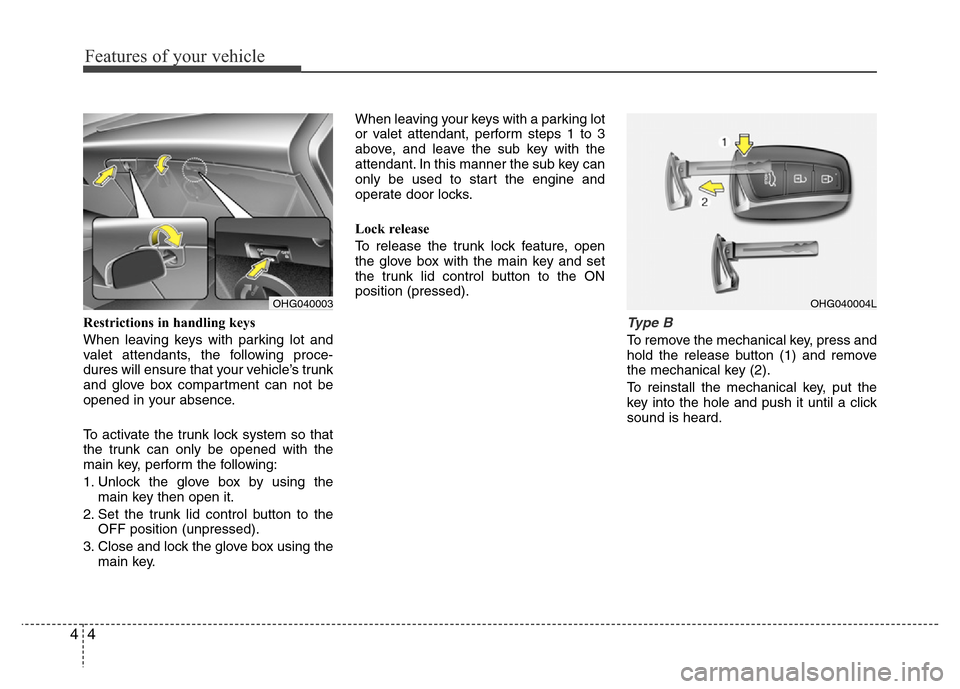
Restrictions in handling keys
When leaving keys with parking lot and
valet attendants, the following proce-
dures will ensure that your vehicle’s trunk
and glove box compartment can not be
opened in your absence.
To activate the trunk lock system so that
the trunk can only be opened with the
main key, perform the following:
1. Unlock the glove box by using the
main key then open it.
2. Set the trunk lid control button to the
OFF position (unpressed).
3. Close and lock the glove box using the
main key.When leaving your keys with a parking lot
or valet attendant, perform steps 1 to 3
above, and leave the sub key with the
attendant. In this manner the sub key can
only be used to start the engine and
operate door locks.
Lock release
To release the trunk lock feature, open
the glove box with the main key and set
the trunk lid control button to the ON
position (pressed).Type B
To remove the mechanical key, press and
hold the release button (1) and remove
the mechanical key (2).
To reinstall the mechanical key, put the
key into the hole and push it until a click
sound is heard.
OHG040003OHG040004L
Page 82 of 473
45
Features of your vehicle
Restrictions in handling keys
When leaving keys with parking lot and
valet attendants, the following proce-
dures will ensure that your vehicle’s trunk
and glove box compartment can not be
opened in your absence.
To activate the trunk lock system so that
the trunk can only be opened with the
mechanical key, perform the following:
1.
Press and hold the release button and
remove the mechanical key.
2. Unlock the glove box by using the
mechanical key then open it.
3. Set the trunk lid control button to OFF
position (unpressed).
4. Close and lock the glove box using the
mechanical key.When leaving your keys with a parking lot
attendant or valet, perform steps 1 to 4
above, remove the mechanical key from
the smart key and leave the smart key
with the attendant. In this manner the
smart key can only be used to start the
engine and operate door locks.
Lock release
To release the trunk lock feature, open
the glove box with the mechanical key
and set the trunk lid control button to ON
position (pressed). In this position the
trunk will open with the trunk lid button or
smart key.
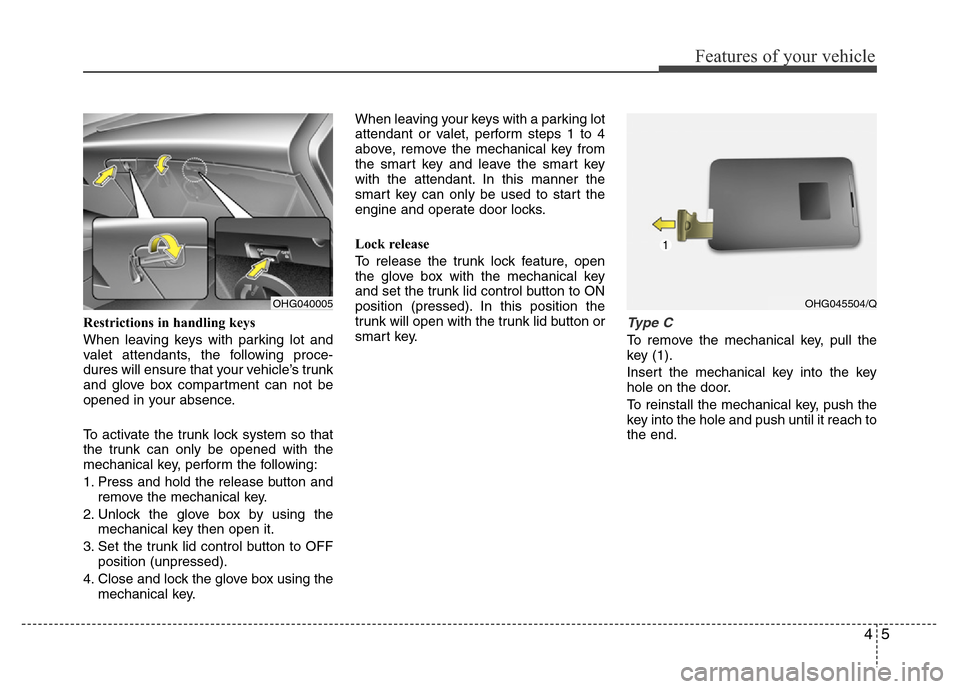
Type C
To remove the mechanical key, pull the
key (1).
Insert the mechanical key into the key
hole on the door.
To reinstall the mechanical key, push the
key into the hole and push until it reach to
the end.
OHG040005OHG045504/Q
Page 83 of 473
Features of your vehicle
6 4
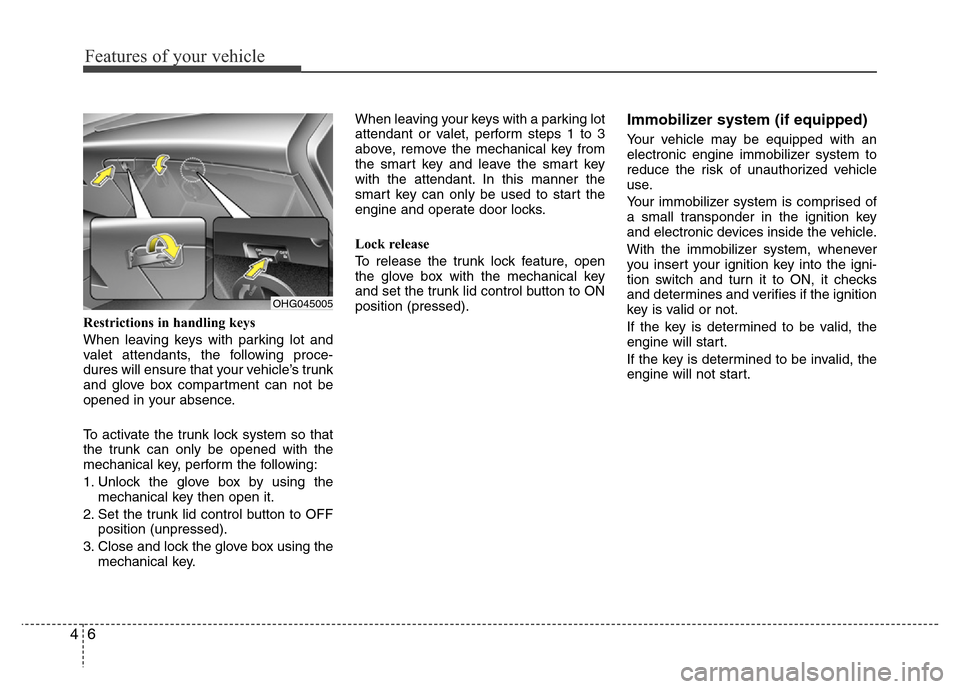
Restrictions in handling keys
When leaving keys with parking lot and
valet attendants, the following proce-
dures will ensure that your vehicle’s trunk
and glove box compartment can not be
opened in your absence.
To activate the trunk lock system so that
the trunk can only be opened with the
mechanical key, perform the following:
1. Unlock the glove box by using the
mechanical key then open it.
2. Set the trunk lid control button to OFF
position (unpressed).
3. Close and lock the glove box using the
mechanical key.When leaving your keys with a parking lot
attendant or valet, perform steps 1 to 3
above, remove the mechanical key from
the smart key and leave the smart key
with the attendant. In this manner the
smart key can only be used to start the
engine and operate door locks.
Lock release
To release the trunk lock feature, open
the glove box with the mechanical key
and set the trunk lid control button to ON
position (pressed).
Immobilizer system (if equipped)
Your vehicle may be equipped with an
electronic engine immobilizer system to
reduce the risk of unauthorized vehicle
use.
Your immobilizer system is comprised of
a small transponder in the ignition key
and electronic devices inside the vehicle.
With the immobilizer system, whenever
you insert your ignition key into the igni-
tion switch and turn it to ON, it checks
and determines and verifies if the ignition
key is valid or not.
If the key is determined to be valid, the
engine will start.
If the key is determined to be invalid, the
engine will not start.
OHG045005
Page 85 of 473
Features of your vehicle
8 4
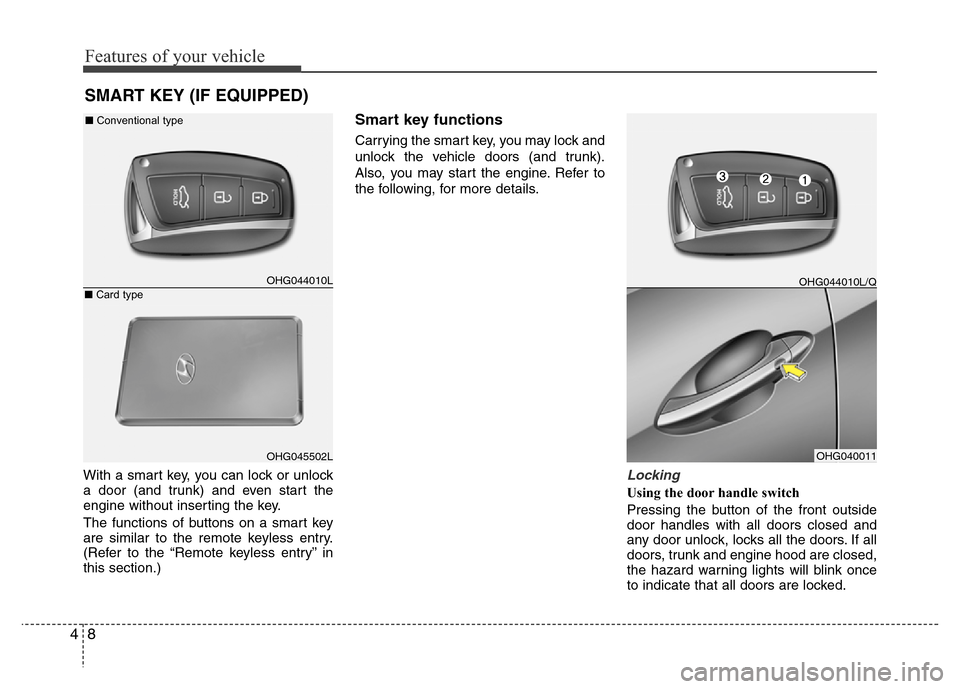
With a smart key, you can lock or unlock
a door (and trunk) and even start the
engine without inserting the key.
The functions of buttons on a smart key
are similar to the remote keyless entry.
(Refer to the “Remote keyless entry” in
this section.)
Smart key functions
Carrying the smart key, you may lock and
unlock the vehicle doors (and trunk).
Also, you may start the engine. Refer to
the following, for more details.
Locking
Using the door handle switch
Pressing the button of the front outside
door handles with all doors closed and
any door unlock, locks all the doors. If all
doors, trunk and engine hood are closed,
the hazard warning lights will blink once
to indicate that all doors are locked.
SMART KEY (IF EQUIPPED)
OHG044010L
OHG045502LOHG040011 ■Conventional type
■Card type
OHG044010L/Q
Page 86 of 473
49
Features of your vehicle
Also, the outside rearview mirror will auto-
matically fold if the outside rearview mirror
folding switch is in the AUTO position (if
equipped).
However, if any door, trunk or engine hood
remains open, the hazard warning lights will
not operate. If all doors, trunk and engine
hood are closed after the lock button is
pressed, the hazard warning lights will blink
once.
The button will only operate when the smart
key is within 0.7~1 m (28~40 in.) from the
outside door handle. If you want to make
sure that a door has locked or not, you
should check the door lock button inside the
vehicle or pull the outside door handle.
Even though you press the outside door
handle buttons, the doors will not lock and
the chime will sound for 3 seconds if any of
following occur:
• The smart key is in the vehicle.
• The ignition switch is in ACC or ON
position.
• Any door except the trunk is open.
Using the button on the smart key
All doors are locked if the lock button(1)
is pressed. If all doors, trunk and hood
are closed, the hazard warning lights will
blink once to indicate that all doors are
locked. Also, the outside rearview mirror
will automatically fold if the outside
rearview mirror folding switch is in the
AUTO position (if equipped).However, if any door, trunk or engine
hood remains open, the hazard warning
lights will not operate. If all doors, trunk
and engine hood are closed after the lock
button is pressed, the hazard warning
lights will blink once.
Unlocking
Using the door handle switch
Press the button of the front outside door
handles with all doors closed and locked,
unlocks all the doors. The hazard warn-
ing lights will blink twice to indicate that
all doors are unlocked. Also, the outside
rearview mirror will automatically unfold if
the outside rearview mirror folding switch
is in the AUTO position (if equipped). The
button will only operate when the smart
key is within 0.7~1 m (28~40 in.) from the
outside door handle.
When the smart key is recognized in the
area of 0.7~1 m (28~40 in.) from the front
outside door handle, other people can
also open the door without possession of
the smart key.
After pressing the button, the doors will
lock automatically unless you open any
door within 30 seconds.Using the button on the smart key
All doors are unlocked if the unlock but-
ton(2) is pressed. The hazard warning
lights will blink twice to indicate that all
doors are unlocked. Also, the outside
rearview mirror will automatically unfold if
the outside rearview mirror folding switch
is in the AUTO position (if equipped).
After pressing this button, the doors will
lock automatically unless you open any
door within 30 seconds.
Trunk open
Using the trunk handle switch
If you are within 0.7~1 m (28~40 in.) from
the outside trunk handle with your smart
key in your possession, the trunk will
unlock and open when you press the
trunk handle switch.
Also, once the trunk is opened and then
closed, the trunk will lock automatically.
Using the button on the smart key
The trunk is opened if the trunk unlock but-
ton(3) is pressed for more than 1 second.
Once the trunk is opened and then
closed, the trunk will lock automatically.
The word “HOLD” is written on the button
to inform you that you must press and
hold the button for more than 1 second.
Page 87 of 473
Features of your vehicle
10 4
Start-up
You can start the engine without inserting
the key. For detailed information refer to
“Engine start/stop button” in section 5.
Smart key precautions
✽NOTICE
• If, for some reason, you happen to lose
your smart key, you will not be able to
start the engine. Tow the vehicle, if
necessary, we recommend that you
contact an authorized HYUNDAI
dealer.
• A maximum of 3 smart keys can be
registered to a single vehicle. If you
lose a smart key, we recommend that
you contact an authorized HYUNDAI
dealer.
• The smart key will not work if any of
following occur:
- The smart key is close to a radio
transmitter such as a radio station or
an airport which can interfere with
normal operation of the smart key.
- You keep the smart key near a
mobile two-way radio system or a
cellular phone.
- Another vehicle’s smart key is being
operated close to your vehicle.
(Continued)(Continued)
When the smart key does not work
correctly, open and close the door with
the mechanical key. If you have a
problem with the smart key, we rec-
ommend that you contact an author-
ized HYUNDAI dealer.
• If the smart key is in close proximity
to your cell phone or smart phone, the
signal from the smart key could be
blocked by normal operation of your
cell phone or smart phone. This is
especially important when the phone
is active such as making call, receiving
calls, text messaging, and/or send-
ing/receiving emails. Avoid placing the
smart key and your cell phone or
smart phone in the same pants or
jacket pocket and maintain adequate
distance between the two devices. Battery replacement
A smart key battery should last for sever-
al years, but if the smart key is not work-
ing properly, try replacing the battery with
a new one. If you are unsure how to use
your smart key or replace the battery, we
recommend that you contact an authorized
HYUNDAI dealer.
CAUTION
Keep the smart key away from
water or any liquid. If the keyless
entry system is inoperative due to
exposure to water or liquids, it will
not be covered by your manufactur-
er’s vehicle warranty.
CAUTION
Keep the smart key away from elec-
tromagnetic materials that blocks
electromagnetic waves to the key
surface.