Page 75 of 473
359
Safety features of your vehicle
SRS Care
The SRS is virtually maintenance-free
and so there are no parts you can safely
service by yourself. If the SRS air bag
warning light does not illuminate or if it
continuously remains on, we recommend
that the system be inspected by an
authorized HYUNDAI dealer.WARNING
• Modification to SRS components
or wiring, including the addition
of any kind of badges to the pad
covers or modifications to the
body structure, can adversely
affect SRS performance and lead
to possible injury.
• For cleaning the air bag pad cov-
ers, use only a soft, dry cloth or
one which has been moistened
with plain water. Solvents or
cleaners could adversely affect
the air bag covers and proper
deployment of the system.
•
No objects should be placed over
or near the air bag modules on the
steering wheel, instrument panel,
and the front passenger's panel
above the glove box, because any
such object could cause harm if the
vehicle is in a crash severe enough
to cause the air bags to inflate.
(Continued)
(Continued)
• If the air bags inflate, we recom-
mend that the system be replaced
by an authorized HYUNDAI dealer.
• Do not tamper with or disconnect
SRS wiring, or other components
of the SRS system. Doing so
could result in injury, due to acci-
dental inflation of the air bags or
by rendering the SRS inoperative.
• If components of the air bag sys-
tem must be discarded, or if the
vehicle must be scrapped, certain
safety precautions must be
observed. An authorized HYUNDAI
dealer knows these precautions
and can give you the necessary
information. Failure to follow these
precautions and procedures
could increase the risk of person-
al injury.
• If your car was flooded and has
soaked carpeting or water on the
flooring, you shouldn't try to start
the engine; we recommend that
you contact an authorized
HYUNDAI dealer.
Page 78 of 473
4
Keys / 4-3
Smart key / 4-7
Remote keyless entry / 4-12
Theft-alarm system / 4-15
Door locks / 4-18
Trunk / 4-22
Smart trunk / 4-24
Windows / 4-28
Hood / 4-32
Fuel filler lid / 4-34
Panorama sunroof / 4-37
Driver position memory system / 4-41
Steering wheel / 4-43
Mirrors / 4-46
Instrument cluster / 4-50
LCD display / 4-55
Trip computer / 4-64
Warnings and indicators / 4-68
Rear parking assist system / 4-85
Parking assist system / 4-89
Rearview camera / 4-93
Hazard warning flasher / 4-93
Lighting / 4-94
Features of your vehicle
Page 79 of 473
Wipers and washers / 4-70
Interior light / 4-103
Welcome system / 4-106
Defroster / 4-107
Manual climate control system / 4-108
Automatic climate control system / 4-118
Windshield defrosting and defogging / 4-129
Storage compartment / 4-134
Interior features / 4-136
Audio system / 4-143
Features of your vehicle4
Page 85 of 473
Features of your vehicle
8 4
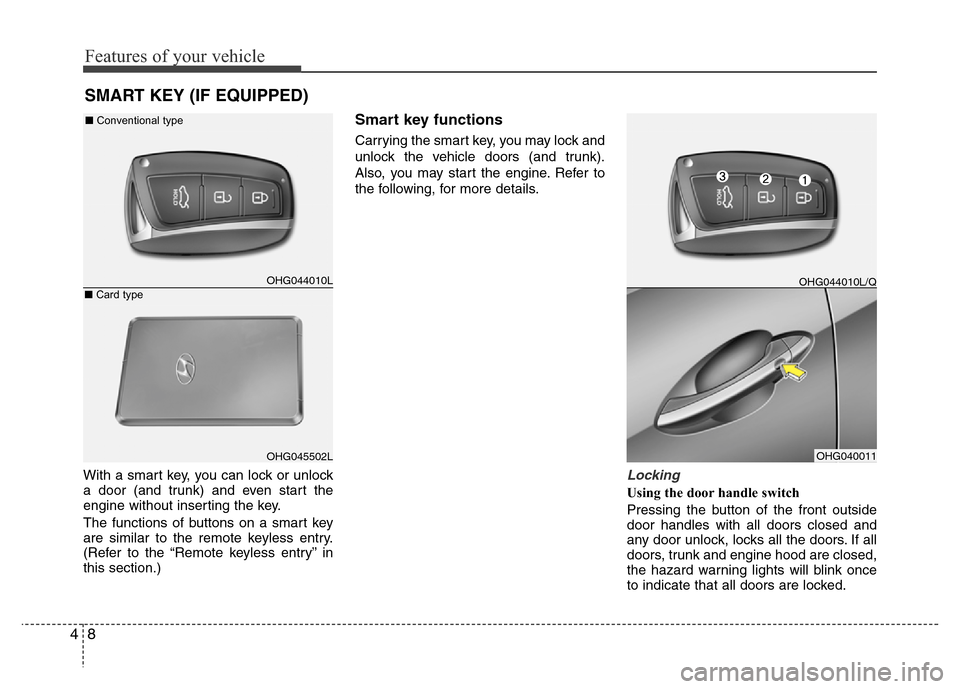
With a smart key, you can lock or unlock
a door (and trunk) and even start the
engine without inserting the key.
The functions of buttons on a smart key
are similar to the remote keyless entry.
(Refer to the “Remote keyless entry” in
this section.)
Smart key functions
Carrying the smart key, you may lock and
unlock the vehicle doors (and trunk).
Also, you may start the engine. Refer to
the following, for more details.
Locking
Using the door handle switch
Pressing the button of the front outside
door handles with all doors closed and
any door unlock, locks all the doors. If all
doors, trunk and engine hood are closed,
the hazard warning lights will blink once
to indicate that all doors are locked.
SMART KEY (IF EQUIPPED)
OHG044010L
OHG045502LOHG040011 ■Conventional type
■Card type
OHG044010L/Q
Page 86 of 473
49
Features of your vehicle
Also, the outside rearview mirror will auto-
matically fold if the outside rearview mirror
folding switch is in the AUTO position (if
equipped).
However, if any door, trunk or engine hood
remains open, the hazard warning lights will
not operate. If all doors, trunk and engine
hood are closed after the lock button is
pressed, the hazard warning lights will blink
once.
The button will only operate when the smart
key is within 0.7~1 m (28~40 in.) from the
outside door handle. If you want to make
sure that a door has locked or not, you
should check the door lock button inside the
vehicle or pull the outside door handle.
Even though you press the outside door
handle buttons, the doors will not lock and
the chime will sound for 3 seconds if any of
following occur:
• The smart key is in the vehicle.
• The ignition switch is in ACC or ON
position.
• Any door except the trunk is open.
Using the button on the smart key
All doors are locked if the lock button(1)
is pressed. If all doors, trunk and hood
are closed, the hazard warning lights will
blink once to indicate that all doors are
locked. Also, the outside rearview mirror
will automatically fold if the outside
rearview mirror folding switch is in the
AUTO position (if equipped).However, if any door, trunk or engine
hood remains open, the hazard warning
lights will not operate. If all doors, trunk
and engine hood are closed after the lock
button is pressed, the hazard warning
lights will blink once.
Unlocking
Using the door handle switch
Press the button of the front outside door
handles with all doors closed and locked,
unlocks all the doors. The hazard warn-
ing lights will blink twice to indicate that
all doors are unlocked. Also, the outside
rearview mirror will automatically unfold if
the outside rearview mirror folding switch
is in the AUTO position (if equipped). The
button will only operate when the smart
key is within 0.7~1 m (28~40 in.) from the
outside door handle.
When the smart key is recognized in the
area of 0.7~1 m (28~40 in.) from the front
outside door handle, other people can
also open the door without possession of
the smart key.
After pressing the button, the doors will
lock automatically unless you open any
door within 30 seconds.Using the button on the smart key
All doors are unlocked if the unlock but-
ton(2) is pressed. The hazard warning
lights will blink twice to indicate that all
doors are unlocked. Also, the outside
rearview mirror will automatically unfold if
the outside rearview mirror folding switch
is in the AUTO position (if equipped).
After pressing this button, the doors will
lock automatically unless you open any
door within 30 seconds.
Trunk open
Using the trunk handle switch
If you are within 0.7~1 m (28~40 in.) from
the outside trunk handle with your smart
key in your possession, the trunk will
unlock and open when you press the
trunk handle switch.
Also, once the trunk is opened and then
closed, the trunk will lock automatically.
Using the button on the smart key
The trunk is opened if the trunk unlock but-
ton(3) is pressed for more than 1 second.
Once the trunk is opened and then
closed, the trunk will lock automatically.
The word “HOLD” is written on the button
to inform you that you must press and
hold the button for more than 1 second.
Page 89 of 473
Features of your vehicle
12 4
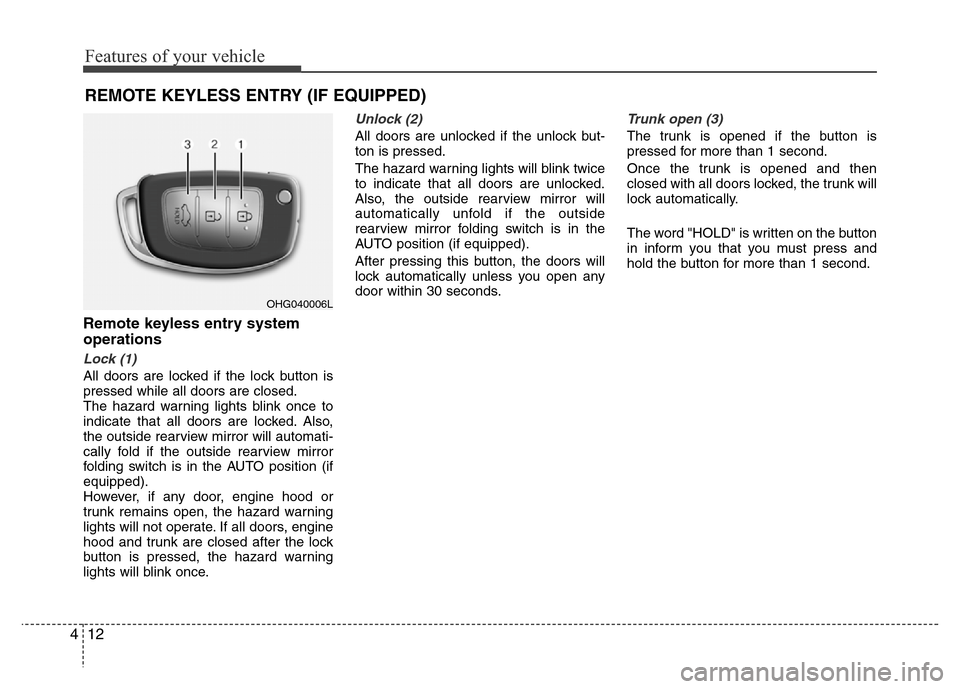
REMOTE KEYLESS ENTRY (IF EQUIPPED)
Remote keyless entry system
operations
Lock (1)
All doors are locked if the lock button is
pressed while all doors are closed.
The hazard warning lights blink once to
indicate that all doors are locked. Also,
the outside rearview mirror will automati-
cally fold if the outside rearview mirror
folding switch is in the AUTO position (if
equipped).
However, if any door, engine hood or
trunk remains open, the hazard warning
lights will not operate. If all doors, engine
hood and trunk are closed after the lock
button is pressed, the hazard warning
lights will blink once.
Unlock (2)
All doors are unlocked if the unlock but-
ton is pressed.
The hazard warning lights will blink twice
to indicate that all doors are unlocked.
Also, the outside rearview mirror will
automatically unfold if the outside
rearview mirror folding switch is in the
AUTO position (if equipped).
After pressing this button, the doors will
lock automatically unless you open any
door within 30 seconds.
Trunk open (3)
The trunk is opened if the button is
pressed for more than 1 second.
Once the trunk is opened and then
closed with all doors locked, the trunk will
lock automatically.
The word "HOLD" is written on the button
in inform you that you must press and
hold the button for more than 1 second.
OHG040006L
Page 91 of 473
Features of your vehicle
14 4
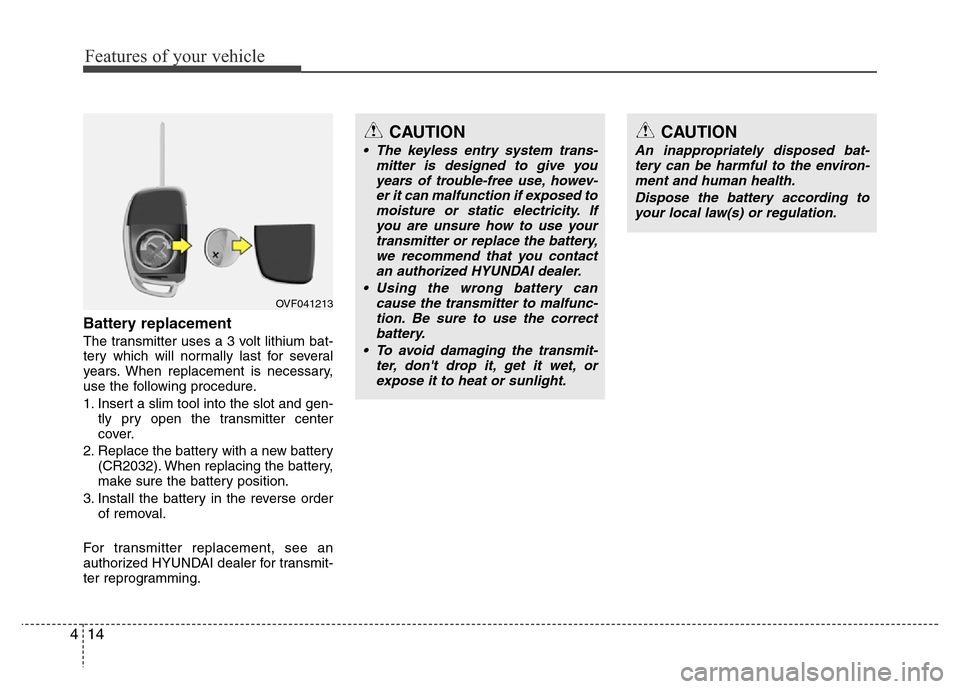
Battery replacement
The transmitter uses a 3 volt lithium bat-
tery which will normally last for several
years. When replacement is necessary,
use the following procedure.
1. Insert a slim tool into the slot and gen-
tly pry open the transmitter center
cover.
2. Replace the battery with a new battery
(CR2032). When replacing the battery,
make sure the battery position.
3. Install the battery in the reverse order
of removal.
For transmitter replacement, see an
authorized HYUNDAI dealer for transmit-
ter reprogramming.
CAUTION
• The keyless entry system trans-
mitter is designed to give you
years of trouble-free use, howev-
er it can malfunction if exposed to
moisture or static electricity. If
you are unsure how to use your
transmitter or replace the battery,
we recommend that you contact
an authorized HYUNDAI dealer.
• Using the wrong battery can
cause the transmitter to malfunc-
tion. Be sure to use the correct
battery.
• To avoid damaging the transmit-
ter, don't drop it, get it wet, or
expose it to heat or sunlight.
CAUTION
An inappropriately disposed bat-
tery can be harmful to the environ-
ment and human health.
Dispose the battery according to
your local law(s) or regulation.
OVF041213
Page 92 of 473
415
Features of your vehicle
THEFT-ALARM SYSTEM (IF EQUIPPED)
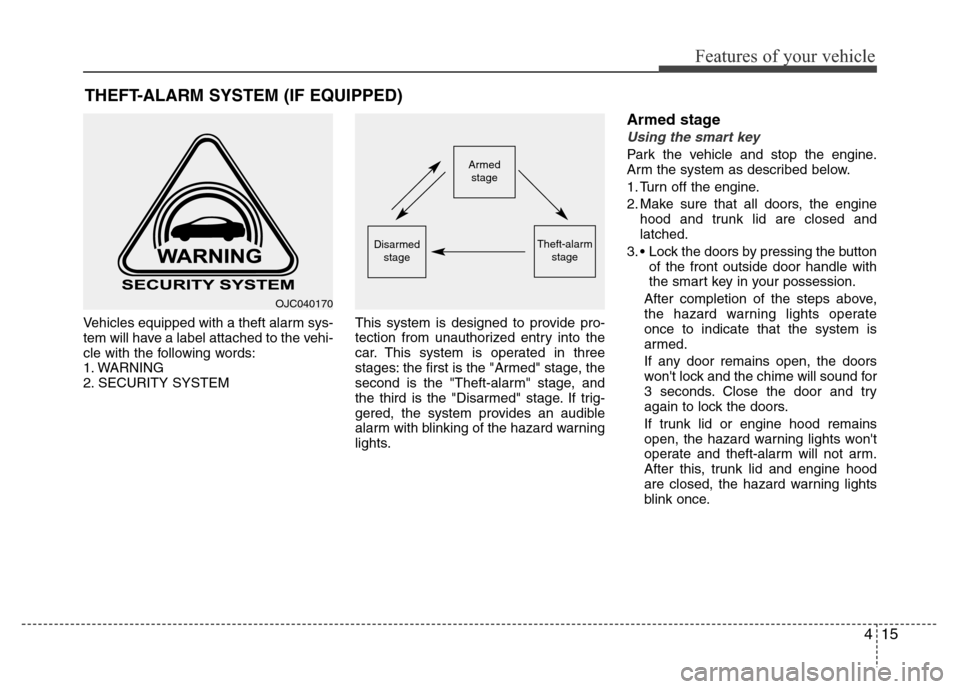
Vehicles equipped with a theft alarm sys-
tem will have a label attached to the vehi-
cle with the following words:
1. WARNING
2. SECURITY SYSTEMThis system is designed to provide pro-
tection from unauthorized entry into the
car. This system is operated in three
stages: the first is the "Armed" stage, the
second is the "Theft-alarm" stage, and
the third is the "Disarmed" stage. If trig-
gered, the system provides an audible
alarm with blinking of the hazard warning
lights.
Armed stage
Using the smart key
Park the vehicle and stop the engine.
Arm the system as described below.
1. Turn off the engine.
2. Make sure that all doors, the engine
hood and trunk lid are closed and
latched.
3. • Lock the doors by pressing the button
of the front outside door handle with
the smart key in your possession.
After completion of the steps above,
the hazard warning lights operate
once to indicate that the system is
armed.
If any door remains open, the doors
won't lock and the chime will sound for
3 seconds. Close the door and try
again to lock the doors.
If trunk lid or engine hood remains
open, the hazard warning lights won't
operate and theft-alarm will not arm.
After this, trunk lid and engine hood
are closed, the hazard warning lights
blink once.Armed
stage
Theft-alarm
stageDisarmed
stage
OJC040170