2015 Hyundai Azera instrument cluster
[x] Cancel search: instrument clusterPage 319 of 473

Driving your vehicle
36 5
Vehicle stability management
(VSM) (if equipped)
This system provides further enhance-
ments to vehicle stability and steering
responses when a vehicle is driven on a
slippery road or a vehicle detects
changes in coefficient of friction between
right wheels and left wheels when brak-
ing.
VSM operation
When the VSM is operating, the steering
wheel may be controlled.
When the vehicle stability management
is operating properly, you can feel a slight
pulsation in the vehicle. This is only the
effect of brake control and indicates noth-
ing unusual.
The VSM does not operate when:
• Driving on bank road such as gradient
or incline
• Driving rearward
• ESC OFF indicator light ( ) remains
illuminated on the instrument cluster
VSM operation off
If you press the ESC OFF button to turn
off the ESC, the VSM will also cancel and
the ESC OFF indicator light ( ) illumi-
nates.
To turn on the VSM, press the button
again. The ESC OFF indicator light goes
out.
Malfunction indicator
The VSM can be deactivated even if you
don’t cancel the VSM operation by press-
ing the ESC OFF button. It indicates that
a malfunction has been detected some-
where in VSM system. If the ESC indica-
tor light ( ) remains on, we recom-
mend that the system be checked by an
authorized HYUNDAI dealer.
✽NOTICE
• The VSM is designed to function
above approximately 15 km/h (9 mph)
on curves.
• The VSM is designed to function
above approximately 30 km/h (18
mph) when a vehicle is braking on a
split-mu road. The split-mu road is
made of surfaces which have different
friction forces.
WARNING
• The Vehicle Stability Management
system is not a substitute for
safe driving practices but a sup-
plementary function only. It is the
responsibility of the driver to
always check the speed and the
distance to the vehicle ahead.
Always hold the steering wheel
firmly while driving.
• Your vehicle is designed to acti-
vate according to the driver’s
intention, even with the VSM
installed. Always follow all the
normal precautions for driving at
safe speeds for the conditions –
including driving in inclement
weather and on a slippery road.
• Driving with varying tire or wheel
sizes may cause the VSM system
to malfunction. When replacing
tires, make sure they are the
same size as your original tires.
Page 322 of 473
539
Driving your vehicle
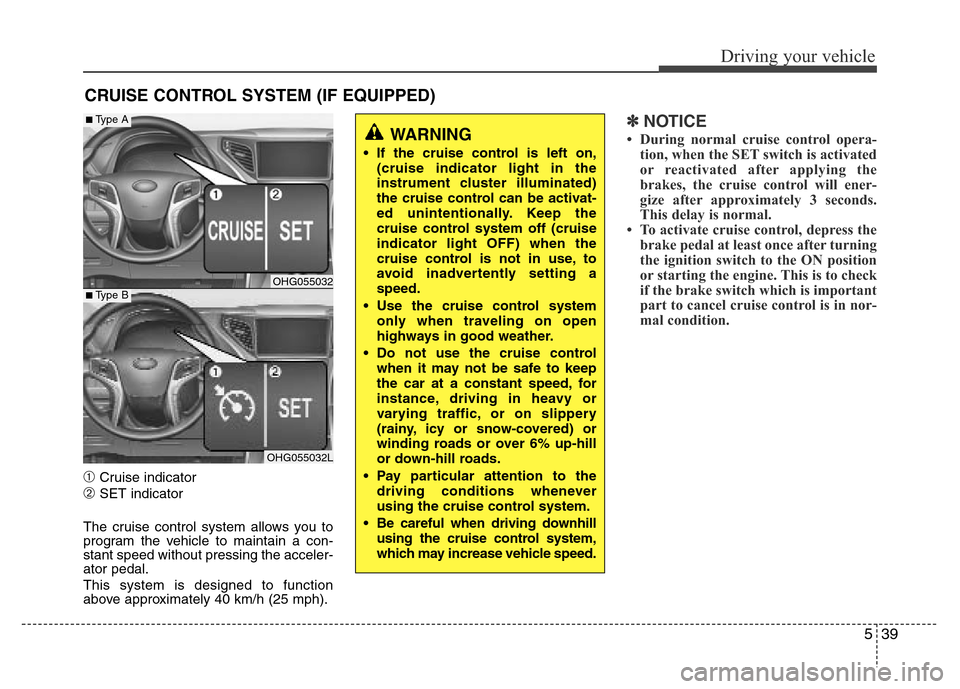
➀Cruise indicator
➁SET indicator
The cruise control system allows you to
program the vehicle to maintain a con-
stant speed without pressing the acceler-
ator pedal.
This system is designed to function
above approximately 40 km/h (25 mph).
✽NOTICE
• During normal cruise control opera-
tion, when the SET switch is activated
or reactivated after applying the
brakes, the cruise control will ener-
gize after approximately 3 seconds.
This delay is normal.
• To activate cruise control, depress the
brake pedal at least once after turning
the ignition switch to the ON position
or starting the engine. This is to check
if the brake switch which is important
part to cancel cruise control is in nor-
mal condition.
CRUISE CONTROL SYSTEM (IF EQUIPPED)
WARNING
• If the cruise control is left on,
(cruise indicator light in the
instrument cluster illuminated)
the cruise control can be activat-
ed unintentionally. Keep the
cruise control system off (cruise
indicator light OFF) when the
cruise control is not in use, to
avoid inadvertently setting a
speed.
• Use the cruise control system
only when traveling on open
highways in good weather.
• Do not use the cruise control
when it may not be safe to keep
the car at a constant speed, for
instance, driving in heavy or
varying traffic, or on slippery
(rainy, icy or snow-covered) or
winding roads or over 6% up-hill
or down-hill roads.
• Pay particular attention to the
driving conditions whenever
using the cruise control system.
• Be careful when driving downhill
using the cruise control system,
which may increase vehicle speed.
OHG055032
OHG055032L
■Type A
■Type B
Page 323 of 473
![Hyundai Azera 2015 Owners Manual Driving your vehicle
40 5
To set cruise control speed:
1. Push the [CRUISE] button on the
steering wheel to turn the system on.
The CRUISE indicator light in the
instrument cluster will illuminate.
2.](/manual-img/35/14466/w960_14466-322.png "Hyundai Azera 2015 Owners Manual Driving your vehicle
40 5
To set cruise control speed:
1. Push the [CRUISE] button on the
steering wheel to turn the system on.
The CRUISE indicator light in the
instrument cluster will illuminate.
2.")
Driving your vehicle
40 5
To set cruise control speed:
1. Push the [CRUISE] button on the
steering wheel to turn the system on.
The CRUISE indicator light in the
instrument cluster will illuminate.
2. Accelerate to the desired speed, which
must be more than 40 km/h (25 mph).3. Push the SET- switch, and release it at
the desired speed. The SET indicator
light in the instrument cluster will illumi-
nate. Release the accelerator pedal. The
desired speed will automatically be
maintained.
On a steep grade, the vehicle may slow
down or speed up slightly while going
uphill or downhill.
To increase cruise control set
speed:
Follow either of these procedures:
• Push the RES+ switch and hold it. Your
vehicle will accelerate. Release the
switch at the speed you want.
• Push the RES+ switch and release it
immediately. The cruising speed will
increase by 1.0 km/h each time the
RES+ switch is operated in this man-
ner.
OHG055035OHG055034OHG055033
Page 325 of 473
Driving your vehicle
42 5
Each of these actions will cancel cruise
control operation (the SET indicator light
in the instrument cluster will go off), but it
will not turn the system off. If you wish to
resume cruise control operation, push
the RES+ switch located on your steering
wheel. You will return to your previously
preset speed.
To resume cruising speed at
more than approximately 40 km/h
(25 mph):
If any method other than the cruise
[CRUISE] switch was used to cancel
cruising speed and the system is still
activated, the most recent set speed will
automatically resume when the RES+
switch is pushed.
It will not resume, however, if the vehicle
speed has dropped below approximately
40 km/h(25 mph).
✽NOTICE
Always check the road conditions when
pressing the RES+ switch to resume the
speed.
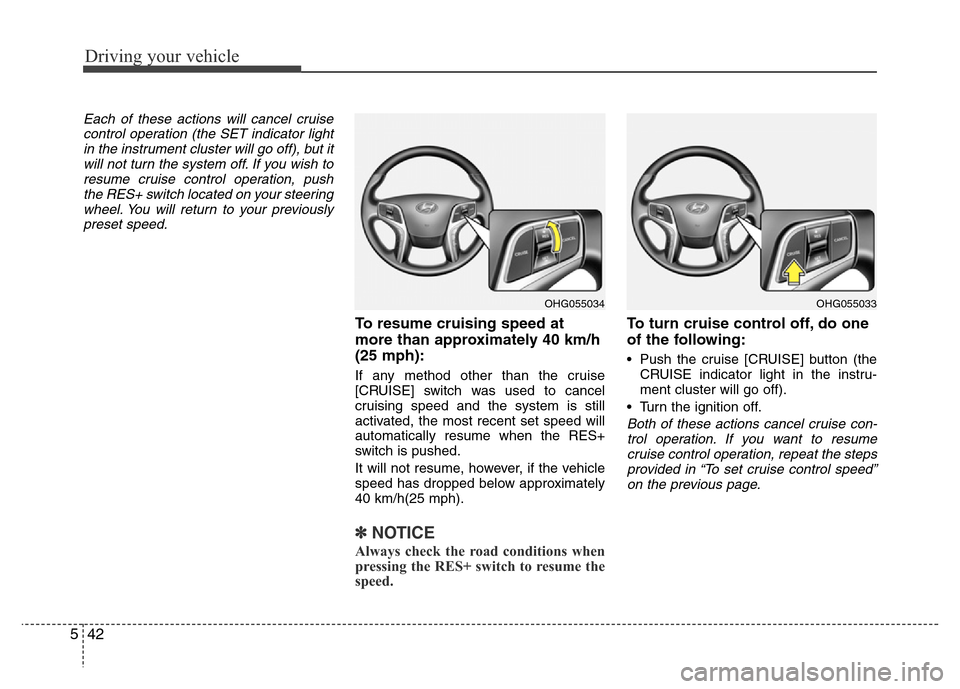
To turn cruise control off, do one
of the following:
• Push the cruise [CRUISE] button (the
CRUISE indicator light in the instru-
ment cluster will go off).
• Turn the ignition off.
Both of these actions cancel cruise con-
trol operation. If you want to resume
cruise control operation, repeat the steps
provided in “To set cruise control speed”
on the previous page.
OHG055034OHG055033
Page 326 of 473
543
Driving your vehicle
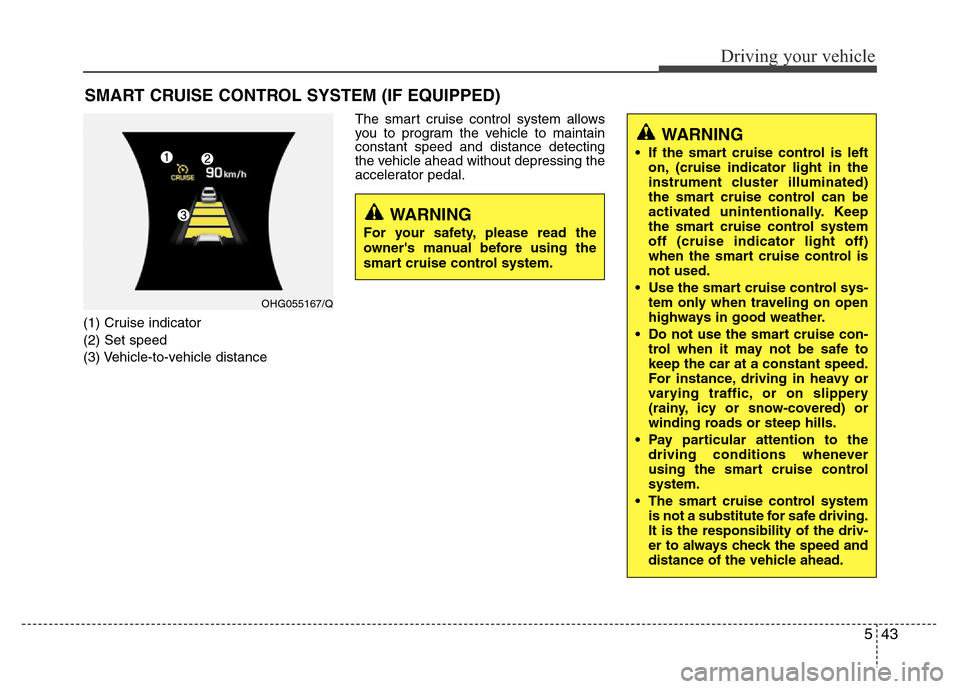
(1) Cruise indicator
(2) Set speed
(3) Vehicle-to-vehicle distanceThe smart cruise control system allows
you to program the vehicle to maintain
constant speed and distance detecting
the vehicle ahead without depressing the
accelerator pedal.
SMART CRUISE CONTROL SYSTEM (IF EQUIPPED)
WARNING
• If the smart cruise control is left
on, (cruise indicator light in the
instrument cluster illuminated)
the smart cruise control can be
activated unintentionally. Keep
the smart cruise control system
off (cruise indicator light off)
when the smart cruise control is
not used.
• Use the smart cruise control sys-
tem only when traveling on open
highways in good weather.
• Do not use the smart cruise con-
trol when it may not be safe to
keep the car at a constant speed.
For instance, driving in heavy or
varying traffic, or on slippery
(rainy, icy or snow-covered) or
winding roads or steep hills.
• Pay particular attention to the
driving conditions whenever
using the smart cruise control
system.
• The smart cruise control system
is not a substitute for safe driving.
It is the responsibility of the driv-
er to always check the speed and
distance of the vehicle ahead.
WARNING
For your safety, please read the
owner's manual before using the
smart cruise control system.
OHG055167/Q
Page 327 of 473
![Hyundai Azera 2015 Owners Manual Driving your vehicle
44 5
Smart cruise control speed
To set cruise control speed:
1. Push the [CRUISE] button on the
steering wheel to turn the system on.
The CRUISE indicator light in the
instrument](/manual-img/35/14466/w960_14466-326.png "Hyundai Azera 2015 Owners Manual Driving your vehicle
44 5
Smart cruise control speed
To set cruise control speed:
1. Push the [CRUISE] button on the
steering wheel to turn the system on.
The CRUISE indicator light in the
instrument")
Driving your vehicle
44 5
Smart cruise control speed
To set cruise control speed:
1. Push the [CRUISE] button on the
steering wheel to turn the system on.
The CRUISE indicator light in the
instrument cluster will illuminate.
2. Accelerate to the desired speed.
The smart cruise control speed can be
set as follows:
• 30 km/h (18.6 mph) ~ 180 km/h (113
mph): when there is no vehicle in
front
• 0 km/h (0 mph) ~ 180 km/h (113
mph): when there is a vehicle in front3. Push the SET- switch, and release it at
the desired speed. The SET indicator
light, set speed and vehicle to vehicle
distance on the LCD screen will illumi-
nate.
4. Release the accelerator pedal. The
desired speed will automatically be
maintained.
If there is a vehicle in front of you, the
speed may decrease to maintain the dis-
tance to the vehicle ahead.
On a steep grade, the vehicle may slow
down or speed up slightly while going
uphill or downhill.To increase cruise control set speed:
Follow either of these procedures:
• Push the RES+
switch and hold it. Your
vehicle set speed will increase by 10
km/h. Release the switch at the speed
you want.
• Push the RES+
switch and release it
immediately. The cruising speed will
increase by 1.0 km/h each time the
RES+
switch is operated in this man-
ner.
• You can set the speed to 180 km/h
(113 mph).
OHG055054LOHG055053LOHG055055L
Page 330 of 473
![Hyundai Azera 2015 Owners Manual 547
Driving your vehicle
To resume cruise control set
speed:
If any method other than the [CRUISE]
switch was used to cancel cruising speed
and the system is still activated, the
cruising speed will a](/manual-img/35/14466/w960_14466-329.png "Hyundai Azera 2015 Owners Manual 547
Driving your vehicle
To resume cruise control set
speed:
If any method other than the [CRUISE]
switch was used to cancel cruising speed
and the system is still activated, the
cruising speed will a")
547
Driving your vehicle
To resume cruise control set
speed:
If any method other than the [CRUISE]
switch was used to cancel cruising speed
and the system is still activated, the
cruising speed will automatically resume
when the SET- or RES+ switch is
pushed.
If the RES+ switch is pushed, the speed
will resume to the recently set speed. It
will not resume if the vehicle speed has
dropped below approximately 30km/h
(18.6mph).
✽NOTICE
Always check the road conditions when
pressing the RES+ switch to resume
speed.
To turn cruise control off:
Push the [CRUISE] button (the CRUISE
indicator light in the instrument cluster
will go off).
Smart cruise control vehicle to
vehicle distance
To set vehicle to vehicle distance:
This function allows you to program the
vehicle to maintain relative distance to
the vehicle ahead without depressing the
accelerator pedal or brake pedal.
OHG055053LOHG055055L
OHG050057
OHG055057K ■Type A
■Type B
Page 440 of 473
Maintenance
58 7
Instrument panel (Driver’s side fuse panel)
No.Fuse ratingSymbol Protected component
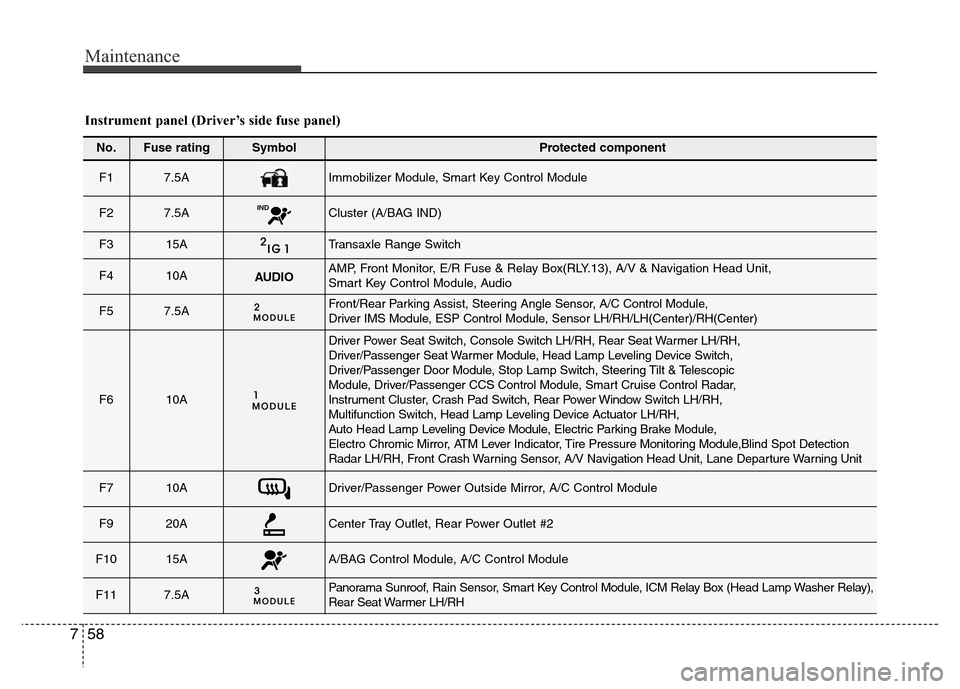
F1 7.5AImmobilizer Module, Smart Key Control Module
F2 7.5A INDCluster (A/BAG IND)
F3 15ATransaxle Range Switch
F410AAUDIOAMP, Front Monitor, E/R Fuse & Relay Box(RLY.13), A/V & Navigation Head Unit,
Smart Key Control Module, Audio
F57.5AFront/Rear Parking Assist, Steering Angle Sensor, A/C Control Module,
Driver IMS Module, ESP Control Module, Sensor LH/RH/LH(Center)/RH(Center)
F610A
Driver Power Seat Switch, Console Switch LH/RH, Rear Seat Warmer LH/RH,
Driver/Passenger Seat Warmer Module, Head Lamp Leveling Device Switch,
Driver/Passenger Door Module, Stop Lamp Switch, Steering Tilt & Telescopic
Module, Driver/Passenger CCS Control Module, Smart Cruise Control Radar,
Instrument Cluster, Crash Pad Switch, Rear Power Window Switch LH/RH,
Multifunction Switch, Head Lamp Leveling Device Actuator LH/RH,
Auto Head Lamp Leveling Device Module, Electric Parking Brake Module,
Electro Chromic Mirror, ATM Lever Indicator, Tire Pressure Monitoring Module,Blind Spot Detection
Radar LH/RH, Front Crash Warning Sensor, A/V Navigation Head Unit, Lane Departure Warning Unit
F710ADriver/Passenger Power Outside Mirror, A/C Control Module
F920ACenter Tray Outlet, Rear Power Outlet #2
F1015AA/BAG Control Module, A/C Control Module
F117.5APanorama Sunroof, Rain Sensor, Smart Key Control Module, ICM Relay Box (Head Lamp Washer Relay),
Rear Seat Warmer LH/RH