Page 125 of 406

Features of your vehicle
48 4
Automatic Transaxleshift
indicator
The indicator displays which automatic
transaxle shift position is selected.
Manual transaxle shift
indicator (if equipped)
This indicator informs you which gear is
desired while driving to save fuel.
For example
: Indicates that shifting up to the 3rd
gear is desired (currently the shift
lever is in the 2nd gear).
: Indicates that shifting down to the
3rd gear is desired (currently the
shift lever is in the 4th gear).
Charging system warning
light
This warning light indicates a malfunction
of either the generator or electrical
charging system.
If the warning light comes on while the
vehicle is in motion:
1. Drive to the nearest safe location.
2. With the engine off, check the genera-
tor drive belt for looseness or break-
age.
3. If the belt is adjusted properly, a prob-
lem exists somewhere in the electrical
charging system. Have an authorized
HYUNDAI dealer correct the problem
as soon as possible.
✽ ✽
NOTICE
When the charging system warning light
comes on or the voltage is low (when the
alteranator (or battery) does not operate
normally or it malfunctions), the steer-
ing wheel may get heavy and become dif-
ficult to control operate abnormally.
Front fog light indicator
(if equipped)
This light comes on when the front fog
lights are ON.
Trunk lid / tailgate open
warning light
This warning light illuminates when the
trunk lid / tailgate is not closed securely
with the ignition in any position.
Door open warning light
This indicator illuminates when a door is
not closed securely.
Page 129 of 406

Features of your vehicle
52 4
CAUTION
If the driver gets out of the vehicle
through other doors, the battery
saver function does not operate.
Therefore, it causes the battery to
be discharged. In this case, make
sure to turn off the lamp before get-
ting out of the vehicle.
The hazard warning flasher should be
used whenever you find it necessary to
stop the car in a hazardous location.
When you must make such an emer-
gency stop, always pull off the road as far
as possible.
The hazard warning lights are turned on
by pushing in the hazard switch. This
causes all turn signal lights to blink. The
hazard warning lights will operate even
though the key is not in the ignition
switch.
To turn the hazard warning lights off,
push the switch a second time.
Battery saver function (if equipped)
The purpose of this feature is to pre-
vent the battery from being dis-
charged. The system automatically
turns off the parking lights when the
driver removes the ignition key and
opens the driver-side door.
With this feature, the parking lights will
be turned off automatically if the driver
parks on the side of road at night.
If necessary, to keep the lights on
when the ignition key is removed, per-
form the following:
1) Open the driver-side door.
2) Turn the parking lights OFF and ON
again using the light switch on the
steering column.
Headlight delay (if equipped)
If you turn the ignition switch to the ACC
or OFF position with the headlights ON,
the headlights (and/or tail lights) remain
on for about 5 minutes. However, if the
driver’s door is opened and closed, the
headlights are turned off after 15 sec-
onds.
The headlights can be turned off by
pressing the lock button on the transmit-
ter twice or turning the light switch to the
OFF or AUTO position.
However, if you turn the light switch to the
AUTO position when it is dark outside,
the headlights will not be turned off.
HAZARD WARNING FLASHER
ORB040045
LIGHTING
Page 131 of 406
Features of your vehicle
54 4
Parking light position ( )
When the light switch is in the parking
light position, the tail, position and
license plate lights will turn on and the
tail light indicator will turn on.
Headlight position ( )
When the light switch is in the headlight
position the head, tail, license and instru-
ment panel lights will turn on.
✽ ✽
NOTICE
The ignition switch must be in the ON
position to turn on the headlights.
Auto light position (if equipped)
When the light switch is in the AUTO light
position, the taillights and headlights will
turn ON or OFF automatically depending
on the amount of light outside the vehi-
cle.
ORB040047DORB040048DORB044360N
Page 138 of 406

461
Features of your vehicle
Automatic turn off function
(if equipped)
The interior lights automatically turn off
approximately 20 minutes after the igni-
tion switch is turned off.
Map lamp
Push the lens (1) to turn the map lamp on
or off. This light produces a spot beam for
convenient use as a map lamp at night or
as a personal lamp for the driver and the
front passenger.
In the DOOR position, the map lamp and
the room lamp come on when any door is
opened regardless of the ignition switch
position.
When doors are unlocked by the trans-
mitter, the map lamp and the room lamp
come on for approximately 30 seconds
as long as any door is not open. The map
lamp and the room lamp goes out gradu-
ally after approximately 30 seconds if the
door is closed. However, if the ignition
switch is ON or all doors are locked, the
map lamp and the room lamp will turn off
immediately. If a door is opened with the
ignition switch in the ACC or LOCK posi-
tion, the map lamp and the room lamp
stay on for about 20 minutes. However, if
a door is opened with the ignition switch
in the ON position, the map lamp and the
room lamp stay on continuously.
INTERIOR LIGHT
WARNING
Do not use the interior lights when
driving in the dark. Accidents could
happen because the view may be
obscured by interior lights.
CAUTION
Do not use the interior lights for
extended periods when the engine
is not running.
It may cause battery discharge.
ORB040057
Page 141 of 406

Features of your vehicle
64 4
DEFROSTER
✽ ✽
NOTICE
If you want to defrost and defog the
front windshield, refer to “Windshield
defrosting and defogging” in this section.
Rear window defroster
The defroster heats the window to
remove frost, fog and thin ice from the
rear window, while the engine is running.
To activate the rear window defroster,
press the rear window defroster button
located in the center facia switch panel.
The indicator on the rear window
defroster button illuminates when the
defroster is ON.
If there is heavy accumulation of snow on
the rear window, brush it off before oper-
ating the rear defroster.
The rear window defroster automatically
turns off after approximately 20 minutes
or when the ignition switch is turned off.
To turn off the defroster, press the rear
window defroster button again.
Outside rearview mirror defroster
(if equipped)
If your vehicle is equipped with the out-
side rearview mirror defrosters, they will
operate at the same time you turn on the
rear window defroster.
CAUTION
To prevent damage to the conduc-
tors bonded to the inside surface of
the rear window, never use sharp
instruments or window cleaners
containing abrasives to clean the
window.
ORB040063L
Page 145 of 406

Features of your vehicle
68 4
MAX A/C-Level (B, D, E)
To select the MAX A/C, turn the temper-
ature knob to the extreme the left.
Air flow is directed toward the upper body
and face.
In this mode, the air conditioning and the
recirculated air position will be selected
automatically.
✽ ✽
NOTICE
This setting should be used briefly to
help quickly cool the interior. After the
interior temperature has cooled suffi-
ciently, turn the temperature knob away
from the MAX A/C position to a com-
fortable setting.
Instrument panel vents
The outlet vents can be opened or closed
separately using the horizontal thumb-
wheel. To close the vent, rotate it left to
the maximum position. To open the vent,
rotate it right to the desired position.
Also, you can adjust the direction of air
delivery from these vents using the vent
control lever as shown.Temperature control
The temperature control knob allows you
to control the temperature of the air flow-
ing from the ventilation system. To
change the air temperature in the pas-
senger compartment, turn the knob to
the right position for warm and hot air or
left position for cooler air.
ORB040356ORB040069ORB040068
Page 151 of 406
Features of your vehicle
74 4
AUTOMATIC CLIMATE CONTROL SYSTEM (IF EQUIPPED)
1. AUTO (automatic control) button
2. OFF button
3. Temperature control knob
4. A/C display5. Air intake control button
6. Fan speed control knob
7. Air conditioning button
8. Mode selection button
9. Front windshield defrost button.
ORB040340N
Page 152 of 406
475
Features of your vehicle
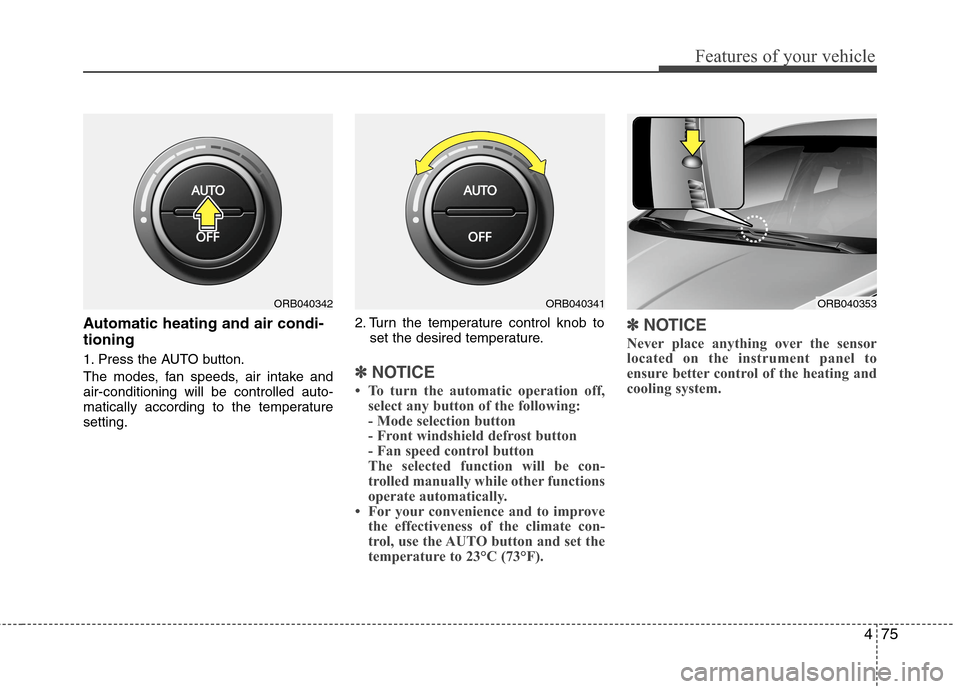
Automatic heating and air condi-
tioning
1. Press the AUTO button.
The modes, fan speeds, air intake and
air-conditioning will be controlled auto-
matically according to the temperature
setting.2. Turn the temperature control knob to
set the desired temperature.✽ ✽
NOTICE
• To turn the automatic operation off,
select any button of the following:
- Mode selection button
- Front windshield defrost button
- Fan speed control button
The selected function will be con-
trolled manually while other functions
operate automatically.
• For your convenience and to improve
the effectiveness of the climate con-
trol, use the AUTO button and set the
temperature to 23°C (73°F).
✽ ✽
NOTICE
Never place anything over the sensor
located on the instrument panel to
ensure better control of the heating and
cooling system.
ORB040353ORB040342ORB040341