Page 192 of 453

191
Features
Audio System Basic Operation
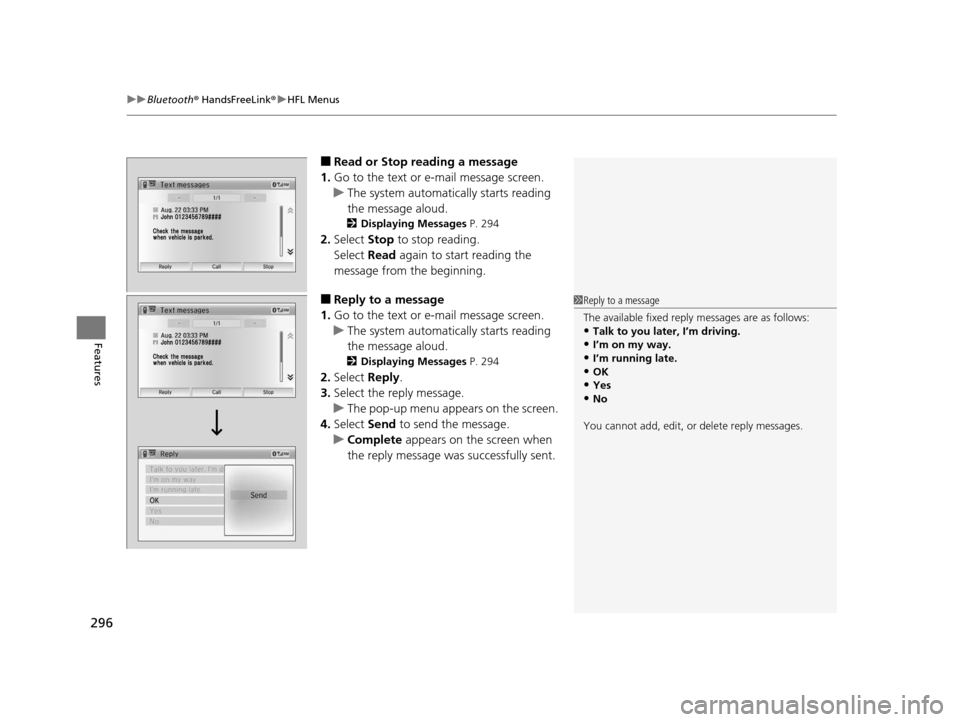
To use the audio system function, the ignition swit ch must be in ACCESSORY (q or
ON
(w*1.
: Select to go to the HOME screen.
2Switching the Display P. 192
: Touch to select any mode.
The available mode includes Change Source,
Station List , Save Preset , Radio Text,
Music Search , and play mode s. Play modes
can be also selected from Scan, Random/
Repeat , and so on.
: Select to go back to the previous display
when it is displayed.
button: Press to change the audio/
information screen brightness.
Press once and select or to make
an adjustment. u Each time you press , the mode
switches between the daytime mode,
nighttime mode and OFF mode.
*1 : Models with the smart entry system have an ENGINE START/STOP button instead of an ignition switch.
1Audio System Basic Operation
Audio Menu Items
2 Station List P. 200
2 Music Search P. 203, 206, 211
2 Random/Repeat P. 204, 212
2 Scan P. 201, 204, 212Models with display audio system
VO L
HOME
MENU
BACK
Button (HOME)
Icon
(MENU) Icon
(BACK) Icon
15 US FIT-31T5A6000.book 191 ページ 2014年3月6日 木曜日 午後7時5分
Page 234 of 453
Continued233
uuCustomized Features u
Features
■How to customize
While the vehicle is at a complete st op with the ignition switch in ON
(w*1, select
Settings , then select a setting item.
*1 : Models with the smart entry system have an ENGINE START/STOP button instead of an ignition switch.
1Customized Features
When you customize settings:
•Make sure that the vehicle is at a complete stop.
•
Shift to (P.
•
Set the parking brake.
Automatic transmission (CVT) models
Manual transmission models
Models with display audio system
VOL
HOME
MENU
BACK
Audio/Information Screen
1 How to customize
To customize other features, select Settings.
2 List of customizable options P. 239
15 US FIT-31T5A6000.book 233 ページ 2014年3月6日 木曜日 午後7時5分
Page 275 of 453

274
uuBluetooth ® HandsFreeLink ®u HFL Menus
Features
HFL Menus
The ignition switch must be in ACCESSORY (q or ON (w*1 to use HFL.
■Phone settings screen
1.Select HOME .
2. Select Settings .
3. Select Phone Settings.
1HFL Menus
To use HFL, you must first pair your Bluetooth-
compatible mobile phone to the system while the
vehicle is parked.
Some functions are limited while driving. A message
appears on the screen when the vehicle is moving
and the operation is canceled.
*1 : Models with the smart entry system have an ENGINE START/STOP button instead of an ignition switch.
*2 : Appears only when a phone is connected to HFL.
PhoneConnect Phone*2Add Bluetooth Device
(Existing entry list)*2
(Existing entry list)
Disconnect
Edit Device Name
Add Bluetooth Device
Bluetooth Device List
Delete This Device
Pair a phone to the system.
Connect a phone to the system.
Disconnect a paired phone from the system.
Edit a previously paired
phone name.
Pair a phone to the system. Delete a previously paired
phone.
15 US FIT-31T5A6000.book 274 ページ 2014年3月6日 木曜日 午後7時5分
Page 293 of 453
uuBluetooth ® HandsFreeLink ®u HFL Menus
292
Features
HFL can display newly received text or e- mail messages as well as 20 of the most
recently received messages on a linked ce ll phone. Each received message can be
read aloud and replied to using a fixed common phrase.
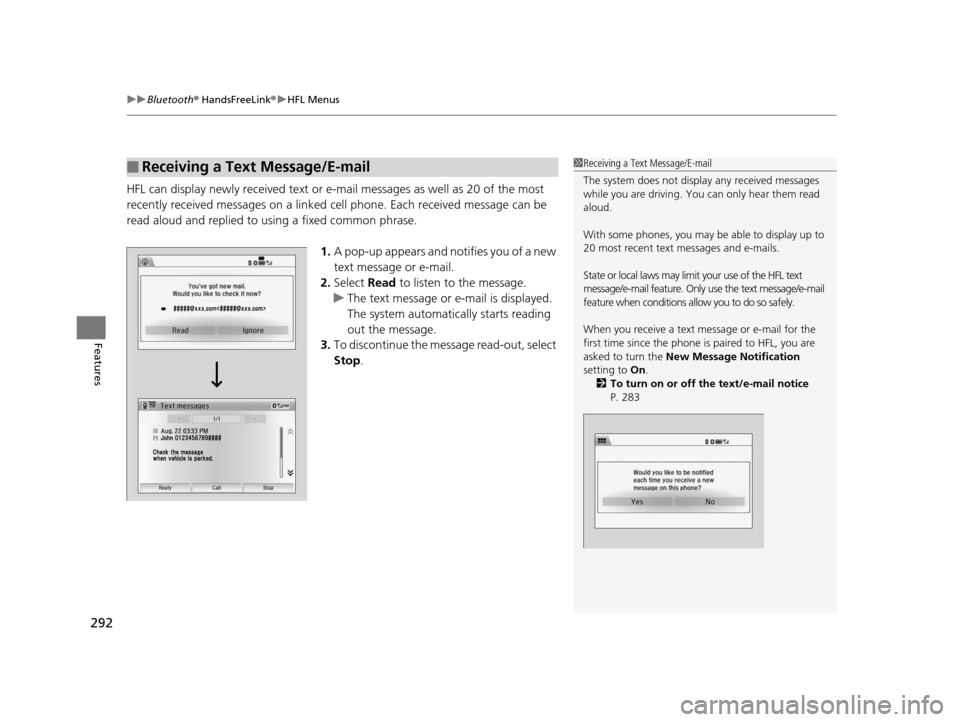
1.A pop-up appears and notifies you of a new
text message or e-mail.
2. Select Read to listen to the message.
u The text message or e-mail is displayed.
The system automatically starts reading
out the message.
3. To discontinue the message read-out, select
Stop .
■Receiving a Text Message/E-mail1Receiving a Text Message/E-mail
The system does not display any received messages
while you are driving. You can only hear them read
aloud.
With some phones, you may be able to display up to
20 most recent text messages and e-mails.
State or local laws may limit your use of the HFL text
message/e-mail feature. Only use the text message/e-mail
feature when conditions a llow you to do so safely.
When you receive a text message or e-mail for the
first time since the phone is paired to HFL, you are
asked to turn the New Message Notification
setting to On.
2 To turn on or off the text/e-mail notice
P. 283
15 US FIT-31T5A6000.book 292 ページ 2014年3月6日 木曜日 午後7時5分
Page 297 of 453
uuBluetooth ® HandsFreeLink ®u HFL Menus
296
Features
■Read or Stop reading a message
1. Go to the text or e-mail message screen.
u The system automatically starts reading
the message aloud.
2 Displaying Messages P. 294
2.Select Stop to stop reading.
Select Read again to start reading the
message from the beginning.
■Reply to a message
1. Go to the text or e-mail message screen.
u The system automatically starts reading
the message aloud.
2 Displaying Messages P. 294
2.Select Reply.
3. Select the reply message.
u The pop-up menu appears on the screen.
4. Select Send to send the message.
u Complete appears on the screen when
the reply message was successfully sent.
1 Reply to a message
The available fixed reply messages are as follows:
•Talk to you later, I’m driving.•I’m on my way.
•I’m running late.
•OK•Yes
•No
You cannot add, edit, or delete reply messages.
15 US FIT-31T5A6000.book 296 ページ 2014年3月6日 木曜日 午後7時5分
Page 302 of 453
301
Driving
This chapter discusses driving, refueling, and information on items such as accessories.
Before Driving
Driving Preparation .............................. 302
Maximum Load Limit............................ 305
Towing a Trailer Towing Your Vehicle ............................ 308
When Driving
Starting the Engine .............................. 311
Starting the Engine .............................. 313
Precautions While Driving..................... 317
Automatic Transmission (CVT)
*............ 318
Shifting ................................................ 319
Models without smart entry system
Models with smart entry system
Automatic transmission (CVT) models
without paddle shifters
Shifting................................................ 321
Shifting................................................ 325
ECON Button
*..................................... 328
Cruise Control*................................... 329Vehicle Stability Assist (VSA®), aka Electronic
Stability Control (ESC), System ............... 332
LaneWatchTM*...................................... 334
Tire Pressure Monitoring System (TPMS) .. 336
Tire Pressure Monitoring System (TPMS) -
Required Federal Explanation ............. 338
Automatic transmission (CVT) models
with paddle shifters
Manual transmission models
Braking Brake System ........................................ 340
Anti-lock Brake System (ABS) ................ 342
Brake Assist System .............................. 343
Parking Your Vehicle When Stopped ..................................... 344
Multi-View Rear Camera ....................... 345
Refueling Fuel Information ................................... 347
How to Refuel ...................................... 348
Fuel Economy ......................................... 350
Improving Fuel Economy....................... 350
Accessories and Modifications Accessories ........................................... 351
Modifications ....................................... 351
* Not available on all models
15 US FIT-31T5A6000.book 301 ページ 2014年3月6日 木曜日 午後7時5分
Page 309 of 453

308
uuTowing a Trailer uTowing Your Vehicle
Driving
Towing Your Vehicle
Your vehicle is not designed to be towed be hind a motorhome. If your vehicle needs
to be towed in an emergency, refe r to the emergency towing information.
2Emergency Towing P. 428
Your vehicle can be towed behind a motorhome.
Perform the following procedure before towing your vehicle.
1. Shift to
(N.
2. Release the parking brake.
3. Turn the ignition switch to ACCESSORY
(q*1.
u Make sure the steering wheel does not lock.
4. Turn off all the electric devices. Do not use any accessory power sockets.
u This can prevent the battery from running down.
*1 : Models with the smart entry system have an ENGINE START/STOP button instead of an ignition switch.
■When Your Vehicle is Towed Behind a Motorhome
1Towing Your Vehicle
Do not exceed 65 mph (100 km/h).
Consult your towing parts sa les or rental agency if
any other items are recommended or required for
your towing situation.Automatic transmission (CVT) models
Manual transmission models
15 US FIT-31T5A6000.book 308 ページ 2014年3月6日 木曜日 午後7時5分
Page 311 of 453

310
uuTowing a Trailer uTowing Your Vehicle
Driving
1. Remove the 20 A accessory powe r socket and 7.5 A ACC fuses. These fuses are located in the
interior fuse box.
2 Interior Fuse Boxes P. 425
2.Remove the 15 A Back up fuse. This fuse is located in the engine compartment fuse box.
2Engine Compartment Fuse Box P. 4233.Store the fuses in a safe place so you do not lose them.
u Make sure to reinstall the fuses be fore you start driving your vehicle.
4. Push the ENGINE START/STOP button without depressing the clutch pedal.
u The indicator on the ENGINE START/STOP button blinks.
5. Touch the center of the ENGINE START/STOP button with the H logo on the smart entry remote
while the indicator is blinking.
u The indicator stop blinking, then stays on.
6. Shift to
(N.
7. Push the ENGINE START/STOP button once without depressing the clutch pedal.
u Make sure the steering wheel does not lock.
Engine Compartment Fuse Box
15 A Back Up Fuse
Interior Fuse Box
20 A Accessory
Power Socket Fuse
7.5 A ACC fuseModels with smart entry system
15 US FIT-31T5A6000.book 310 ページ 2014年3月6日 木曜日 午後7時5分