Page 275 of 453

274
uuBluetooth ® HandsFreeLink ®u HFL Menus
Features
HFL Menus
The ignition switch must be in ACCESSORY (q or ON (w*1 to use HFL.
■Phone settings screen
1.Select HOME .
2. Select Settings .
3. Select Phone Settings.
1HFL Menus
To use HFL, you must first pair your Bluetooth-
compatible mobile phone to the system while the
vehicle is parked.
Some functions are limited while driving. A message
appears on the screen when the vehicle is moving
and the operation is canceled.
*1 : Models with the smart entry system have an ENGINE START/STOP button instead of an ignition switch.
*2 : Appears only when a phone is connected to HFL.
PhoneConnect Phone*2Add Bluetooth Device
(Existing entry list)*2
(Existing entry list)
Disconnect
Edit Device Name
Add Bluetooth Device
Bluetooth Device List
Delete This Device
Pair a phone to the system.
Connect a phone to the system.
Disconnect a paired phone from the system.
Edit a previously paired
phone name.
Pair a phone to the system. Delete a previously paired
phone.
15 US FIT-31T5A6000.book 274 ページ 2014年3月6日 木曜日 午後7時5分
Page 302 of 453
301
Driving
This chapter discusses driving, refueling, and information on items such as accessories.
Before Driving
Driving Preparation .............................. 302
Maximum Load Limit............................ 305
Towing a Trailer Towing Your Vehicle ............................ 308
When Driving
Starting the Engine .............................. 311
Starting the Engine .............................. 313
Precautions While Driving..................... 317
Automatic Transmission (CVT)
*............ 318
Shifting ................................................ 319
Models without smart entry system
Models with smart entry system
Automatic transmission (CVT) models
without paddle shifters
Shifting................................................ 321
Shifting................................................ 325
ECON Button
*..................................... 328
Cruise Control*................................... 329Vehicle Stability Assist (VSA®), aka Electronic
Stability Control (ESC), System ............... 332
LaneWatchTM*...................................... 334
Tire Pressure Monitoring System (TPMS) .. 336
Tire Pressure Monitoring System (TPMS) -
Required Federal Explanation ............. 338
Automatic transmission (CVT) models
with paddle shifters
Manual transmission models
Braking Brake System ........................................ 340
Anti-lock Brake System (ABS) ................ 342
Brake Assist System .............................. 343
Parking Your Vehicle When Stopped ..................................... 344
Multi-View Rear Camera ....................... 345
Refueling Fuel Information ................................... 347
How to Refuel ...................................... 348
Fuel Economy ......................................... 350
Improving Fuel Economy....................... 350
Accessories and Modifications Accessories ........................................... 351
Modifications ....................................... 351
* Not available on all models
15 US FIT-31T5A6000.book 301 ページ 2014年3月6日 木曜日 午後7時5分
Page 309 of 453

308
uuTowing a Trailer uTowing Your Vehicle
Driving
Towing Your Vehicle
Your vehicle is not designed to be towed be hind a motorhome. If your vehicle needs
to be towed in an emergency, refe r to the emergency towing information.
2Emergency Towing P. 428
Your vehicle can be towed behind a motorhome.
Perform the following procedure before towing your vehicle.
1. Shift to
(N.
2. Release the parking brake.
3. Turn the ignition switch to ACCESSORY
(q*1.
u Make sure the steering wheel does not lock.
4. Turn off all the electric devices. Do not use any accessory power sockets.
u This can prevent the battery from running down.
*1 : Models with the smart entry system have an ENGINE START/STOP button instead of an ignition switch.
■When Your Vehicle is Towed Behind a Motorhome
1Towing Your Vehicle
Do not exceed 65 mph (100 km/h).
Consult your towing parts sa les or rental agency if
any other items are recommended or required for
your towing situation.Automatic transmission (CVT) models
Manual transmission models
15 US FIT-31T5A6000.book 308 ページ 2014年3月6日 木曜日 午後7時5分
Page 311 of 453

310
uuTowing a Trailer uTowing Your Vehicle
Driving
1. Remove the 20 A accessory powe r socket and 7.5 A ACC fuses. These fuses are located in the
interior fuse box.
2 Interior Fuse Boxes P. 425
2.Remove the 15 A Back up fuse. This fuse is located in the engine compartment fuse box.
2Engine Compartment Fuse Box P. 4233.Store the fuses in a safe place so you do not lose them.
u Make sure to reinstall the fuses be fore you start driving your vehicle.
4. Push the ENGINE START/STOP button without depressing the clutch pedal.
u The indicator on the ENGINE START/STOP button blinks.
5. Touch the center of the ENGINE START/STOP button with the H logo on the smart entry remote
while the indicator is blinking.
u The indicator stop blinking, then stays on.
6. Shift to
(N.
7. Push the ENGINE START/STOP button once without depressing the clutch pedal.
u Make sure the steering wheel does not lock.
Engine Compartment Fuse Box
15 A Back Up Fuse
Interior Fuse Box
20 A Accessory
Power Socket Fuse
7.5 A ACC fuseModels with smart entry system
15 US FIT-31T5A6000.book 310 ページ 2014年3月6日 木曜日 午後7時5分
Page 315 of 453
uuWhen Driving uStarting the Engine
314
Driving
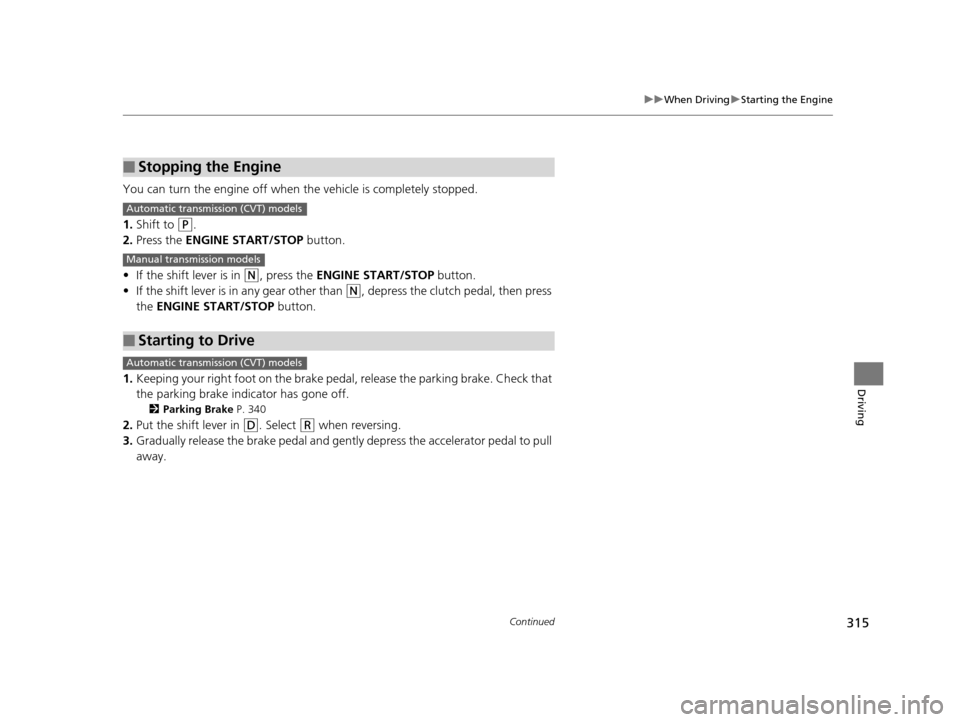
3. Press the ENGINE START/STOP button
without depressing the accelerator pedal.1 Starting the Engine
Bring the smart entry remote close to the ENGINE
START/STOP button if the battery in the smart entry
remote is weak. 2 If the Smart Entry Remote Battery is Weak
P. 412
The engine may not start if the smart entry remote is
subjected to strong radio waves.
Do not hold the ENGINE START/STOP button to
start the engine.
If the engine does not start, wait at least 10 seconds
before trying again.
ENGINE START
STOP
15 US FIT-31T5A6000.book 314 ページ 2014年3月6日 木曜日 午後7時5分
Page 316 of 453
315
uuWhen Driving uStarting the Engine
Continued
Driving
You can turn the engine off when the vehicle is completely stopped.
1. Shift to
(P.
2. Press the ENGINE START/STOP button.
• If the shift lever is in
(N, press the ENGINE START/STOP button.
• If the shift lever is in any gear other than
(N, depress the clutch pedal, then press
the ENGINE START/STOP button.
1. Keeping your right foot on the brake pedal, release the parking brake. Check that
the parking brake indicator has gone off.
2 Parking Brake P. 340
2.Put the shift lever in (D. Select (R when reversing.
3. Gradually release the brake pedal and gently depress the accelerator pedal to pull
away.
■Stopping the Engine
■Starting to Drive
Automatic transmission (CVT) models
Manual transmission models
Automatic transmission (CVT) models
15 US FIT-31T5A6000.book 315 ページ 2014年3月6日 木曜日 午後7時5分
Page 318 of 453

317
uuWhen Driving uPrecautions While Driving
Continued
Driving
Precautions While Driving
Avoid driving in deep water and on flooded roads. This can damage the engine or
driveline, or cause electrical component failure.
■In Rain1Precautions While Driving
NOTICE
Do not operate the shift lever while pressing the
accelerator pedal. You could damage the
transmission.
NOTICE
If you repeatedly turn the steering wheel at an
extremely low speed, or hold the steering wheel on
the full left or right position for a while, the electric
power steering (EPS) system heats up. The system
goes into a protective mode, and limits its
performance. The steering wheel becomes harder
and harder to operate. Once the system cools down,
the EPS system is restored. Repeated operation under
these conditions can eventually damage the system.
If the ignition switch is turned to ACCESSORY
( q or
LOCK ( 0*1 while driving, the e ngine will shut down
and all steering and brake pow er assist functions will
stop, making it difficult to control the vehicle.
Do not put the shift lever in
( N, as you will lose
engine braking (and acce leration) performance.
During the first 600 miles (1,000 km) of operation,
avoid sudden acceleration or full throttle operation so
as to not damage the engine or powertrain.
Avoid hard braking for the first 200 miles (300 km).
You should also follow this when the brake pads are
replaced.
*1: Models with the sma rt entry system have an ENGINE
START/STOP button instead of an ignition switch.
15 US FIT-31T5A6000.book 317 ページ 2014年3月6日 木曜日 午後7時5分
Page 320 of 453

319
uuWhen Driving uShifting
Continued
Driving
Shifting
Change the shift position in accordance with your driving needs.
■Shift lever positions
*1 : Models with the smart entry system have an ENGINE START/STOP button instead of an ignition switch.
Automatic transmission (CVT) models without paddle shifters
1Shifting
You cannot turn the ignition switch to LOCK
(0*1
and remove the key unless the shift lever is in ( P.
The vehicle may move forward very slightly even in
(N while the engine is cold.
Depress the brake pe dal firmly and, when necessary,
apply the parking brake.
When shifting positions in extremely low
temperatures (-22°F/-30°C), there may be a short
delay before the shift posit ion is displayed. Always
confirm you are in the corr ect shift position before
driving.Park
Used when parking or starting the engine
Reverse
Used when reversing
Neutral
Used when idling
Drive
Used for normal driving
Drive (S)
Used:
●For better acceleration●To increase engine braking●When going up or down hills
Release Button
Low
●Used to further increase engine braking●Used when going up or down hills
15 US FIT-31T5A6000.book 319 ページ 2014年3月6日 木曜日 午後7時5分