Page 197 of 453
uuAudio System Basic Operation uAudio/Information Screen
196
Features
■Select wallpaper
1. Select Settings to go to the Settings screen.
2. Select Info.
3. Select Clock/Wallpaper Type , then the Wallpaper tab.
u The screen changes to the wallpaper list.
4. Select a desired wallpaper.
u The preview is displayed on the left side on the screen.
u The pop-up menu appears on the screen.
5. Select Set.
u The display will return to the wallpaper list.
■Delete wallpaper
1. Select Settings to go to the Settings screen.
2. Select Info.
3. Select Clock/Wallpaper Type , then the Wallpaper tab.
u The screen changes to the wallpaper list.
4. Select a wallpaper that you want to delete.
u The preview is displayed on the left side on the screen.
u The pop-up menu appears on the screen.
5. Select Delete.
u The confirmation message will appear.
6. Select Yes to delete completely.
u The display will return to the wallpaper list.
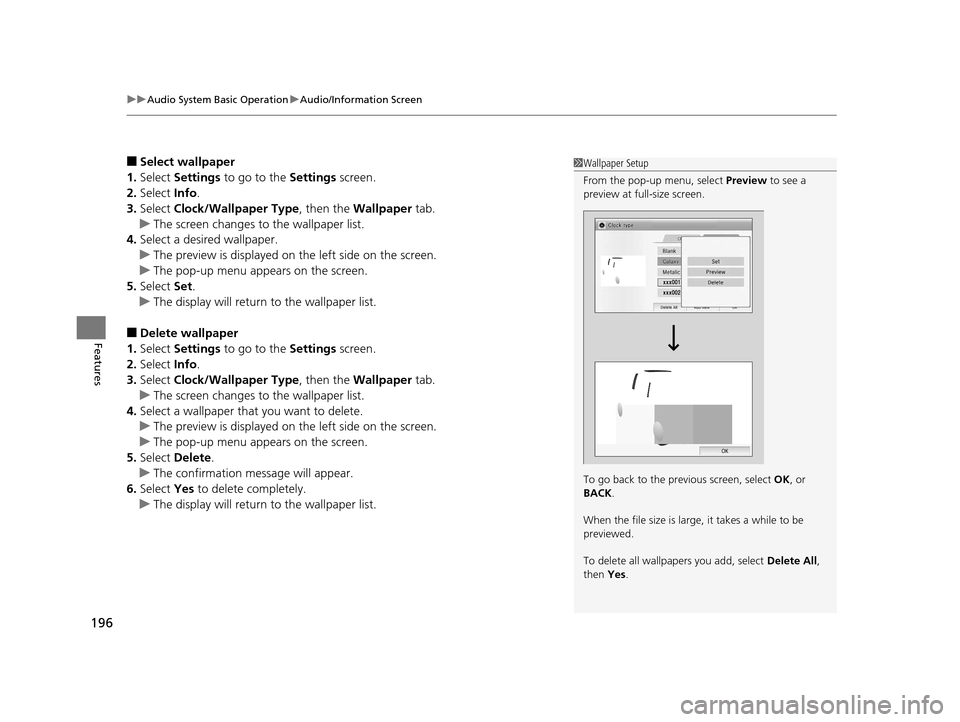
1Wallpaper Setup
From the pop-up menu, select Preview to see a
preview at full-size screen.
To go back to the previous screen, select OK, or
BACK .
When the file size is large, it takes a while to be
previewed.
To delete all wallpapers you add, select Delete All,
then Yes.
15 US FIT-31T5A6000.book 196 ページ 2014年3月6日 木曜日 午後7時5分
Page 227 of 453
226
Features
Customized Features
Use the audio/information screen to customize certain features.
See the navigation system ma nual for information of the customized features.
■How to customize
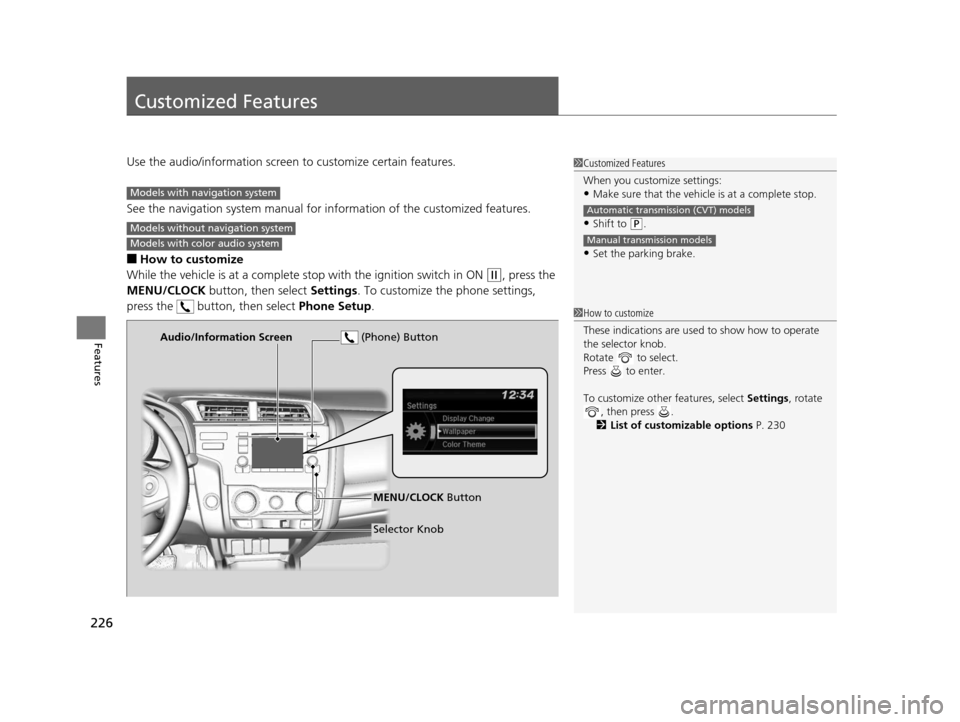
While the vehicle is at a complete stop with the igniti on switch in ON
(w, press the
MENU/CLOCK button, then select Settings. To customize the phone settings,
press the button, then select Phone Setup.
1Customized Features
When you customize settings:
•Make sure that the vehicle is at a complete stop.
•Shift to (P.
•Set the parking brake.
Automatic transmission (CVT) models
Manual transmission models
Models with navigation system
Models without navigation system
Models with color audio system
1 How to customize
These indications are used to show how to operate
the selector knob.
Rotate to select.
Press to enter.
To customize other features, select Settings, rotate
, then press .
2 List of customizable options P. 230
Audio/Information Screen
MENU/CLOCK Button
Selector Knob
(Phone) Button
15 US FIT-31T5A6000.book 226 ページ 2014年3月6日 木曜日 午後7時5分
Page 228 of 453
227
uuCustomized Features u
Continued
Features
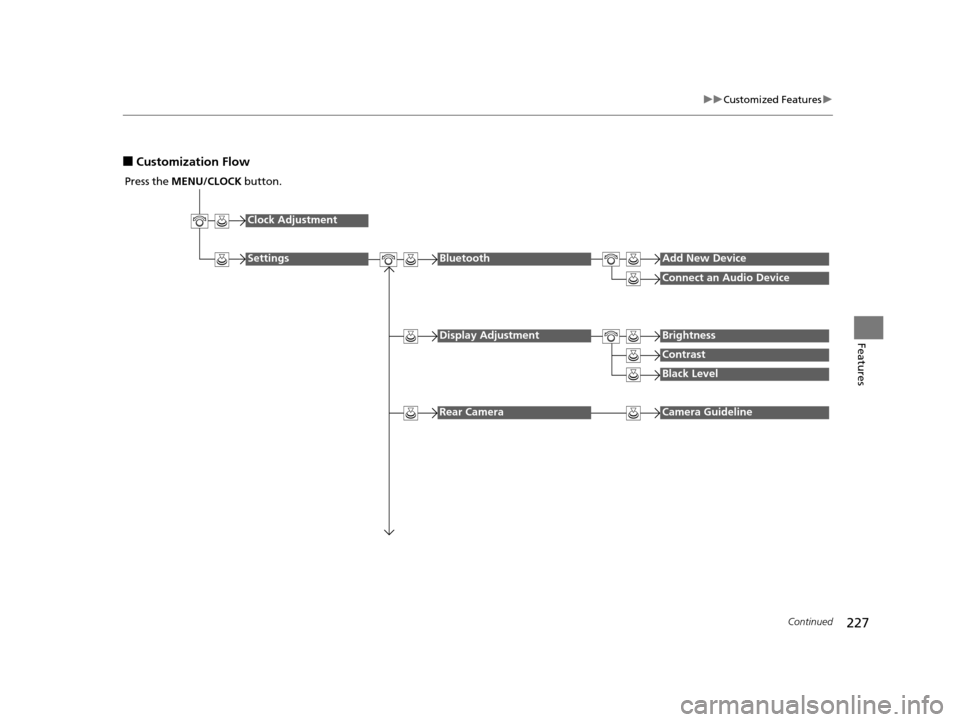
■Customization Flow
Press the MENU/CLOCK button.
Clock Adjustment
SettingsBluetoothAdd New Device
Connect an Audio Device
Display AdjustmentBrightness
Contrast
Black Level
Rear CameraCamera Guideline
15 US FIT-31T5A6000.book 227 ページ 2014年3月6日 木曜日 午後7時5分
Page 229 of 453
228
uuCustomized Features u
Features
Display ChangeAudio
Wallpaper
WallpaperSelect
Import
Delete
Color ThemeBlue
Red
Amber
Gray
Language
Clock Format12H
24H
15 US FIT-31T5A6000.book 228 ページ 2014年3月6日 木曜日 午後7時5分
Page 231 of 453
230
uuCustomized Features u
Features
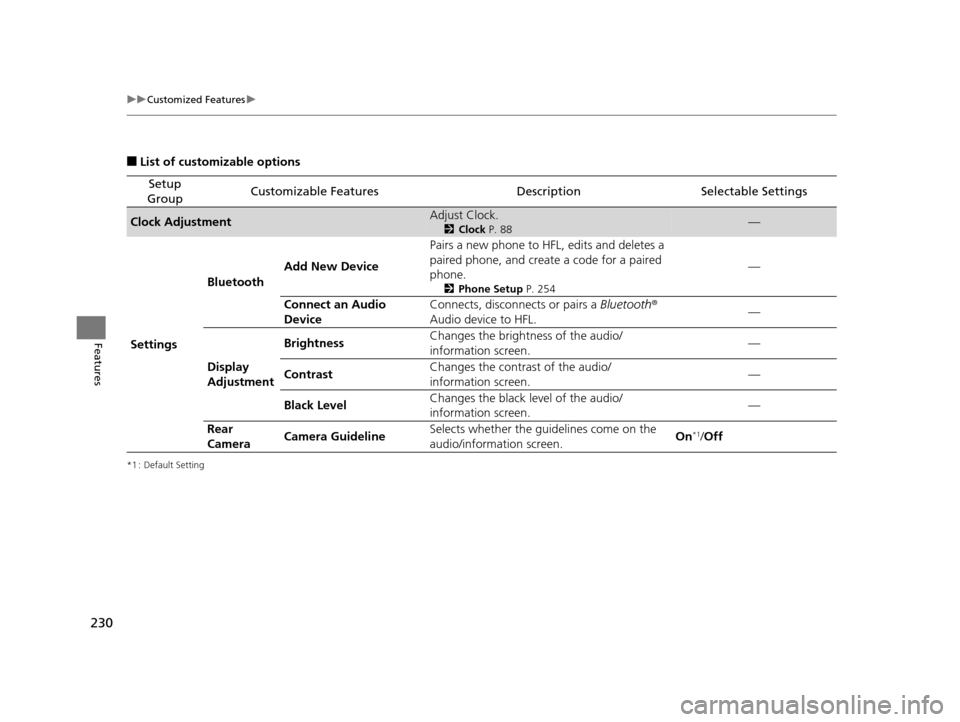
■List of customizable options
*1 : Default Setting
Setup
GroupCustomizable FeaturesDescriptionSelectable Settings
Clock AdjustmentAdjust Clock.
2 Clock P. 88—
Settings Bluetooth
Add New Device Pairs a new phone to HFL, edits and deletes a
paired phone, and create a code for a paired
phone.
2
Phone Setup P. 254
—
Connect an Audio
Device Connects, disconnects or pairs a
Bluetooth®
Audio device to HFL. —
Display
Adjustment Brightness
Changes the brightness of the audio/
information screen.
—
Contrast Changes the contrast of the audio/
information screen. —
Black Level Changes the black level of the audio/
information screen. —
Rear
Camera Camera Guideline Selects whether the guidelines come on the
audio/information screen.
On
*1/
Off
15 US FIT-31T5A6000.book 230 ページ 2014年3月6日 木曜日 午後7時5分
Page 232 of 453
231
uuCustomized Features u
Continued
Features
*1 : Default Setting
Setup
GroupCustomizable FeaturesDescriptionSelectable Settings
Settings Display Change
Changes the display type. Audio
*1/Wallpaper
Wallpaper Select
Changes the wallpaper type. Clock*1/
Image1 /Image2/
Image3
Import Imports an image file for a new wallpaper.
2
Wallpaper Setup P. 173—
Delete Deletes an image file for a wallpaper. Image1
*1/Image2/Image3
Color Theme Changes the background color of the audio/
information screen.
Blue
*1/
Red /Amber /Grey
Language Changes the display language. English
*1/French /Spanish
Clock Format Selects the digital clock display from 12H to
24H. 12H
*1/
24H
15 US FIT-31T5A6000.book 231 ページ 2014年3月6日 木曜日 午後7時5分
Page 235 of 453
234
uuCustomized Features u
Features
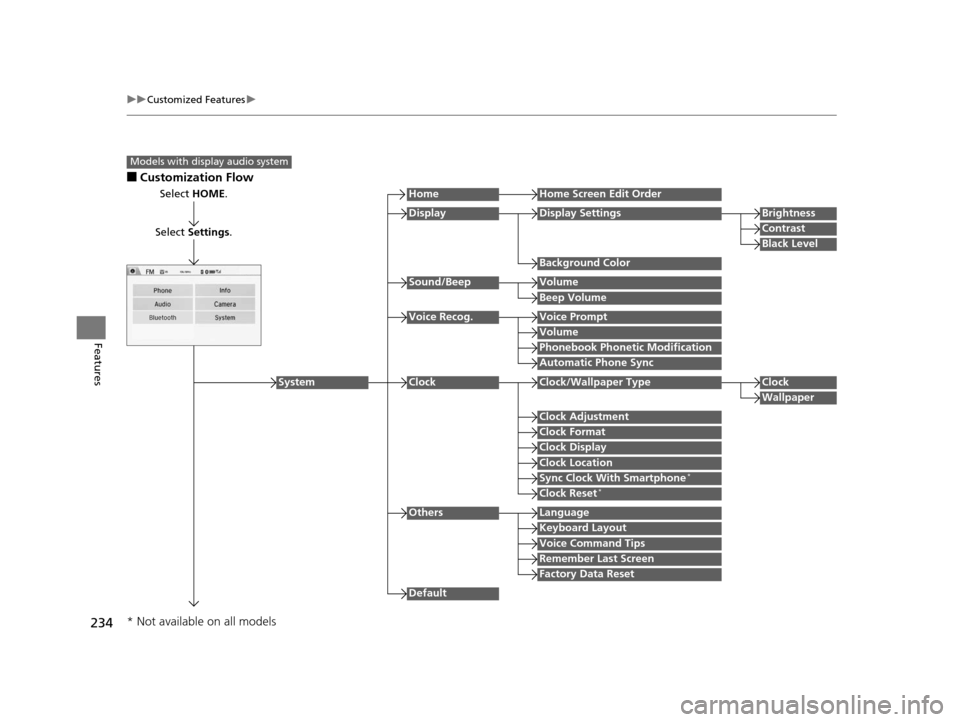
■Customization Flow
Models with display audio system
Select HOME.
Select Settings .
HomeHome Screen Edit Order
Background Color
DisplayDisplay SettingsBrightness
Contrast
Black Level
Beep Volume
Sound/BeepVolume
Volume
Voice Recog.Voice Prompt
Automatic Phone Sync
Phonebook Phonetic Modification
Default
Factory Data Reset
Clock Format
ClockClock/Wallpaper TypeClock
Wallpaper
Clock Adjustment
Clock Display
Clock Location
Sync Clock With Smartphone*
Clock Reset*
Keyboard Layout
OthersLanguage
Remember Last Screen
Voice Command Tips
System
* Not available on all models
15 US FIT-31T5A6000.book 234 ページ 2014年3月6日 木曜日 午後7時5分
Page 237 of 453
236
uuCustomized Features u
Features
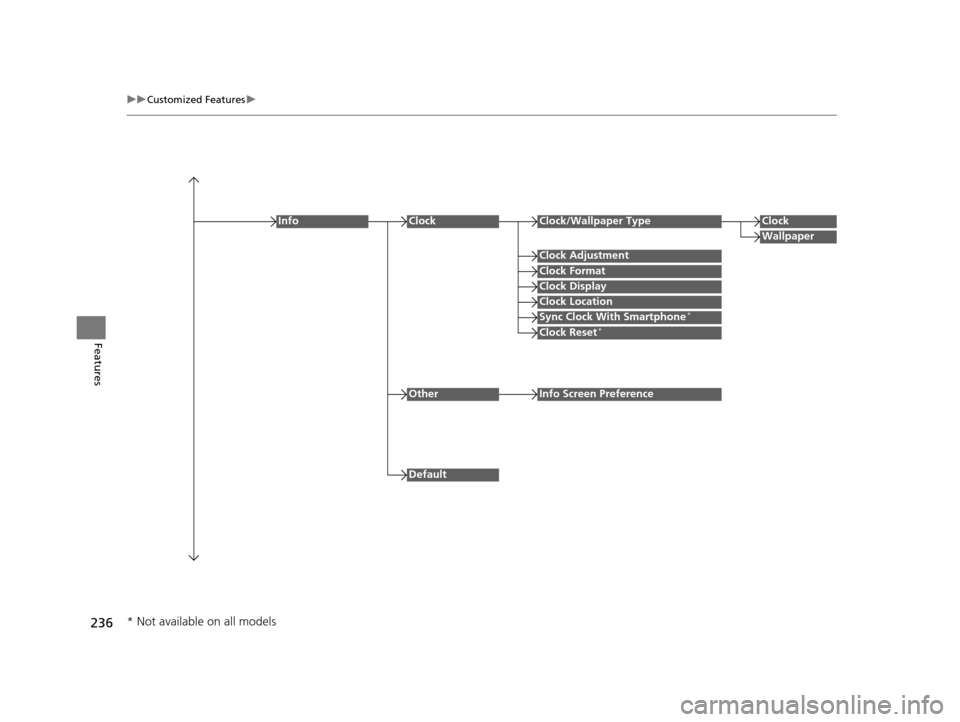
Clock Format
ClockClock/Wallpaper TypeClock
Wallpaper
Clock Adjustment
Clock Display
Clock Location
Sync Clock With Smartphone*
Clock Reset*
Info
Default
OtherInfo Screen Preference
* Not available on all models
15 US FIT-31T5A6000.book 236 ページ 2014年3月6日 木曜日 午後7時5分