2015 HONDA FIT cam
[x] Cancel search: camPage 302 of 453
301
Driving
This chapter discusses driving, refueling, and information on items such as accessories.
Before Driving
Driving Preparation .............................. 302
Maximum Load Limit............................ 305
Towing a Trailer Towing Your Vehicle ............................ 308
When Driving
Starting the Engine .............................. 311
Starting the Engine .............................. 313
Precautions While Driving..................... 317
Automatic Transmission (CVT)
*............ 318
Shifting ................................................ 319
Models without smart entry system
Models with smart entry system
Automatic transmission (CVT) models
without paddle shifters
Shifting................................................ 321
Shifting................................................ 325
ECON Button
*..................................... 328
Cruise Control*................................... 329Vehicle Stability Assist (VSA®), aka Electronic
Stability Control (ESC), System ............... 332
LaneWatchTM*...................................... 334
Tire Pressure Monitoring System (TPMS) .. 336
Tire Pressure Monitoring System (TPMS) -
Required Federal Explanation ............. 338
Automatic transmission (CVT) models
with paddle shifters
Manual transmission models
Braking Brake System ........................................ 340
Anti-lock Brake System (ABS) ................ 342
Brake Assist System .............................. 343
Parking Your Vehicle When Stopped ..................................... 344
Multi-View Rear Camera ....................... 345
Refueling Fuel Information ................................... 347
How to Refuel ...................................... 348
Fuel Economy ......................................... 350
Improving Fuel Economy....................... 350
Accessories and Modifications Accessories ........................................... 351
Modifications ....................................... 351
* Not available on all models
15 US FIT-31T5A6000.book 301 ページ 2014年3月6日 木曜日 午後7時5分
Page 335 of 453

334
uuWhen Driving uLaneWatchTM*
Driving
LaneWatchTM*
Is an assistance system that allows y ou to check the passenger side rear areas
displayed on the audio/information screen when the turn signal is activated to the
passenger’s side. A camera in the passenger side door mirror monitors these areas
and allows you to check for vehicles, in addition to your visual check and use of the
passenger door mirror. You can also keep th e system on for your convenience while
driving.1 LaneWatchTM*
Important Safety Reminder
Like all assistance systems, LaneWatch has
limitations. Over reliance on LaneWatch may result in
a collision.
The LaneWatch func tion can be affected by weather,
lighting (including headli ghts and low sun angle),
ambient darkness, camera condition, and loading.
The LaneWatch may not prov ide the intended display
of traffic to the side and rear under the following
conditions:
•Your vehicle’s suspension has been altered,
changing the height of the vehicle.
•Your tires are over or under inflated.
•Your tires or wheels are of varied size or
construction.
3WARNING
Failure to visually confirm that it is safe to
change lanes before do ing so may result in
a crash and serious injury or death.
Do not rely only on LaneWatch while
driving.
Always look in your mirrors, to either side
of your vehicle, and behind you for other
vehicles before changing lanes.
The system activates when you: The passenger side view
display appears on the
audio/information
screen.
Move the turn
signal lever to the
passenger side. Press the
LaneWatch
button.
The system deactivates when you:
Pull the turn signal
lever back. Press the LaneWatch
button again.
CameraAudio/Information Screen
* Not available on all models
15 US FIT-31T5A6000.book 334 ページ 2014年3月6日 木曜日 午後7時5分
Page 336 of 453

335
uuWhen Driving uLaneWatchTM*
Driving
■Customizing the La neWatch settings
You can customize the following items using the audio/information screen.
• Show with Turn Signal: Selects whether LaneWatch monitor comes on when
you operate the turn signal light lever.
• Display Time after Turn Signal Off: Changes the length of time the
LaneWatch display stays on after yo u pull the turn signal lever back.
• Reference Lines: Selects whether the reference li nes appear on the LaneWatch
monitor.
• Next Maneuver Pop up
*: Selects whether a turn direction screen of the
navigation system interr upts the LaneWatch display.
• Display: Adjusts display settings.
2 Customized Features P. 226
■Reference Lines
Three lines that appear on the screen can give
an idea of how far the vehicles or objects on
the screen are from your vehicle, respectively.
If an object is near line 1 (in red), it indicates
that it is close to your vehicle whereas an
object near line 3 farther away.
1LaneWatchTM*
The LaneWatch camera view is restricted. Its unique
lens makes objects on the screen look slightly
different from what they are.
LaneWatch display does not come on when the shift
lever is in
( R.
For proper LaneWatch operation:
•The camera is located in the passenger side door
mirror. Always keep this ar ea clean. If the camera
lens is covered with dirt or moisture, use a soft,
moist cloth to keep the lens clean and free of
debris.
•Do not cover the camera lens with labels or stickers
of any kind.
•Do not touch the camera lens.
1 Reference Lines
The area around the reference line 1 (red) is very close
to your vehicle. As always, make sure to visually
confirm the safety of a la ne change before changing
lanes.
The distance betwee n your vehicle and lines 1, 2 and
3 on the screen vary depending on road conditions
and vehicle loading. For ex ample, the reference lines
on the screen may seem to appear closer than the
actual distances when the rear of your vehicle is more
heavily loaded.
Consult a dealer if:
•The passenger side door mirr or, or area around it is
severely impacted, resulting in changing the
camera angle.
•The LaneWatch display doe s not come on at all.
* Not available on all models
15 US FIT-31T5A6000.book 335 ページ 2014年3月6日 木曜日 午後7時5分
Page 346 of 453
345Continued
Driving
Multi-View Rear Camera
See the Navigation System Manual.
About Your Multi-View Rear Camera
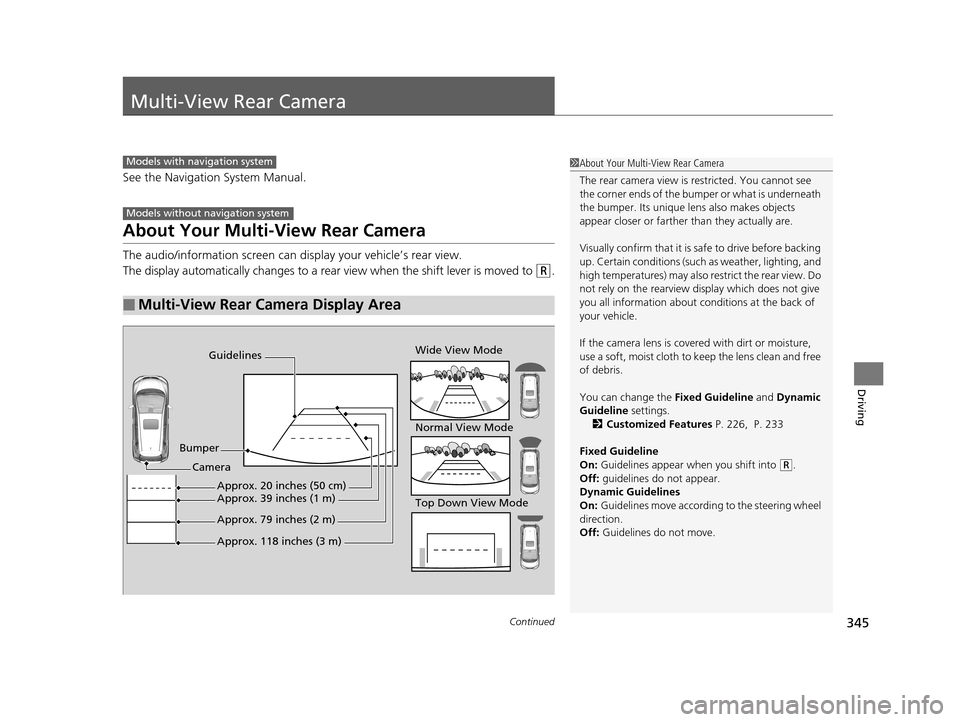
The audio/information screen can display your vehicle’s rear view.
The display automatically changes to a rear view when the shift lever is moved to
(R.
■Multi-View Rear Camera Display Area
Models with navigation system
Models without navigation system
1About Your Multi-View Rear Camera
The rear camera view is restricted. You cannot see
the corner ends of the bum per or what is underneath
the bumper. Its unique le ns also makes objects
appear closer or farther than they actually are.
Visually confirm that it is safe to drive before backing
up. Certain conditions (such as weather, lighting, and
high temperatures) may also re strict the rear view. Do
not rely on the rearview display which does not give
you all information about conditions at the back of
your vehicle.
If the camera lens is cove red with dirt or moisture,
use a soft, moist cloth to keep the lens clean and free
of debris.
You can change the Fixed Guideline and Dynamic
Guideline settings.
2 Customized Features P. 226, P. 233
Fixed Guideline
On: Guidelines appear when you shift into
(R.
Off: guidelines do not appear.
Dynamic Guidelines
On: Guidelines move according to the steering wheel
direction.
Off: Guidelines do not move.
Guidelines
Bumper Wide View Mode
Normal View Mode
Top Down View Mode
Camera
Approx. 118 inches (3 m)
Approx. 79 inches (2 m)
Approx. 39 inches (1 m)Approx. 20 inches (50 cm)
15 US FIT-31T5A6000.book 345 ページ 2014年3月6日 木曜日 午後7時5分
Page 347 of 453

346
uuMulti-View Rear Camera uAbout Your Multi-View Rear Camera
Driving
You can view three different camera angles on the rearview display.
Press the LIST/SELECT (selector) knob to switch the angle.
Touch the appropriate icon to switch the angle. : Wide view
: Normal view
: Top down view
If the last used viewing mode is Wide or Normal, the same mode is selected the next
time you shift into
(R. If Top View is last used before you turned off the engine,
Wide mode is selected next time yo u turn the ignition switch to ON
(w*1 and shift
to
(R.
*1 : Models with the smart entry system have an ENGINE START/STOP button instead of an ignition switch.
Models with color audio system
Models with display audio system
All models
15 US FIT-31T5A6000.book 346 ページ 2014年3月6日 木曜日 午後7時5分
Page 386 of 453

385
uuChecking and Maintaining Tires uTire and Loading Information Label
Continued
Maintenance
Tire and Loading Information Label
The label attached to the dr iver’s doorjamb provides necessary tire and loading
information.
Tire Labeling
The tires that came on your vehicle have a
number of markings. Those you should be
aware of are described below.
Whenever tires are replaced, they should be replaced with tires of the same size.
1Tire and Loading Information Label
The tire and loading informat ion label attached to the
driver’s doorjamb contains:
aThe number of people your vehicle can carry.
bThe total weight your vehicle can carry. Do not
exceed this weight.
cThe original tire sizes for front, rear, and spare.
dThe proper cold tire pre ssure for front, rear, and
spare.
Label
Example
Example Tire Size
Tire
Identification
Number (TIN)
Maximum
Tire Load
Maximum
Tire Pressure
Tire Size
■Tire Sizes
1 Tire Sizes
Following is an example of tire size with an
explanation of what each component means.
185/55R16 83H
185: Tire width in millimeters.
55: Aspect ratio (the tire’s section height as a
percentage of its width).
R: Tire construction code (R indicates radial).
16: Rim diameter in inches.
83: Load index (a numerical code associated with the
maximum load the tire can carry).
H: Speed symbol (an alphabe tical code indicating the
maximum speed rating).
15 US FIT-31T5A6000.book 385 ページ 2014年3月6日 木曜日 午後7時5分
Page 437 of 453
436
Information
Reporting Safety Defects
In the U.S.
If you believe that your vehicle has a defect which could cause a crash or could cause injury or death, you
should immediately inform the Nati onal Highway Traffic Safety Administration (NHTSA) in addition to
notifying American Honda Motor Co., Inc.
If NHTSA receives similar complaints, it may open an inve stigation, and if it finds that a safety defect exists
in a group of vehicles, it may order a recall and remedy campaign. However, NHTSA cannot become involved
in individual problems between you, your dealer, or American Honda Motor Co., Inc.
To contact NHTSA, you may call the Vehicle Safety Ho tline toll-free at 1-888-327-4236 (TTY: 1-800-424-
9153); go to http://www.safercar.gov ; or write to: Administrator, NHTSA , 1200 New Jersey Avenue, SE.,
Washington, DC 20590. You can also obtain othe r information about motor vehicle safety from http://
www.safercar.gov .
In Canada
If you believe that your vehicle has a defect which c ould cause a crash or could cause injury or death, you
should immediately inform Honda Canada Inc. and you may also inform Transport Canada.
If Transport Canada receives similar complaints, it may open an investigation, and if it finds that a safety
defect exists in a group of vehicles, it may lead to a recall and remedy campaign. However, Transport Canada
cannot become involved in individual problems between you, your dealer, or Honda Canada Inc.
To contact Transport Canada’s Defect Investigations and Recalls Division, you may call 1-800-333-0510. For
more information on reporting safety defects or about motor vehicle safety, go to http://www.tc.gc.ca/
roadsafety .
15 US FIT-31T5A6000.book 436 ページ 2014年3月6日 木曜日 午後7時5分
Page 441 of 453
440
uuWarranty Coverages u
Information
Replacement Battery Limited Warranty – provides prorated coverage for a
replacement battery purchased from a dealer.
Replacement Muffler Life time Limited Warranty – provides coverage for as
long as the purchaser of the muffler owns the vehicle.
Restrictions and exclusions apply to a ll these warranties. Please read the Honda
warranty information booklet that came with your vehicle for precise information on
warranty coverages. Your vehi cle’s original tires are covered by their manufacturer.
Tire warranty information is in a separate booklet.
■Canadian Owners
Please refer to the warranty manual that came with your vehicle.
15 US FIT-31T5A6000.book 440 ページ 2014年3月6日 木曜日 午後7時5分