Page 91 of 329
uuGauges and Multi-Information Display uMulti-Information Display
90
Instrument Panel
Use the multi-information display to customize certain features.
■How to customize
Select the CUSTOMIZE SETTINGS screen by pressing the button while the
ignition switch is in ON
(w, the vehicle is at a complete stop, and the shift lever is in
(P (Continuously Variable Transmission), and the parking brake is set (manual
transmission). Press the SEL/RESET button to select CHG SETTING screen.
■Customized Features1Customized Features
To select customizing items, press the
button.
2 List of customizable options P. 92
2 Example of customizing settings P. 94
When you customize settings:
Shift to
( P.
Set the parking brake.
Continuously variable transmission models
Manual transmission models
Button
Press to change the cu stomize menus and items.
SEL/RESET Button
Press to set your selection.
15 CR-Z-31SZT6400.book 90 ページ 2014年8月1日 金曜日 午後1時59分
Page 92 of 329
91
uuGauges and Multi-Information Display uMulti-Information Display
Continued
Instrument Panel
■Customization flow
Press the button.
DEFAULT ALL
EXIT
DOOR SETUP
ADJUST OUTSIDE TEMP. DISPLAY
TRIP A RESET with REFUEL
ELAPSED TIME RESET
INTERIOR LIGHT DIMMING TIME
AUTO LIGHT SENSITIVITY*
AUTO DOOR UNLOCK
DOOR LOCK MODE
KEYLESS LOCK ACKNOWLEDGMENT
SECURITY RELOCK TIMER
AUTO DOOR LOCK
LANGUAGE SELECTIONSEL/RESET
SEL/RESET
SEL/RESET
SEL/RESET
SEL/RESET
SEL/RESET
METER SETUP
LIGHTING SETUP
CHG SETTING
EXIT
CUSTOMIZE SETTINGS
HOLD ECON MODE
METER COLOR CHANGE
DISPLAY KM/MILES
4
3
4
3
4
3
4
3
4
3
4
3
4
3
4
3
4
3
4
3
* Not available on all models
15 CR-Z-31SZT6400.book 91 ページ 2014年8月1日 金曜日 午後1時59分
Page 93 of 329

92
uuGauges and Multi-Information Display uMulti-Information Display
Instrument Panel
■List of customizable options
*1: Default Setting
*2: If equipped Setup Group Customizabl
e Features Description Selectable settings
Meter Setup
Language SelectionChanges the displayed language.English*1, French , Spanish
Adjust Outside Temp.
DisplayAdjusts the temperature reading by a few degrees.-5°F ~ ±0°F*1 ~ +5°F
-3°C ~ ±0°C*1 ~ +3°C
Trip A Reset with RefuelSets Trip A and the averag e fuel economy to reset
when you refuel.ON , OFF*1
Elapsed Time ResetChanges the resetting conditions of the elapsed
time.IGN OFF*1, Trip A , Trip B
Hold ECON ModeMaintains ECON mode.ON , OFF*1
Meter Color ChangeTurns the ambient meter feature on and off.ON*1, OFF
Display Km/MilesChanges the displayed measurement on the multi-
information display.AUTO*1, KM , MILES
Lighting
Setup Interior Light Dimming
Time
Changes the length of time
the interior lights stay on
after you close the doors. 60 sec,
30 sec
*1, 15 sec
Auto Light Sensitivity
*2Changes the timing for the headlights to come on.Max, High , Mid*1, Low , Min
15 CR-Z-31SZT6400.book 92 ページ 2014年8月1日 金曜日 午後1時59分
Page 95 of 329
94
uuGauges and Multi-Information Display uMulti-Information Display
Instrument Panel
■Example of customizing settings
The steps for changing TRIP A RESET with REFUEL setting to ON are shown below.
The default setting for TRIP A RESET with REFUEL is OFF.
1. Press the button until CUSTOMIZE
SETTINGS appears on the display, then
press the SEL/RESET button.
2. Press the SEL/RESET button.
3. Press the SEL/RESET button again.
15 CR-Z-31SZT6400.book 94 ページ 2014年8月1日 金曜日 午後1時59分
Page 96 of 329
95
uuGauges and Multi-Information Display uMulti-Information Display
Instrument Panel
4. Press the button until TRIP A
RESET with REFUEL appears on the
display, then press the SEL/RESET button.
5. Press the button and select ON,
then press the SEL/RESET button.
6. Press the button until EXIT
appears in the display, then press the SEL/
RESET button.
7. Repeat step 6 until you return to the normal
screen.
15 CR-Z-31SZT6400.book 95 ページ 2014年8月1日 金曜日 午後1時59分
Page 99 of 329

98
Controls
Clock
Adjusting the Clock
You can adjust the time in the clock display, using the CLOCK (AM /FM ) button with
the ignition switch in ON
(w.
1. Press and hold the CLOCK button until the clock display begins to blink.
2. Press the
(1 (Hour) button to change the hours.
3. Press the
(2 (Minute) button to change the minutes.
4. Press the CLOCK button to go back to the normal display.
■Adjusting the Time
1Adjusting the Clock
To set the time to the nearest hour:
Press and hold the CLOCK button until the clock
display begins to blink, then press the
( 3 (Reset)
button.
Depending on the displayed time, the clock sets
forward or backward.
Example:
1:06 will reset to 1:00
1:53 will reset to 2:00
The clock is automatica lly updated through the
navigation system, so the ti me does not need to be
adjusted.
Models with navigation system
Models without navigation system
( 2 Button
(1 Button
(3 Button
CLOCK ButtonClock Display
15 CR-Z-31SZT6400.book 98 ページ 2014年8月1日 金曜日 午後1時59分
Page 144 of 329
143
uuAudio System uAudio System Theft Protection
Features
Audio System Theft Protection
The audio system is disabled when it is disconnected from the power source, such as
when the 12 volt battery is disconnected or goes dead.
■Reactivating the audio system
1. Turn the ignition switch to ON
(w, and turn on the audio system.
u If you turn the igniti on switch to ACCESSORY
(q, you will be requested to
enter the audio security code.
2. Enter the audio security code using the preset buttons.
If you enter an incorrect digit, continue to the last digit, then try again. If you do
not enter the code correctly after 10 trie s, leave the system for one hour before
trying again, or visit a dealer to have the system reset.
1Audio System Theft Protection
Find the audio system's se curity code and serial
number label in your owner’s manual kit.
We recommend that you write down the serial
number in this owner’s manual.
Do not store the label in your vehicle. If you lose the
label, you must first retrie ve the serial number, and
then obtain the code.
You can find out about your serial number and
security code from a dealer.
You can register the securi ty code at Honda Owners
(owners.honda.com. ), and find information on how
to retrieve the serial num ber and obtain the code at
radio-navicode.honda.com .
U.S. models
15 CR-Z-31SZT6400.book 143 ページ 2014年8月1日 金曜日 午後1時59分
Page 145 of 329
144
uuAudio System uAudio Remote Controls
Features
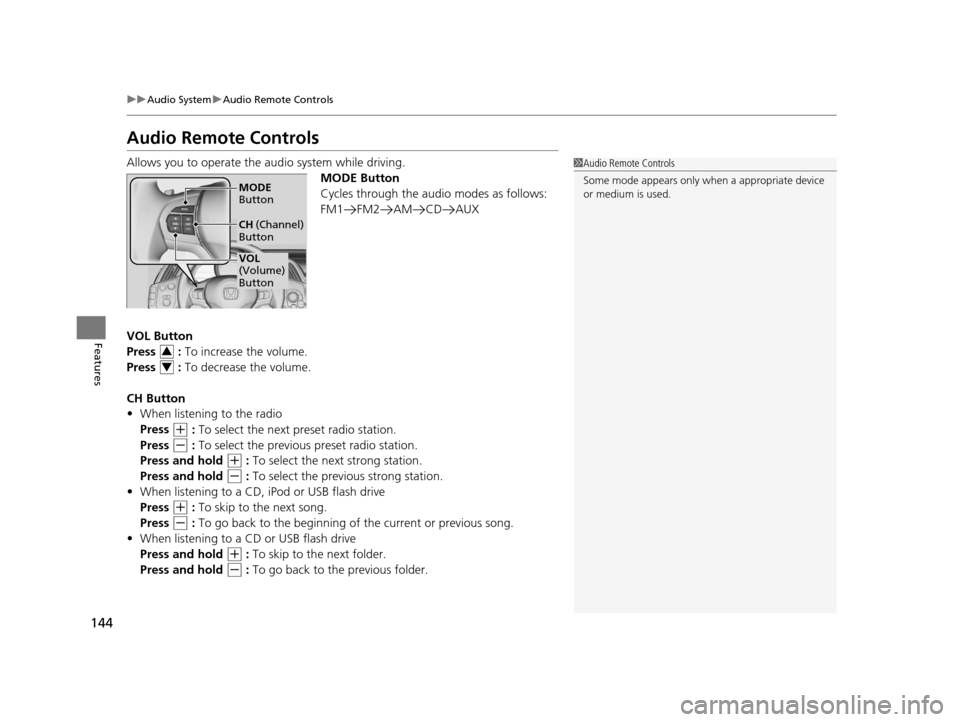
Audio Remote Controls
Allows you to operate the audio system while driving.
MODE Button
Cycles through the audio modes as follows:
FM1 FM2 AM CD AUX
VOL Button
Press : To increase the volume.
Press : To decrease the volume.
CH Button
• When listening to the radio
Press
(+ : To select the next preset radio station.
Press
(- : To select the previous preset radio station.
Press and hold
(+ : To select the next strong station.
Press and hold
(- : To select the previous strong station.
• When listening to a CD, iPod or USB flash drive
Press
(+ : To skip to the next song.
Press
(- : To go back to the beginning of the current or previous song.
• When listening to a CD or USB flash drive
Press and hold
(+ : To skip to the next folder.
Press and hold
(- : To go back to the previous folder.
1 Audio Remote Controls
Some mode appears only wh en a appropriate device
or medium is used.
VOL
(Volume)
Button MODE
Button
CH (Channel)
Button
3
4
15 CR-Z-31SZT6400.book 144 ページ 2014年8月1日 金曜日 午後1時59分


