2015 HONDA CR-V TPMS Calibration
[x] Cancel search: TPMS CalibrationPage 21 of 533

20
Quick Reference Guide
VSA® OFF Button (P 397)
● The vehicle stability assist (VSA® ) system
helps stabilize the vehicle during
cornering, and helps maintain traction
while accelerating on loose or slippery
road surfaces.
● VSA ® comes on automatically every time
you start the engine.
● To turn VSA ® on or off, press and hold
the button until you hear a beep.
Cruise Control* (P 371)
● Cruise control allows you to maintain a
set speed without keeping your foot on
the accelerator pedal.
● To use cruise control, press the CRUISE
button, then press –/SET once you have
achieved the desired speed (above 25
mph or 40 km/h).
Tire Pressure Monitoring
System (TPMS)
(P 401)
● Detects a change in tire conditions and
overall dimensions due to decrease in tire
pressures.
● The TPMS is turned on automatically
every time you start the engine.
● A calibration procedure must be
performed when certain conditions arise.
Collision Mitigation
Braking System
TM
(CMBS
TM) OFF Button*
(P 412)
● When a possible collision is likely
unavoidable, the CMBS
TM can help you to
reduce the vehicle speed and the severity
of the collision.
● To turn the CMBS
TM on or off, press and
hold the button until you hear a beep.
15 CR-V-31T0A6300.book 20 ページ 2015年2月2日 月曜日 午前10時35分
Page 77 of 533

76
uuIndicators u
Instrument Panel
*1:Models with the smart entry system have an ENGINE START/STOP button instead of an ignition switch.
IndicatorNameOn/BlinkingExplanationMessage*
Electric Power
Steering (EPS)
System Indicator
●Comes on when you turn the ignition
switch to ON
(w*1, and goes off
when the engine starts.
●Comes on if there is a problem with
the EPS system.
●Stays on constantly or does not come on
at all - Have your vehicle checked by a
dealer.
2 If the Electric Power Steering (EPS)
System Indicator Comes On P. 501
Low Tire Pressure/
TPMS Indicator
●Comes on for a few seconds when
you turn the ignition switch to ON
(w*1.●May come on for a few seconds
again if the engine is not started for
several tens of seconds with the
ignition switch in ON
(w*1.●Comes on when:
-One or more tires’ pressures are
determined to be significantly low.
- The system has not been calibrated.
●Comes on while driving - Stop in a safe
place, check tire pres sures, and inflate the
tire(s) if necessary.
●Stays on after the tires are inflated to
the recommended pressures - The system
needs to be calibrated.
2 TPMS Calibration P. 401
●Blinks for about one minute, and
then stays on if there is a problem
with the TPMS, or when a compact
spare tire is temporarily installed.●Blinks and remains on - Have your vehicle
checked by a dealer. If the vehicle is fitted
with a compact spare, get your regular tire
repaired or replaced and put back on your
vehicle as soon as you can.
* Not available on all models
15 CR-V-31T0A6300.book 76 ページ 2015年2月2日 月曜日 午前10時35分
Page 102 of 533

101
uuGauges and Displays uMulti-Information Display*
Continued
Instrument Panel
■Customization flow
Press the button.
“TRIP B” RESET TIMING
FUEL EFFICIENCY BACKLIGHT
“TRIP A” RESET TIMING
FORWARD COLLISION WARNING DISTANCESEL/RESET
VEHICLE SETTINGS
CHANGE SETTINGS
ADJUST OUTSIDE TEMP. DISPLAY
LANGUAGE SELECTION
SEL/RESETDRIVER ASSIST SYSTEM
SETUP*
METER SETUPSEL/RESET
LANE KEEPING ASSIST SUSPEND BEEP
TPMS CALIBRATION
ACC DISPLAY SPEED UNIT
ACC FORWARD VEHICLE DETECT BEEP
SEL/RESET
* Not available on all models
15 CR-V-31T0A6300.book 101 ページ 2015年2月2日 月曜日 午前10時35分
Page 105 of 533

104
uuGauges and Displays uMulti-Information Display*
Instrument Panel
■List of customizable options
*1:Default Setting
Setup Group Customizable Features DescriptionSelectable settings
TPMS
CALIBRATION—Calibrates the TPMS.CANCEL/CALIBRATE
CHANGE
SETTINGS DRIVER ASSIST
SYSTEM
SETUP
*
FORWARD
COLLISION WARNING
DISTANCE Changes the distance to activate the collision
alert when a vehicle ah
ead of you gets too
close. LONG/
NORMAL*1/
SHORT
ACC FORWARD
VEHICLE DETECT
BEEP
*
Causes the system to beep when the system
detects a vehicle, or when the vehicle goes
out of the ACC range. ON
/OFF*1
ACC DISPLAY SPEED
UNIT*
Changes the displayed measurement of the
set vehicle speed on the multi-information
display. mph*1/
km/h (U.S.)
mph /km/h*1 (Canada)
LANE KEEPING
ASSIST SUSPEND
BEEP
*
Causes the system to beep when the LKAS is
suspended. ON
/OFF*1
* Not available on all models
15 CR-V-31T0A6300.book 104 ページ 2015年2月2日 月曜日 午前10時35分
Page 117 of 533

116
uuGauges and Displays uintelligent Multi-Information Display (i-MID)
Instrument Panel
Customize Settings
Display Setup
Select Wallpaper*
Language Selection
Adjust Outside Temp. Display
Fuel Efficiency Backlight
Import Wallpaper*
Delete Wallpaper*
Trip Meter Item to Display
Welcome Screen
Color Theme
Turn by Turn Display*
Trip A reset trigger
Trip B reset trigger
TPMS Calibration
Trip Computer Setup
Keyless Start Guidance Screens*
Language Selection
* Not available on all models
15 CR-V-31T0A6300.book 116 ページ 2015年2月2日 月曜日 午前10時35分
Page 119 of 533

118
uuGauges and Displays uintelligent Multi-Information Display (i-MID)
Instrument Panel
■List of customizable options
*1:Default Setting Setup Group Customizabl
e Features Description Selectable settings
Vehicle
InformationMaintenance infoReset the Maintenance MinderTM.No/Yes
Adjust
Clock
*Selects the 12 hour or 24 hour clock display, and
adjusts the time. 12h*1/
24h
Customize
Settings
TPMS CalibrationCalibrates the TPMS.Cancel /Initialize
Display
Setup
Select
Wallpaper*Selects the full-size analogue clock or the wallpaper.Clock*1/Image 1 /Image 2 /
Image 3
Import
Wallpaper*Imports an image file for a new wallpaper.
Three images can be stored.
2 Importing wallpapers
from USB P. 123
Delete
Wallpaper*Deletes an image file for a wallpaper.Image 1/Image 2/ Image 3
Trip Meter
Item to
DisplaySelects an item to be di splayed along with average
fuel economy.Range*1/ Elapsed time /
Average speed
* Not available on all models
15 CR-V-31T0A6300.book 118 ページ 2015年2月2日 月曜日 午前10時35分
Page 402 of 533
401
uuWhen Driving uTire Pressure Monitoring System (TPMS)
Continued
Driving
Tire Pressure Monitoring System (TPMS)
Instead of directly measuring the pressure in each tire, the TPMS on this vehicle
monitors and compares the rolling radius and rotational characteristics of each
wheel and tire while you are driving to determine if one or more tires are
significantly under-inflated. This will caus e the low tire pressure/TPMS indicator to
come on and a message to appear on the multi-information display
*.
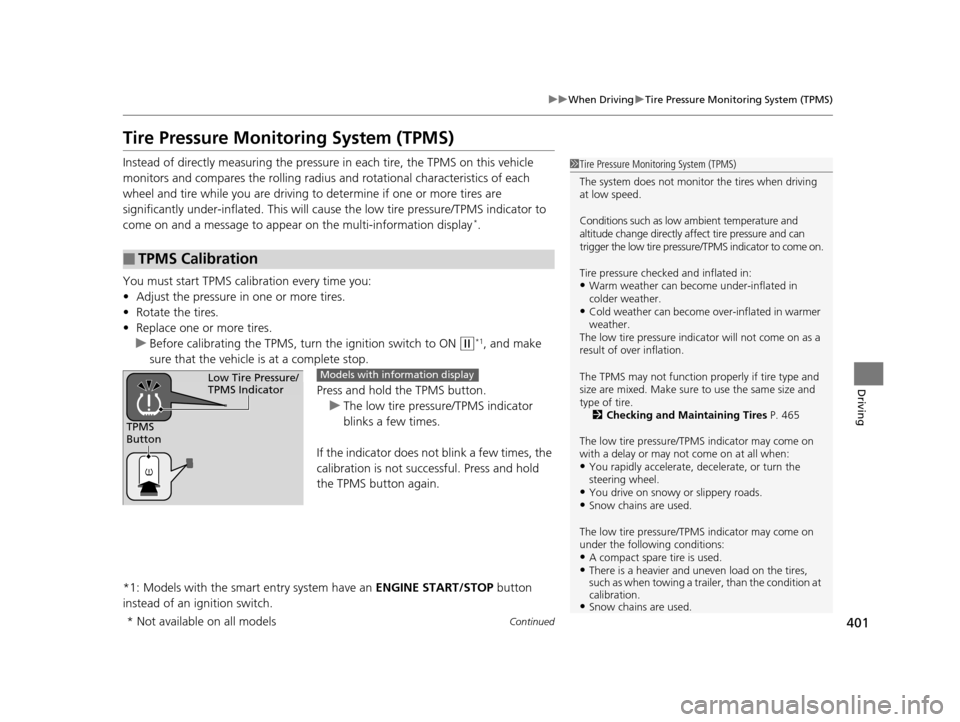
You must start TPMS calibration every time you:
• Adjust the pressure in one or more tires.
• Rotate the tires.
• Replace one or more tires.
u Before calibrating the TPMS, turn the ignition switch to ON
(w*1, and make
sure that the vehicle is at a complete stop.
Press and hold the TPMS button.
u The low tire pressure/TPMS indicator
blinks a few times.
If the indicator does not blink a few times, the
calibration is not successful. Press and hold
the TPMS button again.
*1: Models with the smart entry system have an ENGINE START/STOP button
instead of an ignition switch.
■TPMS Calibration
1 Tire Pressure Monitoring System (TPMS)
The system does not monitor the tires when driving
at low speed.
Conditions such as low ambient temperature and
altitude change directly a ffect tire pressure and can
trigger the low tire pressure/TPMS indicator to come on.
Tire pressure checked and inflated in:
•Warm weather can beco me under-inflated in
colder weather.
•Cold weather can become over-inflated in warmer
weather.
The low tire pressure indica tor will not come on as a
result of over inflation.
The TPMS may not function pr operly if tire type and
size are mixed. Make sure to use the same size and
type of tire. 2 Checking and Maintaining Tires P. 465
The low tire pressure/TPMS indicator may come on
with a delay or may not come on at all when:
•You rapidly accelerate, decelerate, or turn the
steering wheel.
•You drive on snowy or slippery roads.•Snow chains are used.
The low tire pressure/TPMS indicator may come on
under the following conditions:
•A compact spare tire is used.•There is a heavier and une ven load on the tires,
such as when towing a trailer, than the condition at
calibration.
•Snow chains are used.
TPMS
Button
Low Tire Pressure/
TPMS IndicatorModels with info rmation display
* Not available on all models
15 CR-V-31T0A6300.book 401 ページ 2015年2月2日 月曜日 午前10時35分
Page 403 of 533

uuWhen Driving uTire Pressure Monitoring System (TPMS)
402
Driving
You can calibrate the system from the cust omized features on the multi-information
display.
1. Press button to select TPMS CALIBRATION, then press the SEL/RESET
button.
2. Press the SEL/RESET button.
u The display switches to th e customization setup screen, where you can select
Cancel or Calibrate .
3. Press the button and select Calibrate, then press the SEL/RESET button.
u Calibration Started screen appears, then th e display returns to the
customization menu screen.
If the Calibration Failed to Start message appears, repeat steps 2-3.
1TPMS Calibration
•TPMS cannot be calibrated if a compact spare tire is
installed.
•The calibration process requires approximately 30
minutes of cumulative dr iving at speeds between
30-60 mph (48-97 km/h).
•During this period, if the ignition is turned on*1 and
the vehicle is not move d within 45 seconds, you
may notice the low tire pressure indicator comes on
briefly. This is normal and indicates that the
calibration process is not yet complete.
If the snow chains are installed, remove them before
calibrating the TPMS.
If the low tire pressure/TPMS indicator comes on even
when the properly inflated specified regular tires are
installed, have the vehi cle checked by a dealer.
We recommend that the tires be replaced with the
same brand, model, and size as the originals. Ask a
dealer for details.
*1: Models with the smart entry system have an
ENGINE START/STOP button instead of an ignition
switch.
Models with multi- information display
15 CR-V-31T0A6300.book 402 ページ 2015年2月2日 月曜日 午前10時35分