Page 393 of 533
uuWhen Driving uLane Keeping Assist System (LKAS)*
392
Driving
3. Keep your vehicle near the center of the
lane while driving.
u The dotted outer lines change to solid
ones once the system starts operating
after detecting the left and right lane
markings.
To cancel the LKAS:
Press the MAIN or LKAS button.
The LKAS is turned off every time you stop the
engine, even if you turned it on the last time
you drove the vehicle.
■To cancel
1 When the System can be Used
The LKAS temporarily deactivates when it fails to
detect lane lines. When the system detects the lines
again, it comes back on automatically.
1To cancel
Pressing the MAIN button also turns ACC on and off.
MAIN Button
LKAS Button
15 CR-V-31T0A6300.book 392 ページ 2015年2月2日 月曜日 午前10時35分
Page 398 of 533

397
uuWhen Driving uVehicle Stability Assist (VSA ®), aka Electronic Stability Control (ESC), System
Driving
This button is on the driver side control panel.
To partially turn the VSA® features on and off,
press and hold it until you hear a beep.
The traction control stop s fully functioning,
allows the wheels to sp in more freely at low
speed. The VSA ® OFF indicator will also come
on.
To turn it on agai n, press the (VSA ® OFF)
button until you hear a beep.
VSA ® is turned on every time you start the
engine, even if you turned it off the last time
you drove the vehicle.
■VSA ® On and Off1 Vehicle Stability Assist (VSA ®), aka Electronic Stability Control
(ESC), System
With the button pressed, your vehicle will have
normal braking and corn ering ability, but VSA®
traction and stability enhancement becomes less
effective.
In certain unusual conditions when your vehicle gets
stuck in shallow mud or fr esh snow, it may be easier
to free it with VSA® temporarily switched off.
When the button is pressed, the traction control
function becomes less effective. This allows for the
wheels to spin more freely at low speed. You should
only attempt to free your vehicle with the VSA ® off if
you are not able to free it when the VSA ® is on.
Immediately after freeing your vehicle, be sure to
switch VSA ® on again. We do not recommend driving
your vehicle with the VSA ® system switched off.
You may hear a motor sound coming from the
engine compartment while system checks are being
performed immediately after starting the engine or
while driving. This is normal.VSA ® OFF Indicator
15 CR-V-31T0A6300.book 397 ページ 2015年2月2日 月曜日 午前10時35分
Page 402 of 533
401
uuWhen Driving uTire Pressure Monitoring System (TPMS)
Continued
Driving
Tire Pressure Monitoring System (TPMS)
Instead of directly measuring the pressure in each tire, the TPMS on this vehicle
monitors and compares the rolling radius and rotational characteristics of each
wheel and tire while you are driving to determine if one or more tires are
significantly under-inflated. This will caus e the low tire pressure/TPMS indicator to
come on and a message to appear on the multi-information display
*.
You must start TPMS calibration every time you:
• Adjust the pressure in one or more tires.
• Rotate the tires.
• Replace one or more tires.
u Before calibrating the TPMS, turn the ignition switch to ON
(w*1, and make
sure that the vehicle is at a complete stop.
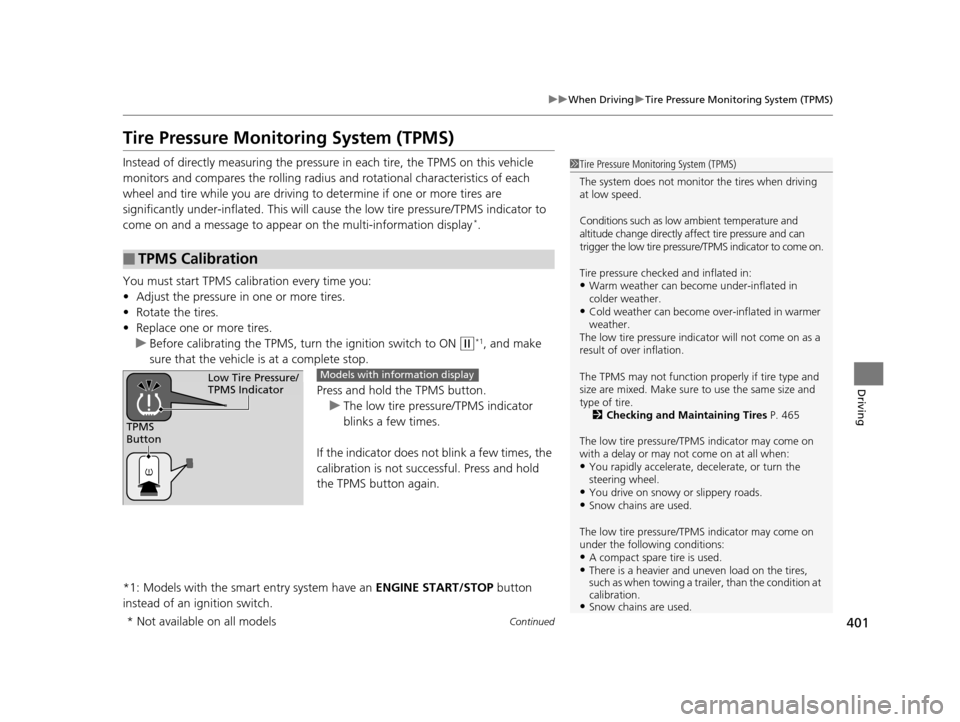
Press and hold the TPMS button.
u The low tire pressure/TPMS indicator
blinks a few times.
If the indicator does not blink a few times, the
calibration is not successful. Press and hold
the TPMS button again.
*1: Models with the smart entry system have an ENGINE START/STOP button
instead of an ignition switch.
■TPMS Calibration
1 Tire Pressure Monitoring System (TPMS)
The system does not monitor the tires when driving
at low speed.
Conditions such as low ambient temperature and
altitude change directly a ffect tire pressure and can
trigger the low tire pressure/TPMS indicator to come on.
Tire pressure checked and inflated in:
•Warm weather can beco me under-inflated in
colder weather.
•Cold weather can become over-inflated in warmer
weather.
The low tire pressure indica tor will not come on as a
result of over inflation.
The TPMS may not function pr operly if tire type and
size are mixed. Make sure to use the same size and
type of tire. 2 Checking and Maintaining Tires P. 465
The low tire pressure/TPMS indicator may come on
with a delay or may not come on at all when:
•You rapidly accelerate, decelerate, or turn the
steering wheel.
•You drive on snowy or slippery roads.•Snow chains are used.
The low tire pressure/TPMS indicator may come on
under the following conditions:
•A compact spare tire is used.•There is a heavier and une ven load on the tires,
such as when towing a trailer, than the condition at
calibration.
•Snow chains are used.
TPMS
Button
Low Tire Pressure/
TPMS IndicatorModels with info rmation display
* Not available on all models
15 CR-V-31T0A6300.book 401 ページ 2015年2月2日 月曜日 午前10時35分
Page 403 of 533

uuWhen Driving uTire Pressure Monitoring System (TPMS)
402
Driving
You can calibrate the system from the cust omized features on the multi-information
display.
1. Press button to select TPMS CALIBRATION, then press the SEL/RESET
button.
2. Press the SEL/RESET button.
u The display switches to th e customization setup screen, where you can select
Cancel or Calibrate .
3. Press the button and select Calibrate, then press the SEL/RESET button.
u Calibration Started screen appears, then th e display returns to the
customization menu screen.
If the Calibration Failed to Start message appears, repeat steps 2-3.
1TPMS Calibration
•TPMS cannot be calibrated if a compact spare tire is
installed.
•The calibration process requires approximately 30
minutes of cumulative dr iving at speeds between
30-60 mph (48-97 km/h).
•During this period, if the ignition is turned on*1 and
the vehicle is not move d within 45 seconds, you
may notice the low tire pressure indicator comes on
briefly. This is normal and indicates that the
calibration process is not yet complete.
If the snow chains are installed, remove them before
calibrating the TPMS.
If the low tire pressure/TPMS indicator comes on even
when the properly inflated specified regular tires are
installed, have the vehi cle checked by a dealer.
We recommend that the tires be replaced with the
same brand, model, and size as the originals. Ask a
dealer for details.
*1: Models with the smart entry system have an
ENGINE START/STOP button instead of an ignition
switch.
Models with multi- information display
15 CR-V-31T0A6300.book 402 ページ 2015年2月2日 月曜日 午前10時35分
Page 420 of 533
419
uuMulti-View Rear Camera*uAbout Your Multi-View Rear Camera
Driving
You can view three different camera angles on the rearview display.
Press the selector knob to switch the angle.
Touch the appropriate icon to switch the angle. : Wide view
: Normal view
: Top down view
If the last used viewing mode is Wide or Normal, the same mode is selected the next
time you shift into
(R. If Top View is last used before you turned off the engine,
Wide mode is selected next time yo u turn the ignition switch to ON
(w*1 and shift
to
(R.
*1: Models with the smart entry system have an ENGINE START/STOP button
instead of an ignition switch.
Models with one display
Models with two displays/Models without navigation system
All models
15 CR-V-31T0A6300.book 419 ページ 2015年2月2日 月曜日 午前10時35分
Page 430 of 533

429Continued
Maintenance
Maintenance MinderTM
If the engine oil life is less than 15%, you will see the Maintenance Minder messages
appear on the information display*/multi-information display* and the i-MID every
time you turn the i gnition switch to ON
(w*1. The messages notify you when to
change the engine oil, or when to bring your vehicle to a dealer for indicated
maintenance services.
To Use Maintenance MinderTM
1. Turn the ignition switch to ON (w*1.
2. Press the (Select/Reset) knob repeatedly
until the engine oil life appears on the
information display.
The Maintenance Minder indicator ( ) stays
on in the instrument panel after the engine oil
life becomes 0%. Have the indicated
maintenance done by a dealer immediately.
*1: Models with the smart entry system have an ENGINE START/STOP button
instead of an ignition switch.
■Displaying the Engine Oil Life on the Information Display*
1 To Use Maintenance MinderTM
Based on the engine ope rating conditions, the
remaining engine oi l life is calculated and displayed
as a percentage.
There is a list of maintena nce main and sub items you
can view on the i-MID. 2 Maintenance Service Items P. 434
Displayed Engine Oil
Life (%)Calculated Engine Oil Life (%)
100 100 to 91
9090 to 81
80 80 to 71
7070 to 61
60 60 to 51
5050 to 41
40 40 to 31
3030 to 21
20 20 to 16
1515 to 11
10 10 to 6
55 to 1
00
* Not available on all models
15 CR-V-31T0A6300.book 429 ページ 2015年2月2日 月曜日 午前10時35分
Page 432 of 533
431
uuMaintenance MinderTMuTo Use Maintenance MinderTM
Continued
Maintenance
Maintenance items, which should be serviced at the same time that you replace the
engine oil, app ear on the i-MID.
You can view them on the Maintenance info screen at any time.
1. Turn the ignition switch to ON
(w*1.
2. Press the MENU button to go to the Vehicle Menu screen.
3. Select Vehicle Information , then press the SOURCE button.
4. Press the SOURCE button again to go to the Maintenance info screen. The
engine oil life appears on the i-MID.
*1: Models with the smart entry system have an ENGINE START/STOP button
instead of an ignition switch.
■Displaying the Engine Oil Life and Maintenance Items on
the i-MID
0(18
6285&(
SOURCE
Button
MENU Button Sub
Item Main
Item
Engine Oil Life
15 CR-V-31T0A6300.book 431 ページ 2015年2月2日 月曜日 午前10時35分
Page 439 of 533
438
uuMaintenance MinderTMuTo Use Maintenance MinderTM
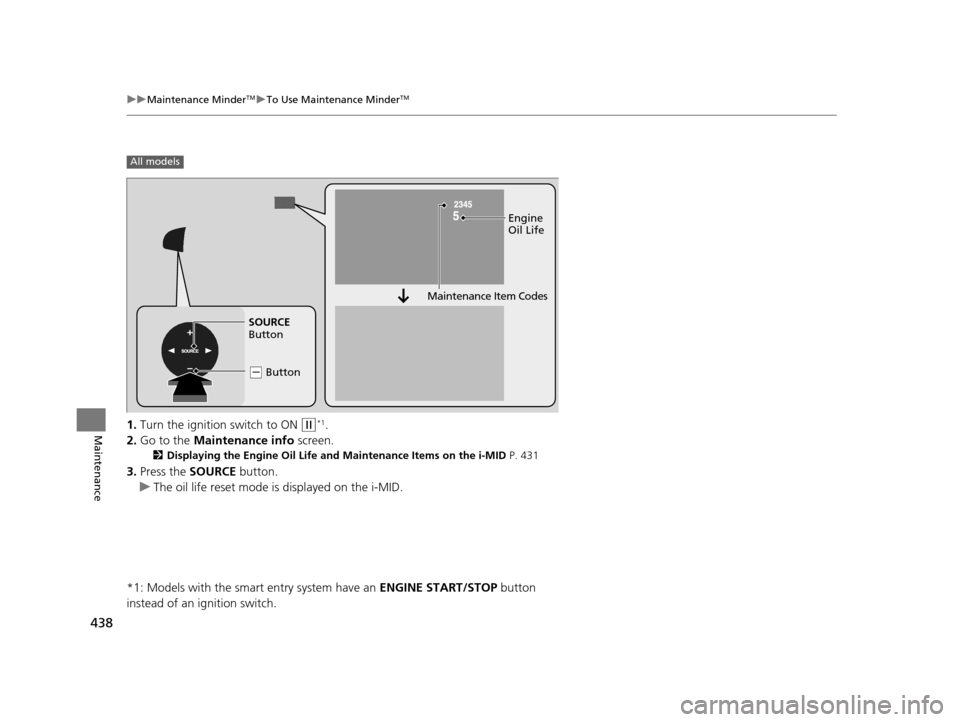
Maintenance1. Turn the ignition switch to ON (w*1.
2. Go to the Maintenance info screen.
2Displaying the Engine Oil Life and Maintenance Items on the i-MID P. 431
3.Press the SOURCE button.
u The oil life reset mode is displayed on the i-MID.
*1: Models with the smart entry system have an ENGINE START/STOP button
instead of an ignition switch.
All models
Engine
Oil Life
SOURCE
Button
( - Button
Maintenance Item Codes
15 CR-V-31T0A6300.book 438 ページ 2015年2月2日 月曜日 午前10時35分