Page 78 of 533
77
uuIndicators u
Continued
Instrument Panel
*1:Models with the smart entry system have an ENGINE START/STOP button instead of an ignition switch.
IndicatorNameOn/BlinkingExplanationMessage*
Turn Signal
Indicators
●Blinks when you operate the turn
signal lever.
●Blinks along with all turn signals if
you press the hazard warning
button.
●Does not blink or blinks rapidly - A turn
signal light bulb has blown. Change the bulb
immediately.
2 Replacing Light Bulbs P. 457
—
High Beam
Indicator●Comes on when the high beam
headlights are on.——
Lights On
Indicator●Comes on whenever the light switch
is on, or in AUTO* when the exterior
lights are on.
●If you remove the key from the ignition
switch*1 while the lights are on, a chime
sounds when the driv er's door is opened.—
Fog Light
Indicator*
●Comes on when the fog lights are
on.——
* Not available on all models
15 CR-V-31T0A6300.book 77 ページ 2015年2月2日 月曜日 午前10時35分
Page 79 of 533

78
uuIndicators u
Instrument Panel
*1:Models with the smart entry system have an ENGINE START/STOP button instead of an ignition switch.
IndicatorNameOn/BlinkingExplanationMessage*
Immobilizer
System Indicator
●Comes on briefly when you turn the
ignition switch to ON
(w*1, then goes
off.
●Comes on if the immobilizer system
cannot recognize the key
information.
●Blinks - You cannot start the engine. Turn
the ignition switch to LOCK
(0*1, pull the
key out, and then inse rt the key and turn it
to ON
(w*1 again.●Repeatedly blinks - The system may be
malfunctioning. Have your vehicle checked
by a dealer.
●Do not attempt to alter this system or add
other devices to it. Electrical problems can
occur.
—
Security System
Alarm Indicator*
●Blinks when the security system
alarm has been set.
2 Security System Alarm* P. 147—
ECON Mode
Indicator
●Comes on when you turn the ignition
switch to ON
(w*1, then goes off.●Comes on when ECON mode is on.2ECON Button P. 370
Indicator
* Not available on all models
15 CR-V-31T0A6300.book 78 ページ 2015年2月2日 月曜日 午前10時35分
Page 80 of 533
79
uuIndicators u
Continued
Instrument Panel
*1:Models with the smart entry system have an ENGINE START/STOP button instead of an ignition switch.
IndicatorNameOn/BlinkingExplanationMessage*
CRUISE MAIN
Indicator*
●Comes on when you press the
CRUISE button.2Cruise Control * P. 371—
CRUISE
CONTROL
Indicator
*
●Comes on when you have set a
speed for cruise control.
2 Cruise Control * P. 371—
Washer Level
Indicator*
●Comes on when the washer fluid
gets low.●Refill washer fluid.
2Refilling Window Washer Fluid P. 451—
Maintenance
Minder Indicator*
●Comes on when you turn the ignition
switch to ON
(w*1, then goes off.●Comes on when the scheduled
maintenance is due soon.2Maintenance MinderTM P. 429—
* Not available on all models
15 CR-V-31T0A6300.book 79 ページ 2015年2月2日 月曜日 午前10時35分
Page 81 of 533
80
uuIndicators u
Instrument Panel
*1:Models with the smart entry system have an ENGINE START/STOP button instead of an ignition switch.
IndicatorNameOn/BlinkingExplanationMessage*
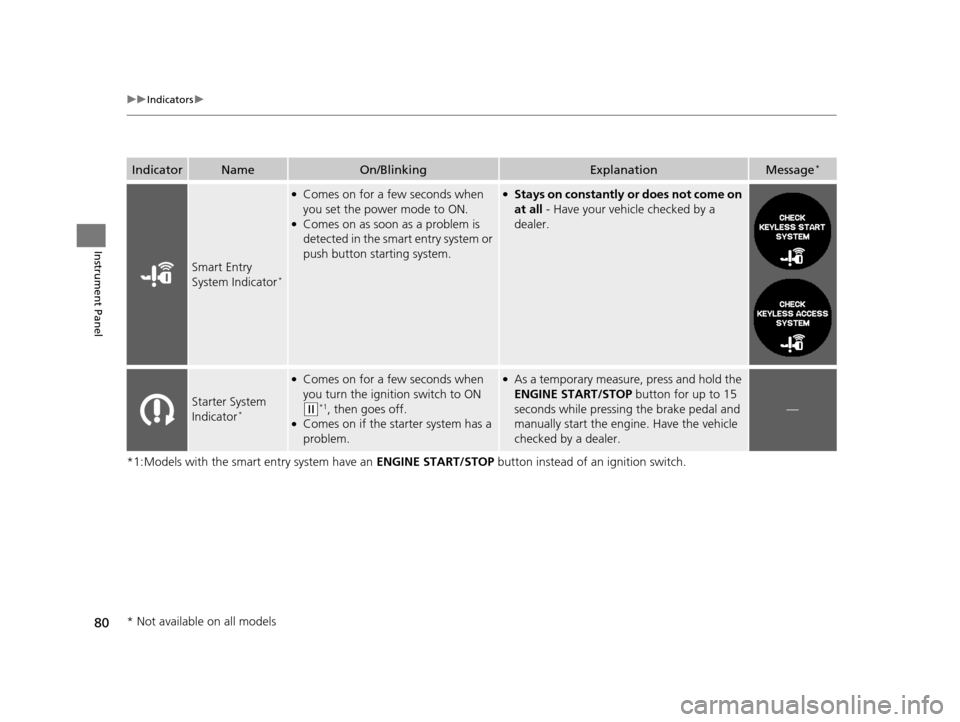
Smart Entry
System Indicator*
●Comes on for a few seconds when
you set the power mode to ON.
●Comes on as soon as a problem is
detected in the smart entry system or
push button starting system.
●Stays on constantly or does not come on
at all - Have your vehicle checked by a
dealer.
Starter System
Indicator*
●Comes on for a few seconds when
you turn the ignition switch to ON
(w*1, then goes off.●Comes on if the starter system has a
problem.
●As a temporary measure, press and hold the
ENGINE START/STOP button for up to 15
seconds while pressing the brake pedal and
manually start the engine. Have the vehicle
checked by a dealer.
—
* Not available on all models
15 CR-V-31T0A6300.book 80 ページ 2015年2月2日 月曜日 午前10時35分
Page 82 of 533

81
uuIndicators u
Continued
Instrument Panel
*1:Models with the smart entry system have an ENGINE START/STOP button instead of an ignition switch.
IndicatorNameOn/BlinkingExplanationMessage*
System Message
Indicator*
●Comes on for a few seconds when
you turn the ignition switch to ON
(w*1, then goes off.●Comes on along with a beep when a
problem is detected. A system
message on the multi-information
display appears at the same time.
●While the indicator is on, press the
(information) button to see the message
again.
●Refer to the Indicators information in this
chapter when a system message appears on
the multi-information display. Take the
appropriate action for the message.
●The multi-information display does not
return to the normal screen unless the
warning is cancelled, or the button
is pressed.
—
Brake System
Indicator (Amber)
●Comes on for a few seconds when
you turn the ignition switch to ON
(w*1, then goes off.●Comes on if there is a problem with a
system related to braking other than
the conventional brake system.
●Comes on while driving - Have your
vehicle checked by a dealer.
●With this indicator on, your vehicle still has
normal braking ability.
U.S.
Canada
(Amber)
U.S.
Canada
* Not available on all models
15 CR-V-31T0A6300.book 81 ページ 2015年2月2日 月曜日 午前10時35分
Page 93 of 533

92
Instrument Panel
Gauges and Displays
Gauges
Gauges include the speedometer, tachometer, fuel gauge, and related indicators.
They are displayed when the ignition switch is in ON
(w*1.
Displays your driving speed in mph (U.S.) or km/h (Canada).
Shows the number of engine revolutions per minute.
Displays the amount of fuel left in the fuel tank.
Displays the temperature of the engine coolant.
*1: Models with the smart entry system have an ENGINE START/STOP button
instead of an ignition switch.
■Speedometer
■Tachometer
■Fuel Gauge
■Temperature Gauge
1 Fuel Gauge
NOTICE
You should refuel when the reading approaches .
Running out of fuel can cause the engine to misfire,
damaging the cata lytic converter.
The actual amount of remain ing fuel may differ from
the fuel gauge reading.E
1 Temperature Gauge
NOTICE
Driving with the temperat ure gauge pointer in the
upper zone can cause serious engine damage. Pull
safely to the side of th e road and allow engine
temperature to return to normal. 2 Overheating P. 497
15 CR-V-31T0A6300.book 92 ページ 2015年2月2日 月曜日 午前10時35分
Page 101 of 533
uuGauges and Displays uMulti-Information Display*
100
Instrument Panel
Use the multi-information display to customize certain features.
■How to customize
Select the VEHICLE SETTINGS screen by pressing the button while the
ignition switch is in ON
(w*1. The screen switches to CHANGE SETTINGS.
*1: Models with the smart entry system have an ENGINE START/STOP button
instead of an ignition switch.
■Customized Features1 Customized Features
To select customizing items, press the SEL/RESET
button on the CHANGE SETTINGS screen, then
press the button. 2 List of customizable options P. 104
2 Example of customization settings P. 109
When you customize settings, shift to
( P.
Multi-Information Display:
Goes to customize settings.
Button:
Changes the customize menus and items.
SEL/RESET Button:
Enters the selected item.
15 CR-V-31T0A6300.book 100 ページ 2015年2月2日 月曜日 午前10時35分
Page 108 of 533

107
uuGauges and Displays uMulti-Information Display*
Continued
Instrument Panel
*1:Default Setting
Setup Group Customizable Features DescriptionSelectable settings
CHANGE
SETTINGSDOOR SETUP AUTO DOOR LOCK
Changes the setting
for when the doors
automatically lock. OFF
/WITH VEH SPD
*1/
SHIFT FROM P
AUTO DOOR
UNLOCK Changes the setting
for when the doors
automatically unlock. WHEN DRIVER’S
DOOR OPENS
*1/
WHEN
SHIFTING INTO PARK /
WHEN IGNITION
SWITCHED OFF /OFF
KEY AND REMOTE
UNLOCK MODE Sets up either the driver’s door or all doors to
unlock on the first operation of the remote or
ignition key. DRIVER DOOR
*1/
ALL
DOORS
KEYLESS LOCK
ACKNOWLEDGMENT Turns on or off the keyless lock
acknowledgment of:
LOCK/UNLOCK- The exterior lights flash.
ON
*1/
OFF
SECURITY RELOCK
TIMER Changes the time it takes for the doors to
relock and the security system to set after you
unlock the vehicle without opening any door.
90 sec
/60 sec /30 sec
*1
15 CR-V-31T0A6300.book 107 ページ 2015年2月2日 月曜日 午前10時35分