Page 90 of 533

89
uuIndicators uDisplay Warning and Information Messages*
Continued
Instrument Panel
MessageConditionExplanation
●Blinks when you fail to steer the vehicle.●Operate the steering whee l to resume the LKAS.
●Appears when the vehicle is driving out of a detected
line. The beeper sounds simultaneously.●Keep the vehicle within the lane you are driving.
●Appears when the LKAS is in operation, or the LKAS
button is pressed, but the temperature inside the front
sensor camera is too high. The LKAS cancels
automatically. The beeper sounds simultaneously.●Use the climate control system to cool down the camera.●Goes off - The camera has been cooled down. Pressing
the LKAS button can resume the system.
2 Front Sensor Camera* P. 374
●Appears when the LKAS button is pressed or the LKAS
automatically canceled . The beeper sounds
simultaneously.●If any other system indicato rs come on, such as the
VSA ®, ABS and brake system, take appropriate action.
2 Indicators P. 82
Models with LKAS
* Not available on all models
15 CR-V-31T0A6300.book 89 ページ 2015年2月2日 月曜日 午前10時35分
Page 128 of 533

127
Controls
This chapter explains how to operate the various controls necessary for driving.
Clock.................................................. 128
Locking and Unlocking the Doors
Key Types and Functions .................. 130
Low Smart Entry Remote Signal Strength*...132Locking/Unlocking the Doors from the Outside .......................................... 133
Locking/Unlocking the Doors from the Inside ... 137Childproof Door Locks ..................... 138
Auto Door Locking/Unlocking .......... 139
Opening and Closing the Tailgate ... 140
Security System ................................ 147
Immobilizer System .......................... 147
Security System Alarm
*.................... 147Opening and Closing the Windows ..... 150
Opening and Closing the Moonroof*.. 152Operating the Switches Around the Steering Wheel
Ignition Switch ................................. 153
ENGINE START/STOP Button............. 154
Ignition Switch and Power Mode
Comparison ................................... 157
Turn Signals ..................................... 158
Light Switches.................................. 159
Fog Lights
*...................................... 162
Daytime Running Lights ................... 163
Wipers and Washers ........................ 164
Brightness Control ........................... 167
Models without smart entry system
Models with smart entry system
Defogger/Heated Door Mirror*........ 168
Driving Position Memory System*.... 170
Adjusting the Steering Wheel .......... 172
Adjusting the Mirrors ....................... 173
Interior Rearview Mirror ................... 173
Power Door Mirrors ......................... 174
Adjusting the Seats .......................... 175
Adjusting the Seat Positions ............. 175
Interior Lights/Interior Convenience Items.. 185Heating and Cooling System*......... 197
Using Vents, Heating and A/C.......... 197
Climate Control System
*.................. 200
Using Automatic Climate Control .... 200
Automatic Climate Control Sensors ... 203
* Not available on all models
15 CR-V-31T0A6300.book 127 ページ 2015年2月2日 月曜日 午前10時35分
Page 169 of 533

168
uuOperating the Switches Around the Steering Wheel uDefogger/Heated Door Mirror*
Controls
Defogger/Heated Door Mirror*
Press the rear defogger and heated door mirror button to defog the rear window
and mirrors when the ignition switch is in ON
(w*1.
The rear defogger and heated door mirrors
automatically switch off after 20 minutes.
However, if the outside temperature is 18°F
(−8°C) or below, they do not automatically
switch off.
The rear defogger and heated door mirrors
automatically switch off after 10-30 minutes
depending on the outside temperature.
However, if the outside temperature is 32°F
(0°C) or below, they do not automatically
switch off.
*1: Models with the smart entry system have an ENGINE START/STOP button
instead of an ignition switch.
■Rear Defogger/Heated Door Mirror* Button1 Rear Defogger/Heated Door Mirror* Button
NOTICE
When cleaning the inside of the rear window, be
careful not to damage the heating wires.
It is critical to wipe the window from side to side
along the defogger heating wires.
This system consumes a lot of power, and may
weaken the battery, making it difficult to start the
engine. Turn it off when the window has been
defogged.
Also, do not use the system for a long period even if
the engine is idling.
Models with heating and cooling system
Models with climate control system
* Not available on all models
15 CR-V-31T0A6300.book 168 ページ 2015年2月2日 月曜日 午前10時35分
Page 201 of 533
200
Controls
Climate Control System*
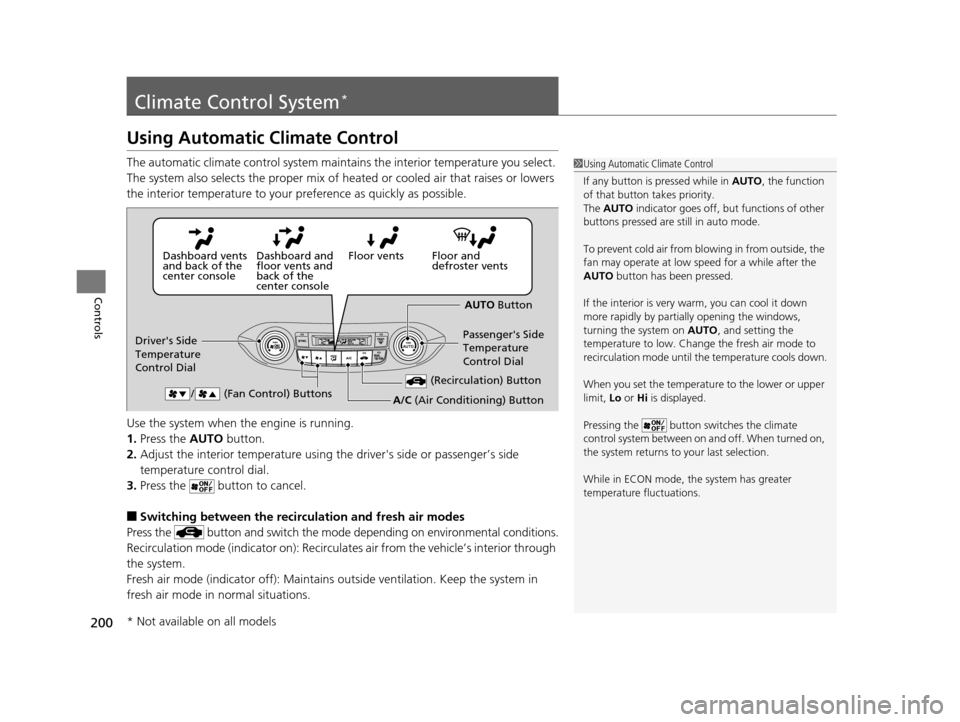
Using Automatic Climate Control
The automatic climate control system maintains the interior temperature you select.
The system also selects the proper mix of heated or cooled air that raises or lowers
the interior temperature to your pr eference as quickly as possible.
Use the system when the engine is running.
1. Press the AUTO button.
2. Adjust the interior temperature using the driver's side or passenger’s side
temperature control dial.
3. Press the button to cancel.
■Switching between the recirculation and fresh air modes
Press the button and switch the mode depending on environmental conditions.
Recirculation mode (indicator on): Recirculat es air from the vehicle’s interior through
the system.
Fresh air mode (indicator off): Maintains ou tside ventilation. Keep the system in
fresh air mode in normal situations.
1 Using Automatic Climate Control
If any button is pressed while in AUTO, the function
of that button takes priority.
The AUTO indicator goes off, but functions of other
buttons pressed are st ill in auto mode.
To prevent cold air from bl owing in from outside, the
fan may operate at low speed for a while after the
AUTO button has been pressed.
If the interior is very warm, you can cool it down
more rapidly by partial ly opening the windows,
turning the system on AUTO, and setting the
temperature to low. Change the fresh air mode to
recirculation mode until the temperature cools down.
When you set the temperat ure to the lower or upper
limit, Lo or Hi is displayed.
Pressing the button switches the climate
control system between on and off. When turned on,
the system returns to your last selection.
While in ECON mode, the system has greater
temperature fluctuations.
Floor and
defroster vents
Floor vents
Dashboard and
floor vents and
back of the
center console
Dashboard vents
and back of the
center console
AUTO Button
Driver's Side
Temperature
Control Dial Passenger's Side
Temperature
Control Dial
/ (Fan Control) Buttons
(Recirculation) Button
A/C (Air Conditioning) Button
* Not available on all models
15 CR-V-31T0A6300.book 200 ページ 2015年2月2日 月曜日 午前10時35分
Page 202 of 533
201
uuClimate Control System*uUsing Automatic Climate Control
Controls
Pressing the button turns the air
conditioning system on and automatically
switches the system to fresh air mode.
Pressing the button again to turn off, the
system returns to the previous settings.
■To rapidly defrost the windows
1.Press the button.
2. Press the button.
■Defrosting the Windshield and Windows1Defrosting the Windshield and Windows
For your safety, make sure you have a clear view
through all the windows before driving.
Do not set the temperatur e near the upper or lower
limit.
When cold air hits the windshield, the outside of the
windshield may fog up.
If the side windows fog up, adjust the vents so that
the air hits th e side windows.
1To rapidly defrost the windows
After defrosting the windows, switch over to fresh air
mode. If you keep the syst em in recirculation mode,
the windows may fog up from humidity. This
impedes visibility.
15 CR-V-31T0A6300.book 201 ページ 2015年2月2日 月曜日 午前10時35分
Page 203 of 533
202
uuClimate Control System*uSynchronized Mode
Controls
Synchronized Mode
You can set the temperature synchronously for the driver side and the passenger
side in synchronized mode.
1. Press the SYNC button.
u The system switches to synchronized mode.
2. Adjust the temperature using driver ’s side temperature control dial.
Press the SYNC button to return to dual mode.
1Synchronized Mode
When you press the button, the system changes
to synchronized mode.
When the system is in dua l mode, the driver side
temperature and the passenger side temperature can
be set separately.
In AUTO mode, the system adjusts each temperature
based on the information of the sunlight sensor and
the sun position updated by the navigation system’s
GPS.
Models with navigation system
15 CR-V-31T0A6300.book 202 ページ 2015年2月2日 月曜日 午前10時35分
Page 204 of 533
203
uuClimate Control System*uAutomatic Climate Control Sensors
Controls
Automatic Climate Control Sensors
The automatic climate control system is
equipped with sensors. Do not cover or spill
any liquid on them.Sensor
Sensor
15 CR-V-31T0A6300.book 203 ページ 2015年2月2日 月曜日 午前10時35分
Page 357 of 533

356
uuTowing a Trailer uDriving Safely with a Trailer
Driving
Driving Safely with a Trailer
• Have the trailer properly serviced and keep it in good condition.
• Make sure that all the weights and load in the vehicle and trailer are within limits.
2Towing Load Limits P. 353
•Securely attach the hitch, safety chains, and other necessary parts to the trailer.
• Securely store all the items in and on the trailer so that they do not shift while
driving.
• Check if the lights and brakes on the trailer are working properly.
• Check the pressures of the traile r tires, including the spare.
• Drive slower than normal.
• Obey posted speed limits for vehicles with trailers.
• Use the
(D position when towing a trailer on level roads.
• Turn more slowly and with a wider turning arc than normal.
• Allow more time and distance for braking.
• Do not brake or turn suddenly.
• Monitor your temperature gauge. If it nears the red (Hot) mark, turn off the
heating and cooling system
*/climate control system* and reduce speed. Pull to the
side of the road safely to cool down the engine if necessary.
■Things You Need To Know Before Towing a Trailer
■Towing Speeds and Gears
■Turning and Braking
■Driving in Hilly Terrain
1Driving Safely with a Trailer
Operating speed when towing a trailer is restricted
up to 65 mph (100 km/h).
Parking
In addition to the normal precautions, place wheel
chocks at each of the trailer's tires.
* Not available on all models
15 CR-V-31T0A6300.book 356 ページ 2015年2月2日 月曜日 午前10時35分


