Page 70 of 533
69
Instrument Panel
This chapter describes the buttons, indicators, and gauges that are used while driving.
Indicators............................................ 70
Gauges and Displays Gauges .............................................. 92
Information Display
*.......................... 93
Multi-Information Display*................. 96
intelligent Multi-Information Display (i- MID) .............................................. 111
* Not available on all models
15 CR-V-31T0A6300.book 69 ページ 2015年2月2日 月曜日 午前10時35分
Page 131 of 533

130
Controls
Locking and Unlocking the Doors
Key Types and Functions
This vehicle comes with the following key:Use the key to start and stop the engine, and
to lock and unlock the doors and tailgate. You
can also lock and unlock the doors and
tailgate pressing the buttons on remote
transmitter.
■Keys
1Key Types and Functions
All the keys have an immobilizer system. The
immobilizer system helps to protect against vehicle
theft. 2 Immobilizer System P. 147
The keys contain precision electronics.
Adhere to the following advi ce to prevent damage to
the electronics:
•Do not leave the keys in direct sunlight, or in
locations with high temperature or high humidity.
•Do not drop the keys or set heavy objects on them.
•Keep the keys away from liquids.
•Do not take the keys apart except for replacing the
battery.
If the circuits in the keys are damaged, the engine
may not start, and the remote transmitter may not
work.
If the keys do not work properly, have them
inspected by a dealer.
Ignition Keys with Remote
Transmitter*
Smart Entry Remote*
* Not available on all models
15 CR-V-31T0A6300.book 130 ページ 2015年2月2日 月曜日 午前10時35分
Page 198 of 533

197Continued
Controls
Heating and Cooling System*
Using Vents, Heating and A/C
Mode ButtonsChange airflow.
Floor and defroster vents
Floor vents
Dashboard and floor vents and
back of the center console
Dashboard vents and back
of the center console
Fan Control Dial
Adjusts the fan speed.
Rotate the dial all the
way to OFF to turn
everything off.
ButtonTurns on the A/C, selects airflow
from the dashboard vents, and
switches the mode to recirculation.
A/C ButtonPress to cool the interior or
dehumidify while heating.
Windshield Defroster ButtonTurns on the A/C, selects airflow from
the defroster vents at the base of the
windshield, and switches the mode to
fresh air.
Temperature
Control Dial
Adjusts the interior
temperature.
(Recirculation) ButtonPress the button and switch the mode
depending on environmental conditions.
Recirculation mode (indicator on):
Recirculates air from the vehicle’s interior
through the system.
Fresh air mode (indicator off):
Maintains outside ventilation. Keep the system
in fresh air mode in normal situations.
* Not available on all models
15 CR-V-31T0A6300.book 197 ページ 2015年2月2日 月曜日 午前10時35分
Page 201 of 533
200
Controls
Climate Control System*
Using Automatic Climate Control
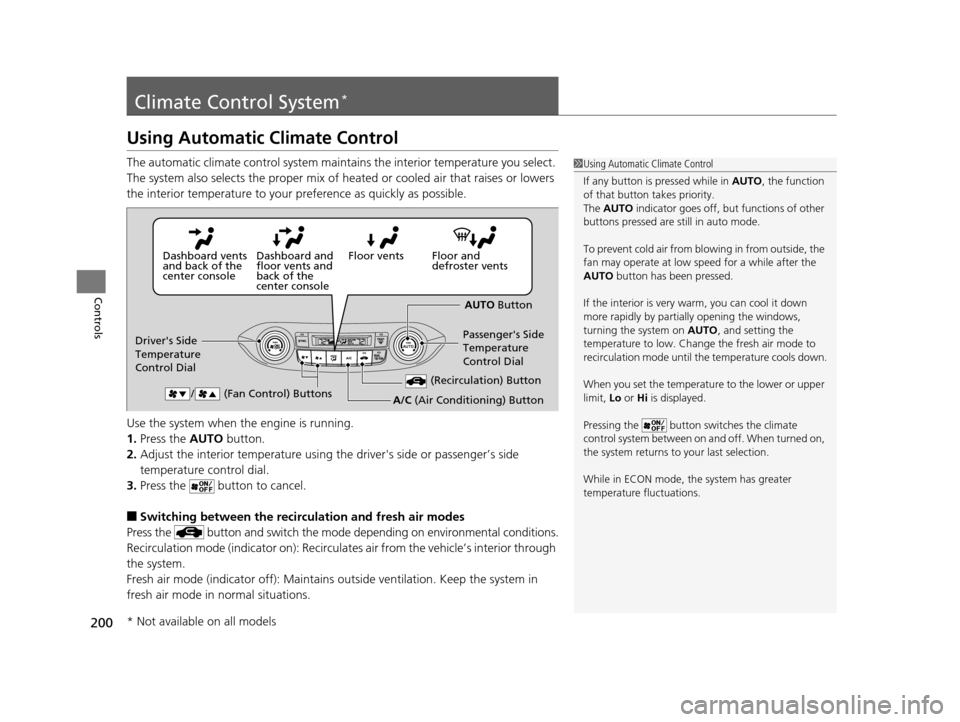
The automatic climate control system maintains the interior temperature you select.
The system also selects the proper mix of heated or cooled air that raises or lowers
the interior temperature to your pr eference as quickly as possible.
Use the system when the engine is running.
1. Press the AUTO button.
2. Adjust the interior temperature using the driver's side or passenger’s side
temperature control dial.
3. Press the button to cancel.
■Switching between the recirculation and fresh air modes
Press the button and switch the mode depending on environmental conditions.
Recirculation mode (indicator on): Recirculat es air from the vehicle’s interior through
the system.
Fresh air mode (indicator off): Maintains ou tside ventilation. Keep the system in
fresh air mode in normal situations.
1 Using Automatic Climate Control
If any button is pressed while in AUTO, the function
of that button takes priority.
The AUTO indicator goes off, but functions of other
buttons pressed are st ill in auto mode.
To prevent cold air from bl owing in from outside, the
fan may operate at low speed for a while after the
AUTO button has been pressed.
If the interior is very warm, you can cool it down
more rapidly by partial ly opening the windows,
turning the system on AUTO, and setting the
temperature to low. Change the fresh air mode to
recirculation mode until the temperature cools down.
When you set the temperat ure to the lower or upper
limit, Lo or Hi is displayed.
Pressing the button switches the climate
control system between on and off. When turned on,
the system returns to your last selection.
While in ECON mode, the system has greater
temperature fluctuations.
Floor and
defroster vents
Floor vents
Dashboard and
floor vents and
back of the
center console
Dashboard vents
and back of the
center console
AUTO Button
Driver's Side
Temperature
Control Dial Passenger's Side
Temperature
Control Dial
/ (Fan Control) Buttons
(Recirculation) Button
A/C (Air Conditioning) Button
* Not available on all models
15 CR-V-31T0A6300.book 200 ページ 2015年2月2日 月曜日 午前10時35分
Page 207 of 533

206
Features
Audio System
About Your Audio System
See the Navigation System Manual for operation of the audio system, Bluetooth®
HandsFreeLink ®, and voice commands for these features.
The audio system features AM/FM radio and the SiriusXM ® Radio
* service. It can also
play audio CDs, WMA/MP3/AAC files, USB flash drives, and iPod, iPhone, and
Bluetooth ® devices.
You can operate the audio system from the buttons and switches on the panel, or
the remote controls on the steering wheel.
1About Your Audio System
SiriusXM ® Radio
* is available on a subscription basis
only. For more information on SiriusXM ® Radio*,
contact a dealer.
2 General Information on the Audio System
P. 267
SiriusXM ® Radio
* is available in the United States and
Canada, except Ha waii, Alaska, and Puerto Rico.
SiriusXM ®
* is a registered trademark of SiriusXM
Radio, Inc.
Video CDs, DVDs, and 3-inch (8-cm) mini CDs are not
supported.
iPod, iPhone and iTunes are trademarks of Apple Inc.
State or local laws may pr ohibit the operation of
handheld electronic devi ces while operating a
vehicle.
Models with navigation system
Models without navigation system
Remote Control
iPod
USB Flash
Drive
iPod
USB Flash Drive
Models with one displayModels with two displays
* Not available on all models
15 CR-V-31T0A6300.book 206 ページ 2015年2月2日 月曜日 午前10時35分
Page 208 of 533

207
uuAudio System uAuxiliary Input Jack*
Features
Auxiliary Input Jack*
Use the jack to connect a standard audio device.
1.Open the AUX cover.
2. Connect a standard audio device to the
input jack using a 1/8 inch (3.5 mm) stereo
miniplug.
u The audio system auto matically switches
to the AUX mode.
USB Adapter Cable*
1. Unclip the USB connec tor and loosen the
adapter cable.
2. Install the iPod dock connector or the USB
flash drive to the USB connector.
1Auxiliary Input Jack*
To switch the mode, pres s any of the audio mode
buttons. You can return to the AUX mode by
pressing the AUX button.
1USB Adapter Cable*
•Do not leave the iPod or USB flash drive in the
vehicle. Direct sunlight and high temperatures may
damage it.
•Do not use an extension cable with the USB
adapter cable.
•Do not connect the iPod or USB flash drive using a
hub.
•Do not use a device such as a card reader or hard
disk drive, as the device or your files may be
damaged.
•We recommend keeping y our data backed up
before using the device in your vehicle.
•Displayed messages may vary depending on the
device model and software version.
If the audio system does not recognize the iPod, try
reconnecting it a few times or reboot the device. To
reboot, follow the manufac turer’s instructions
provided with the iPod or visit www.apple.com/ipod.
* Not available on all models
15 CR-V-31T0A6300.book 207 ページ 2015年2月2日 月曜日 午前10時35分
Page 212 of 533
211
uuAudio System uAudio Remote Controls
Continued
Features
Audio Remote Controls
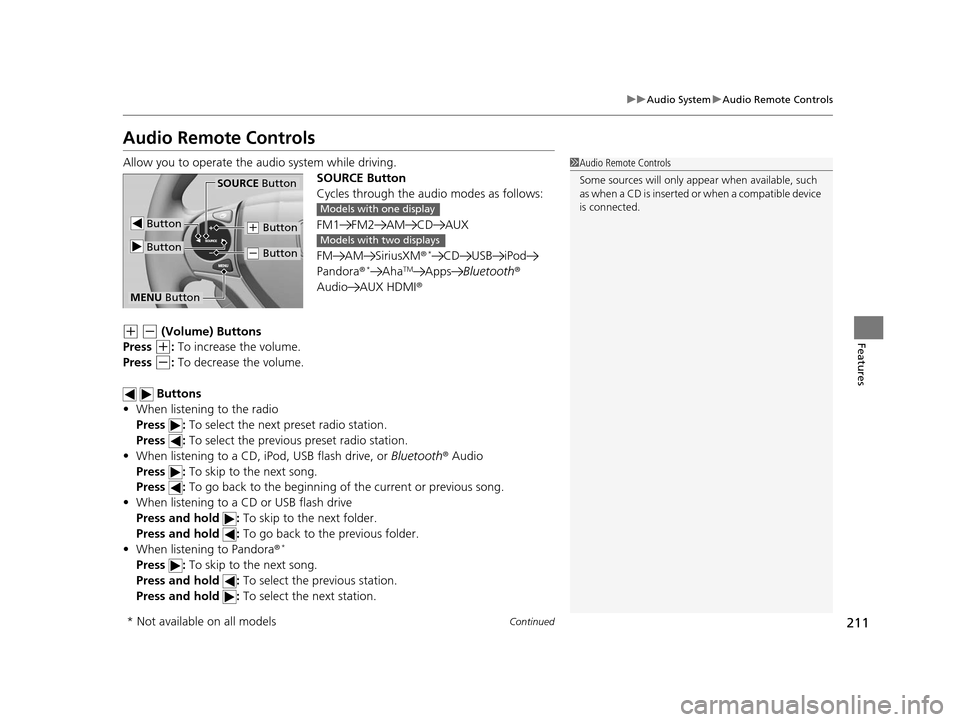
Allow you to operate the au dio system while driving.
SOURCE Button
Cycles through the audio modes as follows:
FM1 FM2 AM CD AUX
FM AM SiriusXM ®
*CD USB iPod
Pandora®*AhaTMApps Bluetooth ®
Audio AUX HDMI ®
(+ (- (Volume) Buttons
Press
(+: To increase the volume.
Press
(-: To decrease the volume.
Buttons
• When listening to the radio
Press : To select the next preset radio station.
Press : To select the previous preset radio station.
• When listening to a CD, iPod, USB flash drive, or Bluetooth® Audio
Press : To skip to the next song.
Press : To go back to the beginning of the current or previous song.
• When listening to a CD or USB flash drive
Press and hold : To skip to the next folder.
Press and hold : To go back to the previous folder.
• When listening to Pandora ®
*
Press : To skip to the next song.
Press and hold : To select the previous station.
Press and hold : To select the next station.
1Audio Remote Controls
Some sources will only appe ar when available, such
a s w h e n a C D i s i n s e r t e d o r w h e n a c o m p a t i b l e d e v i c e
is connected.
Button
SOURCE Button
Button
(+ Button
(- Button
MENU Button
Models with one display
Models with two displays
* Not available on all models
15 CR-V-31T0A6300.book 211 ページ 2015年2月2日 月曜日 午前10時35分
Page 216 of 533
215
uuAudio System Basic Operation uPlaying AM/FM Radio
Continued
Features
Playing AM/FM Radio
FM Button / Buttons
Press to display and select an
RDS category.
SCAN Button
Press to sample each of the
strongest stations on the
selected band for 10 seconds.
To turn off scan, press the
button again. (Power) Button
Press to turn the audio
system on and off.Preset Buttons (1-6)
To store a station:
1. Tune to the selected station.
2. Pick a preset button and hold it until you hear a beep.
To listen to a stored station, select a
band, then press the preset button.
Seek/Skip Buttons
Press to search up and down
the selected band for a
station with a strong signal. SETUP Button
Press to display menu items. Selector Knob
Turn to adjust the volume.
Press and turn to tune the radio
frequency.
AM Button
Press to select a band.
15 CR-V-31T0A6300.book 215 ページ 2015年2月2日 月曜日 午前10時35分

