2015 HONDA CIVIC HYBRID remote control
[x] Cancel search: remote controlPage 149 of 377

148
Features
Audio System
About Your Audio System
On models with navigation system, see the Navigation System Manual for operation
of the audio system, Bluetooth® HandsFreeLink ®, and voice commands for these
features.
The audio system features AM/FM radio and SiriusXM ® Radio service
*. It can also
play audio CDs, WMA/MP3/AAC files, USB flash devices, and iPod, iPhone and
Bluetooth ® devices.
You can operate the audio system from the buttons and switches on the panel, or
the icons on the touchscreen interface.
1 About Your Audio System
SiriusXM ® Radio is available on a subscription basis
only. For more information on SiriusXM ® Radio,
contact a dealer.
2 General Information on the Audio System
P. 188
SiriusXM ® Radio is available in the United States and
Canada, except Ha waii, Alaska, and Puerto Rico.
SiriusXM ® is a registered trademark of Sirius XM
Radio, Inc.
Video CDs, DVDs, and 3-inch (8-cm) mini CDs are not
supported.
iPod, iPhone and iTunes are trademarks of Apple Inc.
State or local laws may li mit the circumstances in
which you can launch or cont rol your attached audio
device.
Remote Control
iPod
USB Flash
Drive
iPod
USB Flash
Drive HDMI
®
* Not available on all models
15 CIVIC IMA-31TR26300.book 148 ページ 2014年9月9日 火曜日 午後12時20分
Page 153 of 377

152
uuAudio System uAudio Remote Controls
Features
Audio Remote Controls
Allow you to operate the au dio system while driving.
SOURCE Button
Cycles through the audio modes as follows:
FM AM SiriusXM®
*CD USB iPod
Pandora®*ahaTM *Apps*, *1Bluetooth ®
Audio AUX HDMI
(+ (- (Volume) Buttons
Press
(+: To increase the volume.
Press
(-: To decrease the volume.
Buttons
• When listening to the radio
Press : To select the next preset radio station.
Press : To select the previous preset radio station.
Press and hold : To select the next strong station.
Press and hold : To select the previous strong station.
• When listening to a CD, iPod, USB flash drive, or Bluetooth® Audio
Press : To skip to the next song.
Press : To go back to the beginning of the current or previous song.
• When listening to a CD or USB flash drive
Press and hold : To skip to the next folder.
Press and hold : To go back to the previous folder.
• When listening to Internet radio
*
Press : To skip to the next song.
Press and hold : To select the next station.
Press and hold : To select the previous station.
*1: Appears only when connected to HondaLink
TM.
1Audio Remote Controls
The CD or AUX mode appears only when a CD is
loaded or HDMI device is connected. Pandora®
* and
Bluetooth ® Audio appear when a connection
(Bluetooth ® or USB) is established with a device.
Button
SOURCE Button
Button
(+ Button
(- Button
MENU Button
* Not available on all models
15 CIVIC IMA-31TR26300.book 152 ページ 2014年9月9日 火曜日 午後12時20分
Page 154 of 377

153
uuAudio System uAudio Remote Controls
Features
Steering Wheel MENU Button
• When listening to the radio
Press and hold the MENU button: To select the radio station by Scan, Save
Preset, or Seek.
• When listening to SiriusXM® radio
*
Press and hold the MENU button: To select the channel by Scan, Save
Preset, Channel , or Category .
• When listening to a CD or USB flash drive
Press and hold the MENU button: To select the song by Scan, Repeat , or
Random .
• When listening to an iPod
Press and hold the MENU button: To select the song by Repeat or Shuffle .
• When listening to Internet radio
*
Press and hold the MENU button: To select Bookmark , or Play/Pause .
• When listening to a Bluetooth® Audio
Press and hold the MENU button: To select Pause or Play for the song.
1Audio Remote Controls
The MENU button is available only when the audio
mode is FM, AM, SiriusXM ®
*, CD, USB, iPod,
Pandora ®*, AhaTM, or Bluetooth ® Audio.
* Not available on all models
15 CIVIC IMA-31TR26300.book 153 ページ 2014年9月9日 火曜日 午後12時20分
Page 163 of 377

uuAudio System Basic Operation uPlaying AM/FM Radio
162
Features
To store a station:
1. Tune to the selected station.
2. Select MENU .
3. Select Save Preset .
4. Select the preset number you wa nt to store that station.
You can also store a preset station by the following procedure.
1. Select open/close icon to display a channel list.
2. Select Preset tab.
3. Press and hold the preset number for the st ation you want to store until you hear
a beep.
Provides text data information related to your selected RDS-capable FM station.
■To find an RDS station from Station List
1. Select MENU while listening to an FM station.
2. Select Station List .
3. Select a station.
■Manual update
Updates your available station list at any time.
1. Select MENU while listening to an FM station.
2. Select Station List .
3. Select Refresh .
■Preset Memory
■Radio Data System (RDS)
1Playing AM/FM Radio
The ST indicator appears on the display indicating
stereo FM broadcasts.
Stereo reproduction in AM is not available.
Switching the Audio Mode
Press the SOURCE button on the steering wheel or
select SOURCE on the list.
2 Audio Remote Controls P. 152
You can also switch the mode by selecting Change
Source on the MENU screen.
You can store 6 AM stations and 12 FM stations into
the preset memory.
1 Radio Data System (RDS)
When you select an RDS-capable FM station, the RDS
automatically turns on, and the frequency display
changes to the station name. However, when the
signals of that station become weak, the display
changes from the statio n name to the frequency.
15 CIVIC IMA-31TR26300.book 162 ページ 2014年9月9日 火曜日 午後12時20分
Page 166 of 377

Continued165
uuAudio System Basic Operation uPlaying SiriusXM ® Radio*
Features
1. Select SiriusXM ® mode.
2 Audio Remote Controls P. 152
2 Audio/Information Screen P. 155
From the Status Mode screen:
2.Select a channel using the or icon.
To select a preset station:
2. Select open/close ic on to display a preset channel list.
3. Select a channel from the list.
To switch between channel and category modes:
1. Select SiriusXM ® mode.
2. Select MENU .
3. Select XM Tune Mode .
4. Select Channel Mode or Category Mode .
■To Play SiriusXM® Radio1 Playing SiriusXM ® Radio*
In channel mode, all available channels are selectable.
In category mode, you can select a channel within a
category (Jazz, Rock, Classical, etc.).
There may be instances when SiriusXM ® Radio does
not broadcast all the data fi elds (artist name, title).
This does not indicate a problem with your audio
system.
* Not available on all models
15 CIVIC IMA-31TR26300.book 165 ページ 2014年9月9日 火曜日 午後12時20分
Page 167 of 377

uuAudio System Basic Operation uPlaying SiriusXM ® Radio*
166
Features
To store a station:
1. Tune to the selected station.
2. Select MENU .
3. Select Save Preset .
4. Select the preset number for the station you want to store.
You can also store a preset station by the following procedure.
1. Tune to the selected station.
2. Select open/close icon. The preset channel list appears.
3. Select Preset tab.
4. Press and hold the preset number for the st ation you want to store until you hear
a beep.
1. Select MENU .
2. Select Channel List.
3. Select the station.
1. Select MENU .
2. Select Scan.
u In channel mode, all channels ar e sampled for a few seconds each.
u In category mode, channels within a category are sampled for a few seconds
each.
3. Select Cancel to stop scanning channels and to continue listening to the sampling
channel.
■Preset Memory
■To Select a Channel from a List
■Scan
1 Playing SiriusXM ® Radio*
Switching audio mode
Press the SOURCE button on the steering wheel or
select SOURCE on the list.
2 Audio Remote Controls P. 152
You can also switch the mode by selecting Change
Source on the MENU screen.
You can store 12 SiriusXM ® stations into the preset
memory.
* Not available on all models
15 CIVIC IMA-31TR26300.book 166 ページ 2014年9月9日 火曜日 午後12時20分
Page 206 of 377
205Continued
Features
Bluetooth® HandsFreeLink ®
Bluetooth® HandsFreeLink ® (HFL) allows you to place and receive phone calls using
your vehicle’s navigation system, without handling your cell phone.
Bluetooth ® HandsFreeLink ® (HFL) allows you to place and receive phone calls using
your vehicle’s audio system, without handling your cell phone.
Using HFL
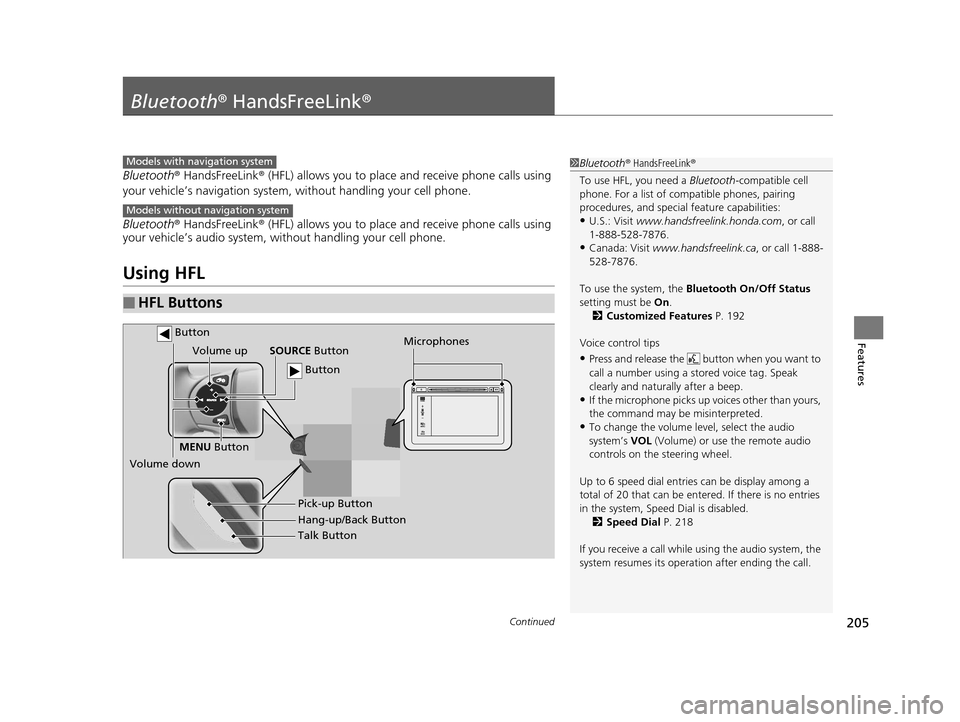
■HFL Buttons
1 Bluetooth ® HandsFreeLink ®
To use HFL, you need a Bluetooth-compatible cell
phone. For a list of compatible phones, pairing
procedures, and special feature capabilities:
•U.S.: Visit www.handsfreelink.honda.com , or call
1-888-528-7876.
•Canada: Visit www.handsfreelink.ca , or call 1-888-
528-7876.
To use the system, the Bluetooth On/Off Status
setting must be On.
2 Customized Features P. 192
Voice control tips
•Press and release the but ton when you want to
call a number using a st ored voice tag. Speak
clearly and naturally after a beep.
•If the microphone picks up vo ices other than yours,
the command may be misinterpreted.
•To change the volume level, select the audio
system’s VOL (Volume) or use the remote audio
controls on the steering wheel.
Up to 6 speed dial entries can be display among a
total of 20 that can be entered. If there is no entries
in the system, Speed Dial is disabled. 2 Speed Dial P. 218
If you receive a call while using the audio system, the
system resumes its operati on after ending the call.
Models with navigation system
Models without navigation system
Talk Button
Volume up
Microphones
Hang-up/Back Button Pick-up Button
Volume down SOURCE
Button
MENU Button
Button
Button
15 CIVIC IMA-31TR26300.book 205 ページ 2014年9月9日 火曜日 午後12時20分
Page 280 of 377

279
Maintenance
This chapter discusses basic maintenance.
Before Performing MaintenanceInspection and Maintenance ............ 280
Safety When Performing Maintenance ..281
Parts and Fluids Used in Maintenance Service ........................................... 282
Maintenance Minder
TM..................... 283
Maintenance Under the Hood Maintenance Items Under the Hood .. 288
Opening the Hood ........................... 289
Recommended Engine Oil ................ 290
Oil Check ......................................... 291
Adding Engine Oil ............................ 292
Changing the Engine Oil and Oil Filter .. 293
Engine Coolant ................................ 295
Transmission Fluid ............................ 297
Brake Fluid ....................................... 298
Refilling Window Washer Fluid......... 299
Replacing Light Bulbs ....................... 300
Checking and Maintaining Wiper
Blades .......................................... 306
Checking and Maintaining Tires
Checking Tires ................................. 308
Tire and Loading Information Label .. 309
Tire Labeling .................................... 309
DOT Tire Quality Grading (U.S. Vehicles).. 311Wear Indicators................................ 313 Tire Service Life ................................ 313
Tire and Wheel Replacement ........... 314
Tire Rotation .................................... 315
Winter Tires ..................................... 316
12 Volt Battery .................................. 317
Remote Transmitter Care
Replacing the Button Battery ........... 318
Climate Control System Maintenance.. 319Cleaning
Interior Care .................................... 320
Exterior Care.................................... 322
15 CIVIC IMA-31TR26300.book 279 ページ 2014年9月9日 火曜日 午後12時20分