Page 225 of 441

224
uuCustomized Features
*u
Features
■List of customizable options
*1:Default Setting Setup
Group Customizable Features Description Selectable SettingsSystem
Home
Home Screen Edit Order
Changes the
HOME screen icon layout.
—
Display
Display
Settings
Brightness
Changes the brightness of the audio/information
screen.
—
Contrast
Changes the contrast of the audio/information
screen.
—
Black Level
Changes the black level of the audio/information
screen.
—
Background Color
Changes the background color of the audio/
information screen.
Blue
*1/Amber /Red /
Violet
Sound/
Beep
Volume
Changes the sound volume.
0 ~6
*1~11
Beep Volume
Changes the beep volume.
Off
*1/1 /2 /3
Voice
Recog.
Voice Prompt
Turns the voice prompt on and off.
On
*1/Off
Volume
Changes the volume of the voice prompt.
0 ~6
*1~11
Phonebook Phonetic
Modification
Modifies a voice command for the phonebook.
—
Automatic Phone Sync
Sets a phonebook data to be automatically
imported when a phone is paired to HFL.
On
*1/Off
Page 226 of 441
225
uuCustomized Features
*u
Continued
Features
*1:Default SettingSetup
Group Customizable Features Description Selectable SettingsSystem
Clock
Clock/
Wallpaper
Type
Clock
Changes the clock display type.
Analog
/Digital
*1/
Small Digital/ Off
Wallpaper
●Changes the wallpaper type.●Imports an image file for a new wallpaper.●Deletes an image file for a wallpaper.2Wallpaper Setup P. 187
Blank/Galaxy
*1/
Metallic
Clock Adjustment
Adjusts Clock.
2 Clock P. 100
—
Clock Format
Selects the digital clock display from 12H to 24H.
12H
*1/24H
Clock Display
Selects whether the clock display comes on.
On /Off
*1
Clock Location
Changes the clock display layout.
Right upper
*1/Left
upper /Right lower /
Left lower /Off
Sync Clock With
Smartphone
*
Selects whether the clock links to the device you
connect.
On
*1/ Off
Clock Reset
*
Cancels/Resets all customized items for clock
display as default.
Yes /No
* Not available on all models
Page 228 of 441
227
uuCustomized Features
*u
Continued
Features
*1:Default SettingSetup
Group Customizable Features Description Selectable Settings
Audio [Your selected media]
Cover Art Turns on and off the cover art display.
On
*1/Off
Display
Adjustment Display
Brightness
See System on P. 226
Contrast
Black Level
Color Color
Changes the color of the audio/information
screen. —
Tint Changes the tint of the audio/information screen. —
Aspect Ratio Adjustment Changes the aspect ratio and zoom settings of
the audio/information screen.
Normal
/Full
*1/Zoom
Change Bluetooth Audio Device Connects, disconnects or pairs a
Bluetooth®
Audio device to HFL. —
Bluetooth Device List Pairs a new phone to HFL, edits or deletes a
paired phone.
2
Phone Setup P. 240
—
Default Cancels/Resets all customized items in the
Audio
group as default. Yes
/No
iPod or USB modeHDMI ® modeHDMI ® modeBluetooth ® Audio modeBluetooth ® Audio mode
Page 229 of 441
228
uuCustomized Features
*u
Features
*1:Default SettingSetup
Group Customizable Features Description Selectable SettingsClock/
Info
Clock
Clock/Wall-
paper type
Clock
See
System on P. 226
Wallpaper
Clock AdjustmentClock FormatClock DisplayClock LocationSync Clock With
Smartphone
*
Clock Reset
*
Other
Info Screen Preference
Changes the Info Screen type.
Info Top /Info Menu /
Off
*1
Default
Cancels/Resets all customized items in the Info
group as default.
Yes /No
* Not available on all models
Page 230 of 441

229
uuCustomized Features
*u
Continued
Features
*1:Default Setting Setup
Group Customizable Features Description Selectable Settings
Phone PhoneConnect Phone
Pairs a new phone to HFL,
connects or disconnects a
paired phone.
2 Phone Setup P. 240
—
Bluetooth
Device List Pairs a new phone to HFL, edits or deletes a paired
phone.
2
Phone Setup P. 240
—
Edit Speed Dial Edits, adds or deletes a speed dial entry.
2
Speed Dial P. 250
—
Ring Tone Selects the ring tone. Fixed/Mobile Phone
*1
Automatic
Phone Sync Sets a phonebook data to be automatically imported
when a phone is paired to HFL.
On
/Off
HondaLink
Assist Turns HondaLink Assist on and off.
On/Off
*1
Text/Email Enable Text/
Email
Turns the text/e-mail message function on and off.
On
*1/Off
Select Account Selects a mail or text message account. —
New Message
Notification Selects whether a pop-up alert comes on the screen
when HFL receives a new text/e-mail message.
On
/Off
*1
Default Cancels/Resets all customized items in the
Phone and
Text/Email groups as default. Yes
/No
Page 232 of 441
231
uuCustomized Features
*u
Features
*1:Default SettingSetup
Group Customizable Features Description Selectable Settings
Bluetooth Blue-
toothBluetooth On/Off Status
Changes the Bluetooth® status. On
*1/Off
Bluetooth Device List Pairs a new phone to HFL, edits or deletes a
paired phone, or creates a security PIN.
2
Phone Setup P. 240
—
Edit Pairing Code Edits
Pairing Code .
2To change the pairing code setting P. 271
Random/Fixed
*1
Default Cancels/Resets all customized items in the
Bluetooth
group as default. Yes
/No
Page 233 of 441
232
uuCustomized Features
*uDefaulting All the Settings
Features
Defaulting All the SettingsReset all the menu and customized settings as the factory defaults.
1.Select Settings .
2. Select System .
u Repeat the procedure to select Others
tab, then Factory Data Reset .
u The confirmation message will appear.
3. Select Yes to reset the settings.
4. Select Yes again to reset the settings.
u The confirmation message will appear.
Select OK.
1Defaulting All the Settings
When you transfer the vehicle to a third party, reset
all settings to default and delete all personal data.
The following settings will be reset:•Audio preset settings•Phonebook entries•Other display and personal settings.
Page 234 of 441
233
Continued
Features
Bluetooth® HandsFreeLink ®For models with the navigation system, see the Navigation System Manual for how
to operate the Bluetooth ® HandsFreeLink®.
Bluetooth ® HandsFreeLink ® (HFL) allows you to place and receive phone calls using
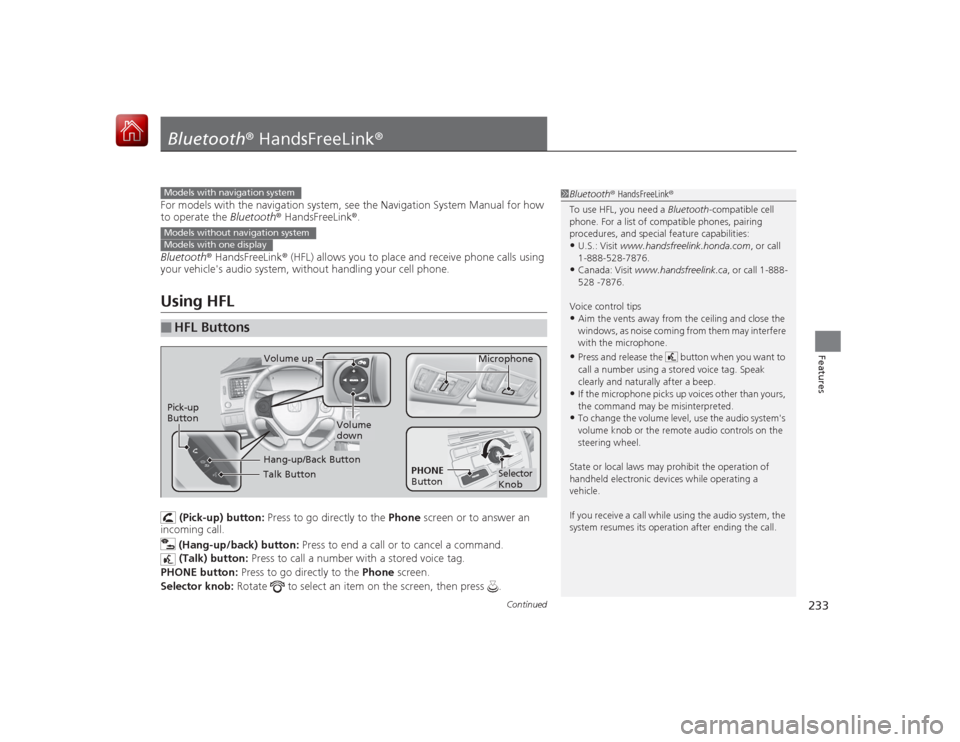
your vehicle's audio system, without handling your cell phone.Using HFL
(Pick-up) button: Press to go directly to the Phone screen or to answer an
incoming call.
(Hang-up/back) button: Press to end a call or to cancel a command.
(Talk) button: Press to call a number with a stored voice tag.
PHONE button: Press to go directly to the Phone screen.
Selector knob: Rotate to select an item on the screen, then press .
■
HFL Buttons
1Bluetooth ® HandsFreeLink ®
To use HFL, you need a Bluetooth-compatible cell
phone. For a list of compatible phones, pairing
procedures, and special feature capabilities:•U.S.: Visit www.handsfreelink.honda.com , or call
1-888-528-7876.•Canada: Visit www.handsfreelink.ca , or call 1-888-
528 -7876.
Voice control tips•Aim the vents away from the ceiling and close the
windows, as noise coming from them may interfere
with the microphone.•Press and release the button when you want to
call a number using a stored voice tag. Speak
clearly and natural ly after a beep.•If the microphone picks up voices other than yours,
the command may be misinterpreted.•To change the volume level, use the audio system's
volume knob or the remote audio controls on the
steering wheel.
State or local laws may prohibit the operation of
handheld electronic devices while operating a
vehicle.
If you receive a call while using the audio system, the
system resumes its operation after ending the call.
Models with navigation systemModels without navigation systemModels with one display
Talk ButtonVolume up Microphone
Hang-up/Back Button
Pick-up
Button
Volume
down
Selector
Knob
PHONE
Button

![HONDA CIVIC COUPE 2015 9.G Owners Manual 227
uuCustomized Features
*u
Continued
Features
*1:Default SettingSetup
Group Customizable Features Description Selectable Settings
Audio [Your selected media]
Cover Art Turns on and off the cover a](/manual-img/13/5862/w960_5862-227.png "HONDA CIVIC COUPE 2015 9.G Owners Manual 227
uuCustomized Features
*u
Continued
Features
*1:Default SettingSetup
Group Customizable Features Description Selectable Settings
Audio [Your selected media]
Cover Art Turns on and off the cover a")


