Page 146 of 441
145
Continued
Controls
Interior Lights/Interior Convenience ItemsInterior Lights
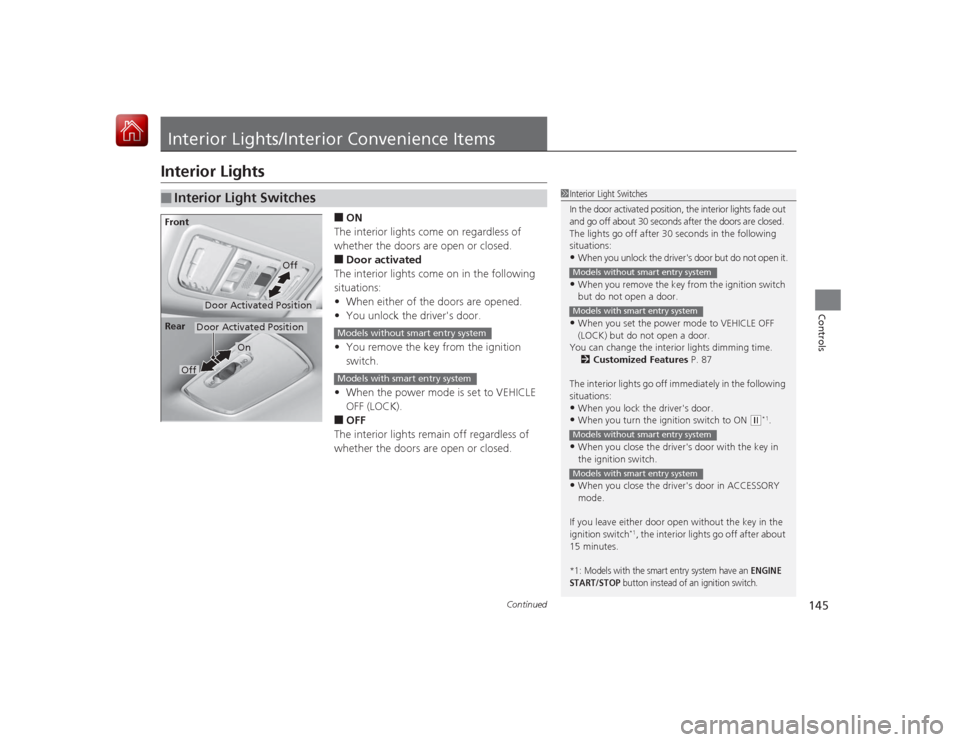
■ON
The interior lights come on regardless of
whether the doors are open or closed.■Door activated
The interior lights come on in the following
situations:
• When either of the doors are opened.
• You unlock the driver's door.
• You remove the key from the ignition
switch.
• When the power mode is set to VEHICLE
OFF (LOCK).■OFF
The interior lights remain off regardless of
whether the doors are open or closed.
■
Interior Light Switches
1 Interior Light Switches
In the door activated position, the interior lights fade out
and go off about 30 seconds after the doors are closed.
The lights go off after 30 seconds in the following
situations:•When you unlock the driver's door but do not open it.•When you remove the key from the ignition switch
but do not open a door.•When you set the power mode to VEHICLE OFF
(LOCK) but do not open a door.
You can change the interior lights dimming time.
2 Customized Features P. 87
The interior lights go off immediately in the following
situations:•When you lock the driver's door.•When you turn the ignition switch to ON
( w*1.
•When you close the driver's door with the key in
the ignition switch.•When you close the driver's door in ACCESSORY
mode.
If you leave either door open without the key in the
ignition switch
*1, the interior lights go off after about
15 minutes.
*1: Models with the smart entry system have an
ENGINE
START/STOP
button instead of an ignition switch.
Models without smart entry systemModels with smart entry systemModels without smart entry systemModels with smart entry system
Door Activated Position
Off
Front
Door Activated Position
On
Off
Rear
Models without smart entry systemModels with smart entry system
Page 222 of 441
221
uuCustomized Features
*u
Continued
Features
■Customization flow
Clock Format
Remember Last ScreenFactory Data ResetClock Adjustment
Select Settings .
Language
Default
BrightnessContrastBlack Level
Clock
Wallpaper
Display
Home Screen Edit Order
Background Color
Volume
Sync Clock With Smartphone
*
Clock LocationClock DisplayBeep VolumeKeyboard Layout
Home
Sound/Beep
Display Settings
Clock
Clock/Wallpaper Type
System
Clock Reset
*
Others
Phonebook Phonetic Mo dification
Automatic Phone Sync
Voice Prompt
Volume
Voice Recog.
Voice Command Tips
* Not available on all models
Page 227 of 441

226
uuCustomized Features
*u
Features
*1:Default SettingSetup
Group Customizable Features Description Selectable SettingsSystem
Others
Language
Changes the display language.
English
*1/
French /
Spanish
Keyboard Layout
Selects the on-screen keyboard type.
Alphabet /QWERTY
*1
Voice Command Tips
Alerts you when manual control of the system is
disabled to prevent distraction while driving. Only
voice commands are available.
On
*1/ Off
Remember Last Screen
Selects whether the device remembers the last
screen.
On /Off
*1
Factory Data Reset
Resets all the settings to their factory default.
2 Defaulting All the Settings P. 232
Yes/No
Default
Cancels /Resets all customized items in the
System group as default.
Yes/No
Audio Sound
Adjusts the settings of the audio speaker’s sound.
2
Adjusting the Sound P. 167
-6 ~ 0
*1 ~ +6 (BASS ,
TREBLE , and SUBW
*),
RR9 ~0
*1~FR9
( FADER ), L9~0
*1~R9
( BALANCE ), Off /Low /
Mid
*1/ High (SVC )
Audio Source Pop-up Selects whether the list of selectable audio
sources comes on when
Audio is selected on the
HOME screen. On
/Off*1
* Not available on all models
Page 281 of 441
uuBluetooth ® HandsFreeLink ®u HFL Menus
280Features
■To make a call usin g the imported
phonebook
1. Go to the Phone menu screen.2Phone menu screen P. 268
2.Select Phonebook .
3. Select a name.
u You can also search by letter. Select
Search .
u Use the keyboard on the touch screen for
entering letters.
4. Select a number.
u Dialing starts automatically.■To make a call using a phone number
1. Go to the Phone menu screen.2Phone menu screen P. 268
2.Select Dial.
3. Select a number.
4. Select .
u Dialing starts automatically.
1To make a call using the imported phonebook
This function is disabled while the vehicle is moving.
However, you can call a stored voice-tagged speed
dial number using voice commands.
2 Speed Dial P. 2771To make a call using a phone number
This function is disabled while the vehicle is moving.
However, you can call a stored voice-tagged speed
dial number using voice commands.
2 Speed Dial P. 277
Page 293 of 441

292Driving
Before DrivingDriving PreparationCheck the following items before you start driving.
•Make sure there are no obstructions on the windows, door mirrors, exterior
lights, or other parts of the vehicle.
u Remove any frost, snow, or ice.
u Remove any snow on the roof, as this can slip down and obstruct your field of
vision while driving. If frozen solid, remove ice once it has softened.
u When removing ice from around the wheels, be sure not to damage the wheel
or wheel components.
• Make sure the hood is securely closed.
u If the hood opens while driving, your front view will be blocked.
• Make sure the tires are in good condition.
u Check air pressure, check for damage and excessive wear.
2 Checking and Maintaining Tires P. 372
•Make sure there are no people or objects behind or around the vehicle.
u There are blind spots from the inside.■
Exterior Checks
1Exterior ChecksNOTICEWhen doors are frozen shut, use warm water around
the door edges to melt any ice. Do not try to force
them open, as this can damage the rubber trim
around the doors. When done, wipe dry to avoid
further freezing.
Do not pour warm water into the key cylinder.
You will be unable to inse rt the key if the water
freezes in the hole.
Heat from the engine and exhaust can ignite
flammable materials left under the hood, causing a
fire. If you've parked your vehicle for an extended
period, inspect and remove any debris that may have
collected, such as dried grass and leaves that have
fallen or have been carried in for use as a nest by a
small animal.
Also check under the hood for leftover flammable
materials after you or someone else has performed
maintenance on your vehicle.
Page 300 of 441

299
uuWhen Driving uStarting the Engine
Driving
3. Turn the ignition switch to START
(e
without depressing the accelerator pedal.
1. Keeping your right foot on the brake pedal, release the parking brake. Check that
the parking brake indicator has gone off.
2 Parking Brake P. 326
2.Put the shift lever in
(D
. Select
(R
when reversing.
3. Gradually release the brake pedal and gently depress the accelerator pedal to pull
away.
■Hill start assist system
Hill start assist keeps the brake engaged briefly to help prevent the vehicle from
rolling on inclines as you move your foot from the brake pedal to the accelerator.
Depress the clutch pedal, and shift to one of the forward gears when facing uphill,
or (R
when facing downhill, then release the brake pedal.
Move the shift lever to
(D
, (S
, or
(L
when facing uphill, or
(R
when facing
downhill, then release the brake pedal.
1 Starting the Engine
Do not hold the key in START
(e for more than 15
seconds.
•If the engine does not start right away, wait for at
least 10 seconds before trying again.•If the engine starts, but then immediately stops,
wait at least 10 seconds before repeating step 3
while gently depressing the acce lerator pedal.
Release the accelerator pedal once the engine
starts.
The immobilizer system protects your vehicle from
theft. If an improperly coded key (or other device) is
used, the engine's fuel system is disabled. 2 Immobilizer System P. 116
All models
■
Starting to DriveContinuously variable transmission modelsManual transmission modelsContinuously variable transmission models
1Hill start assist system
Hill start assist may not prevent the vehicle from
rolling downhill on a very steep or slippery slope, and
does not operate on small inclines.
Hill start assist is not a replacement for the parking
brake.
Page 306 of 441
305
uuWhen Driving uShifting
Continued
Driving
ShiftingChange the shift position in acco rdance with your driving needs.■Shift lever positions
*1:Models with the smart entry system have an ENGINE START/STOP button instead of an
ignition switch.
Continuously variable transmission models without paddle shifters
1 Shifting
You cannot turn the ignition switch to LOCK
(0*1
and remove the key unless the shift lever is in
( P.
The vehicle may move forward very slightly even in
( N while the engine is cold.
Depress the brake pedal firmly and, when necessary,
apply the parking brake.
Reverse
Used when reversingDrive
Used for normal drivingPark
Used when parking or starting the engine
Neutral
Used when idling
Release ButtonDrive (S)
Used:●For better acceleration●To increase engine braking●When going up or down hills
Low●Used to furth er increase engine braking●Used when going up or down hills
Page 308 of 441
307
uuWhen Driving uShifting
Continued
Driving
ShiftingChange the shift position in acco rdance with your driving needs.■Shift lever positions*1: Models with the smart entry system have an ENGINE START/STOP button instead of an
ignition switch.Continuously variable transmission models with paddle shifters
1 Shifting
You cannot turn the ignition switch to LOCK
(0*1
and remove the key unless the shift lever is in
( P.
The vehicle may move forward very slightly even in
( N while the engine is cold.
Depress the brake pedal firmly and, when necessary,
apply the parking brake.
Reverse
Used when reversingDrive
Used:●For normal driving●When temporarily driving in the 7-speed
manual shift modePark
Used when parking or starting the engine
Neutral
Used when idling
Release ButtonDrive (S)
Used:●For better acceleration●To increase engine braking●When going up or down hills●When driving in the 7-speed manual
shift mode


