Page 126 of 441

125
uuOperating the Switches Around the Steering Wheel uENGINE START/STOP Button
*
Controls
If you open the driver’s door when the power mode is set to ACCESSORY, a warning
buzzer sounds.
Warning buzzers may sound from inside or/
and outside the vehicle to remind you that the
smart entry remote is out of the vehicle. If the
buzzer continues even after the remote is put
back inside, place it to be within its
operational range.
■When the power mode is in ON
If the smart entry remote is taken out of the
vehicle, and the driver’s door is closed,
warning buzzers sound from both inside and
outside the vehicle. A warning message on
the i-MID notifies the driver inside that the
remote is out.■When the power mode is in
ACCESSORY
If the smart entry remote is taken out of the
vehicle, and both doors are closed, a warning
buzzer sounds from outside the vehicle.
■
Power Mode Reminder
■
Smart Entry Remote Reminder
1 Smart Entry Remote Reminder
When the smart entry remote is within the system’s
operational range, and the driver’s door is closed, the
warning function cancels.
If the smart entry remote is taken out of the vehicle
after the engine has been started, you can no longer
change the ENGINE START/STOP button mode or
restart the engine. Al ways make sure if the remote is
in your vehicle when you operate the ENGINE
START/STOP button.
Removing the smart entry re mote from the vehicle
through a window does not activate the warning
buzzer.
Do not put the smart entry remote on the dashboard
or in the glove box. It may cause the warning buzzer
to go off. Under some other conditions that can
prevent the vehicle from locating the remote, the
warning buzzer may also go off even if the remote is
within the system’s operational range.
Page 130 of 441

129
uuOperating the Switches Around the Steering Wheel uLight Switches
Controls
The headlights automatically come on when the wipers are used several ti\
mes within
a certain number of intervals with the headlight switch in AUTO.
The headlights automatically go off a few minutes later if the wipers are stopped.
The headlights, all other exterior lights, and the instrument panel lights turn off 15
seconds after you remove the key or set the power mode to VEHICLE OFF (LOCK),
take the remote with you, and close the driver's door. u You can change the headlight auto off timer setting.
2 Customized Features P. 87
If you turn the ignition switch to LOCK
(0
*1 with the headlight switch on, but do
not open the door, the lights turn off after 10 minutes (three minutes, if the switch
is in the AUTO position).
The lights turn on again when you unlock or open the driver's door. If you unlock
the door, but do not open it within 15 secon ds, the lights go off. If you open the
driver's door, you will hear a lights on reminder chime.
*1: Models with the smart entry system have an ENGINE START/STOP button instead of an
ignition switch.■
Headlight Integration with Wipers
*
■
Automatic Lighting Off Feature
1 Headlight Integration with Wipers
*
This feature activates while the headlights are off in
AUTO .
The instrument panel brightness does not change
when the headlights come on.
At dark ambient light levels, the automatic lighting
control feature turns on the headlights, regardless of
the number of wiper sweeps.
* Not available on all models
Page 160 of 441

159
Features
This chapter describes how to operate technology features.
Audio SystemAbout Your Audio System ................ 160
USB/HDMI ® Port
*............................. 161
USB Adapter Cable .......................... 162
Auxiliary Input Jack*........................ 162
Audio System Theft Protection
*....... 163
Audio Remote Controls .................... 164
Audio System Basic Operation ........ 166
Adjusting the Sound ........................ 167
Playing AM/FM Radio ....................... 168
Playing a CD .................................... 171
Models with one display
Playing an iPod ................................ 174
Playing Internet Radio ...................... 177
Playing a USB Flash Drive ................. 179
Playing Bluetooth® Audio................. 182
Audio System Basic Operation ........ 184
Audio/Information Screen ................ 185
Adjusting the Sound ........................ 189
Display Setup ................................... 190
Playing AM/FM Radio ....................... 191
Playing a CD .................................... 194
Playing an iPod ................................ 197Models with display audio system
Playing Internet Radio ...................... 200
Playing a USB Flash Drive ................. 202
Playing Bluetooth ® Audio ................ 205
Playing a Video Using the HDMI® ..... 207
Smartphone Apps ............................ 209
Siri Eyes Free .................................... 210
Audio Error Messages ...................... 211
General Information on the Audio System ............................................. 217
Customized Features
*...................... 220
Bluetooth ® HandsFreeLink ®..... 233 , 264
* Not available on all models
Page 161 of 441
160Features
Audio SystemAbout Your Audio SystemOn models with navigation system, see the Navigation System Manual for operation
of the audio system, Bluetooth®HandsFreeLink ®, and voice commands for these
features.
The audio system features AM/FM radio. It can also play audio CDs, WMA/MP3/AAC
files, USB flash drives, iPod, iPhone and Bluetooth® devices.
You can operate the audio system from the buttons and switches on the panel, or
the icons on the touchscreen interface
*.
1 About Your Audio System
Video CDs, DVDs, and 3-inch (8-cm) mini CDs are not
supported.
iPod, iPhone and iTunes are trademarks of Apple Inc.
State or local laws may limit the circumstances in
which you can launch or control your attached audio
device.
Remote Control
iPod
USB Flash
Drive
iPod
HDMI
USB
Flash Drive
* Not available on all models
Page 165 of 441

164
uuAudio System uAudio Remote Controls
Features
Audio Remote ControlsAllow you to operate the audio system while driving.
SOURCE Button
Cycles through the audio modes as follows:
FM AM CD USB iPodBluetooth®
Audio Pandora ®
*
aha
*
Apps
*,*1
AUX HDMI®
*
(+
(-
(Volume) Buttons
Press (+
: To increase the volume.
Press
(-
: To decrease the volume.
Buttons
• When listening to the radio
Press : To select the next preset radio station.
Press : To select the previous preset radio station.
Press and hold : To select the next strong station.
Press and hold : To select the previous strong station.
• When listening to a CD, iPod, USB flash drive, or Bluetooth® Audio
Press : To skip to the next song.
Press : To go back to the begi nning of the current or previous song.
• When listening to a CD or USB flash drive
Press and hold : To skip to the next folder.
Press and hold : To go back to the previous folder.
• When listening to Internet radio
*
Press : To skip to the next song.
Press and hold : To select the next station.
Press and hold : To select the previous station.*1: Appears only when connected to HondaLink
TM.
1Audio Remote Controls
The CD or AUX mode appears only when a CD is
loaded or AUX
*/HDMI ®
* device is connected.
Pandora ® and Bluetooth® Audio appear when a
connection (Bluetooth ® or USB) is established with a
device.
SOURCE Button
(+ Button(- Button
Button ButtonMENU Button* Not available on all models
Page 166 of 441
165
uuAudio System uAudio Remote Controls
Features
Steering Wheel MENU Button
• When listening to the radio
Press and hold the MENU button: To select the radio station by Scan, Save
Preset, or Seek.
• When listening to a CD or USB flash drive
Press and hold the MENU button: To select the song by Scan, Repeat , or
Random .
• When listening to an iPod
Press and hold the MENU button: To select the song by Repeat or Shuffle .
• When listening to Internet radio
*
Press and hold the MENU button: To select Bookmark , or Play/Pause.
• When listening to a Bluetooth® Audio
Press and hold the MENU button: To select Pause or Play for the song.
1Audio Remote Controls
The MENU button is available only when the audio
mode is FM, AM, CD, USB, iPod, Pandora ®, Aha
TM, or
Bluetooth ® Audio.
Models with display audio system* Not available on all models
Page 167 of 441
166Features
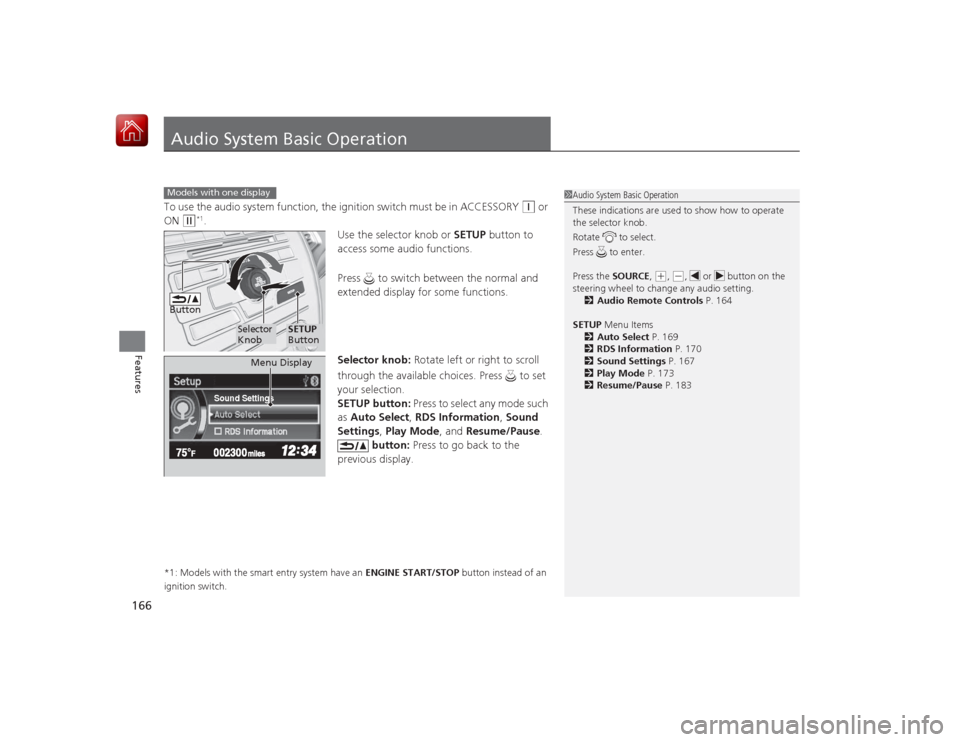
Audio System Basic OperationTo use the audio system function, the ignition switch must be in ACCESSORY
(q
or
ON
(w
*1.
Use the selector knob or SETUP button to
access some audio functions.
Press to switch between the normal and
extended display for some functions.
Selector knob: Rotate left or right to scroll
through the available choices. Press to set
your selection.
SETUP button: Press to select any mode such
as Auto Select , RDS Information , Sound
Settings , Play Mode , and Resume/Pause .
button: Press to go back to the
previous display.
*1: Models with the smart entry system have an ENGINE START/STOP button instead of an
ignition switch.Models with one display
1 Audio System Basic Operation
These indications are used to show how to operate
the selector knob.
Rotate to select.
Press to enter.
Press the SOURCE,
(+, (-, or button on the
steering wheel to change any audio setting. 2 Audio Remote Controls P. 164
SETUP Menu Items
2 Auto Select P. 169
2 RDS Information P. 170
2 Sound Settings P. 167
2 Play Mode P. 173
2 Resume/Pause P. 183
Button
Selector
Knob
SETUP
Button
Sound Settings
Menu Display
Page 170 of 441
Continued
169
uuAudio System Basic Operation uPlaying AM/FM Radio
Features
Use the auto select feature to scan both bands and store the strongest station in
each preset.
1.Press the SETUP button.
2. Rotate to select Auto Select, then press
.
To turn off auto select, press again. This
restores the presets you originally set.■
Auto Select
1 Playing AM/FM Radio
The ST indicator appears on the display indicating
stereo FM broadcasts.
Stereo reproduction in AM is not available.
Switching the Audio Mode
Press the SOURCE button on the steering wheel.
2 Audio Remote Controls P. 164
You can store six AM stations and twelve FM stations
into the preset memory.
Auto Select function scans and stores up to six AM
stations and twelve FM stations with a strong signal
into the preset button memory.
If you do not like the stations auto select has stored,
you can manually store your preferred frequencies.
Sound Settings


