2015 HONDA ACCORD brakes
[x] Cancel search: brakesPage 25 of 593
24Quick Reference Guide
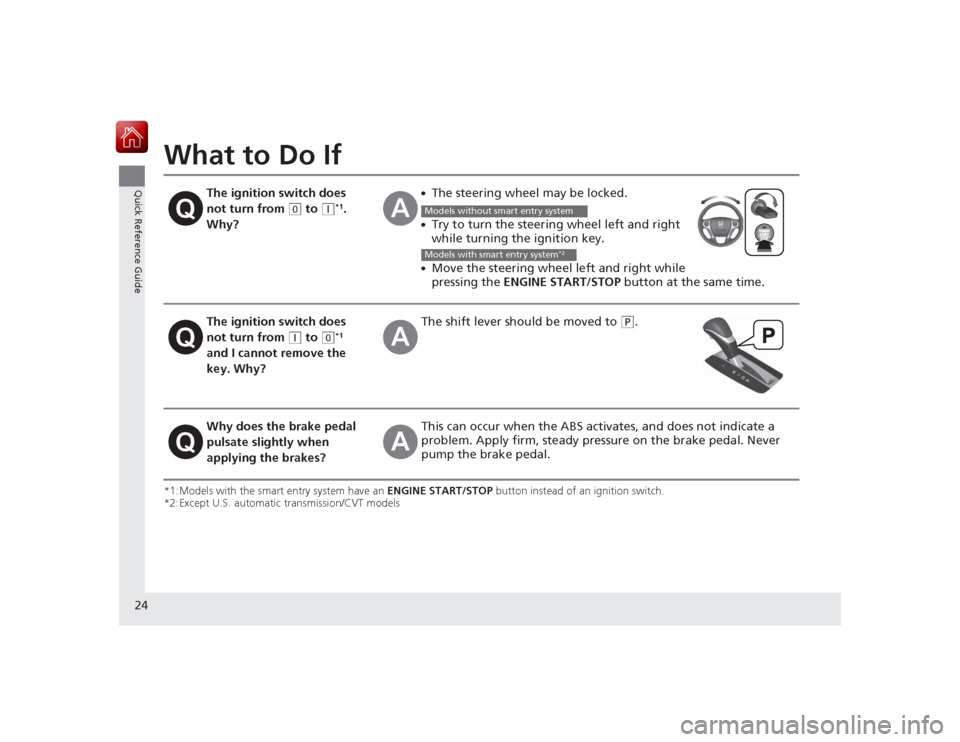
What to Do If*1:Models with the smart entry system have an ENGINE START/STOP button instead of an ignition switch.
*2:Except U.S. automatic transmission/CVT models
The ignition switch does
not turn from
(0
to
(q
*1.
Why?
●The steering wheel may be locked.●Try to turn the steering wheel left and right
while turning the ignition key.●Move the steering wheel left and right while
pressing the ENGINE START/STOP button at the same time.
The ignition switch does
not turn from
(q
to
(0
*1
and I cannot remove the
key. Why?
The shift lever s hould be moved to
(P
.
Why does the brake pedal
pulsate slightly when
applying the brakes?
This can occur when the ABS act ivates, and does not indicate a
problem. Apply firm, steady pressure on the brake pedal. Never
pump the brake pedal.Models without smart entry systemModels with smart entry system
*2
Page 79 of 593

78
uuIndicators u
Instrument Panel
*1:Models with the smart entry system have an ENGINE START/STOP button instead of an ignition switch.
*2:On the left: Models with information display On the right: Models with multi-information displayIndicator
Name
On/Blinking
Explanation
Message
*2
Forward
Collision
Warning
( FCW )
Indicator
*●Comes on for a few seconds
when you turn the ignition
switch to ON
(w
*1, then goes off.
●Comes on when you have
customized FCW to turn off.●Comes on if there is a problem
with the FCW system.
●Stays on constantly without FCW off - Have your
vehicle checked by a dealer.
●Blinks when the system detects
a likely collision with a vehicle in
front of you. The beeper sounds.
●Blinks while driving - Take appropriate action to prevent
a collision (apply the brakes, change lanes, etc.).
—
—
●Comes on when the FCW
system shuts itself off.
●Stays on - The temperature inside the FCW system is too high.
The system activates when the temperature inside the system
cools down.
2 Automatic shutoff P. 458
—
●Stays on - The radar sensor or the area around the camera is
blocked by dirt, mud, etc. Stop your vehicle in a safe place, and
wipe it off with a soft cloth.●Have your vehicle checked by a dealer if:
The indicator and message stay on after you cleaned the
radar sensor cover.
The indicator and message come back on after you cleaned
the area around the camera.
2 Automatic shutoff P. 4582Automatic shutoff P. 458
—
—
Models with information displayAll models
Models with information displayModels with multi-information displayModels with information display
* Not available on all models
Page 88 of 593

87
uuIndicators uMulti-Information Display Wa rning and Information Messages
*
Continued
Instrument Panel
Message
Condition
Explanation
●Appears when there is a problem with the sensor on
the battery.●Appears when the battery is not charging.
●Have your vehicle checked by a dealer.
2Checking the Battery P. 532
●Appears along with the battery charging system
indicator - Turn off the climate control system and rear
defogger to reduce el ectricity consumption.
2If the Charging System Indicator Comes On P. 558
●Appears when the starter system has a problem.
●As a temporary measure, press and hold the ENGINE
START/STOP button for up to 15 seconds while
pressing the brake pedal and manually start the engine.
Have your vehicle checked by a dealer.
●Appears for about three seconds when ACC has
been automatically canceled.
●You can resume the set speed after the condition that
caused ACC to cancel improves. Press the RES/+
button.
2 Adaptive Cruise Control (ACC)
* P. 448
●Flashes when the system senses a likely collision with
a vehicle in front of you.
●Take appropriate action to prevent a collision (apply the
brakes, change lanes, etc.).
2Adaptive Cruise Control (ACC)
* P. 448
2 Forward Collision Warning (FCW)* P. 456
●Appears when your vehicle is too close to the traffic
lane lines. The beeper sounds.
●Take appropriate action to keep your vehicle within the
lane lines.
2Lane Departure Warning (LDW)
* P. 460
* Not available on all models
Page 423 of 593

uuTowing a Trailer uTowing Preparation
422Driving
Towing equipment varies by the size of your trailer, how much load you are towing,
and where you are towing.■Hitches
The hitch must be of an approved typ e and properly bolted to the underbody.■Safety chains
Always use safety chains when you tow a trailer. Leave enough slack to allow the
trailer to turn corners easily, but do not allow the chains to drag on the ground.■Trailer brakes
There are two common types of trailer brakes: surge and electric. Surge brakes are
common for boat trailers, since the brakes will get wet. If you choose electric brakes,
be sure they are electronically actuated. Do not attempt to attach trailer brakes to
your vehicle's hydraulic system, as it will lower braking effectiveness and create a
potential hazard.■Additional towing equipment
Many states and provinces/territories require special outside mirrors when towing a
trailer. Even if mirrors are not required in your locale, you should install special
mirrors if visibility is restricted in any way.■Trailer light
Trailer lights and equipment must comply with federal, state, province/territory, and
local regulations. Check with your local trailer sales or rental agency for the
requirements in the area where you plan to tow.■
Towing Equipment and Accessories
1 Towing Equipment and Accessories
Make sure that all equi pment is properly installed and
maintained, and that it meets federal, state, province/
territory, and local regulations.
Consult your trailer sales or rental agency if any other
items are recommended or required for your towing
situation.
The lighting and wiring of trailers can vary by type
and brand. If a connector is required, it should only
be installed by a qualified technician.
Page 424 of 593

423
uuTowing a Trailer uDriving Safely with a Trailer
Continued
Driving
Driving Safely with a Trailer• Have the trailer properly serviced and keep it in good condition.
• Make sure that all the weights and load in the vehicle and trailer are within limits.
2 Towing Load Limits P. 421
•Securely attach the hitch, safety chains, and other necessary parts to the trailer.
• Securely store all the items in and on the trailer so that they do not shift while
driving.
• Check if the lights and brakes on the trailer are working properly.
• Check the pressures of the trailer tires, including the spare.
• Drive slower than normal.
• Obey posted speed limits for vehicles with trailers.
• Use the
(D
position when towing a trailer on level roads.
• Turn more slowly and with a wider turning arc than normal.
• Allow more time and distance for braking.
• Do not brake or turn suddenly.
■
Things You Need To Know Before Towing a Trailer
■
Towing Speeds and Gears
■
Turning and Braking
1Driving Safely with a Trailer
Parking
In addition to the normal precautions, place wheel
chocks at each of the trailer's tires.
Automatic transmission/CVT models
Page 449 of 593

448
uuWhen Driving uAdaptive Cruise Control (ACC)
*
Driving
Adaptive Cruise Control (ACC)
*
Helps maintain a constant vehicle speed and a set following distance behind a
vehicle detected ahead of yours, without you having to keep your foot on the brake
or the accelerator.
1Adaptive Cruise Control (ACC)
*
Important Reminder
As with any system, there are limits to ACC. Use the
brake pedal whenever necessary, and always keep a
safe distance between your vehicle and other
vehicles.
The radar sensor for ACC is shared with FCW
(Forward Collision Warning).
2 Forward Collision Warning (FCW)
* P. 456
3
WARNING
Improper use of ACC can lead to a crash.
Use ACC only when traveling on open
highways in good weather.
3
WARNING
ACC has limited braking capability.
When your vehicle speed drops below
22 mph, ACC will automatically cancel
and no longer will apply your vehicle's
brakes.
Always be prepared to apply the brake
pedal when conditions require.
When to use■Vehicle speed for adaptive cruise control:
Desired speed in a ran ge above roughly 25
mph (40 km/h) ~■Shift positions for adaptive cruise control:
In ( D or
(S
The radar sensor is inside the front
grille on the right side.
How to use■Press the MAIN button on
the steering wheel. ACC is on in the multi-
information display.
Adaptive cruise control is
ready to use.
* Not available on all models
Page 452 of 593

Continued
451
uuWhen Driving uAdaptive Cruise Control (ACC)
*
Driving
■There is no vehicle ahead
Your vehicle cruises at the set speed.■A vehicle ahead is within ACC range an d going slower than the set speed
Your vehicle slows down, and maintains the same speed as the speed of the vehicle
ahead to maintain the set following distance.■A vehicle ahead is within ACC range and going at a steady speed
Your vehicle follows the vehicle ahead of it, keeping a constant distance, without
going beyond the set speed.■A vehicle ahead goes out of range
ACC accelerates your vehicle to the set speed, and then maintains it.■When you depress the accelerator pedal
You can temporarily increase the vehicle speed. In this case, there is no audible or
visual alerts even if a vehicle is in ACC range.
ACC stays on unless you cancel it. Once you release the accelerator pedal, the
system resumes the set speed.
1 When in Operation
Limitations
Be aware that ACC has limitations. For example, it is
not designed to operate when a vehicle ahead of
yours is going slower than 13 mph (20 km/h) or is
parked. Smaller vehicles, such as motorcycles, may
also be difficult for the system to detect depending
on their size.
You must always be prepared to use the brake pedal
to maintain a safe distance with other vehicles.
ACC may momentarily apply brakes or sound an alert
if there is a vehicle or building adjacent to your
vehicle and:•You make a sudden turn or are driving on a narrow
road.•You abruptly move the steering wheel.•Your vehicle is unusually positioned within your
lane (e.g., at a slight diagonal to the lane direction).
Page 457 of 593

456
uuWhen Driving uForward Collision Warning (FCW)
*
Driving
Forward Collision Warning (FCW)
*
Alerts you when it determines that there is a possibility that your vehicle may collide
with a vehicle detected in front of yours.
If the system determines a collision is possible, it gives both visual and audible alerts,
including a head-up warning that flashes on the windshield.
u Take appropriate action to prevent a collision (apply the brakes, change lanes,
etc.).■How the system works
The system may give warnings of potential collisions when your vehicle speed is
above 10 mph (15 km/h).
1 Forward Collision Warning (FCW)
*
Important Safety Reminder
FCW cannot detect all objects ahead and may not
detect a given object; accuracy of the system will vary
based on weather, speed and other factors. FCW
does not include a braking function. It is always your
responsibility to safely operate the vehicle and avoid
collisions.
You can change the Forward Collision Warning
Distance setting or turn the system on and off.
2 Customized Features P. 97, 298
For the FCW system to work properly:•Always keep the radar sensor cover clean.•Never use chemical solvents or polishing
compounds to clean the sensor cover. Instead,
clean it with water and a mild detergent.•Do not put anything on the radar sensor cover.
See a dealer if the radar sensor gets damaged or
requires repair.
The camera is shared wi th Lane Departure Warning
(LDW).
2 LDW Camera P. 461Models with multi-information displayModels with information display
LONG
NORMAL SHORT
Your Vehicle Vehicle Ahead
You can set
Long, Normal or Short for when warnings start:
* Not available on all models