Page 311 of 593

310
uuCustomized Features u
Features
*1:Default Setting
*2:Models with one displaySetup
Group Customizable Features Description Selectable SettingsAudio
Settings
Sound
*2
Adjusts the settings of the audio speaker’s sound.
2
Adjusting the Sound P. 185
-6 ~ C
*1 ~ +6 (Bass ,
Treble and SUBW
*), -9
~ C
*1 ~ +9 (Fader and
Balance ), Off/Low /
Mid*1/ High (SVC)
Source Select Popup
Selects whether the list of selectable audio
sources comes on when the AUDIO button is
pressed.
Selects whether the list of selectable audio
sources comes on when Audio is selected on the
Function Change screen.
On/Off
*1
Cover Art
Turns on and off the cover art display.
On
*1/Off
Connect Bluetooth Audio Device
Connects, disconnects or pairs a Bluetooth®
Audio device to HFL.
—
Bluetooth Device List
Edits or deletes a Bluetooth® Audio device paired
to HFL.
—
Default
Cancels/Resets all customized items in the Audio
Settings group as default.
Yes/No
Models with one displayModels with two displays
iPod, USB, Pandora ®
* or Aha
TM * mode
Bluetooth® Audio, Pandora®
* or Aha
TM * mode
Bluetooth ® Audio, Pandora®
* or Aha
TM * mode
* Not available on all models
Page 312 of 593
311
uuCustomized Features u
Continued
Features
Setup
Group Customizable Features Description Selectable Settings
Info
Settings Clock/
Wall-
paper
type
Clock Type
See System Settings on P. 305 to P. 306
Wallpaper
Clock Adjustment
Clock Format
Default Cancels/Resets all customized items in the
Info
Settings group as default. Yes
/No
Page 314 of 593
313
uuCustomized Features u
Continued
Features
*1:Default Setting
*2:Models with one display
*3:Models with two displaysSetup
Group Customizable Features Description Selectable SettingsPhone
Settings
Text/
Message
*2,
Text/
Email
*3
Enable Text Message
*2,
Enable Text/Email
*3
Turns the text/e-mail message function on and
off.
On
*1/ Off
Select Account
*3
Selects a text/e-mail message account.
—
New Text Message Alert
*2,
New Text/Email Alert
*3
Selects whether a pop-up alert comes on the
screen when HFL receives a new text/e-mail
message.
On /Off
*1
Message Auto Reading
Sets the system to automatically read an
incoming text/e-mail message.●On - A text/e-mail message is always read
aloud.●Off - A text/e-mail message is not read aloud.●Auto - A text/e-mail message is read aloud only
when driving.
On /Off /Auto
*1
Default
Cancels/Resets all customized items in the Phone
Settings group as default.
Yes/No
Page 315 of 593

314
uuCustomized Features u
Features
*1:Default Setting
*2:Models with two displaysSetup
Group Customizable Features Description Selectable Settings
Camera
Settings Lane-
Watch
*
Show with Turn Signal
Select whether the LaneWatch display comes on
when you move the turn signal lever to the
passenger side. On
*1/
Off
Reference Lines Selects whether the reference lines come on the
LaneWatch monitor. On*1/
Off
Display Brightness
Adjusts the LaneWatch display settings. —
Contrast
Black Level
Color
Tint
Default
*2
Cancels/Resets all customized items in the
LaneWatch group as default. Yes
/No
Rear
Camera Fixed Guideline
Selects whether the fixed guidelines come on the
rear camera monitor.
On
*1/
Off
Dynamic Guideline Selects whether the dynamic guidelines come on
the rear camera monitor. On*1/
Off
Default Cancels/Resets all customized items in the
Rear
Camera group as default. Yes
/No
Default Cancels/Resets all customized items in the
Camera Settings
group as default. Yes
/No
* Not available on all models
Page 318 of 593
317
uuCustomized Features u
Continued
Features
System Device Information
Factory Data Reset
Background ColorHeader Clock Display
Clock Reset
Auto Time Zone
*
Auto Daylight
*
Clock
Clock AdjustmentClock Format
Clock
UnitsLanguage
Voice Command Tips
Others
Wallpaper
Clock/Wallpaper
Type
* Not available on all models
Page 319 of 593
318
uuCustomized Features u
Features
“Trip A” Reset Timing“Trip B” Reset TimingFuel Efficiency Backlight
Language Selection
*
Adjust Outside Temp. Display
Forward Collision Warning DistanceACC Pre-Running Car Detect Beep
*
ACC Display Speed Unit
*
Keyless Start Guidance Screens
Default
Memory Position Link
Door Unlock Mode
Keyless Access Light Flash
Interior Light Dimming TimeHeadlight Auto Off TimerAuto light Sensitivity
Key And Remote Unlock ModeKeyless Lock Answer BackSecurity Relock Timer
Auto Door LockAuto Door Unlock
Maintenance Reset
TPMS Calibration
Vehicle
Settings
Meter SetupDriver Assist
System
Setup
Driving Position Setup
*
Keyless Access
SetupLighting SetupDoor
Setup
Maintenance Info.
Keyless Access Beep
* Not available on all models
Page 322 of 593
321
uuCustomized Features u
Continued
Features
Auto Daylight
*
Clock Reset
Info Screen Preference
Clock FormatAuto Time Zone
*
Clock/Wallpaper TypeClock Adjustment
Clock
Default
Others
Info
SettingsNavi
Settings
See Navigation System Manual.
* Not available on all models
Page 325 of 593
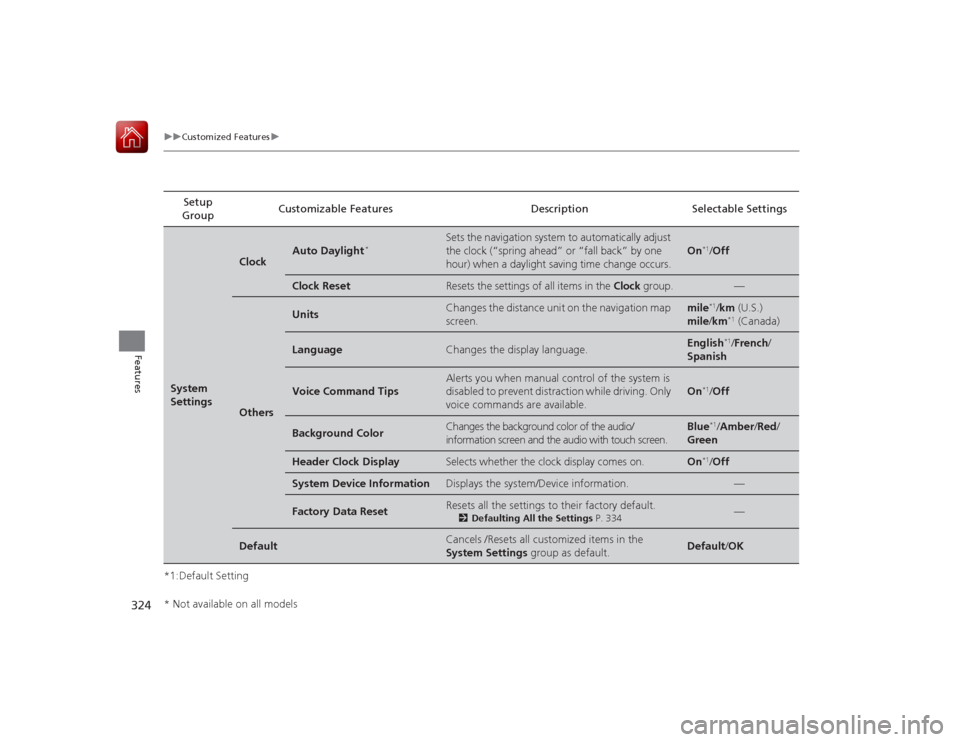
324
uuCustomized Features u
Features
*1:Default SettingSetup
Group Customizable Features Description Selectable SettingsSystem
Settings
Clock
Auto Daylight
*
Sets the navigation system to automatically adjust
the clock (“spring ahead” or “fall back” by one
hour) when a daylight saving time change occurs.
On
*1/
Off
Clock Reset
Resets the settings of all items in the Clock group.
—
Others
Units
Changes the distance unit on the navigation map
screen.
mile
*1/km (U.S.)
mile /km*1 (Canada)
Language
Changes the display language.
English
*1/French /
Spanish
Voice Command Tips
Alerts you when manual control of the system is
disabled to prevent distraction while driving. Only
voice commands are available.
On
*1/ Off
Background Color
Changes the background color of the audio/
information screen and the audio with touch screen.
Blue
*1/Amber /Red/
Green
Header Clock Display
Selects whether the clock display comes on.
On
*1/ Off
System Device Information
Displays the system/Device information.
—
Factory Data Reset
Resets all the settings to their factory default.
2 Defaulting All the Settings P. 334
—
Default
Cancels /Resets all customized items in the
System Settings group as default.
Default/OK
* Not available on all models


