Page 495 of 593
uuMaintenance Minder
TMuTo Use Maintenance Minder
TM
494Maintenance
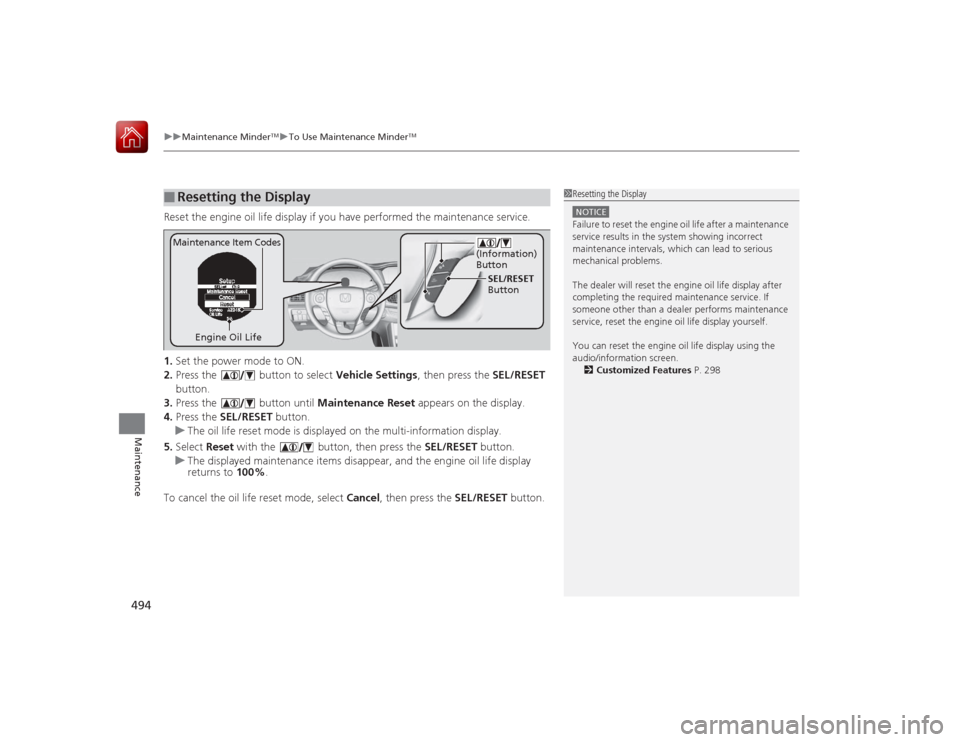
Reset the engine oil life display if you have performed the maintenance service.
1. Set the power mode to ON.
2. Press the button to select Vehicle Settings, then press the SEL/RESET
button.
3. Press the button until Maintenance Reset appears on the display.
4. Press the SEL/RESET button.
u The oil life reset mode is displayed on the multi-information display.
5. Select Reset with the button, then press the SEL/RESET button.
u The displayed maintenance items disappear, and the engine oil life display
returns to 100%.
To cancel the oil life reset mode, select Cancel, then press the SEL/RESET button.■
Resetting the Display
1Resetting the DisplayNOTICEFailure to reset the engine oil life after a maintenance
service results in the system showing incorrect
maintenance intervals, which can lead to serious
mechanical problems.
The dealer will reset th e engine oil life display after
completing the requi red maintenance service. If
someone other than a dealer performs maintenance
service, reset the engine oil life display yourself.
You can reset the engine oil life display using the
audio/information screen.
2 Customized Features P. 298
Engine Oil Life SEL/RESET
Button
Maintenance Item Codes
(Information)
Button
Page 527 of 593

526
uuChecking and Maintaining Tires uDOT Tire Quality Gra ding (U.S. Vehicles)
Maintenance
DOT Tire Quality Grading (U.S. Vehicles)The tires on your vehicle meet all U.S. Federal Safety
Requirements. All tires are also graded for treadwear, traction,
and temperature performance according to Department of
Transportation (DOT) standards. The following explains these
gradings.
Quality grades can be found where applicable on the tire sidewall
between tread shoulder and maxi mum section width.
The treadwear grade is a comparative rating based on the wear
rate of the tire when tested under controlled conditions on a
specified government test course. For example, a tire graded 150
would wear one and one-half (1 1/2) times as well on the
government course as a tire graded 100. The relative performance
of tires depends upon the actual conditions of their use, however,
and may depart significantly from the norm due to variations in
driving habits, service practices and differences in road
characteristics and climate.■
Uniform Tire Quality Grading
■
Treadwear
1 Uniform Tire Quality GradingFor example:
Treadwear 200
Traction AA
Temperature A
All passenger car tires must conform
to Federal Safety Requirements in
addition to these grades.
Page 529 of 593

528
uuChecking and Maintaining Tires uWear Indicators
Maintenance
Wear Indicators
The groove where the wear indicator is
located is 1/16 inch (1.6 mm) shallower than
elsewhere on the tire. If the tread has worn so
that the indicator is exposed, replace the tire.
Worn out tires have poor traction on wet
roads.
Tire Service LifeThe life of your tires is dependent on many factors, including driving habits, road
conditions, vehicle loading, inflation pressure, maintenance history, speed, and
environmental conditions (even when the tires are not in use).
In addition to regular inspections and inflation pressure maintenance, it is
recommended that you have annual inspections performed once the tires reach five
years old. All tires, including the spare, should be removed from service after 10
years from the date of manufacture, regardless of their condition or state of wear.
1 Checking Tires
High speed driving
We recommend that you do not drive faster than the
posted speed limits and conditions allow. If you drive
at sustained high speeds (over 99 mph or 160 km/h),
adjust the cold tire press ures as shown below to
avoid excessive heat build up and sudden tire failure.Tire Size
215/55R17 94V
235/45R18 94V
Pressure 35 psi (240 kPa, 2.4 kgf/cm
2)
Models with 215/55R17 tiresModels with 235/45R18 tires
Example of a Wear
Indicator mark
Page 555 of 593
554
uuJump Starting u
Handling the Unexpected
Once your vehicle's engine has started, remove the jumper cables in the following
order.
1.Disconnect the jumper cable from your vehicle's ground.
2. Disconnect the other end of the ju mper cable from the booster battery -
terminal.
3. Disconnect the jumper cable from your vehicle's battery + terminal.
4. Disconnect the other end of the ju mper cable from the booster battery +
terminal.
Have your vehicle inspected by a nearby service station or a dealer.■
What to Do After the Engine Starts
Page 566 of 593
565Handling the Unexpected
Emergency TowingCall a professional towing service if you need to tow your vehicle.■Flat bed equipment
The operator loads your vehicle on the back of a truck.
This is the best way to transport your vehicle.■Wheel lift equipment
The tow truck uses two pivoting arms that go under the front tires and lift them off
the ground. The rear tires remain on the ground. This is an acceptable way to
tow your vehicle.
1 Emergency TowingNOTICETrying to lift or tow your vehicle by the bumpers will
cause serious damage. The bumpers are not designed
to support the vehicle's weight.NOTICEImproper towing such as towing behind a
motorhome or other motor vehicle can damage the
transmission.
Never tow your vehicle with just a rope or chain.
It is very dangerous since ropes or chains may shift
from side to side or break.
Page 568 of 593
567
Information
This chapter includes your vehicle's specifications, locations of identification numbers, and other
information re quired by regulation.
Specifications .................................... 568
Identification Numbers Vehicle Identification Number (VIN), Engine Number and Transmission
Number ......................................... 572
Devices that Emit Radio Waves ....... 573
Reporting Safety Defects ................. 574Emissions Testing
Testing of Readiness Codes.............. 575
Warranty Coverages ........................ 577
Authorized Manuals ......................... 579
Customer Service Information ......... 580
Page 580 of 593
579Information
Authorized Manuals■Service Express
For electronic copies of service publication s, you can purchase a subscription to
Service Express. Visit www.techinfo.honda.com for pricing and options.■For U.S. Owners:
Manuals can be purchased from Helm Incorpo rated. You can order a manual by
phone at (800) 782-4356 (credit card orders only), or online at www.helminc.com.
1Authorized Manuals
For Canadian Owners:
Please contact a dealer to order any manuals that you
may require.
Page 581 of 593

580Information
Customer Service InformationHonda dealership personnel are trained professionals.
They should be able to answer all your questions. If you encounter a problem that
your dealership does not solve to your satisfaction, please discuss it with the
dealership's service manager or general manager. If you are dissatisfied with the
decision made by the dealership's management, contac t Honda Customer Services.
U.S. Owners:
American Honda Motor Co., Inc.
Honda Automobile Customer Services
Mail Stop 500-2N-7A
1919 Torrance Blvd.
Torrance, CA 90501-2746
Tel: (800) 999-1009 Canadian Owners:
Honda Canada Inc.
Customer Relations
180 Honda Boulevard
Markham, ON
L6C 0H9
Tel: 1-888-9-HONDA-9
Fax: 1-877-939-0909
E-mail: [email protected]
In Puerto Rico and the U.S. Virgin
Islands:
Bella International
P.O. Box 190816
San Juan, PR 00919-0816
Tel: (787) 620-7546
1 Customer Service Information
When you call or write, please give us the following
information:•Vehicle Identification Number
2Vehicle Identification Number (VIN),
Engine Number and Transmission
Number P. 572•Date of purchase•Odometer reading of your vehicle•Your name, address, and telephone number•A detailed description of the problem•Name of the dealer who sold the vehicle to you


